 ProMapRanker
Best MEGA Alternatives in 2026

Key takeaways
- Proton Drive, Sync.com, Tresorit, Internxt, and Filen offer end-to-end encryption by default, while pCloud and Icedrive offer it only in a paid encrypted folder.
- Encryption does not make unlawful file sharing lawful, and this guide lists only legitimate storage services for your own files, backups, and sharing.
- Sync.com offers strong value for large encrypted storage, while Proton Drive suits users who also want mail, VPN, and calendar in one privacy suite.
- Free plans are useful for testing, but they are small, so check storage limits, version history, and sharing controls before moving a full library.
Quick comparison
| Pick | Great for | Pricing starts at | Free tier | |
|---|---|---|---|---|
 Proton Drive | Privacy suite users | $3.99 per month | Yes | Visit |
 Sync.com | Large encrypted storage value | $8 per month | Yes | Visit |
 pCloud | Lifetime plans and media | See website | Yes | Visit |
 Internxt | Budget encrypted storage | See website | Yes | Visit |
 Tresorit | Business compliance | $11.99 per month | Free trial | Visit |
 Filen | Low cost zero knowledge storage | See website | Yes | Visit |
 Icedrive | Affordable storage with encrypted folder | See website | Yes | Visit |
 Nextcloud | Self hosted control | Free | Yes | Visit |
The best mega alternatives
MEGA is known for end-to-end encrypted storage and a large free tier. The services below are legitimate alternatives for storing, backing up, and sharing your own files with encryption. We compared published features, free plans, and pricing signals. Encryption protects privacy, but it does not make unlawful sharing lawful, and you should only store and share files you have the right to use.
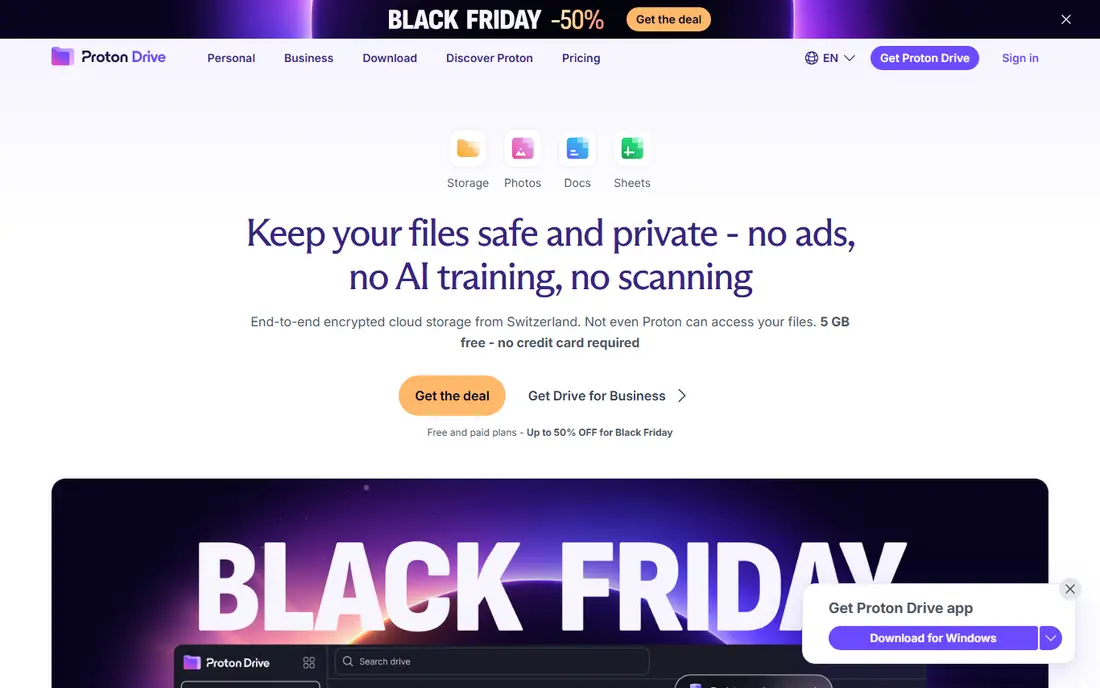
Proton Drive suits users who already value the Proton ecosystem. Files are encrypted on the device before upload, so Proton cannot read them, and the service sits alongside Proton Mail, VPN, Calendar, and Pass. Proton Docs adds encrypted document editing, which helps teams that need collaboration without giving up encryption.
The limits are storage size and sync speed. The free tier is small, starting at a few gigabytes depending on onboarding steps, and the Drive Plus plan covers 200 GB. Large folder sync can also feel slower than Google Drive or Dropbox. For a privacy focused user who wants a full suite, Proton Drive is a strong pick. For a user who only needs bulk storage, Sync.com offers more space per dollar.
- End-to-end encryption by default
- Swiss based privacy suite
- Proton Docs for encrypted editing
- Free tier is small
- Desktop sync can be slower than mainstream rivals for large folders
Sync.com is the value pick for encrypted storage at scale. Every plan, including the free 5 GB plan, uses the same end-to-end encryption, so privacy is not an upgrade. Paid plans offer large storage, file requests, version history, and team controls, which suit both individuals with large libraries and small businesses sharing client files.
The drawbacks are the small free tier and the lack of a Linux desktop app. Sync.com also has fewer third party integrations than Dropbox or Google Drive. For a user who wants private storage for personal files or client work, and who values storage per dollar, Sync.com is hard to beat. For a Linux heavy workflow, check the current app support first.
- End-to-end encryption on every plan including free
- 2 TB on the entry paid plan in published comparisons
- Strong sharing controls
- Free tier is only 5 GB
- No Linux desktop app in published descriptions
pCloud suits users who dislike subscriptions and want a one time lifetime plan. The service offers a virtual drive, media playback, and file sharing, with a free tier up to 10 GB. Lifetime plans cover larger storage without a monthly bill, which appeals to users who want predictable long term costs.
The important limit is encryption scope. Standard pCloud storage encrypts data in transit and at rest, but the provider holds the keys, so true end-to-end encryption applies only in the paid Crypto folder. Users who want every file encrypted by default should choose Proton Drive, Sync.com, or Tresorit instead. For a media heavy user who values lifetime pricing, pCloud is still a practical choice if the Crypto folder is used for sensitive files.
- Up to 10 GB free
- Lifetime plans avoid subscriptions
- Built in media player and virtual drive
- End-to-end encryption is a paid Crypto folder, not default for all files
- Lifetime prices vary
Internxt is a budget focused encrypted storage service from Spain, with open source clients and a privacy suite that includes mail, VPN, and antivirus on higher plans. Its published pricing is low for 1 TB plans, which makes it attractive for users who want encrypted storage without a large monthly bill. Post quantum encryption is part of its published security description.
The limits are the small free tier and mixed public reports on sync reliability. A 1 GB free plan is only enough for testing, and users with large libraries should trial sync performance before migrating. For a budget conscious user who wants EU based encrypted storage, Internxt is worth testing. For a business that needs proven large scale sync, Sync.com or Tresorit may be safer.
- End-to-end encryption with post quantum layer in published descriptions
- Open source clients
- EU based
- Free tier is small at 1 GB in many listings
- Sync reliability reports vary in public reviews
Tresorit suits business and legal teams that need encrypted storage with compliance controls. It offers end-to-end encryption by default, secure data rooms, access controls, and audit friendly features that help regulated teams share sensitive files. That focus on compliance is why it costs more than consumer storage.
The price is the barrier for personal use. At $11.99 per month for 1 TB in published comparisons, Tresorit is more expensive than Sync.com or Internxt for the same storage. The free option is a trial, not a permanent free tier. For a team handling sensitive client or legal files, the compliance features justify the cost. For personal photo backup, a cheaper encrypted service will do.
- End-to-end encryption by default
- Strong compliance and control features
- Secure data rooms
- Higher price than consumer rivals
- Free option is a trial rather than a lasting free plan
Filen is a low cost, EU based encrypted storage service with zero knowledge encryption and open source clients. Paid plans start low in published listings, which makes it attractive for users who want encrypted storage on a tight budget. The free tier offers 10 GB, which is more generous than many encrypted rivals.
The limits are vendor size and breadth. Filen is smaller than Proton, Sync.com, or pCloud, and it offers fewer integrations and collaboration tools. Users should check support, uptime, and roadmap before moving a large library. For a budget user who wants default encryption and a decent free tier, Filen is a strong value pick.
- Zero knowledge encryption by default
- Open source clients
- Low cost paid plans in published listings
- Smaller vendor than Proton or Sync.com
- Fewer integrations and collaboration features
Icedrive suits users who want affordable cloud storage with a clean interface and a virtual drive. The free tier offers 10 GB, paid plans are low cost in published listings, and media playback and sharing are straightforward. For general storage and media, it is a simple and affordable service.
The encryption limit matters. Like pCloud, Icedrive encrypts stored data, but true client side encryption applies only in its paid encrypted folder. Users who assume every file is end-to-end encrypted by default will be mistaken. For sensitive files, use the encrypted folder, or choose a service with default encryption. For general affordable storage, Icedrive is a practical option.
- 10 GB free tier
- Affordable paid plans
- Virtual drive and media features
- End-to-end encryption applies only in the paid encrypted folder, not to all files by default
Nextcloud is the pick for users who want total control. The software is free and open source, and you can host it on your own server or a provider you choose. It includes file storage, collaboration, calendar, contacts, and chat apps, so it can replace several cloud tools at once. Data stays where you put it, which suits privacy conscious teams and self hosters.
The trade off is responsibility. You handle hosting, updates, security, and backups, and encryption strength depends on how you configure it. A poorly maintained Nextcloud can be less secure than a managed encrypted service. For a technical user or team that wants sovereignty and can maintain a server, Nextcloud is powerful. For a non technical user, a managed encrypted service will be safer.
- Free open source software
- Full control over hosting and data
- Collaboration apps included
- You manage hosting, updates, and backups
- Encryption strength depends on your setup
How we picked these
We compared official product pages and public encrypted storage guides, and we kept only legitimate services that are live in October 2026 and that offer cloud storage for personal or business files. We did not claim hands on testing. We weighed encryption scope, free plans, pricing, sharing controls, and whether encryption is default or limited to a paid folder, since that distinction changes the privacy promise.
What to check before you choose
Start with encryption scope. Ask whether every file is end-to-end encrypted by default, or only files in a special folder. That answer matters more than the word encrypted in marketing. Also ask who holds the keys, whether filenames are encrypted, and what happens if you lose your password, since zero knowledge services often cannot reset it for you.
Next, check sharing and recovery. Test password protected links, expiry dates, and version history on a small set of files. Check how deleted files are kept, how versions are restored, and whether two factor login is available. A storage service that is hard to recover from is risky, even if its encryption is strong.
Finally, trial sync before migrating. Upload a representative folder, test desktop and mobile apps, and measure upload and download speed on your connection. Encrypted sync can be slower than mainstream sync, especially for many small files. A short trial will show whether the service fits your daily workflow before you move a full library.
Frequently asked questions
What is the best MEGA alternative for privacy?
Proton Drive, Sync.com, and Tresorit are the strongest privacy picks, because they offer end-to-end encryption by default on paid and, for Proton and Sync.com, free plans. Filen and Internxt also offer default encryption at lower prices. pCloud and Icedrive are useful, but their end-to-end encryption applies only in a paid folder, so check that detail before choosing.
Is there a free encrypted alternative to MEGA?
Yes, but free tiers are smaller than MEGA's 20 GB. Proton Drive offers a small free tier, Sync.com offers 5 GB, pCloud offers up to 10 GB, and Filen offers 10 GB. Use a free tier to test sync and sharing, then pay for the storage you actually need. A free tier alone rarely covers a full photo or backup library.
Does encryption make file sharing legal?
No, encryption does not make unlawful file sharing lawful. Encryption protects the privacy of files you have the right to store and share, but it does not change copyright or other laws. Only store and share files you own or have permission to use, and follow the storage provider's terms.
Can I use encrypted storage for team collaboration?
Yes, but collaboration features vary. Proton Drive offers encrypted document editing, Sync.com offers file requests and team controls, and Tresorit offers secure data rooms. Mainstream tools such as Google Drive still offer deeper real time collaboration, but they do not offer default end-to-end encryption. Choose based on whether privacy or live editing matters more.
What happens if I lose my encryption password?
With zero knowledge services, password loss can mean permanent loss of access, since the provider cannot decrypt your files. Save your recovery key or backup phrase in a safe place, separate from the account, and enable two factor login. Test recovery before you store irreplaceable files.
Should I self host with Nextcloud or use a managed service?
Self hosting with Nextcloud gives you control, but you take on hosting, updates, and backups. A managed service such as Proton Drive or Sync.com handles that work and offers default encryption. Choose self hosting only if you have the technical time to maintain it securely. Otherwise, a managed encrypted service is safer.
Sources
- https://www.cloudwards.net/mega-alternatives/
- https://blog.internxt.com/best-encrypted-cloud-storage/
- https://gizmodo.com/best-cloud-storage/most-secure
- https://proton.me/drive
- https://www.sync.com
- https://www.pcloud.com
- https://internxt.com
- https://tresorit.com
- https://filen.io
- https://icedrive.net
- https://nextcloud.com
See where you really rank - block by block
ProMapRanker scans Google Maps across a grid of your service area. Simple monthly plans from $19, white-label on every plan.
Start freeKeep reading
 zyte alternatives
Best Zyte Alternatives in 2026
These zyte alternatives cover managed scraping APIs, proxy networks and no code tools for lawful collection from your own or consented sources only in 2026.
Read → zerto alternatives
Best Zerto Alternatives in 2026
Compare the best zerto alternatives for disaster recovery and replication, with recovery targets, cloud options and honest trade-offs for teams in 2026.
Read → zerofox alternatives
Best ZeroFox Alternatives in 2026
We compared 9 zerofox alternatives for brand protection, phishing takedowns, dark web monitoring, and social impersonation, with clear coverage notes.
Read →