 ProMapRanker
Best Looker Alternatives in 2026


Polished enterprise dashboards · Pricing starts at: $15 per user per month
Key takeaways
- Tableau and Power BI suit large teams that need polished dashboards and broad adoption.
- Metabase and Apache Superset suit small teams and self-hosted setups with tight budgets.
- Looker Studio is the free Google option for simple reports, not a full semantic-layer replacement.
- Holistics and Sigma suit teams that want governed models or spreadsheet-style analysis on a warehouse.
- Modelling, hosting, and per-user pricing matter more than chart count when you switch from Looker.
Quick comparison
| Pick | Great for | Pricing starts at | Free tier | |
|---|---|---|---|---|
| Tableau | Polished enterprise dashboards | $15 per user per month | Free trial | Visit |
 Microsoft Power BI | Microsoft-centred teams | $14 per user per month | Yes | Visit |
 Metabase | Fast small-team BI | Free | Yes | Visit |
 Looker Studio | Free Google reporting | Free | Yes | Visit |
 ThoughtSpot | Search-driven analysis | $25 per user per month | Free trial | Visit |
 Qlik Sense | Associative exploration | See website | Free trial | Visit |
 Sigma | Spreadsheet-style warehouse BI | See website | Free trial | Visit |
 Apache Superset | Open-source BI | Free | Yes | Visit |
 Holistics | Governed modelling without LookML | See website | Free trial | Visit |
The best looker alternatives
This list covers alternatives to Looker only, not Looker itself. Looker Studio appears because it is a separate free Google reporting product, not the Looker platform. The right replacement depends on if you need a semantic layer, self-hosting, embedded analytics, or simple dashboards.
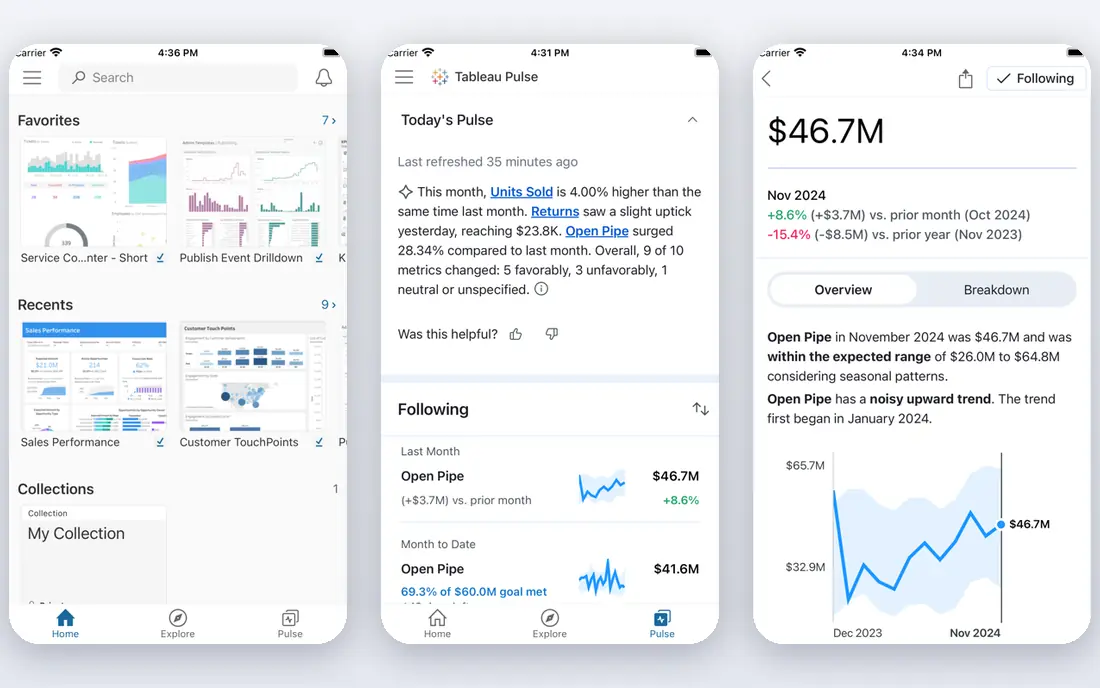
Tableau remains the visual standard for many large teams. Its drag-and-drop exploration, calculated fields, and dashboard formatting give analysts room to build reports that non-technical readers can grasp at a glance. Tableau Server also gives organisations a self-hosted route that cloud-only tools lack.
The catch is tiered pricing. Viewer pricing looks low, but creators who build and publish pay more, so a team with many builders faces a larger bill. Tableau also lacks a central semantic layer like LookML, so metric definitions need discipline across workbooks.
- Deep chart library and flexible formatting
- Strong community and learning resources
- Server option for self-hosting
- Creator pricing is much higher than viewer pricing
- Complex workbooks need skilled analysts
- Enterprise costs rise with users
Power BI is the natural pick for teams already using Microsoft 365, Teams, and Azure. Desktop lets analysts build reports for free, and the service adds sharing, scheduled refresh, and governance. Its modelling tools handle relationships, measures, and time intelligence well.
Sharing is where costs appear. Free Desktop builds reports, but publishing and collaborating at scale need Pro or Premium capacity licences. Teams outside the Microsoft stack may find Tableau or Metabase simpler, but Microsoft shops get the most value here.
- Deep Microsoft 365 and Azure integration
- Power BI Desktop is free to start
- Strong data modelling with DAX
- Full sharing needs paid licences
- DAX learning curve is steep
- Some features work best on Windows
Metabase is the fastest route to dashboards for a small team. You connect a database, ask questions with a visual builder or SQL, and share charts and dashboards in minutes. The open-source version costs nothing to self-host, which makes it easy to trial.
Larger teams will notice the limits. Metric definitions can drift across questions, and permissions and governance are simpler than Looker. For a startup or small team that needs answers quickly, Metabase is an excellent starting point that you can outgrow later.
- Free open-source self-hosted option
- Visual query builder for non-technical users
- Fast setup on common databases
- No central semantic layer by default
- Governance is lighter than Looker
- Cloud pricing rises with users
Looker Studio suits teams that need simple, shareable reports without a BI budget. It connects well to Google products, and you can build dashboards, blend sources, and share links with stakeholders. For marketing reports and small operational dashboards, it is often enough.
Do not expect Looker-level modelling. Looker Studio lacks the central LookML layer, version-controlled models, and enterprise governance that Looker teams rely on. Use it for free reporting, and choose another tool on this list when metric consistency becomes critical.
- Free for basic reporting
- Strong Google Sheets, Analytics, and BigQuery links
- Easy sharing with a Google account
- Not a Looker semantic-layer replacement
- Limited modelling and governance
- Performance varies with data size
ThoughtSpot changes how non-technical users query data. Instead of opening a dashboard, a manager types a question and gets a chart, with follow-up questions to refine it. That search model suits teams where many people need answers but few know SQL.
The trade-off is control. ThoughtSpot works best when data models and worksheets are set up well, and its dashboards prioritise exploration over precise layout. If your team asks many ad-hoc questions, it can reduce analyst bottlenecks. If you need highly formatted board reports, Tableau may fit better.
- Natural-language search for business users
- AI-assisted analysis and explanations
- Strong for ad-hoc questions
- Entry pricing is higher than simple BI tools
- Modelling needs setup for best results
- Less suited to pixel-perfect dashboards
Qlik Sense suits analysts who explore data by clicking through associations. Its engine highlights what is selected, what is related, and what is excluded, which helps users spot patterns that a fixed dashboard might hide. That exploration model works well for operations and sales analysis.
Pricing and setup are the barriers. Many teams need a quote, and building governed Qlik apps takes more planning than Metabase. For organisations that already value associative analysis, Qlik is a strong Looker alternative. For simple reporting, it may be more tool than you need.
- Associative engine shows related and unrelated data
- Strong exploration across large datasets
- AI-assisted insights
- Pricing is by quote for many teams
- Learning curve for app building
- Administration needs planning
Sigma appeals to teams that think in spreadsheets but work on a cloud warehouse. Users build tables, formulas, and pivots in a familiar grid, while queries run directly against Snowflake, BigQuery, Databricks, or similar platforms. That model avoids stale extracts and keeps analysis close to source data.
The catch is infrastructure. Sigma needs a warehouse, and pricing is often custom, so small teams without a warehouse may prefer Metabase. For warehouse-centred companies, Sigma gives business users more freedom without forcing them to learn a new modelling language.
- Spreadsheet interface on live warehouse data
- No data extracts for many queries
- Good for Excel-heavy teams
- Pricing is custom for many teams
- Needs a cloud warehouse
- Less suited to small database-only setups
Apache Superset is the open-source choice for technical teams that want control. It supports many databases, offers a broad visualisation library, and handles dashboards, alerts, and permissions. Because it is free software, licence cost is not the barrier.
Engineering time is the real cost. Hosting, upgrades, security, and user support fall to your team, and non-technical users may need training. If you have data engineers and want a free, flexible platform, Superset is powerful. If you want a managed service, choose a cloud BI tool instead.
- Free and open-source
- Wide chart and dashboard options
- Scales for technical teams
- Needs engineering time to host and maintain
- No vendor support by default
- Setup is heavier than Metabase
Holistics is the closest philosophical replacement for Looker teams that want governance without LookML lock-in. It uses a code-based modelling language with Git control, while business users explore with drag-and-drop on governed models. That balance suits data teams that want consistency and auditability.
The entry price is higher than Metabase or Looker Studio, and the community is smaller than the major BI vendors. For teams that left Looker over cost or portability, Holistics offers a familiar workflow with a different modelling language and clearer pricing tiers.
- Code-based semantic layer with Git version control
- Governed drag-and-drop for business users
- Dashboard-as-code workflow
- Pricing starts higher than small-team tools
- Smaller community than Tableau or Power BI
- Needs modelling discipline
How we picked these
We compared official pricing pages, documentation, and independent 2026 BI comparisons for tools that can replace Looker dashboards, exploration, or modelling. We kept only live products with a clear BI use case, and we excluded Looker itself. We noted where pricing is public and where it requires a quote, and we flagged self-hosted and open-source options separately from managed cloud tools.
How to choose the right replacement
Start with your data stack. Warehouse teams suit Sigma, Holistics, or ThoughtSpot, while database teams suit Metabase or Superset. Microsoft teams suit Power BI, and Google teams suit Looker Studio for simple reports. Next, decide how much governance you need. If metric definitions must match across every report, choose a tool with a central model, not just a chart builder.
Then test with one real dataset and one real audience. Build the same three dashboards in two finalists and ask business users to find answers without analyst help. The tool that survives that test with clear numbers and low support load is the right replacement, even if it is not the most famous name on this list.
Frequently asked questions
What are the best alternatives to Looker?
The best alternatives to Looker depend on your needs: Tableau for visual depth, Power BI for Microsoft teams, Metabase for small budgets, and Holistics for governed modelling. Looker Studio suits free Google reporting, while Superset suits open-source teams. Test two finalists on your own data before you commit.
What are the best Looker Studio alternatives?
Looker Studio alternatives include Metabase, Tableau Public for public work, Power BI Desktop for free building, and Apache Superset for self-hosted dashboards. For governed business reporting, Power BI and Tableau are stronger, while Metabase is simpler to run. Choose based on sharing needs and data sources.
Are there free alternatives for Looker?
Yes, Metabase open source, Apache Superset, and Looker Studio are free to start, though hosting and maintenance may still cost time or infrastructure. Power BI Desktop is also free for building reports. Free tools suit small teams, while larger teams usually pay for governance, support, and managed hosting.
Which Looker alternative is best for small businesses?
Metabase is usually the best Looker alternative for small businesses, because it is free to self-host, quick to set up, and easy for non-technical users. Looker Studio also works for simple Google-based reports. Move to Tableau or Power BI when you need deeper governance or larger user counts.
Do these tools support self-hosting?
Metabase, Apache Superset, and Tableau Server support self-hosted deployment, while most cloud BI tools are hosted only. Self-hosting gives control over data residency and upgrades, but it adds maintenance work. Check the vendor documentation for the exact deployment model before you choose.
Can I migrate LookML models to another tool?
You cannot copy LookML directly into another tool, because each platform uses its own modelling language. Holistics and other code-based tools can recreate the logic, but the work still needs manual mapping and testing. Budget time for model migration, not just dashboard rebuilds, when you leave Looker.
Sources
See where you really rank - block by block
ProMapRanker scans Google Maps across a grid of your service area. Simple monthly plans from $19, white-label on every plan.
Start freeKeep reading
 zoho inventory alternatives
6 Alternatives to Zoho Inventory, Compared on Price and Fit
Zoho Inventory alternatives: 6 tools compared on price, free plans and fit. Katana leads the list for manufacturers. Fit and flaws are laid out for each entry.
Read → zoho crm alternatives
Best Zoho CRM Alternatives (2026)
Need Zoho CRM alternatives? We compare 7 tools on cost, free access and who each suits. Every pick gets a straight assessment. Built for quick decisions.
Read → zelle alternatives
Best Zelle Alternatives in 2026
Compare the best Zelle alternatives for sending money to friends, paying sellers and moving funds abroad, with honest notes on fees, speed and safety in 2026.
Read →