 ProMapRanker
Best Jellyfin Alternatives in 2026

Key takeaways
- Plex is the easiest switch for most households, with polished apps on almost every TV, phone, and streaming box.
- Kodi and Universal Media Server cost nothing and keep your library fully local, with no account needed for basic playback.
- Emby sits between the two camps, with a free core and a paid Premiere tier for DVR, offline mobile access, and parental controls.
- Channels DVR is the strongest pick if live TV and recording matter more than a large movie library.
- Stremio is different from the rest, since it focuses on finding and organising streams rather than running a full home server.
Quick comparison
| Pick | Great for | Pricing starts at | Free tier | |
|---|---|---|---|---|
 Plex | Easiest setup and widest device support | Free | Yes | Visit |
 Emby | Polished server with live TV and DVR | Free | Yes | Visit |
 Kodi | Free local playback and deep customisation | Free | Yes | Visit |
 Stremio | Finding shows across sources in one place | Free | Yes | Visit |
 Universal Media Server | Simple DLNA streaming with no account | Free | Yes | Visit |
 Serviio | Lightweight DLNA streaming to TVs | Free | Yes | Visit |
 MediaPortal | Dedicated Windows home theatre PC | Free | Yes | Visit |
 Channels DVR | Live TV recording and commercial skipping | $8 per month | Free trial | Visit |
The best jellyfin alternatives
These eight options all let you watch media you already own, but they differ in setup effort, device support, and cost. Pick by how much tinkering you enjoy and where you watch most.
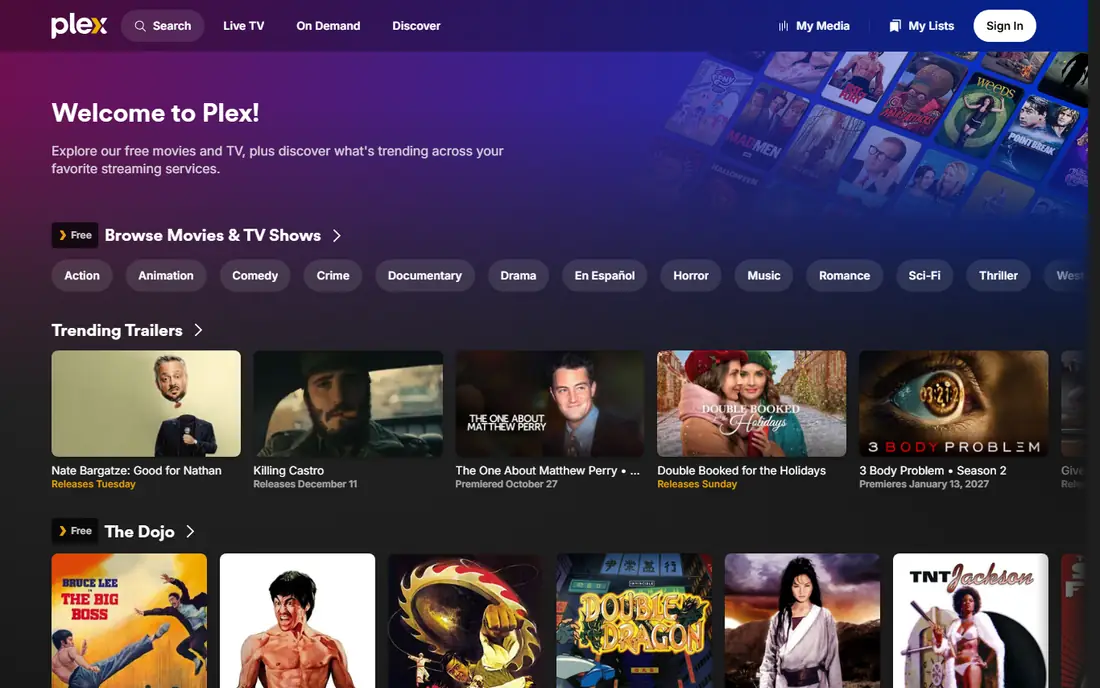
Plex turns a computer or network storage device into a media server, then streams your films, shows, and music to apps on your TV, phone, tablet, and browser. Setup is short for most people: install the server, point it at your folders, and Plex fetches posters, descriptions, and cast details for you. That polish is why it remains the default recommendation for households that do not want to fiddle with settings every weekend.
The catch is the price of convenience. The core server and apps are free, and Plex Pass starts at $6.99 per month for extras such as offline mobile downloads, hardware transcoding, and skip intro. Since April 2025, streaming your own library outside your home network also needs Plex Pass or a Remote Watch Pass. If you mostly watch at home, the free tier still covers a lot. If you travel and stream often, factor that cost in before you commit.
- Apps on most TVs, phones, and boxes
- Automatic posters and metadata
- Optional free ad-supported streaming library
- Remote streaming now needs a paid pass
- Account login runs through Plex servers
- Premium features add up over time

Emby works much like Plex, with a server on your own hardware and apps for TVs, phones, tablets, and browsers. Its interface feels tidy, and it handles movies, shows, music, and photos in one library. For many households, the free tier is enough for watching at home, while Premiere adds the extras that make a server feel complete.
Premiere starts at $4.99 per month, with a lifetime option listed at $119, and it adds DVR, offline mobile sync, cinema mode, and stronger parental controls. Emby also includes tools to move a library over from Plex, which lowers the switching cost if you already have folders organised. The honest trade is time: you will spend a little longer on first setup than with Plex, but you keep a similar level of polish once it is running.
- Clean apps on TVs and phones
- Live TV and DVR support
- One-time lifetime Premiere option
- Some mobile and DVR features need Premiere
- Setup takes more care than Plex
- Smaller free streaming library

Kodi is a media centre rather than a classic server. You install it on the device you watch on, point it at your files or network storage, and it builds a browsable library with posters and episode details. It runs on Windows, Mac, Linux, Android, and Fire TV, and it has a long history of community skins and add-ons that change how it looks and what it can do.
That freedom is also the drawback. There is no single server app that quietly serves every screen in the house unless you add that yourself, and keeping libraries in sync across several devices takes planning. For a single home theatre PC or a TV box, though, Kodi is hard to beat: no subscription, no account, and playback that handles formats other players sometimes refuse. It suits people who enjoy setting things up once and then leaving them alone.
- Completely free and open source
- Plays a very wide range of file types
- Skins and add-ons allow deep customisation
- Not a client-server system by default
- Setup and upkeep fall on you
- Remote streaming needs extra work
Stremio takes a different approach. Instead of focusing only on files on your own drive, it gathers films and shows into one catalogue, tracks what you have watched, and lets add-ons connect extra sources. You can also add local files, but the real strength is discovery: one search, one watchlist, and progress that follows you across devices.
That makes it a good companion rather than a straight server swap for everyone. If your main frustration is hunting across services to find where a show lives, Stremio solves that fast. If you want careful control of metadata, multi-user libraries, and DVR, Plex or Emby will serve you better. Treat Stremio as the front door to your viewing, and keep a server behind it when you have a large owned collection.
- One library and watchlist across sources
- Free to use
- Add-ons extend what it can find
- Not a full replacement for a local media server
- Add-on quality varies
- Local library tools are thinner than Plex or Emby
Universal Media Server
Great for: Simple DLNA streaming with no account
Universal Media Server is the plain, dependable option. Install it on Windows, Mac, or Linux, add your media folders, and any DLNA device on your network can play from it. There is no account to create and no client app to install on the TV in many cases, since the TV itself finds the server. For a household that just wants files on a TV screen, that simplicity is a real benefit.
The trade is presentation. You will not get the rich posters, watch states, and recommendations that Plex and Emby offer, and mobile playback is less polished. Transcoding, which converts files your TV cannot play natively, depends on your computer's power. Still, for older TVs, game consoles, and a quick setup on a spare computer, it is one of the least fussy tools on this list.
- Free and open source
- No account needed
- Works with many DLNA TVs and consoles
- Plain interface compared with Plex
- No polished mobile apps
- Transcoding depends on your computer
Serviio is another DLNA server, built to be light on system resources and easy to leave running. It detects many TVs and players automatically and picks a profile that matches what each device can play, which cuts down on files that refuse to open. The free version handles basic streaming well, and a paid Pro licence adds features such as media browser access and online source support.
It will not win a beauty contest against Plex or Emby, and it lacks their deep mobile apps and watch tracking. What it does offer is a server that stays out of the way on modest hardware. If you have an older PC or a small home server and a TV that already supports DLNA, Serviio is a sensible, low-cost way to get your library onto the big screen without buying new kit.
- Light footprint on older computers
- Automatic device profiles
- Free tier covers basic streaming
- Paid Pro version needed for some extras
- Interface is functional rather than pretty
- No full app ecosystem like Plex
MediaPortal is built for one job: turning a Windows PC connected to a TV into a full media centre. It covers movies, shows, music, and photos, and it has long supported TV tuners for live TV and recording. If you already have a PC under the TV and an antenna or tuner card, it gives you a remote-friendly interface without a monthly fee.
The limits are clear. It is Windows only, and getting tuners, codecs, and skins right takes patience. It is not the best choice if your main screens are phones and tablets, or if you want a server that serves the whole house with little upkeep. For a dedicated living room PC, though, it remains a capable free option with a community that has kept it going for years.
- Free and open source
- Built for TV and DVR on a home theatre PC
- Strong tuner support
- Windows only
- Setup is hands-on
- Less suited to phones and tablets on their own
Channels DVR starts from live TV rather than from a movie folder. Pair it with an antenna tuner or a supported TV source, and it records shows, builds a guide, and lets you watch live or recorded TV around the house. Its commercial skipping is a genuine time saver, and its apps are polished on Apple TV, Android TV, iOS, and Android. You can also add personal media files to your library.
Pricing is $8 per month or $80 per year after a free first month, and there is no lifetime purchase. That makes it the most expensive option here for someone who only wants to stream owned files. For a household cutting cable but keeping live sports, news, and network shows, the cost can still compare well with a cable box, and the recording tools are stronger than those in most general media servers.
- Strong live TV guide and DVR
- Automatic commercial skipping
- Apps for Apple TV, Android TV, and mobile
- Subscription only, with no lifetime plan
- Less focused on large owned movie libraries
- Needs a tuner or TV source for live TV
How we picked these
We compared official feature pages, pricing pages, and app store listings for media servers that exist and work in October 2026, and we left out any tool that only streams pirated sources or has shut down. We favoured tools with real device apps, clear pricing, and a working free tier or trial, and we mixed free open source servers with paid options so readers with different budgets and skills can find a fit. We did not claim hands-on testing we did not do; this list reflects what vendors publish and what public reviews report.
What to check before you switch
Start with your devices. Check that your chosen server has a proper app for your TV brand, not just a phone app you plan to cast from. Samsung, LG, Roku, Apple TV, and Fire TV support varies a lot between tools, and a server that works well on one TV can feel thin on another. Next, check your network: watching at home needs far less upload speed than streaming to a phone away from home, and transcoding 4K files needs a capable computer or network device.
Think about live TV early, too. If you want to record over-the-air shows, you need a tuner, an antenna, and guide data, and only some tools on this list handle that well. If you only want owned movies and music, a free server plus a good TV app may be all you need. Finally, back up your folder structure before you migrate, and test with a small library first so metadata mistakes do not turn into a weekend of fixing posters.
Frequently asked questions
What is the best free jellyfin alternative?
Kodi and Universal Media Server are strong free picks. Kodi gives the richest local playback and customisation, while Universal Media Server gives the simplest way to stream to a DLNA TV with no account. Pick Kodi for a home theatre PC and Universal Media Server for quick streaming to a TV you already own.
Can I use Plex without paying?
Yes, the core Plex server and apps are free for watching at home. Paid Plex Pass adds offline downloads, hardware transcoding, and extra features, and remote streaming outside your home network now needs Plex Pass or a Remote Watch Pass. Check the current Plex pricing page before you rely on remote access.
Is Emby cheaper than Plex?
For a lifetime purchase, Emby Premiere is listed at $119, which is well below the current Plex Pass lifetime price. Monthly pricing is also lower for Emby in most comparisons. Prices change, so compare the two pricing pages on the day you buy.
Do these alternatives work on smart TVs?
Plex and Emby have the widest smart TV app coverage, including Samsung, LG, Roku, Apple TV, and Android TV. Kodi runs on Android TV and Fire TV, while Universal Media Server and Serviio rely on DLNA support built into many TVs. Channels DVR has polished apps for Apple TV and Android TV.
Can I keep my Jellyfin library folders?
Yes, in most cases you can point a new server at the same folders, since these tools read ordinary movie, show, and music files. Metadata and watch history may not carry over cleanly, so expect to rebuild posters and watched states. Test with a small folder first before you move everything.
Sources
See where you really rank - block by block
ProMapRanker scans Google Maps across a grid of your service area. Simple monthly plans from $19, white-label on every plan.
Start freeKeep reading
 zscaler alternatives
Best Zscaler Alternatives in 2026
Looking for zscaler alternatives? We compare 9 SASE and zero trust platforms on architecture, data protection, pricing, and fit for your network and team.
Read → zapier alternatives free
Best Zapier Alternatives Free in 2026
Nine automation tools for zapier alternatives free in 2026, all with genuinely free tiers, plus free plan limits, starting prices and upgrade paths explained.
Read → which platform is best for online reputation
Which Platform Is Best for Online Reputation in 2026
Wondering which platform is best for online reputation? We compare 8 review, listing, and response tools for small and multi-location businesses and agencies.
Read →