 ProMapRanker
Best FlowMapp Alternatives in 2026

Key takeaways
- Slickplan is the most complete planning suite here, pairing sitemaps with a content planner and diagram maker in one project.
- Octopus.do is the easiest free starting point, with a free plan covering one project and unlimited editors.
- DYNO Mapper suits teams that audit existing sites, since it pairs visual sitemaps with content inventory and analytics data.
- Miro and Lucidchart are broader diagram tools, so they fit teams that also map user flows and wireframes beyond sitemaps.
Quick comparison
| Pick | Great for | Pricing starts at | Free tier | |
|---|---|---|---|---|
 Slickplan | Full website planning | $10.79 per month | Yes | Visit |
 Octopus.do | Fast free sitemaps | Free | Yes | Visit |
 DYNO Mapper | Site audits and inventory | $39 per month | No | Visit |
 GlooMaps | Simple visual sitemaps | See website | Yes | Visit |
 WriteMaps | Team sitemap collaboration | $16 per month | Yes | Visit |
 VisualSitemaps | Crawling existing sites | See website | Yes | Visit |
 Relume | Sitemaps to wireframes | See website | Yes | Visit |
 Miro | Visual collaboration boards | $8 per user per month | Yes | Visit |
 Lucidchart | Diagrams and user flows | $7.95 per user per month | Yes | Visit |
The best flowmapp alternatives
FlowMapp combines sitemaps, user flows, and content planning, so the best replacement depends on which of those jobs matters most to your team.

Slickplan is the closest all-round replacement for FlowMapp because it covers the whole planning job in one workspace. You can drag pages into a sitemap, attach content blocks and SEO fields, map user flows with its diagram maker, and share the plan for comments. For agencies, the Team plan covering ten users is good value, and exports keep handoffs to developers tidy.
The catch is that the cheapest plan leaves out the two features that make Slickplan shine: the crawler and the content planner both start on Pro. A solo freelancer planning a small site may not need those, but anyone redesigning an existing site should budget for Pro from the start. If you want one tool for planning, content, and client review, Slickplan is still the strongest pick here.
- Sitemaps plus content planner and diagram maker
- Site crawler on Pro plans
- Clean exports to XML, Word, and PDF
- Crawler and content planner need Pro or higher
- Annual billing gives the lowest price
- Can feel large for a one-page site
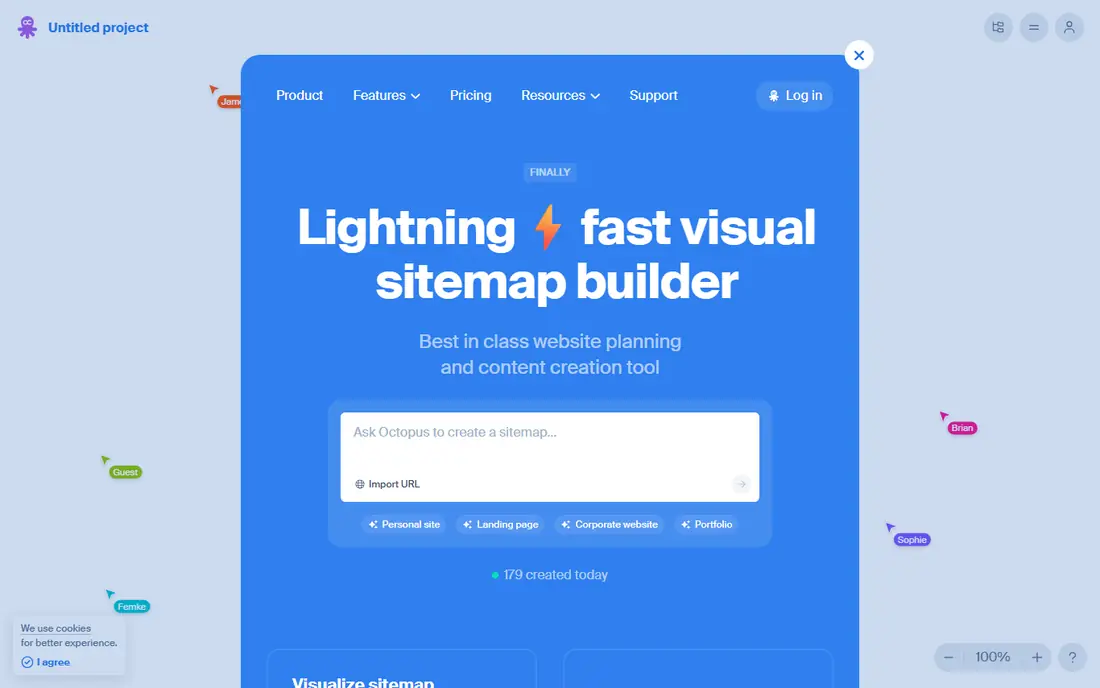
Octopus.do is the tool to try first if you just need a visual sitemap quickly. It opens fast, lets you build without signing up, and turns a structure into an XML sitemap you can hand to search engines. The free plan covers one project with unlimited editors, which is generous for a freelancer testing a single site plan.
Where it falls short is depth. Its wireframing stays at a low-fidelity level, and teams that plan content in detail will miss a dedicated content planner. Paid plans add projects, branding, and Figma sync, but the per-user Team price adds up. For quick sitemaps and client approval on structure, Octopus.do is hard to beat for speed and price.
- Free plan with one project
- Very fast drag-and-drop builder
- Exports to XML, PDF, PNG, and CSV
- Limited to one project on the free plan
- Wireframing is basic
- Team plan costs more per user

DYNO Mapper suits a team that audits a live site before redesigning it. It crawls an existing site, builds a visual sitemap, and shows content inventory alongside analytics data, so you can see which pages matter before you move them. That audit angle is its real strength, and it goes further than a simple drawing tool for content strategy work.
The price is the barrier. At $39 a month on annual billing, with no free plan, it costs more than Slickplan or Octopus.do to start. Its interface also feels less modern than its rivals, though it remains functional. If your work starts with auditing and inventory rather than drawing from scratch, DYNO Mapper earns its price.
- Visual sitemaps plus content inventory
- Google Analytics integration
- Strong audit and SEO fields
- Highest starting price among dedicated sitemap tools
- No free plan
- Interface feels dated next to newer tools
GlooMaps is a good choice when the job is simply to show a client how a site will be structured. There is little to learn, pages can be rearranged by dragging, and a finished sitemap is easy to share. Small teams and freelancers who do not need content planning or audits will appreciate how little gets in the way.
Simplicity is also its limit. GlooMaps does not offer the content planner, flow diagrams, or audit tools that larger planning suites include, so a complex redesign may need a second tool. Pricing should be checked on its site, since plans and limits change. For a clear, quick sitemap with no fuss, it does the job well.
- Very simple to learn
- Quick sitemap creation
- Easy sharing with clients
- Fewer features than Slickplan
- Limited content planning
- Pricing varies by plan
WriteMaps focuses on teams that build sitemaps together and want a simple shared workspace. The free plan covers two projects, which is enough to test it on a real client job, and paid plans raise project limits for busier studios. Editing stays straightforward, and the tool does not bury the sitemap under unrelated features.
It will not replace a full planning suite. There is no content inventory or analytics pairing like DYNO Mapper, and no diagram maker as broad as Slickplan. For a team whose main need is collaborative sitemap building at a fair price, WriteMaps is a clean and honest option.
- Free plan with two projects
- Collaboration built in
- Straightforward sitemap editing
- Smaller feature set than Slickplan
- No deep audit tools
- Paid plan starts above some rivals
VisualSitemaps starts from a live website and turns it into a visual map, which makes it handy when a redesign begins with understanding what already exists. You enter a URL, the tool crawls the site, and you get a structure you can edit and share. That crawl-first approach saves hours of manual page listing on larger sites.
It is less suited to planning a brand-new site from a blank page, where a tool like Slickplan or Octopus.do feels more natural. Pricing and plan limits should be confirmed on its site before buying, since they are not as widely published as some rivals. As an audit and mapping companion, it is a strong supporting tool.
- Strong crawling of existing sites
- Visual sitemaps from live URLs
- Useful for redesign audits
- Less of a from-scratch planning suite
- Pricing needs checking on its site
- Collaboration is lighter than Slickplan
Relume bridges the gap between a sitemap and a wireframe, which suits teams that move straight from structure to design. You can plan pages, then build wireframes from a component library without starting over in a separate design tool. That link between planning and design is its main advantage over simpler sitemap builders.
The trade-off is focus. Relume is aimed at design-led teams, so a content strategist who only needs sitemaps and SEO fields may find it heavier than needed. Pricing should be checked on its site, as plans have changed over time. For teams that design as they plan, Relume shortens the path from map to mockup.
- Sitemap builder linked to wireframes
- Large component library
- Good for design-led teams
- More design focused than pure sitemap tools
- Pricing needs checking
- Can be more than a content team needs
Miro is not a sitemap tool first, but many teams use it that way because its whiteboard is so flexible. Sitemaps, user flows, wireframes, and sticky-note workshops can live on one board, and real-time collaboration is excellent for remote teams. Templates give a fast start, and the free plan lets a small team test it without paying.
The weakness is specialization. Miro does not generate XML sitemaps from a board in the way Octopus.do or Slickplan do, so SEO handoffs need an extra step. It also costs per user, which adds up for a large agency. If your team already uses Miro for workshops and wants sitemaps in the same place, it works well, but pure sitemap work is better served by a dedicated tool.
- Flexible whiteboard for sitemaps, flows, and wireframes
- Strong real-time collaboration
- Many templates
- Not a dedicated sitemap tool
- No XML sitemap export by default
- Costs rise with team size
Lucidchart shines for user flows and diagrams, which is half of what FlowMapp users often need. You can map journeys, decision points, and screens with clean shapes and templates, then share them for comment. Integrations with workplace apps make it easy to drop diagrams into docs and presentations.
For sitemaps specifically, Lucidchart is manual: you draw the structure rather than crawling a site or exporting XML, so it takes more effort for SEO work. Its free plan is useful for trying diagrams, but advanced collaboration and data features sit on paid tiers. As a flow and diagram replacement, it is excellent; as a pure sitemap generator, a dedicated tool will be faster.
- Strong diagramming and user flow tools
- Good templates
- Integrates with common workplace apps
- Sitemaps are manual rather than crawled
- Not built for SEO metadata
- Higher tiers needed for advanced features
How we picked these
We compared official feature pages, pricing pages, and public reviews for visual sitemap builders, website planners, and diagram tools that are still sold in October 2026. We kept tools that can build or map a site structure, whether by crawling, drawing, or both, and we noted where a tool is broader than sitemaps so readers do not buy a whiteboard expecting an XML export. Prices are the lowest verified paid plan, or the free plan where one exists, and we used See website where pricing was not clearly published.
How to choose the right one
Start by naming the job. If you need an XML sitemap for search engines, pick a crawler like Slickplan, DYNO Mapper, or VisualSitemaps. If you need client approval on structure, a fast visual builder like Octopus.do or GlooMaps will do. If flows and wireframes matter as much as structure, Miro, Lucidchart, or Relume will serve you better.
Then check the limits that bite later: how many projects the plan allows, whether the crawler is included, and which export formats you need. A free plan with one project is fine for a test, but an agency planning several sites a month needs a plan with room to grow. Run a real project through the trial, including an export, before you move a whole client portfolio onto a new tool.
Frequently asked questions
What is the best free FlowMapp alternative?
Octopus.do offers a free plan with one project and unlimited editors, and Slickplan, WriteMaps, Miro, and Lucidchart also offer free plans with limits. The best free option depends on whether you need crawling, content planning, or just a visual map.
Can these tools generate an XML sitemap?
Slickplan, Octopus.do, and VisualSitemaps can export XML sitemaps, while Miro and Lucidchart are diagram tools that do not generate XML by default. Check the export options on the plan you intend to buy, since some exports sit on paid tiers.
Which tool is best for auditing an existing website?
DYNO Mapper and VisualSitemaps are built around crawling a live site, and Slickplan adds a crawler on its Pro plan. These are better audit choices than a blank-canvas drawing tool.
Do I need a sitemap tool if I use a CMS?
A CMS can generate an XML sitemap for search engines, but it does not plan structure, content, or user flows before a build. Visual sitemap tools help teams agree on structure and content before development starts, which is a different job from generating the final XML file.
Is Miro a good FlowMapp replacement?
Miro works well for sitemaps, flows, and workshops on one board, but it is not a dedicated sitemap tool and does not export XML by default. It fits teams that already collaborate on boards and want sitemaps in the same workspace.
How much should a small team budget?
A freelancer can start free or near $10 a month, while a small agency should budget $30 to $65 a month for a plan with crawling, content planning, and enough projects. Check annual versus monthly billing, since annual rates are usually lower.
Sources
See where you really rank - block by block
ProMapRanker scans Google Maps across a grid of your service area. Simple monthly plans from $19, white-label on every plan.
Start freeKeep reading
 zyte alternatives
Best Zyte Alternatives in 2026
These zyte alternatives cover managed scraping APIs, proxy networks and no code tools for lawful collection from your own or consented sources only in 2026.
Read → zerto alternatives
Best Zerto Alternatives in 2026
Compare the best zerto alternatives for disaster recovery and replication, with recovery targets, cloud options and honest trade-offs for teams in 2026.
Read → zerofox alternatives
Best ZeroFox Alternatives in 2026
We compared 9 zerofox alternatives for brand protection, phishing takedowns, dark web monitoring, and social impersonation, with clear coverage notes.
Read →