 ProMapRanker
Civitai Alternatives in 2026

Key takeaways
- Hugging Face is the strongest model hub alternative, with documentation, versioning, and a broad developer ecosystem.
- Tensor.Art, SeaArt, and OpenArt suit artists who want browser generation plus community model browsing.
- Leonardo, Midjourney, and NightCafe suit creators who want polished image tools rather than a raw model library.
- Use only licensed models, respect creator licenses, and do not generate images of real people without their consent.
Quick comparison
| Pick | Great for | Pricing starts at | Free tier | |
|---|---|---|---|---|
 Hugging Face | Developers and researchers | Free | Yes | Visit |
 Tensor.Art | Community model browsing | See website | Yes | Visit |
 SeaArt | Anime style AI art community | See website | Yes | Visit |
 OpenArt | Curated image generation | See website | Yes | Visit |
 Leonardo AI | Polished creative generation | See website | Yes | Visit |
 Midjourney | High quality stylized images | See website | No | Visit |
 NightCafe | Beginners and casual creators | See website | Yes | Visit |
 RunDiffusion | Cloud generation for power users | See website | Free trial | Visit |
 ThinkDiffusion | Cloud workflows without local GPU | $29.99 per month | Free trial | Visit |
The best Civitai alternatives
Model sharing sites differ in what they actually offer: some host downloadable models, some offer browser generation, and some do both. The nine platforms below are alternatives only, and they are legitimate creative platforms with published content rules. A plain safety note applies to all of them: use only models and images you have a right to use, respect creator licenses, and never generate images of real people without consent, and never use these tools for explicit or non consensual imagery.

Hugging Face is the most durable alternative for anyone who values documentation and version control. It hosts models across text, image, audio, and video, with model cards that explain training, license, and intended use. Developers and studios can build pipelines on it, while Spaces let creators share working demos without a separate server.
Casual artists may find it technical. Browsing is research oriented, and generating an image often needs a Space or an API call rather than a one click art app. If you want a serious, long lived model library with clear licensing, Hugging Face is the foundation. If you want instant art, pair it with a consumer tool below.
- Massive model library with documentation
- Versioning and model cards
- Spaces for demos and apps
- Interface is technical for casual artists
- Image generation needs more setup than a consumer art app
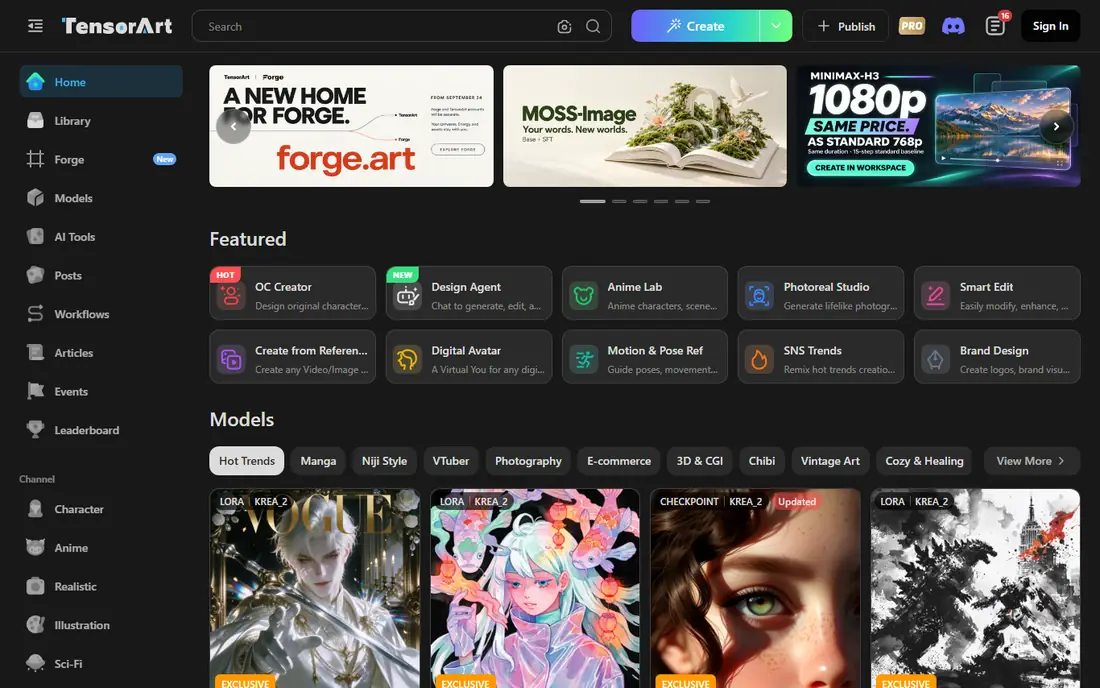
Tensor.Art combines a gallery with in browser generation, so you can test a community model without downloading it or setting up a local GPU. Workflow sharing is a strength: you can see how an image was made and adapt the steps for your own work. That instant testing suits artists who hate local setup.
Credit pricing and free allowances change over time, so check the current plan before a large project. Model quality also varies, because community uploads range from polished to experimental. For browsing, testing, and sharing workflows, Tensor.Art is a strong, artist friendly alternative.
- Gallery plus browser generation
- Community models and workflows
- Instant testing without local setup
- Pricing and credits change often
- Community quality varies by model
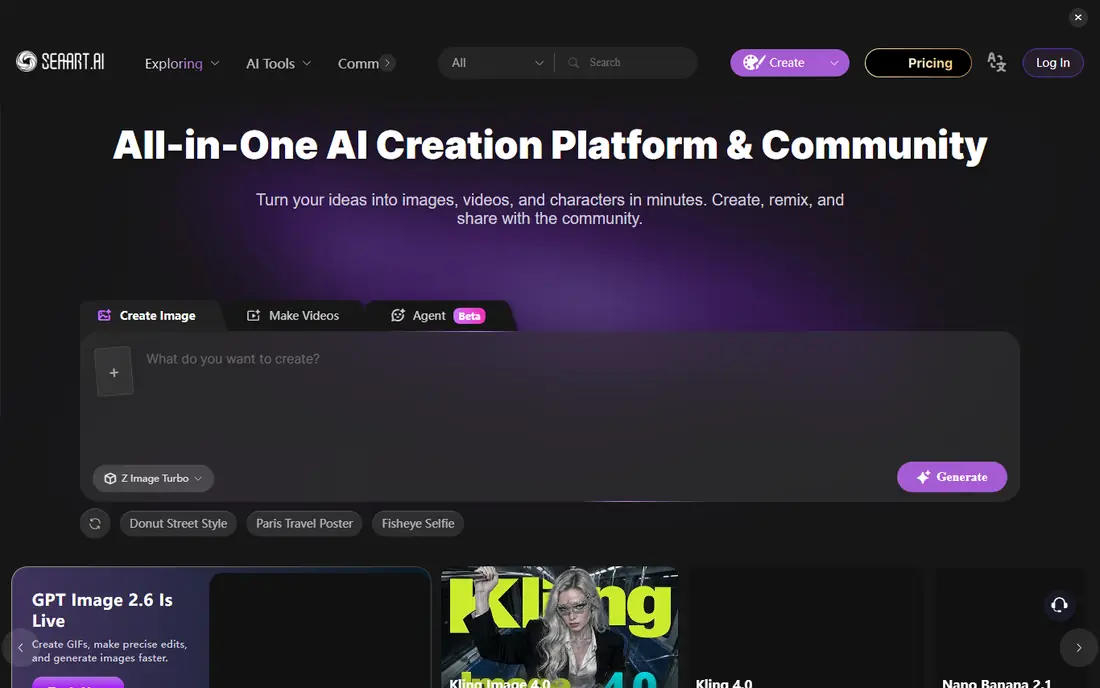
SeaArt suits artists focused on anime style work who want a community plus generation in one place. You can browse models, generate images in a browser, and share work with a community that understands that style. Users also note backup and creator protection features, which matter when a model or image set is important to your workflow.
The interface packs a lot into each screen, and free credits need care if you generate in volume. For anime creators who want community and generation together, SeaArt is a natural alternative. For technical model work, Hugging Face remains the deeper library.
- Strong anime art community
- Browser generation with model browsing
- Creator protections and backups noted by users
- Interface can feel busy
- Free credits need managing for large batches
OpenArt focuses on quality and discovery rather than raw model volume. It offers browser generation with curated styles and prompt discovery, which helps beginners learn what makes a good image without wading through thousands of uploads. That curation suits creators who want polished results fast.
It is not a full replacement for a model hub if you need to upload, version, and share many custom models. Free use is also limited, so heavy users will need a paid plan. If you value curation and ease over library size, OpenArt is a clean, friendly pick.
- Curated quality focus
- Prompt and style discovery
- Browser generation without local setup
- Model upload and sharing is more limited than a full hub
- Free plan is limited
Leonardo AI is built for creative professionals who want consistent, polished images for games, concept art, and marketing. It offers trained models for repeatable styles, plus editing and upscaling tools that fit a production workflow. That polish separates it from a raw model download site.
Free credits run out fast on a large project, and the best features need a paid plan. For a studio or freelancer who needs reliable style control, Leonardo is worth the trial. For casual browsing of community models, a hub like Hugging Face or Tensor.Art will feel broader.
- Polished image and design tools
- Trained model options for consistent styles
- Useful for game and concept art
- Free credits are limited
- Advanced features sit behind paid plans
Midjourney is the style leader on this list. Its images have a distinctive, polished look that many creators prefer for illustration, concept art, and editorial work. The community gallery is also a strong source of inspiration, with prompts and styles visible alongside finished work.
There is no free plan in most cases, and the workflow runs through Midjourney's own app and web editor rather than a downloadable model library. If you want a model hub, look elsewhere. If you want high quality stylized images with minimal setup, Midjourney remains a top choice.
- Distinctive, high quality stylized output
- Strong community gallery
- Regular model updates
- No free plan in most cases
- Workflow runs through its own app and web editor
NightCafe is the beginner friendly alternative for casual creators. It offers several generation styles in one browser app, with challenges and galleries that help new users learn by example. You can start generating in minutes, without understanding checkpoints, LoRAs, or local setup.
It does not replace a model hub, because custom model upload and sharing are not its focus. Free credits also limit heavy use. For a newcomer who wants to make and share AI art safely and simply, NightCafe is an easy, low pressure start.
- Beginner friendly
- Many generation styles in one place
- Community challenges and galleries
- No custom model upload like a full hub
- Free credits are limited for heavy use
RunDiffusion suits power users who want cloud GPU power without buying hardware. You can run popular generation workflows, including ComfyUI style setups, in a cloud session, with your own models and settings. That flexibility suits advanced creators and small studios that need control.
Session pricing needs careful budgeting, because idle time and long renders add up. Setup is also more technical than a consumer art app. If you already use local generation tools and want cloud power on demand, RunDiffusion is a practical alternative. If you are new, start with a browser tool first.
- Cloud GPU sessions for popular workflows
- No local GPU needed
- Good for ComfyUI and similar tools
- Pricing is session based and needs budgeting
- Setup is more technical than consumer art apps
ThinkDiffusion gives cloud access to AI workflows without local hardware, with a free trial period to test the setup. It suits creators who want a ready made cloud workspace for generation and editing, rather than building their own server. That convenience saves hours of setup for advanced workflows.
The monthly price is high for casual users, and community features are lighter than on art focused sites. For a power user or small studio that needs cloud generation regularly, ThinkDiffusion is a solid option. For occasional art, a free tier browser tool will be cheaper.
- Cloud workflows with popular tools
- Free trial time to test
- No local GPU or setup needed
- Monthly price is high for casual use
- Community features are lighter than art focused platforms
How we picked these
We compared official platform pages, feature lists, and recent alternative guides, and we kept only legitimate creative platforms live in October 2026 that host models, offer generation, or both, with published content rules. We excluded tools marketed for explicit or non consensual imagery, and we listed the original site itself nowhere in the product list, as this is an alternatives guide.
We did not claim hands-on testing on every platform, and we did not invent user counts or ratings. Library depth, generation quality, licensing clarity, and content safety mattered more than a long feature list. A platform with clear rules and licensed models beats a larger platform with unclear moderation.
What to check before you switch
Decide hub, generator, or both
A hub gives you models and documentation, while a generator gives you instant images. Most serious creators use both: a hub for models and a generator for fast work. Do not expect one platform to replace every part of a workflow, and keep your prompts and settings backed up outside any single site.
Check licenses before you publish
Read the license on every model you use, especially for commercial work. Some models allow commercial use, some require credit, and some restrict certain uses. Keep a record of model names, versions, and licenses for any image you publish or sell, so you can prove your rights later.
Respect people in your prompts
Do not generate images of real people without their consent, and do not use AI tools to create explicit or misleading images of anyone. Check each platform's content rules before you post, and report content that breaks those rules. Creative freedom works best when it respects the people in the images.
Keep a backup of your work
Platforms change rules, remove models, and suffer outages. Download your finished images, save your prompts and model names, and keep copies in your own storage. A backup plan protects your portfolio when a single site changes, and it makes moving to a new platform far easier.
Frequently asked questions
What are the best Civitai alternatives?
Hugging Face, Tensor.Art, SeaArt, and OpenArt are strong starting points, with Hugging Face for model depth, Tensor.Art and SeaArt for community generation, and OpenArt for curated quality. Leonardo, Midjourney, and NightCafe suit polished or beginner image work. The best pick depends on whether you need a hub, a generator, or both.
Are Civitai alternatives safe and legitimate?
The platforms on this list are legitimate creative tools with published content rules, but safety also depends on how you use them. Use only licensed models, respect creator licenses, and never generate images of real people without consent. Avoid any platform marketed for explicit or non consensual imagery, even if it claims to be a model hub.
Can I move my models from Civitai to another platform?
Not directly in most cases. Each platform runs its own model library, so moving usually means rebuilding with models available on the new site, not copying a checkpoint file across. Save your prompts, settings, and finished images before you move, and test the new platform with a small project first.
Which alternative is best for beginners?
NightCafe and OpenArt are the easiest starts, because they offer browser generation with little setup and clear styles to try. Tensor.Art and SeaArt add community model browsing for users who want to explore further. Hugging Face suits beginners only if they are comfortable with technical docs and demos.
Do I need a local GPU to use these alternatives?
No, most platforms on this list offer browser or cloud generation, so you do not need a local GPU. RunDiffusion and ThinkDiffusion offer cloud GPU sessions for power users, while Hugging Face Spaces also let you try models without local hardware. Local GPU work only matters if you want to run large models entirely on your own machine.
Sources
- https://huggingface.co
- https://tensor.art
- https://www.seaart.ai
- https://openart.ai
- https://leonardo.ai
- https://www.midjourney.com
- https://nightcafe.studio
- https://www.rundiffusion.com
- https://www.thinkdiffusion.com
- https://www.geniusfirms.com/blog/best-civitai-alternatives-in-2026-and-how-they-really-compare/
See where you really rank - block by block
ProMapRanker scans Google Maps across a grid of your service area. Simple monthly plans from $19, white-label on every plan.
Start freeKeep reading
 zscaler alternatives
Best Zscaler Alternatives in 2026
Looking for zscaler alternatives? We compare 9 SASE and zero trust platforms on architecture, data protection, pricing, and fit for your network and team.
Read → zapier alternatives free
Best Zapier Alternatives Free in 2026
Nine automation tools for zapier alternatives free in 2026, all with genuinely free tiers, plus free plan limits, starting prices and upgrade paths explained.
Read → which platform is best for online reputation
Which Platform Is Best for Online Reputation in 2026
Wondering which platform is best for online reputation? We compare 8 review, listing, and response tools for small and multi-location businesses and agencies.
Read →