 ProMapRanker
Best Check Alternatives in 2026


Small businesses paying vendors by ACH or check · Pricing starts at: Free
Key takeaways
- This article covers alternatives to paper checks for paying bills and people, including ACH bill pay, digital payments, and check-writing software.
- Melio is the strongest starting point for small businesses, with a free tier and the option to still send a check when a payee requires one.
- BILL and Checkbook suit companies that need approvals, audit trails, and higher payment volume than a consumer app can handle.
- For personal payments, PayPal, Venmo, and Zelle replace most check use cases at no account cost, though transaction fees and limits vary.
Quick comparison
| Pick | Great for | Pricing starts at | Free tier | |
|---|---|---|---|---|
| Melio | Small businesses paying vendors by ACH or check | Free | Yes | Visit |
 BILL | Growing companies needing approval and audit controls | See website | Free trial | Visit |
 Checkbook | Businesses sending digital checks at volume | See website | No | Visit |
 OnlineCheckWriter | Businesses that print or mail checks from a browser | See website | Free trial | Visit |
 Checkeeper | Small teams printing checks in-house | See website | Free trial | Visit |
 Deluxe | Businesses needing check supplies and payment services | See website | No | Visit |
 PayPal | Personal and business payments across borders | Free | Yes | Visit |
 Venmo | Friends, family, and small sellers in the US | Free | Yes | Visit |
 Zelle | Fast bank-to-bank payments in the US | Free | Yes | Visit |
The best check alternatives
A note on the angle first: this article treats "check alternatives" as ways to pay without writing a paper check, plus tools that print or mail checks for you when a payee still insists on one. It does not cover check-cashing storefronts, since the keyword evidence points to payment methods and check-writing tools. This is not financial advice; fees, limits, and delivery times change, so confirm them with each provider before you switch a regular payment.

Melio is our pick for most small businesses moving away from paper checks. You upload or enter a bill, choose ACH, check, card, or wire, and the vendor gets paid without you writing, signing, and mailing a check by hand. The free Go tier covers a handful of ACH payments each month, which is enough for a very small business to test the workflow before paying for a plan.
The honest catch is fees on top of the subscription. ACH is the cheap route, while card payments and faster delivery cost more, so a business that pays mostly by card should compare the total monthly cost, not just the plan price. Still, Melio keeps the check option open for vendors who will not accept anything else, which makes the switch less risky than a tool that drops checks entirely.
- Free tier covers a small number of ACH payments each month
- Can send a check when a vendor requires one
- Syncs with QuickBooks Online and Xero
- Card-funded payments carry a percentage fee
- Higher tiers cost more as volume grows
- Some faster delivery options carry extra fees

BILL suits companies that have outgrown paying bills one by one. Invoices flow through approvals, payments go out by ACH or check, and the accounting system stays in sync, which cuts down on manual entry and missing paperwork. That control matters once more than one person touches payments and finance needs a clear record of who approved what.
The downside is weight. BILL is a business system, not a quick way to send money to a friend, and its pricing often requires a quote. A sole trader with five bills a month will find Melio simpler and cheaper. A company with staff, approvals, and dozens of vendors each month will get real value from the structure BILL adds.
- Approval workflows and audit trails for accounts payable
- ACH, check, card, and international payment options
- Accounting software integrations
- Pricing is quote-based for many plans
- Setup takes longer than a consumer payment app
- Small businesses may not need the full control set
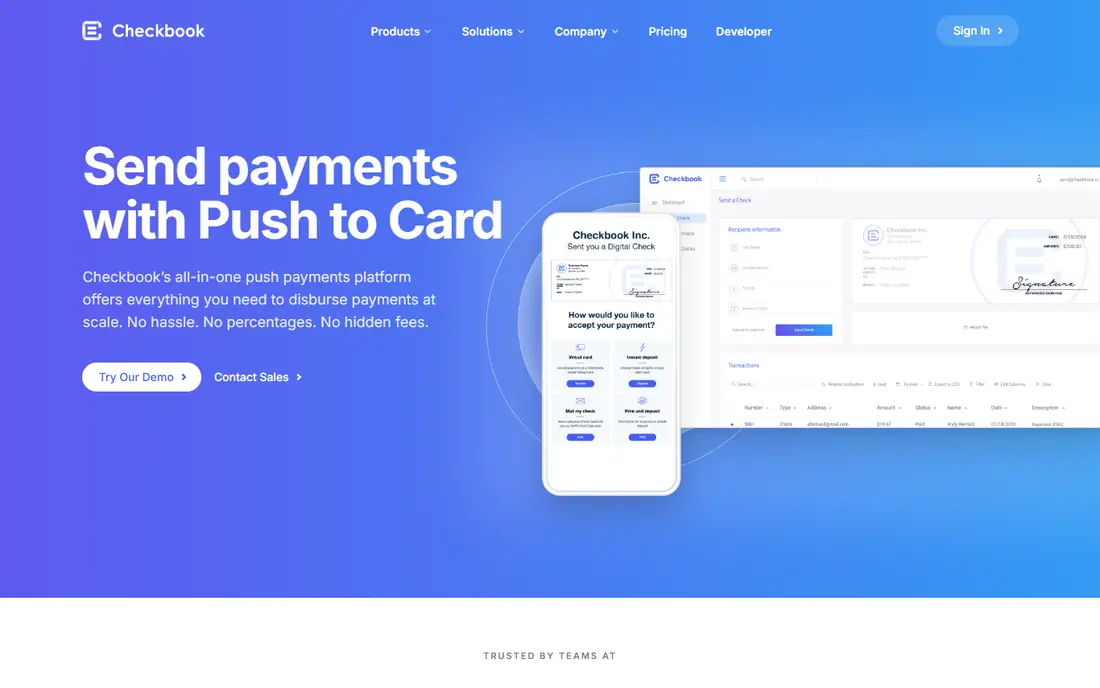
Checkbook replaces the paper check with a digital version that a payee can print or deposit. That design fits businesses that still deal with check-friendly payees, such as landlords, contractors, and smaller vendors, but want to stop buying check stock and trips to the post office. Bulk sending and recurring payments help companies that pay many people on a regular schedule.
The limit is adoption on the receiving side. A digital check still needs a payee who knows what to do with it, and some banks and vendors handle them more smoothly than others. Checkbook is best for businesses with a steady, repeatable payment flow, not for someone sending a single payment to a relative.
- Digital checks can be sent by email and deposited online
- Built for bulk and recurring payments
- API access for software integration
- Pricing is not published as a simple plan
- Payees must be willing to accept a digital check
- Less useful for one-off personal payments
OnlineCheckWriter
Great for: Businesses that print or mail checks from a browser
OnlineCheckWriter sits between old paper checks and full digital payments. You create checks in a browser, print them on blank stock, or have the service mail them for you, which removes handwriting and manual record keeping while keeping the familiar check format. For businesses whose vendors still demand checks, that middle step is practical.
The catch is that checks remain checks. You still need to guard blank stock, reconcile cleared checks, and watch for fraud, which digital payments avoid by design. OnlineCheckWriter is a good bridge tool, but teams that can move payees to ACH should do so for the payments where it is possible, and keep printed checks only for the holdouts.
- Print checks on blank stock from any printer
- Mail checks without a trip to the post office
- Works with common accounting tools
- You still manage check stock and printer setup
- Pricing depends on plan and volume
- Check fraud controls need care and attention
Checkeeper is the simplest tool on this list for a team that just needs to print checks. You enter payee details, design the check, and print it on blank stock with a regular printer. There is no long setup, no accounting overhaul, and no new payment network to explain to vendors. For a small office that writes a modest number of checks each month, that simplicity is the point.
The trade-off is scope. Checkeeper does not manage approvals, bill capture, or vendor onboarding the way BILL or Melio do. It solves printing, not payables. If your problem is volume and control, pick a fuller platform. If your problem is only that handwriting checks is slow and error-prone, Checkeeper solves it cleanly.
- Simple check design and printing from a browser
- No special printer or software install needed
- Low learning curve for small teams
- Feature set is narrower than full AP platforms
- No built-in vendor payment network
- Pricing scales with check volume
Deluxe is the traditional route, and it remains relevant because many businesses still need physical checks, deposit slips, and related forms. Security features, business check styles, and bulk ordering are its strengths, and it also sells payment services for companies that want one supplier for both paper and digital needs. A business that already orders from Deluxe can keep that relationship while it moves some payments online.
The honest view is that Deluxe is a supplies company first. It will not modernize your payables workflow the way BILL or Melio can, and every paper check still carries handling, mailing, and fraud risk. Use Deluxe for the checks you truly still need, and pair it with a digital tool for everything else.
- Long-established supplier of business checks and forms
- Payment and payroll services sit beside check products
- Wide check styles and security features
- Pricing varies by product and order, with no single plan price
- Ordering checks still means managing paper
- Digital payment tools may be simpler for new businesses
PayPal is the most widely recognized replacement for a personal or small-business check. A free account lets you send money to an email address or phone number, invoice a customer, or share a payment link, without either side handling paper. That reach matters: a payee who has never heard of a niche check tool almost certainly already has, or can quickly open, a PayPal account.
Fees are where PayPal needs care. Personal transfers from a bank balance or PayPal balance are often free inside the US, but business payments, card-funded transfers, and cross-border payments carry fees that vary by type and currency. Read the fee page for your exact payment type before you assume a transfer is free. For reach and ease, PayPal is still hard to beat.
- Account signup is free and widely accepted
- Send money, invoices, and payment links from one account
- Buyer and seller protections on eligible transactions
- Fees apply to many business and cross-border payments
- Account holds can delay access to funds
- Currency conversion adds cost
Venmo replaces the personal check for splitting rent, paying a babysitter, or settling up after dinner. Payments move between accounts quickly, and the app is built around people you already know, which keeps the flow simple. Small sellers can also use a business profile to accept payments without setting up a full payment processor.
The limits are geography and privacy. Venmo works in the US only, and its social feed means you should check your privacy settings before your payments become visible to others. Instant transfers to a bank account also carry a fee, while standard transfers take longer. For everyday US personal payments, Venmo is one of the easiest check replacements available.
- Free account with fast person-to-person payments
- Social feed and payment notes suit casual use
- Business profiles available for small sellers
- US-only, so no cross-border payments
- Instant transfer to a bank carries a fee
- Privacy settings need checking, since payments can be visible by default
Zelle is the closest thing to a check that clears fast, because money moves from one bank account to another without sitting in a third-party balance. If your bank offers Zelle inside its app, sending money is often just an email address or phone number away, and the recipient does not need a new account beyond their bank. That simplicity makes it a strong default for rent, family support, and contractor payments.
The warning matters more here than with the other tools. Zelle payments are meant for people you trust, and a payment sent to the wrong person is hard to reverse. There is also no buyer protection if you use it to buy goods from a stranger. Treat Zelle like cash: fast, direct, and final, and only for recipients you know.
- Money moves directly between bank accounts
- No separate balance to manage
- Many US banks offer it inside their own apps
- US-only and bank-dependent
- Sent payments generally cannot be cancelled
- No purchase protection for goods and services
How we picked these
We compared official feature pages, pricing pages, and public reviews for tools that replace paper checks in a real payment flow, whether by ACH, digital check, or person-to-person transfer. We kept only tools that are live in the US in October 2026, and we left out check-cashing storefronts, since the keyword evidence points to payment and check-writing tools. Where a vendor does not publish a simple plan price, we wrote See website rather than inventing a figure.
What to check before you switch
Start with your payees, not the tool. List who must still receive a check, who will accept ACH, and who already uses a payment app, then pick a tool that covers the largest group without forcing the holdouts into a method they will reject. Check fees for your exact payment type, delivery times, and daily or monthly limits, since a free account can still cost money on card-funded or instant transfers. For business payments, confirm approval controls, accounting sync, and how voided or failed payments are handled.
Also protect yourself against check and payment fraud during the switch. Use positive pay or account alerts where your bank offers them, keep blank check stock locked away if you still print checks, and never send a Zelle or Venmo payment to a stranger for goods. A short pilot with a few trusted payees will show you where the friction sits before you move every recurring payment at once.
Frequently asked questions
What is the best alternative to checks?
For small businesses, Melio is the strongest starting point, since it covers ACH, card, wire, and check payments in one place. For personal payments in the US, Zelle and Venmo cover most check use cases, while PayPal adds cross-border reach. The best choice depends on who you pay and what they accept.
Can I still send a check if a vendor requires one?
Yes. Melio, BILL, and Checkbook can send checks on your behalf, and OnlineCheckWriter and Checkeeper let you print or mail checks yourself. That fallback matters during a switch, since some landlords, government offices, and small vendors still ask for a check. Keep one check route open until every regular payee has moved.
Are alternatives to checks free?
Many accounts are free to open, including Melio Go, PayPal, Venmo, and Zelle, but transaction fees vary. ACH transfers are usually the cheapest route, while card-funded, instant, and cross-border payments cost more. Always check the fee page for your payment type rather than assuming every transfer is free.
Is Zelle safer than a paper check?
Zelle avoids lost mail and check washing, since money moves directly between bank accounts, but sent payments are hard to reverse. A paper check can be stopped in some cases, while a Zelle payment to the wrong person often cannot be recalled. Use Zelle only for people you trust, and keep records of every payment.
What is the best check-writing software?
OnlineCheckWriter suits businesses that print and mail checks from a browser, while Checkeeper suits small teams that only need simple in-house printing. If you also want bill capture, approvals, and accounting sync, Melio or BILL are better fits, since they manage the whole payment flow rather than just printing.
Sources
See where you really rank - block by block
ProMapRanker scans Google Maps across a grid of your service area. Simple monthly plans from $19, white-label on every plan.
Start freeKeep reading
 zscaler alternatives
Best Zscaler Alternatives in 2026
Looking for zscaler alternatives? We compare 9 SASE and zero trust platforms on architecture, data protection, pricing, and fit for your network and team.
Read → zapier alternatives free
Best Zapier Alternatives Free in 2026
Nine automation tools for zapier alternatives free in 2026, all with genuinely free tiers, plus free plan limits, starting prices and upgrade paths explained.
Read → which platform is best for online reputation
Which Platform Is Best for Online Reputation in 2026
Wondering which platform is best for online reputation? We compare 8 review, listing, and response tools for small and multi-location businesses and agencies.
Read →