 ProMapRanker
Best Writing Software for Novels in 2026


Long, research-heavy novels · Pricing starts at: $59.99 one-time
Key takeaways
- Scrivener remains the strongest pick for long, research-heavy novels, while Dabble and LivingWriter suit writers who want cloud sync and a gentler setup.
- Reedsy Studio is the best free starting point, and Plottr is the best pure outlining companion rather than a full drafting app.
- One-time purchases such as Scrivener at $59.99 and Atticus at $147 can cost less over three years than a monthly subscription, but check what each plan includes.
- Apple-only tools such as Ulysses rule out Windows writers, so check platform support before falling for a clean interface.
- We compared drafting, plotting, research storage, sync, and export, and we kept only tools that are still sold and support book-length work in October 2026.
Quick comparison
| Pick | Great for | Pricing starts at | Free tier | |
|---|---|---|---|---|
| Scrivener | Long, research-heavy novels | $59.99 one-time | Free trial | Visit |
 Ulysses | Apple writers wanting a calm editor | $5.99 per month | Free trial | Visit |
 Plottr | Visual outlining and timelines | $60 per year | Free trial | Visit |
 Dabble | Cloud drafting with plot grids | $19 per month | Free trial | Visit |
 Novlr | Goal-driven drafting on a budget | Free | Yes | Visit |
 LivingWriter | Guided drafting with story boards | $14.99 per month | Free trial | Visit |
 Atticus | Writing plus book formatting | $147 one-time | No | Visit |
 Reedsy Studio | Free drafting and formatting | Free | Yes | Visit |
The best writing software for novels
A novel app has to do more than hold text. It has to keep chapters, scenes, character notes, and research in order for months, and then export a clean manuscript. The tools below cover different strengths: deep organization, visual plotting, cloud drafting, and formatting. We compared official feature and pricing pages, plus app store listings, and we kept only tools that fit book-length fiction.

Scrivener fits writers with a long manuscript, many scenes, and research to keep beside the draft. The binder holds chapters and scenes as separate pieces, the corkboard shows them as cards, and the outliner gives a structural view of the whole book. Research files, images, and web pages can live inside the project, so notes stay near the scenes they support. Compile then turns the draft into Word, PDF, EPUB, or Kindle formats with control over headings and front matter. The catch is the learning curve. New writers often need the built-in tutorial before the layout feels natural, and sync is manual through Dropbox or iCloud rather than built in. The $59.99 price is per desktop platform, with the iOS app sold separately at $23.99 in recent listings. For a writer who wants full control and owns the software outright, that trade is worth it.
- Binder, corkboard, and outliner for complex books
- Research folder
- Strong compile and export
- Steep learning curve
- Sync needs Dropbox or iCloud setup
- Desktop and iOS licenses are separate

Ulysses fits Mac, iPad, and iPhone writers who want a calm space to draft without clutter. The Markdown editor keeps formatting simple, the library organizes sheets into groups, and iCloud sync moves work between devices without extra setup. Export covers Word, PDF, EPUB, and HTML, so a draft can leave Ulysses cleanly for an editor or a formatting tool. Goals and word counts help writers track daily progress. The limits are platform and structure. There is no Windows version, so a writer who switches systems will need another app. Plotting, character sheets, and timeline views are far lighter than Scrivener or Plottr. At $5.99 per month or $39.99 per year in recent listings, Ulysses is a fair price for Apple writers who value focus over plotting depth.
- Clean Markdown editor
- ICloud sync across Apple devices
- Strong export to Word, PDF, and EPUB
- Apple only, no Windows or Android version
- Subscription only
- Plotting tools are light
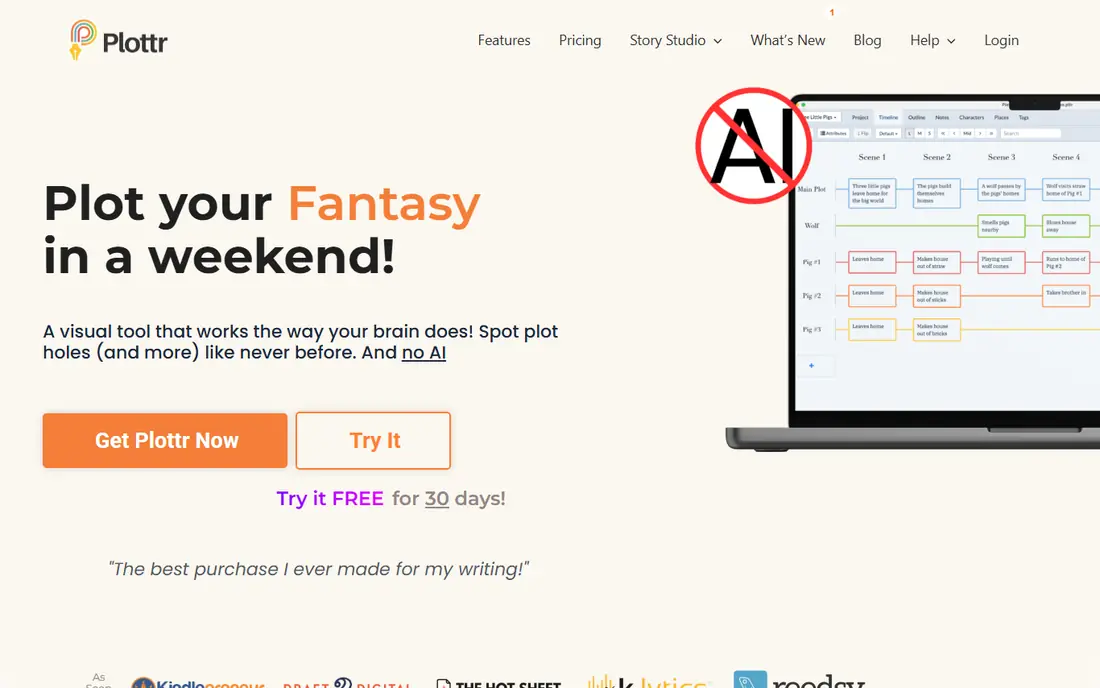
Plottr fits plotters who want to see the whole story at once. The timeline shows scenes across plotlines, characters, and places, and templates cover common structures such as three-act and hero journey forms. The story bible tracks characters, locations, and notes across a series, which helps when book two or three must stay consistent with book one. Exports to Scrivener and Word make it a planning partner rather than a replacement for a drafting app. The catch is that Plottr alone does not finish a novel. A writer still needs Scrivener, Word, Dabble, or another editor for drafting and formatting. The $60 per year plan or $150 lifetime option in recent listings is fair for pure outlining, but the total cost rises once a drafting app is added. Buy Plottr when structure is the main problem, not when the draft itself is the problem.
- Visual timeline and plot grid
- Story bible templates
- Exports to Scrivener and Word
- No drafting editor, so a second app is needed
- Lifetime price is higher
- No book formatting
Dabble fits writers who want to draft anywhere and keep plot structure visible. The cloud app syncs across browser, desktop, iOS, and Android, so a scene started on a laptop can continue on a phone. The Plot Grid shows scenes arranged by plotline, and story notes hold character and world details beside the draft. Goals, focus mode, and version history support a steady writing habit without extra setup. The trade is price and export. The Writer tier starts at $19 per month in recent listings, with higher tiers adding grammar checks, comments, and courses. Dabble exports to Word, Google Docs, and Markdown, but not directly to EPUB, so a formatting tool is still needed for publication. For a writer who values sync and a gentle interface over one-time ownership, Dabble is a strong pick.
- Automatic cloud sync
- Plot Grid for scenes by plotline
- Co-authoring and goal tracking
- Monthly cost adds up
- No EPUB export
- Formatting needs a separate tool
Novlr fits writers who need a simple cloud editor and a push to write every day. The free tier covers basic drafting, and goals, streaks, and progress views help a new novelist build a habit. The interface stays out of the way, which suits pantsers who draft in order and do not want a complex binder or timeline in front of them. Paid plans add more storage and features for writers who outgrow the free tier. The limit is depth. Novlr does not match Scrivener for research storage or Plottr for visual planning, and writers with a complex series bible may feel constrained. Recent listings put paid plans from about $8 to $10 per month, so the cost stays low. Pick Novlr when budget and daily habit matter most, and add Plottr later if structure becomes the bottleneck.
- Free tier for basic drafting
- Writing goals and streaks
- Clean cloud editor
- Plotting tools are light
- Paid features are limited compared with Scrivener
- Export needs checking per plan
LivingWriter fits writers who want guidance built into the app. Story elements track characters, locations, and items, boards help plan scenes visually, and templates give a starting shape for a novel. Drafting happens in the cloud, so work is available on different devices, and export to Word, PDF, and EPUB covers both editor submissions and self-publishing steps. That combination suits a writer who wants planning and drafting in one place. The catch is the subscription at $14.99 per month in recent listings, plus a learning step to use boards and elements well. Writers who already plan in Plottr may not need the extra planning tools, and writers who only need a clean editor may prefer Novlr or Ulysses. LivingWriter earns its price when a writer wants a guided, all-in-one novel workspace.
- Story elements, boards, and templates
- Cloud drafting
- EPUB, Word, and PDF export
- Subscription cost
- Interface can feel busy
- Collaboration is limited compared with Reedsy Studio
Atticus fits indie authors who want to write and then format a professional ebook and print interior without paying for two tools. The editor handles chapters and scenes, and the formatting side offers themes, trim sizes for print, and previews that match the exported file. At $147 one time in recent listings, with a 30-day money-back guarantee noted by the vendor, it can cost less over several books than a formatting subscription. The trade is that Atticus is not a plotting app. It has no corkboard or timeline like Scrivener or Plottr, and its editor is simpler than Dabble or LivingWriter. Many authors draft elsewhere and use Atticus for the final formatting pass, which is a sensible workflow. Buy Atticus when formatting for publication is the next step, not when the first draft still needs structure.
- One-time purchase
- Professional EPUB and print formatting
- Works on web and desktop
- Editor is basic, with no spellcheck in some views
- No plotting boards
- Formatting learning curve for custom themes
Reedsy Studio fits budget-conscious writers who want a solid editor, collaboration, and professional formatting at no cost. The free plan includes drafting, one planning board, and three formatting templates, plus real-time collaboration that makes editor or beta reader work simple. EPUB export is included, so a writer can move from draft to a readable ebook without buying another tool. That breadth at zero cost is rare in this category. The limits are platform and boards. Reedsy Studio is web only, so offline drafting needs care, and writers who want many boards must pay for the Outline add-on, listed at $7.99 per month in recent material, or the combined add-on bundle. For a first novel, the free plan is usually enough. Start here when cost is the main barrier, and move to Scrivener or Atticus only when a specific limit bites.
- Free core drafting and formatting
- Real-time collaboration
- EPUB export included
- Web only
- Only one free planning board
- Optional add-ons cost extra for stats and unlimited boards
How we picked these
We compared official feature pages, pricing pages, and app store listings for novel tools, and we checked platform support, plotting, research storage, sync, and export. We kept tools that are still sold in October 2026 and that support book-length work, not just short articles or notes. We left out general note apps that lack chapter and scene organization, and we did not claim hands-on testing. Prices are starting prices from vendor or recent pricing material, and we used See website only where a vendor price was not clear, which was not needed for this list.
How to choose the right novel app for your writing style
Start with how you write, not with a feature list. Plotters who outline before drafting will get the most from Plottr, LivingWriter, or Scrivener, while pantsers who discover the story as they draft may prefer Ulysses, Novlr, or Dabble. Check whether you need research storage, series tracking, or formatting, because no single app in this list leads on all three at once.
Test export before you commit to a draft
Write a short test chapter, add a scene break and a chapter heading, then export to Word and EPUB. Check that headings, italics, and scene breaks survive, and that an editor can open the file without cleanup. A clean export saves hours later, and it is the fastest way to spot a tool that will cause trouble at submission or publication time.
Count the three-year cost, not just the first month
A $19 per month subscription costs more than $59.99 one-time Scrivener or $147 Atticus after a few years, but a subscription may still be right when cloud sync and updates matter. Add the cost of a second app when needed, such as Plottr plus Scrivener, or Dabble plus Atticus, and compare that total with a single-app workflow. Choose the total that fits both budget and habit.
Frequently asked questions
What is the best novel writing app for beginners?
Reedsy Studio is the best free start for beginners, because it covers drafting, collaboration, and formatting without a purchase. Novlr is also friendly for writers who want goals and a simple editor. Scrivener is stronger long term, but its learning curve can slow a first draft, so beginners often do better starting simple and moving to Scrivener when the book grows complex.
What is the best app for writing a novel on Windows and Mac?
Scrivener is the strongest cross-platform pick, with full Mac and Windows versions, plus a separate iOS app. Dabble, LivingWriter, Novlr, and Reedsy Studio also work across systems through the web or desktop apps. Ulysses is the main exception here, because it is Apple only, so Windows writers should rule it out early.
What is the best writing software for novels with plotting tools?
Plottr is the best pure plotting tool, with timelines, plot grids, and story bible templates. LivingWriter and Scrivener also offer strong planning views, with boards and corkboards respectively. Dabble adds a Plot Grid for writers who want plotting inside the drafting app. The right pick depends on whether plotting is the main job or one part of drafting.
Is there a free app for writing novels?
Reedsy Studio offers the most complete free novel workflow, with drafting, one planning board, collaboration, and EPUB export. Novlr also has a free tier for basic drafting. Free tools will not match Scrivener for research or Atticus for print formatting, but they are enough to finish a first draft and share it with readers or an editor.
Do I need Scrivener and Plottr, or just one?
Many writers use both, with Plottr for structure and Scrivener for drafting and research. That pairing costs more than one app, but it covers structure and manuscript control well. A writer who wants one app can pick Dabble or LivingWriter, which combine drafting and planning, and accept lighter research or formatting tools.
What is the best novel writing software for self-publishing?
Atticus is the strongest pick for self-publishing formatting, with EPUB and print interiors from one purchase. Reedsy Studio also formats ebooks for free, with fewer themes. Scrivener can compile EPUB and Kindle files, but its compile settings take more setup. For a polished print book, Atticus or a dedicated formatter usually gives the cleanest result.
Sources
See where you really rank - block by block
ProMapRanker scans Google Maps across a grid of your service area. Simple monthly plans from $19, white-label on every plan.
Start freeKeep reading
 zscaler alternatives
Best Zscaler Alternatives in 2026
Looking for zscaler alternatives? We compare 9 SASE and zero trust platforms on architecture, data protection, pricing, and fit for your network and team.
Read → zapier alternatives free
Best Zapier Alternatives Free in 2026
Nine automation tools for zapier alternatives free in 2026, all with genuinely free tiers, plus free plan limits, starting prices and upgrade paths explained.
Read → which platform is best for online reputation
Which Platform Is Best for Online Reputation in 2026
Wondering which platform is best for online reputation? We compare 8 review, listing, and response tools for small and multi-location businesses and agencies.
Read →