 ProMapRanker
Best Writing Software in 2026


Long books and research · Pricing starts at: $59.99 one-time
Key takeaways
- Scrivener is our pick for long books and research-heavy projects, thanks to its binder, corkboard and compile tools.
- Ulysses suits Apple users who want clean Markdown writing with sync across Mac, iPad and iPhone.
- Google Docs and LibreOffice Writer cover most everyday writing for free, while iA Writer and Obsidian suit focused and linked-note workflows.
- One-time purchases suit writers who dislike subscriptions, while subscriptions suit writers who want constant updates and cloud sync.
- Export matters as much as writing, so check DOCX, PDF, EPUB and Markdown export before you commit to a tool.
Quick comparison
| Pick | Great for | Pricing starts at | Free tier | |
|---|---|---|---|---|
| Scrivener | Long books and research | $59.99 one-time | Free trial | Visit |
 Ulysses Ulysses | Apple writers, Markdown | $5.99 per month | Free trial | Visit |
 Google Docs Google Docs | Free everyday writing | Free | Yes | Visit |
 Microsoft Word Microsoft Word | Standard documents | See website | No | Visit |
 iA Writer iA Writer | Distraction-free writing | $29.99 one-time | Free trial | Visit |
 Obsidian Obsidian | Linked notes and research | Free | Yes | Visit |
 Atticus Atticus | Writing and book formatting | $147 one-time | No | Visit |
 Dabble Dabble | Cloud novel writing | $10 per month | Free trial | Visit |
The best writing software
We compared official pricing pages, platform support, export formats, organization tools and app store listings. The list covers book writers, bloggers, students and professionals, with free and paid options side by side.
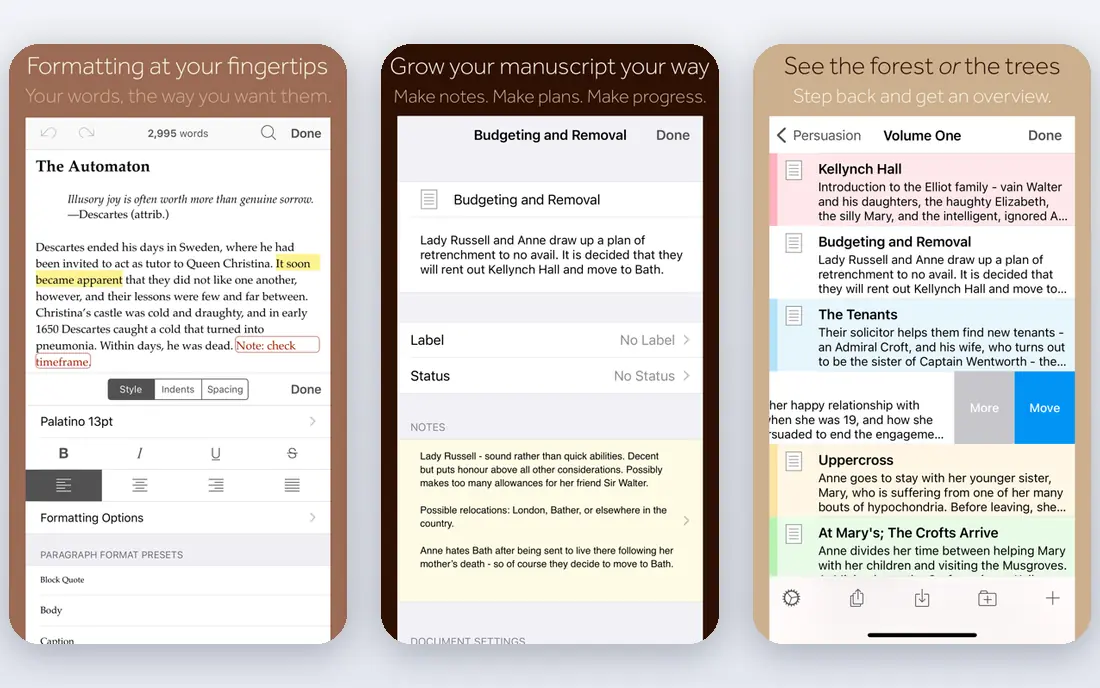
Scrivener treats a book as a set of movable pieces rather than one long document. You can split chapters into scenes, rearrange them on a corkboard, keep research notes beside the draft and compile the whole project into a formatted manuscript. That structure is why so many novelists and academics stay with it for years.
The learning curve is the honest cost. Scrivener offers many views and settings, and new users may spend a week learning the binder, inspector and compile steps. Sync also needs care, since it relies on Dropbox or iCloud rather than a built-in cloud. If you write long projects, the effort is worth it. If you write short articles, a simpler app will feel faster.
- Binder and corkboard for scenes and chapters
- Templates for novels and nonfiction
- Flexible compile to DOCX, PDF and EPUB
- Steep learning curve
- Sync needs Dropbox or iCloud setup
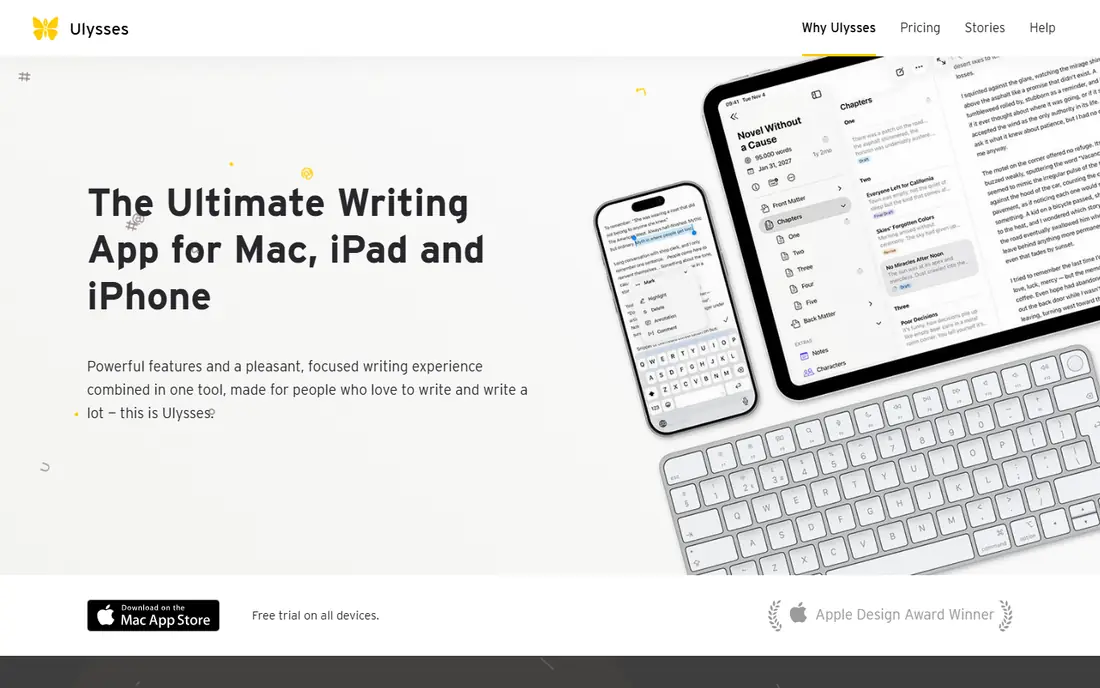
Ulysses is the calmest writing environment on this list for Apple users. Its Markdown editor hides formatting until export, its library keeps projects organized, and iCloud sync moves drafts between Mac, iPad and iPhone without manual file handling. Export to DOCX, PDF, EPUB and HTML covers most publishing needs.
The limits are platform and price. Ulysses does not run on Windows or Android, and its subscription costs add up over years compared with a one-time purchase. Writers who live inside the Apple ecosystem and value a clean, consistent workspace will like it. Writers on mixed devices should look at Obsidian or Google Docs instead.
- Clean Markdown editor
- Library and goal tracking
- Sync across Mac, iPad and iPhone
- Apple only
- Subscription pricing
- Fewer formatting controls than Scrivener

Google Docs is the best free starting point for most writers. It opens in a browser, saves automatically, lets several people edit at once and keeps version history for easy recovery. Comments and suggestions make it a strong choice for editors, teachers and teams, and its mobile apps cover writing on the go.
Long books expose its limits. Very large documents can slow down, and book formatting tools are weaker than Scrivener or Atticus. Offline mode helps, but it needs setup in advance. For articles, essays, reports and collaborative drafts, Google Docs is hard to beat at its price.
- Free with a Google account
- Real-time collaboration
- Autosave and version history
- Needs internet for full features
- Long manuscripts can feel slow
- Limited book formatting
Microsoft Word remains the default for professional documents, publishing submissions and workplace writing. Its formatting, styles, track changes and comments are familiar to editors and publishers, which reduces friction when sharing files. Word for the web offers a free, lighter version for basic writing.
The subscription is the drawback for writers who only need a word processor. Microsoft 365 Personal costs a recurring fee, and the full desktop app includes many features a novelist may never use. If your work must arrive as a polished DOCX file, Word is the safest choice. If you write for yourself, a cheaper or free tool may be enough.
- Industry-standard DOCX format
- Strong formatting and review tools
- Word for the web is free
- Full desktop version needs a Microsoft 365 subscription
- Interface can feel heavy for simple drafts
IA Writer strips writing back to text on a clean page. Focus mode highlights the sentence you are working on, syntax highlighting can show verbs, nouns and adjectives in different colors, and export to DOCX, PDF and HTML is straightforward. Writers who get distracted by toolbars and side panels often find their output rises here.
It is not a project manager. IA Writer lacks Scrivener-style scene organization, and buying it on several platforms can cost more than expected, depending on the store. Use it for essays, blog posts, journals and first drafts, then move long manuscripts to a stronger organizer if needed.
- Minimal interface with focus mode
- Markdown support
- Syntax highlighting for parts of speech
- Separate purchase per platform in some cases
- No built-in book organization like Scrivener
Obsidian suits writers who think in connected notes. You write in plain Markdown files stored on your own device, link notes with backlinks, and view connections in a graph. That setup works well for research, worldbuilding, academic notes and long nonfiction projects where ideas link across chapters.
The flexibility can overwhelm beginners. Obsidian offers many plugins, themes and settings, and setting up sync across devices needs either its paid sync service or a third-party method. Writers who want a simple editor should pick iA Writer or Google Docs. Writers who want a personal knowledge base alongside their drafts will find Obsidian powerful.
- Free for personal use
- Markdown files stored locally
- Backlinks and graph view for connected notes
- Learning curve for plugins and themes
- Paid sync and publish add-ons cost extra
Atticus targets self-published authors who want to write and format in the same place. You can draft chapters, add front and back matter, choose a theme and export a print-ready PDF and an ebook EPUB without learning a separate layout program. Its browser access means you can work from any computer.
The price is a commitment for a first-time author, and formatting options, while good, do not match the full control of professional layout software. Authors who plan to publish several books will get more value than someone writing a single short book. For self-publishers who want a clear path from draft to ebook, Atticus is a strong shortcut.
- Writing and ebook formatting in one tool
- EPUB, PDF and DOCX export
- Cloud access from a browser
- One-time price is high for beginners
- Formatting customization is less deep than specialist tools
Dabble is a cloud novel writer with a friendly plot grid, chapter organization and writing goals. Because it runs in a browser and on apps, your manuscript stays available across devices without manual sync setup. Goal tracking and progress charts help writers who work to daily targets.
The subscription model means costs continue as long as you use it, and export options are simpler than Scrivener or Atticus. Dabble suits novelists who want an easy, cloud-first workspace and do not need deep formatting. Writers who prefer a one-time purchase should compare Scrivener first.
- Cloud-based novel organization
- Plot grid and goal tracking
- Works on web, Mac, Windows and iOS
- Subscription only
- Fewer export and formatting options than Scrivener
How we picked these
We compared official pricing, platform support, export formats, organization features and collaboration tools, favoring tools that are actively maintained in 2026 and that store work in portable formats. We kept a mix of book software, general word processors and note tools, and we avoided tools that lock drafts into a format you cannot export. We did not claim hands-on testing; our comparison rests on vendor pages and public reviews.
How to choose writing software
Start with the kind of writing you do most. Novelists and academics need scene organization, research storage and flexible export. Bloggers and journalists need speed, collaboration and clean HTML or DOCX export. Students need free or low-cost tools with reliable autosave and citation support.
Next, test the writing feel. A clean interface helps some writers focus, while others need side panels for notes and outlines. Check export early by sending a test chapter to your editor, publisher or blog platform, and confirm backup and sync before you write a large project. Finally, weigh subscription cost over three years against a one-time purchase, since the cheaper first year is not always the cheaper tool.
Frequently asked questions
What is the best software for writing a book?
Scrivener is a strong choice for most book writers because it organizes scenes, research and drafts in one project and compiles to DOCX, PDF and EPUB. Atticus suits self-publishers who also want formatting, while Dabble suits cloud-first novelists. Try the free trials before committing to a long project.
What are the best writing apps for beginners?
Google Docs is the easiest free starting point, with autosave and collaboration. IA Writer suits beginners who want a distraction-free page, and Ulysses suits Apple beginners who like Markdown. Start free or with a trial, and only pay when you know which features you use daily.
What is the best free writing assistant software?
Google Docs includes spelling and grammar checks for free, and LibreOffice Writer offers a free desktop alternative. Obsidian is free for personal use and works well for notes and research. Paid assistants such as ProWritingAid add deeper style reports, but they are optional for most writers.
Is Scrivener or Ulysses better?
Scrivener suits long, complex projects on Mac or Windows with a one-time price, while Ulysses suits Apple writers who want clean Markdown, sync and a simpler library. If you write on Windows, choose Scrivener. If you write only on Apple devices and prefer subscriptions, Ulysses may feel better.
Can I write a book in Google Docs?
Yes, many writers draft books in Google Docs, especially early drafts and collaborative projects. For very long manuscripts, split the book into chapter documents or move to Scrivener for organization and formatting. Export to DOCX early to check how the manuscript looks outside Google Docs.
What is the best app for writers who travel?
Cloud tools such as Google Docs and Dabble work well for travel, since drafts stay available across devices. Obsidian with a sync method and Ulysses on Apple devices also work, as long as sync is set up before you leave. Always keep a local backup of important drafts.
Sources
See where you really rank - block by block
ProMapRanker scans Google Maps across a grid of your service area. Simple monthly plans from $19, white-label on every plan.
Start freeKeep reading
 youtube alternatives
Best YouTube Alternatives in 2026
Looking for youtube alternatives in 2026? We compare Vimeo, Dailymotion, Twitch, Rumble, and more on price, audience, monetization, control and privacy.
Read → what's the best ai tool for photo editing
What Is the Best AI Tool for Photo Editing in 2026
What is the best AI tool for photo editing? We compare ten tools for 2026, from Photoshop and Lightroom to Luminar, Topaz, Canva and mobile editors today.
Read → twitter alternatives
Best Twitter Alternatives in 2026
Compare the best twitter alternatives for 2026, from Bluesky, Threads, and Mastodon to Reddit, Tumblr, and Micro.blog, with free plans and audience notes.
Read →