 ProMapRanker
Best Workout Apps in 2026: 9 Apps Compared

Key takeaways
- Nike Training Club is the best free starting point, with guided workouts that cost nothing and need no subscription.
- Fitbod suits gym lifters who want a plan made for them, while Strong and Hevy suit lifters who prefer to log their own program.
- Peloton and Apple Fitness+ suit class lovers, but they work best if you already use their devices or enjoy instructor-led sessions.
- Paid prices vary widely, so use a free tier or trial for two weeks before paying for a full year.
Quick comparison
| Pick | Great for | Pricing starts at | Free tier | |
|---|---|---|---|---|
 Nike Training Club Nike Training Club | Free guided workouts | Free | Yes | Visit |
 Fitbod Fitbod | Personalized strength plans | $15.99 per month | Free trial | Visit |
 Peloton App Peloton App | Live and on-demand classes | $15.99 per month | Free trial | Visit |
 Apple Fitness+ Apple Fitness+ | Apple Watch classes | $9.99 per month | Free trial | Visit |
 Strong Strong | Simple strength logging | $4.99 per month | Yes | Visit |
 Hevy Hevy | Social strength logging | $2.99 per month | Yes | Visit |
 JEFIT JEFIT | Gym database and tracking | $12.99 per month | Yes | Visit |
 Freeletics Freeletics | Bodyweight and HIIT training | See website | Yes | Visit |
 Centr Centr | Guided programs and nutrition | $29.99 per month | Free trial | Visit |
The best workout apps
We compared official feature pages, pricing, app store listings, and public reviews to cover home training, gym training, classes, and logging. The apps below serve different training styles, so the best choice depends on where you train, how much guidance you want, and whether you like classes or your own program.
Nike Training Club is the easiest recommendation for most people because it removes price from the decision. You get guided workouts across strength, cardio, mobility, and yoga, with programs for different levels and time limits. That range makes it useful for home training, hotel workouts, and days when you want a session without planning one yourself.
The limit is planning. Nike Training Club does not build a long-term strength program around your lifts, equipment, and progress in the way Fitbod does. It also lacks the live leaderboard energy that keeps some class users consistent. If you want free, well-made sessions and you are happy to pick each workout yourself, start here before paying for anything else.
- Full workout library at no cost
- Strength, HIIT, yoga, and mobility options
- Clear video guidance
- Limited personalization and progression tracking
- No live class community like Peloton
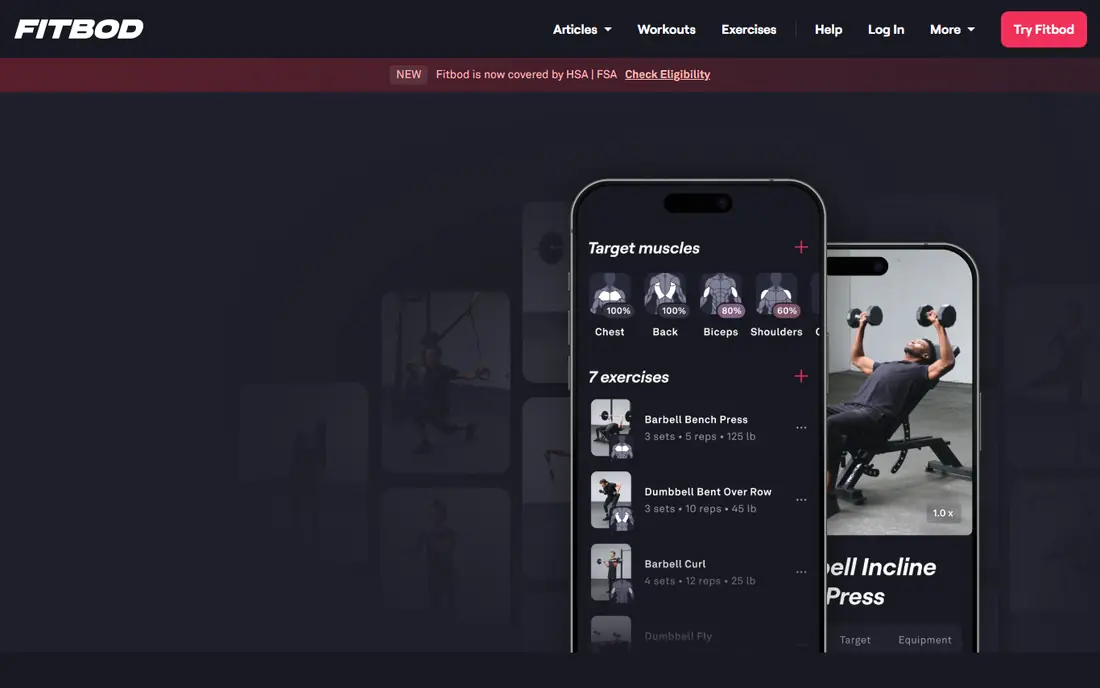
Fitbod is built for gym users who want the next workout decided for them. You enter your equipment, goals, and experience, and the app generates sessions that balance muscle groups and adjust as you log results. That removes a common barrier for lifters who know how to train but do not want to write a program each week. Progress charts also make it easier to see whether weights and volume are moving in the right direction.
The trade-off is cost and focus. At the monthly rate, Fitbod is one of the pricier fitness apps here, and it is not a class platform. Runners, yoga fans, and people who need live motivation may prefer a class app. For lifters who train three or more times a week and want adaptive strength programming, the time saved can justify the price, especially on an annual plan.
- Workouts adapt to equipment, goals, and past sessions
- Tracks sets, reps, and muscle recovery
- Works on phone and watch
- Monthly price is high
- Less suited to class lovers or runners who want coached sessions
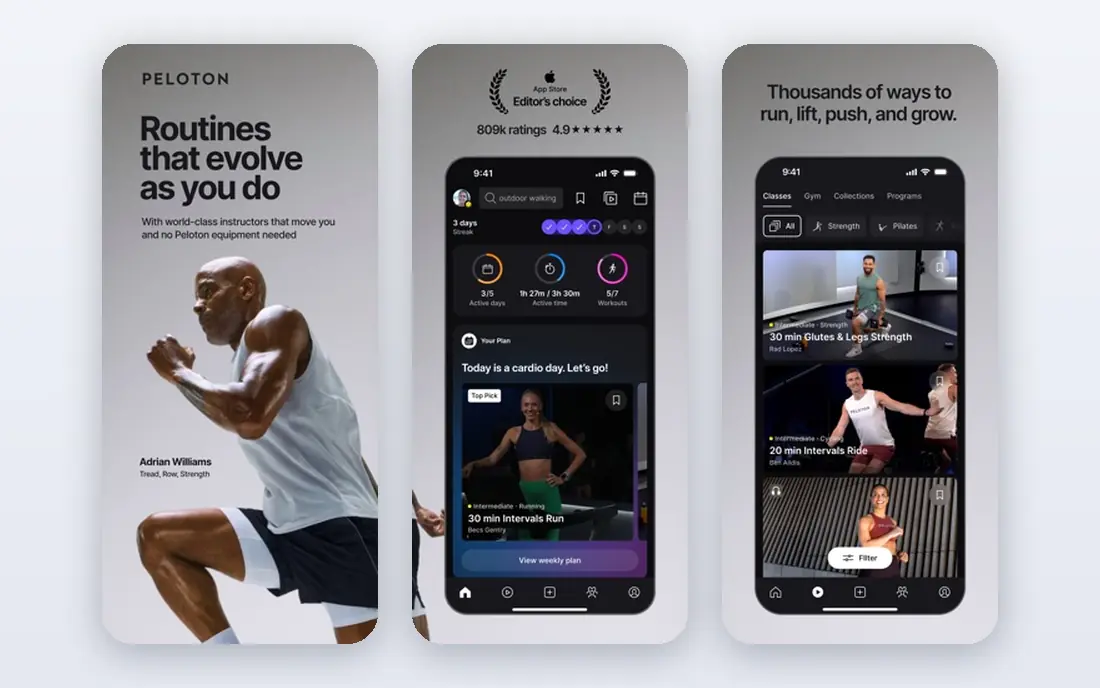
Peloton App is no longer only for bike owners. The app version gives access to running, strength, yoga, meditation, and other classes, with live sessions and a large on-demand library. Instructor energy, music, and community features are the main draw, and they help many users stay consistent when a solo plan would fade after a few weeks. You can train with a phone, tablet, or TV, without buying Peloton equipment.
The cost is the main question. Peloton App One is priced above Apple Fitness+ and well above free options, so it makes sense mainly if you use classes several times a week. Solo lifters who prefer their own program will get less value here. If classes motivate you, and you like training with an instructor rather than following a written plan, Peloton is a strong pick.
- Large class library across cardio, strength, yoga, and meditation
- Strong instructors and live sessions
- Works without Peloton hardware
- Higher price than many rivals
- Social and leaderboard features may not suit solo trainers
Apple Fitness+ fits best if you already own an Apple Watch and an iPhone, iPad, or Apple TV. Classes show heart rate, calories, and other Watch metrics on screen, which makes effort easier to judge during a session. The library covers many class types, and new sessions appear regularly, so boredom is less likely than with a fixed program.
Android users should skip it, and serious lifters may still want a logging app alongside it, because Fitness+ is a class service rather than a strength program builder. The price is moderate for a class app, and a free trial period for new subscribers helps you test whether the instructors and formats suit you. For Apple households that enjoy classes, it is a tidy, well-made option.
- On-screen Watch metrics during classes
- Wide class range including strength, HIIT, yoga, and dance
- Family sharing option
- Needs an Apple Watch for full metrics
- Less useful for Android users or dedicated strength programming
Strong is for lifters who already know what to do and just want to record it well. The interface is focused on starting a workout, logging sets quickly, and reviewing past performance without extra menus. Personal record tracking and clear history charts help you see progress over months, which is often enough motivation for experienced gym users. Offline use is useful in gyms with weak signal.
What Strong does not do is plan for you. There are no generated programs, no classes, and no coaching prompts, so beginners who need guidance should pair it with a program or choose Fitbod instead. The free tier covers basic logging with a limit on custom routines, and the paid plan removes those limits. If logging speed matters more than guidance, Strong is hard to beat.
- Fast, clean workout logging
- Tracks personal records and history
- Offline use available
- No built-in workout plans
- No coaching or class content
Hevy covers similar ground to Strong, with a stronger social layer. You can log workouts, follow other lifters, share routines, and see progress in charts that are easy to read. The free tier is generous for casual lifters, and Pro is cheap compared with most paid fitness apps, with yearly and lifetime options also listed. That pricing makes Hevy a low-risk choice for lifters who want logging plus a bit of community.
Like Strong, Hevy does not create a full program for you, so you still need to know your training split or follow a routine from the community. The free limits on routines may push regular users toward Pro, but even then the cost stays low. For gym lifters who like tracking with friends and want a clean log without a high subscription, Hevy is a strong value pick.
- Generous free tier
- Social feed and community routines
- Clear progress visuals and plate calculator
- No generated training plans
- Free tier caps routines and custom exercises
JEFIT suits gym users who want a deep exercise library alongside logging. You can search exercises, see instructions, build routines, and track progress over time. Community routines give beginners a starting point, and the database helps when you want to swap an exercise for a similar movement. The free tier is ad-supported but usable for basic tracking.
The app can feel crowded, with many menus and features competing for attention during a workout. That is a real drawback if you value the speed of Strong or Hevy. Elite pricing is also steep if you only need logging. JEFIT makes most sense for lifters who use the exercise database often, follow structured routines, and want one app for planning and tracking.
- Large exercise database with instructions
- Routine builder and tracking in one app
- Community routines to follow
- Interface feels busy compared with Strong or Hevy
- Elite price is high for logging alone
Freeletics is built around bodyweight training and high-intensity sessions that fit small spaces and busy days. The Coach feature adapts workouts based on feedback and progress, which gives more structure than a random workout library. That makes it useful for home training, travel, and people who do not have gym access. A basic free version lets you try core workouts before paying.
Heavy lifters will find it limited, because bodyweight and HIIT work cannot replace a barbell program for maximal strength goals. Pricing also varies by subscription term, so check the current offer in your store before committing. If you want guided, equipment-light training with a coach-style plan, Freeletics is one of the best options in this style.
- Bodyweight workouts need little or no equipment
- Adaptive coach plans
- Short, intense sessions
- Pricing varies by term and region
- Less suited to heavy barbell programs
Centr brings training, meal planning, and mindfulness together in structured programs. That breadth suits people who want a weekly plan that covers workouts and food, rather than separate apps for each part. Programs include strength, HIIT, yoga, and Pilates, with guidance that feels closer to a coached plan than a loose class library. A trial lets you test the format before paying.
The price is the clear barrier. At the monthly rate, Centr costs more than Peloton, Apple Fitness+, and Fitbod, so it only makes sense if you use the meal planning and structured programs regularly. Users who only want workouts can get similar sessions for less elsewhere. If you want one guided system for training and eating, and you will follow it, Centr can justify the cost.
- Programs from trainers plus meal planning in one place
- Strength, HIIT, yoga, and Pilates options
- Structured weekly plans
- Highest monthly price on this list
- Nutrition features add value only if you use them
How we picked these
We compared official feature pages, pricing, app store listings, privacy policies, and public reviews. We included free, class, logging, and planning apps so different training styles are covered, and we favored apps that are actively maintained and available on major phones. We did not claim hands-on testing, and prices reflect published rates that can vary by store, region, and promotion. Check the final price in your app store before subscribing.
How to choose the right workout app
Start with where and how you train, not with the app that has the most features. A great gym planner is useless if you train at home, and a great class app is useless if you hate classes. Pick one app for your main training, use it for at least two weeks, and only add a second app if a clear gap remains.
Home, gym, or classes
Home trainers should start with Nike Training Club or Freeletics. Gym lifters should choose between Fitbod for planning and Strong or Hevy for logging. Class lovers should compare Peloton and Apple Fitness+, with device ownership as the deciding factor. Centr suits people who want training plus meal planning in one guided system.
Free, trial, or annual plan
Use free tiers first, then trials, then annual plans only after regular use. Monthly prices are useful for testing, but they add up fast across a year. If you train less than twice a week, a free app plus occasional classes may serve you better than any paid plan. If you train often, an annual plan for one app usually beats several monthly subscriptions.
Watch for the real cost
Check whether a price is monthly, yearly, or per term, and whether a trial needs a card. Also check device needs, such as an Apple Watch for full Apple Fitness+ metrics, and whether offline use matters in your gym. A cheaper app that you open four times a week beats a smarter app that you abandon after a month.
Frequently asked questions
What is the best fitness app for beginners?
Nike Training Club is a strong start for beginners because it is free and offers guided workouts at different levels. The best apps for fitness tracking and guidance depend on your goal, but beginners should avoid paying for a complex planner before they know their routine. Start free, build a two-week habit, then decide if a paid plan adds value.
What is the best workout app for strength training?
Fitbod is the best workout app for lifters who want a plan made for them, while Strong and Hevy are better for lifters who want to log their own program. The best fitness apps for strength differ on this point, so choose planning if you want guidance and logging if you already know your split. JEFIT sits between the two, with a large exercise database and routine tools.
What is the best app for fitness classes at home?
Peloton App suits class lovers who want live sessions and a large library, while Apple Fitness+ suits Apple Watch owners who want metrics on screen. Both are among the best exercise apps for home classes, but Peloton costs more and Apple Fitness+ needs Apple devices for full use. Try the trial for each if you are torn between them.
Is there a good free workout app?
Yes, Nike Training Club is fully free and covers strength, cardio, yoga, and mobility. Hevy and Strong also offer usable free tiers for logging, and Freeletics offers a basic free version. The best free fitness apps still have limits, usually in planning or advanced tracking, but they cover the core needs of many trainers.
What is the best bodybuilding app?
For bodybuilding-style training, Fitbod, JEFIT, Strong, and Hevy all fit, with different strengths. Fitbod builds adaptive plans, JEFIT offers a deep exercise database, and Strong and Hevy offer fast logging with progress charts. The best bodybuilding app for you depends on whether you want a plan, a database, or a simple log, and how much you want to pay.
Do workout apps replace a gym or a coach?
Workout apps can guide home training and track gym progress, but they do not replace in-person coaching for technique, injury concerns, or complex programs. Use an app for structure and consistency, and seek qualified help if you have pain, a medical condition, or a goal that needs close supervision. This guide is general information, not medical advice.
Sources
See where you really rank - block by block
ProMapRanker scans Google Maps across a grid of your service area. Simple monthly plans from $19, white-label on every plan.
Start freeKeep reading
 youtube alternatives
Best YouTube Alternatives in 2026
Looking for youtube alternatives in 2026? We compare Vimeo, Dailymotion, Twitch, Rumble, and more on price, audience, monetization, control and privacy.
Read → what's the best ai tool for photo editing
What Is the Best AI Tool for Photo Editing in 2026
What is the best AI tool for photo editing? We compare ten tools for 2026, from Photoshop and Lightroom to Luminar, Topaz, Canva and mobile editors today.
Read → twitter alternatives
Best Twitter Alternatives in 2026
Compare the best twitter alternatives for 2026, from Bluesky, Threads, and Mastodon to Reddit, Tumblr, and Micro.blog, with free plans and audience notes.
Read →