 ProMapRanker
Best Weather App in 2026: 8 Apps Compared

Key takeaways
- The best free weather app for most people is Apple Weather on iPhone or The Weather Channel on Android, because both cover the basics well at no cost.
- The best weather apps for radar fans are Windy and MyRadar, which show far more map detail than a simple daily forecast.
- Paid plans mostly remove ads and add widgets or longer forecasts, so check the free version first before you pay.
- If privacy matters to you, read the app privacy policy before turning on precise location, since data practices vary a lot between apps.
- No single app is right for every place, so we suggest keeping one everyday app and one radar app on your phone.
Quick comparison
| Pick | Great for | Pricing starts at | Free tier | |
|---|---|---|---|---|
 Apple Weather Apple Weather | iPhone and iPad owners | Free | Yes | Visit |
 The Weather Channel The Weather Channel | Everyday forecasts and video updates | Free | Yes | Visit |
 AccuWeather AccuWeather | Minute-by-minute precipitation timing | See website | Yes | Visit |
 Weather Underground Weather Underground | Neighborhood-level station data | Free | Yes | Visit |
 CARROT Weather CARROT Weather | Widgets, customization, and personality | See website | Yes | Visit |
 Windy Windy | Wind, waves, and forecast models | Free | Yes | Visit |
 MyRadar MyRadar | Fast radar checks | Free | Yes | Visit |
 Yahoo Weather Yahoo Weather | Simple, photo-led forecasts | Free | Yes | Visit |
The best weather apps
A good weather app answers three questions fast: will it rain, how hot or cold will it feel, and is anything dangerous on the way. The apps below do that job in different ways, from plain daily forecasts to detailed radar maps. We compared official feature pages, app store listings, pricing pages, and privacy policies, plus public reviews.
Apple Weather is the easiest pick if you already carry an iPhone, since it is built in and costs nothing extra. It gives hourly forecasts, a 10-day outlook, precipitation charts, wind, humidity, UV index, and air quality in many places. The layout stays readable at a glance, which matters when you are checking the forecast while walking out the door.
The trade-off is depth. Apple Weather covers radar, but it does not match Windy or MyRadar for layers, storm tracking, or model comparison. It also leaves Android users out entirely. For most everyday use, though, that simplicity is a strength rather than a weakness, and it is our pick for most iPhone owners who just want a reliable forecast without ads or a subscription.
- Clean design
- Hourly and 10-day forecasts
- Severe weather alerts built in
- Apple devices only
- Radar detail is lighter than specialist apps
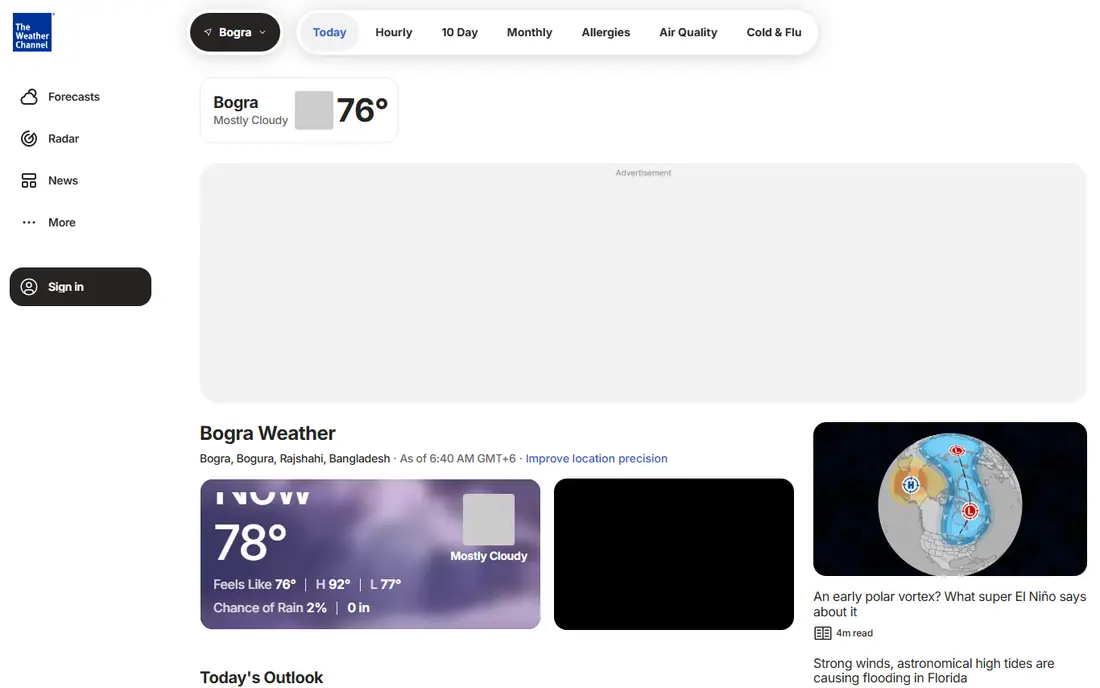
The Weather Channel app is a solid all-rounder for the best weather apps conversation, because it pairs familiar forecasts with radar, severe weather alerts, and short video updates. It also includes extras such as allergy outlooks and conditions for outdoor activities, which families and allergy sufferers may find useful. Coverage is broad across the United States, including smaller towns.
The free version carries ads, and that is the main annoyance. A paid tier removes ads and adds more features, but the price and exact feature set can change, so check the current listing in your app store before subscribing. If you want one app that does a bit of everything and you do not mind ads, this is a dependable choice on both iPhone and Android.
- Wide coverage
- Hourly and extended forecasts
- Allergy and health outlooks
- Ads in the free version
- Some features sit behind a paid tier
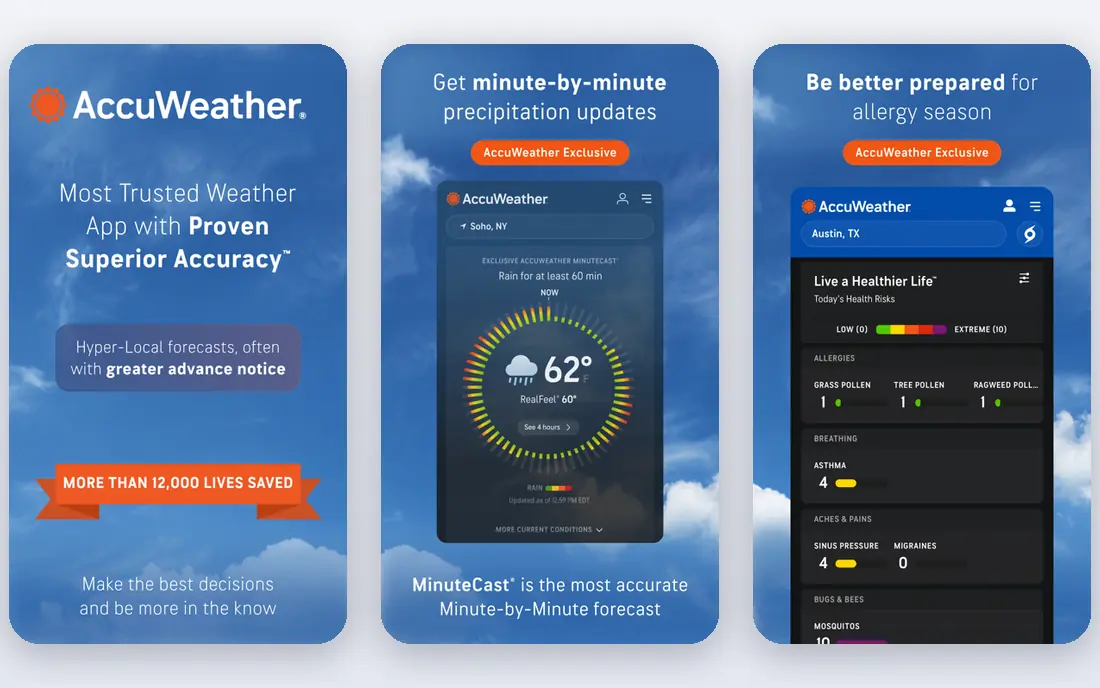
AccuWeather stands out for MinuteCast, its minute-by-minute precipitation forecast for your exact location. When you need to know if rain starts in ten minutes or forty, that detail is genuinely useful for dog walks, runs, and commutes. The app also shows RealFeel temperature, which tries to reflect how the air actually feels once wind, sun, and humidity are factored in.
The free version is ad-supported, and the paid options have changed over time, so we list the starting price as See website rather than guess a figure that may be out of date. Read the privacy policy too, since AccuWeather collects location and device data and shares some of it with partners. If short-term rain timing is your top need, AccuWeather earns its place here.
- MinuteCast rain timing
- RealFeel temperature
- Long-range outlooks
- Ads in the free version
- Paid tiers can be confusing
Weather Underground takes a different approach from most weather apps: it draws on a large network of personal weather stations run by hobbyists and schools, alongside standard forecast data. That can give you conditions from a station a few streets away rather than the nearest airport, which matters in hilly areas or places where weather changes quickly over short distances.
The downside is uneven coverage. If no personal station sits near you, the local advantage fades. The interface also packs in a lot of data, so it can feel busy compared with Apple Weather or Yahoo Weather. For weather watchers who like history charts, station data, and digging into the numbers, it is still one of the most interesting free options available.
- Personal weather station network
- Detailed history
- Radar maps
- Interface feels busy
- Some data depends on nearby stations
CARROT Weather is the pick for people who love customizing their home screen. Its widgets are among the most flexible in this category, with many layouts, data points, and styles to choose from. You can also pick a personality for the app, from strictly professional to openly sarcastic, or turn the jokes off entirely. Under the humor sits a serious app with hourly forecasts, radar, and alerts.
The catch is that the free tier is limited, and the features most people buy CARROT for, such as full radar and richer widgets, sit behind a subscription. Pricing varies by platform and tier, so check the app store listing for the current price. If you enjoy tweaking widgets and do not mind paying for a polished setup, CARROT is hard to beat.
- Highly customizable widgets
- Multiple forecast sources
- Fun tone options
- Best features need a paid subscription
- Radar is limited on the free tier
Windy is our pick for anyone who spends time outdoors, sails, flies, hikes, or simply wants to see why forecasts disagree. Instead of giving you one number, it lets you compare several forecast models on the same map, so you can see where models agree and where they part ways. Wind, rain, temperature, clouds, and waves all get detailed layers, and the maps are fast and sharp.
Beginners may find all of that overwhelming at first. Windy rewards a few minutes of exploring, but it is not the app to open for a one-line answer about tomorrow. Privacy is a plus here: its app store privacy label lists no tracking, which is rare in this category. For map lovers, it is the strongest free weather app in this list.
- Many forecast models side by side
- Detailed wind and rain maps
- No ads in the free tier
- Learning curve for beginners
- Forecast detail can overwhelm casual users
MyRadar does one job extremely well: it shows radar quickly, clearly, and without fuss. Open it and you see precipitation moving across the map, with smooth animation and simple controls. That speed matters during storms, when you want to know if a cell is heading toward you rather than waiting for a slow app to load layers and menus.
It is not a complete forecast app on its own. Daily and hourly forecasts exist, but they are not the reason to install MyRadar. Pair it with Apple Weather, The Weather Channel, or Windy for forecasts, and use MyRadar when radar is what you actually need. The free version covers the core radar well, which makes it an easy second app to keep on your phone.
- Very fast radar
- Clean map
- Optional layers and alerts
- Focused on radar rather than full forecasts
- Some advanced features are paid
Yahoo Weather is the quiet option in this list, and that is its appeal. It shows current conditions, hourly forecasts, and a 10-day outlook in a clean layout with large photos that change with the weather. There is little to learn and nothing to configure, which suits anyone who finds other weather apps cluttered.
Advanced users will miss the model comparison of Windy and the station data of Weather Underground. Radar is present but basic. If your main need is a quick, pleasant check before you leave home, Yahoo Weather handles it well and costs nothing. It is also a good choice for an older phone or for someone who wants the simplest of the best weather apps for iPhone and Android alike.
- Clean layout
- Attractive photos
- Hourly and 10-day forecasts
- Fewer advanced tools
- Radar is basic
How we picked these
We compared official feature pages, pricing pages, app store listings, and privacy policies for each app, along with public reviews. We favored apps that are actively maintained, available in the United States in October 2026, and genuinely useful for everyday forecasts, radar, or alerts. We left out apps that only show one city, demand payment before showing any forecast, or had not been updated in a long time.
What to look for before you install
Start with how you actually use a forecast. If you check the weather once a day, a clean app such as Apple Weather or Yahoo Weather is enough, and paying for extras buys little. If you work outdoors, travel, or live where storms move fast, radar quality and alert speed matter more than a pretty daily summary, so Windy or MyRadar deserve a spot on your phone.
Accuracy, alerts, and privacy
No app can promise perfect accuracy, since forecasts come from models that disagree, especially beyond a few days. Treat any single temperature number as an estimate, and look at the hourly trend and the chance of rain together. Turn on severe weather alerts from a source you trust, and keep location permission set to only while using the app if you want to limit tracking.
Free or paid
Free tiers in this category are generous, and most people never need to pay. Paid plans usually remove ads, add widgets, or extend forecasts. Try the free version for a week of real weather, including at least one rainy day, before subscribing. If the paid feature does not change a decision you make, cancel it and keep the money.
Frequently asked questions
What is the best free weather app?
For most people, Apple Weather on iPhone or The Weather Channel on Android is the best free weather app, since both cover hourly and multi-day forecasts, alerts, and radar at no cost. Windy and MyRadar are stronger free choices if radar and maps matter more to you than a simple daily summary. The best rated weather app for you depends on whether you value simplicity, radar detail, or customization most.
Which are the best weather apps for iPhone?
Apple Weather is the natural starting point on iPhone because it is built in, free, and well designed. CARROT Weather is the best weather app for iPhone users who want rich widgets and customization, while Windy and MyRadar add the radar depth Apple Weather lacks. Many iPhone owners end up with two apps: Apple Weather for daily checks and one radar app for storms.
What is the best phone weather app for Android?
The Weather Channel, AccuWeather, Windy, and MyRadar all work well on Android and cover the main needs. The Weather Channel is the simplest all-rounder, AccuWeather adds minute-by-minute rain timing, and Windy gives the deepest maps. Yahoo Weather is a good pick if you want the lightest, simplest option on an Android phone.
Are paid weather apps worth it?
Paid weather apps are worth it only if you use the paid feature regularly, such as ad-free radar, advanced widgets, or longer forecasts. Most free weather apps already include hourly forecasts, alerts, and basic radar. Try the free tier first, and subscribe only when a specific feature changes how you plan your day.
How accurate are weather apps?
Weather apps are usually reliable for the next day or two and less certain further out, because forecast models diverge over time. Comparing two apps, or two models inside Windy, gives a better sense of uncertainty than trusting one number. For severe weather, always follow official warnings from the National Weather Service alongside any app alert.
Do weather apps sell your location data?
Some weather apps share precise location data with advertising partners, while others do not track at all, so practices vary by app. Check the privacy label in your app store and the app privacy policy before granting precise or always-on location access. Setting location permission to only while using the app is a sensible middle ground for most people.
Sources
See where you really rank - block by block
ProMapRanker scans Google Maps across a grid of your service area. Simple monthly plans from $19, white-label on every plan.
Start freeKeep reading
 youtube alternatives
Best YouTube Alternatives in 2026
Looking for youtube alternatives in 2026? We compare Vimeo, Dailymotion, Twitch, Rumble, and more on price, audience, monetization, control and privacy.
Read → what's the best ai tool for photo editing
What Is the Best AI Tool for Photo Editing in 2026
What is the best AI tool for photo editing? We compare ten tools for 2026, from Photoshop and Lightroom to Luminar, Topaz, Canva and mobile editors today.
Read → twitter alternatives
Best Twitter Alternatives in 2026
Compare the best twitter alternatives for 2026, from Bluesky, Threads, and Mastodon to Reddit, Tumblr, and Micro.blog, with free plans and audience notes.
Read →