 ProMapRanker
Best Transaction Coordinator Software in 2026


Agents wanting docs and e-sign in one place · Pricing starts at: $34.99 per month
Key takeaways
- Dotloop suits agents who want documents, e-signatures and tasks in one place, while SkySlope suits brokerages that need stronger compliance and audit trails.
- Paperless Pipeline suits brokerages that prefer paying by transaction volume rather than by seat, with unlimited users at the brokerage level.
- ListedKit and Nekst suit coordinators who want contract details turned into timelines and checklists with less manual setup.
- Open to Close and DocJacket suit coordinator teams that want custom checklists, client portals and repeatable workflows.
- Prices and availability vary, and no software guarantees a closing, so test deadline handling and client communication with a real file before you commit.
Quick comparison
| Pick | Great for | Pricing starts at | Free tier | |
|---|---|---|---|---|
| Dotloop | Agents wanting docs and e-sign in one place | $34.99 per month | Free trial | Visit |
 SkySlope | Brokerages needing compliance at scale | See website | No | Visit |
 Paperless Pipeline | Brokerages paying by transaction volume | $69 per month | Free trial | Visit |
 Open to Close | Custom checklists per deal side | See website | Free trial | Visit |
 Nekst | Coordinators wanting contract-reading help | See website | Free trial | Visit |
 ListedKit | AI-assisted coordination, pay per deal | $14.99 per intake | First intake free | Visit |
 DocJacket | Independent coordinators needing portals | $29 per month | No | Visit |
 Trackxi | Small teams wanting visual deal tracking | See website | Free trial | Visit |
 BoldTrail BackOffice | Brokerages needing commissions plus transactions | See website | No | Visit |
The best transaction coordinator software
A transaction coordinator keeps a deal moving from contract to close: deadlines, documents, lender and title updates, and client messages. The right software makes that work visible, so nothing relies on memory or a scattered inbox.

Dotloop is the tool many agents touch first, because documents, signatures, tasks and a shared workspace live together. An agent can draft a form, send it for signature, track tasks and keep all parties in one loop without exporting files between systems. In markets where local association forms are integrated, agents can pull official contracts directly, which saves time and reduces version errors.
The limit is brokerage compliance depth. Dotloop handles agent workflows well, but brokerages that need detailed audit controls, commission accounting and large-team oversight may need a stronger back-office tool beside it. For solo agents and small teams, that balance is usually enough, and wide adoption means clients and co-op agents often already know the system.
- Built-in e-signatures
- Document editing and templates
- Broad adoption among agents
- Compliance tools are lighter than SkySlope
- Interface feels dated in places

SkySlope is built for brokerages that need control over many agents and files at once. Brokers can review transactions, track compliance, keep audit trails and see where files stall, while agents work through checklists and documents. Built-in e-signatures keep signing inside the same system, which helps brokers prove what was signed and when.
Pricing is quoted by brokerage size, so solo agents may find it more than they need. The platform also takes setup work to match brokerage checklists, document rules and approval steps. SkySlope fits mid-size and large brokerages where compliance risk and reporting matter more than a light solo workflow. Smaller teams should compare its total quote with Dotloop and Paperless Pipeline first.
- Strong compliance and audit trails
- Brokerage reporting
- Built-in DigiSign e-signatures
- Pricing is broker-quoted
- Setup is heavier for solo agents
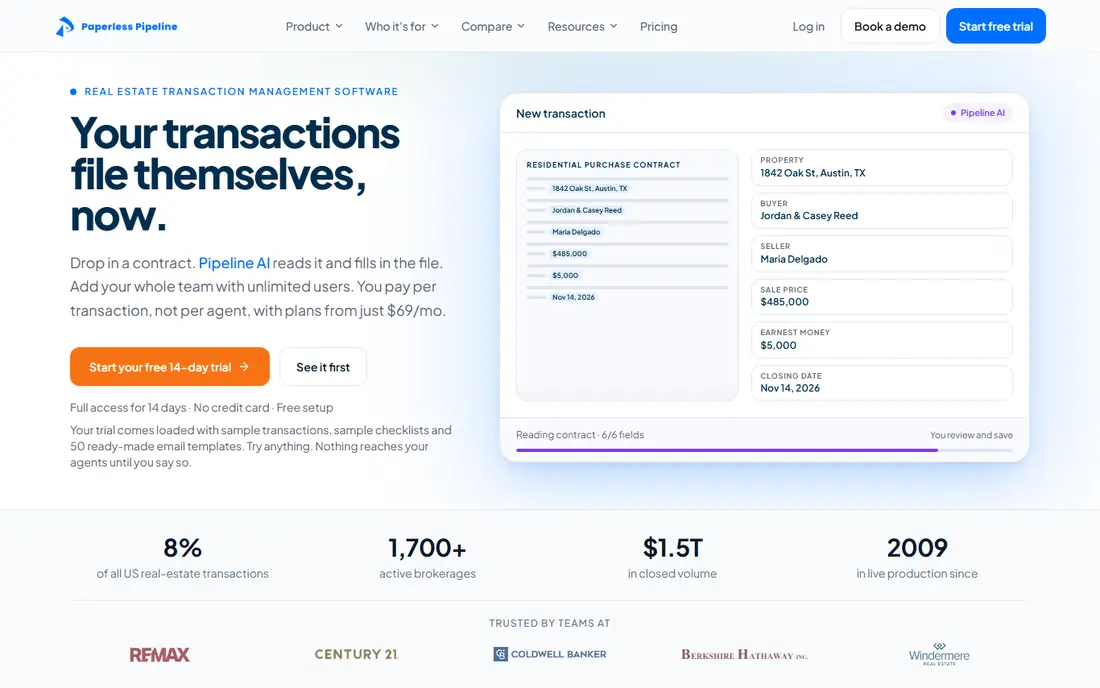
Paperless Pipeline prices by monthly transaction volume, not by headcount, and every user in the brokerage gets access at no extra seat cost. That model suits brokerages with fluctuating agent counts, seasonal volume or coordinator businesses that manage files across several brokerages. Broker compliance review, agent dashboards, task checklists and document storage sit in one place.
Solo agents doing only a few deals a month may find per-transaction pricing less attractive than a flat agent plan. E-signatures also come through an add-on or an integration such as DocuSign, rather than as a native core feature in every plan. Paperless Pipeline fits small and mid-size brokerages that want predictable compliance control without a per-seat tax on growth.
- Unlimited users per brokerage
- Transaction-based pricing
- Broker compliance review tools
- E-signatures need an add-on or integration
- Less of a coordinator productivity tool than some rivals
Open to Close is built around checklists that change by deal side, property type or brokerage rules. Coordinators can build a template once, apply it to each file, and track tasks, documents and contacts as the deal moves. Clients and team members can follow progress through portals, which cuts down on status-update messages.
That flexibility needs setup. A team that rushes configuration may end up with checklists that are too long or too generic. Pricing also rises as team reporting and advanced features are added, so get a quote for your actual team size. Open to Close fits established coordinator teams and small brokerages that want a repeatable workflow they can tune over time.
- Highly customisable checklists
- Client and team portals
- Reporting for coordinator teams
- Setup takes time to configure well
- Pricing climbs with team features
Nekst focuses on the coordinator's daily list. It starts with a core task list that can be edited to match each transaction, sets reminders, delegates tasks and sends repeatable emails automatically or with one click. Clients get their own step list, so buyers and sellers can see what to do and when, without waiting for a status call.
Nekst also collects status updates from lenders, title representatives and other parties, which helps coordinators chase fewer loose ends by phone. It is less of a brokerage accounting or compliance suite than SkySlope or BoldTrail BackOffice, so brokerages needing that depth should pair it or choose another tool. Nekst fits coordinators who want a clean, task-first workflow with strong client communication.
- Contract details turned into tasks and dates
- Automated follow-up emails
- Client-facing checklists
- Pricing varies by plan and needs a quote
- Fewer brokerage back-office tools
ListedKit takes a different pricing approach: teams pay per contract intake rather than a monthly seat fee, and the first intake is free. Its AI assistant helps turn contracts and ongoing deal email into timelines, checklists and follow-up tasks, with shared pipeline visibility for the team. That model suits lean in-house teams and coordinators with variable volume, who do not want to pay for seats in quiet months.
As a newer entrant, ListedKit has fewer integrations than long-established incumbents, so check your CRM, e-signature and document tools during a trial. At very high, steady volume, a flat monthly plan may work out cheaper than paying per intake. ListedKit fits small teams that want modern, AI-assisted coordination without a monthly commitment.
- Pay per intake, no monthly fee
- AI help turning contracts and email into timelines
- Shared pipeline visibility
- Newer entrant with fewer integrations
- Per-intake cost adds up at very high volume
DocJacket is built for independent transaction coordinators and coordinator companies that open many files quickly. AI contract extraction helps build a timeline and checklist from the contract, rather than typing every date by hand. Portals, SMS, e-signatures and an archive sit in one flat-rate platform, which helps a coordinator business serve several brokerages without juggling separate tools per client.
Brokerages that need deep oversight dashboards across many agents may find DocJacket lighter than SkySlope or Paperless Pipeline. Its strength is coordinator productivity: fast file opening, clear client communication and a single place for documents. Independent coordinators and small coordinator teams should trial it with a real contract, including amendments, to judge extraction accuracy.
- AI contract extraction for fast file setup
- Client portals and SMS
- Flat-rate unlimited transactions on paid plans
- Less brokerage dashboard tooling
- Newer brand than Dotloop or SkySlope
Trackxi gives small teams a visual way to follow deals, tasks and deadlines without a heavy brokerage system. Agents and coordinators can see where each file stands, what is due next and who owns each task. That clarity helps small teams that share files informally and want one board instead of spreadsheets and group messages.
Large brokerages with strict compliance review, commission accounting and audit needs will likely need more depth. Trackxi fits solo agents, small teams and coordinators who want a clear, visual workflow and are willing to keep e-signatures or accounting in another tool where needed. Trial it with a file that has several contingencies to see how deadline changes flow through.
- Visual pipeline for deals
- Task and deadline tracking
- Simple for small teams
- Less depth for large brokerages
- Pricing needs checking on the vendor site
BoldTrail BackOffice, formerly Brokermint, combines transaction management with commission tracking and back-office accounting for brokerages. Brokers can follow a file from contract to close and then into commission calculation and disbursement, without moving data between separate systems. Reporting helps brokerages see agent performance, deal volume and pending payouts.
The platform is brokerage-first, so a solo coordinator may find it heavier than a task-focused tool such as Nekst or ListedKit. Pricing is quoted, so brokerages should ask for a total that covers agents, transactions and commission features. BoldTrail BackOffice fits brokerages that want transactions and commissions in one back office, with coordinators working inside the same system.
- Commission accounting plus transactions
- Back-office reporting
- Brokerage workflow tools
- Pricing is quote-based
- More back-office than coordinator-first
How we picked these
We compared vendor pricing and feature pages with recent transaction coordinator comparisons, favouring tools that are still sold in 2026 and that handle real coordinator work such as checklists, deadlines, documents and client updates. We kept a mix of agent tools, coordinator-first tools and brokerage systems, and we marked pricing as See website where the vendor quotes by brokerage or team size. Prices shown are starting prices from vendor or reputable comparison sources at the time of writing.
What to check before you buy
Start with who runs the file. A solo agent needs documents and signatures first. A coordinator needs checklists, deadline math and client communication first. A brokerage needs compliance, reporting and commission handling first. A tool built for a different owner will feel wrong even if its feature list looks long.
Test deadline handling with a real contract. Enter contract dates, contingency periods and closing dates, then change one date and watch what moves. Check how amendments, lender updates and title messages are stored, and whether clients can see progress without constant calls. Confirm e-signature coverage, association forms in your market, data export and support hours. Prices and availability vary, and a trial file is the best proof of fit.
Frequently asked questions
What does a transaction coordinator do?
A transaction coordinator manages a real estate file from contract to close, tracking deadlines, documents, inspections, appraisals, lender and title updates, and communication with all parties. Software helps by turning contracts into checklists, sending reminders and keeping a shared record. The coordinator still needs to review dates and documents, since software cannot replace that judgement.
Is Dotloop or SkySlope better for a brokerage?
SkySlope usually fits brokerages better when compliance, audit trails and broker oversight across many agents are the priority. Dotloop usually fits agents and small teams better when documents, e-signatures and simple tasks are the priority. Many brokerages use one as the system of record and add other tools for commissions or accounting.
How much does transaction coordinator software cost?
Costs range from pay-per-intake pricing such as ListedKit at $14.99 per intake, to agent plans such as Dotloop at $34.99 per month, to brokerage quotes for SkySlope and BoldTrail BackOffice. Paperless Pipeline starts at $69 per month for a brokerage transaction tier. Always confirm what is included, such as e-signatures, users and support, before comparing prices.
Can transaction coordinator software replace a human coordinator?
No, software organises tasks, dates and documents, but a human coordinator still reviews contracts, chases parties, solves problems and communicates with clients. The best result pairs a coordinator with software that removes manual tracking. Teams that expect software alone to close files often miss deadlines that need human follow-up.
Do these tools work with my CRM and e-signature tool?
Most integrate with common CRMs and e-signature tools, but depth varies by product and plan. Dotloop and SkySlope include e-signatures, while others rely on integrations. Check your exact CRM, association forms and document tools during a trial, and test a full file from intake to close.
Sources
See where you really rank - block by block
ProMapRanker scans Google Maps across a grid of your service area. Simple monthly plans from $19, white-label on every plan.
Start freeKeep reading
 what’s the best risk software for enterprises
What Is the Best Risk Software for Enterprises in 2026
We compared what’s the best risk software for enterprises on risk registers, controls, third-party risk, and reporting, with pricing notes for large teams.
Read → what's the best pam software for enterprises
What is the Best PAM Software for Enterprises in 2026
Find what's the best pam software for enterprises, with vaulting, session recording, just in time access and pricing compared for large enterprise IT teams.
Read → what’s the best grc software
What Is the Best GRC Software in 2026
We compared what’s the best grc software on risk, compliance, audit and vendor risk, so teams can pick a platform that fits their frameworks and budget.
Read →