 ProMapRanker
Best Text Analysis Software in 2026


No code sentiment and topic analysis · Pricing starts at: See website
Key takeaways
- Text analysis tools fall into two groups: no code tools for feedback and sentiment, and research tools for coding interviews and documents in depth.
- MonkeyLearn is our pick for most business teams that need sentiment, topic, and intent analysis without a data science team.
- NVivo, MAXQDA, and ATLAS.ti suit researchers who need to code, compare, and report on interviews, transcripts, and documents.
- Pricing varies widely, from free trials to enterprise quotes, so check whether you pay per analysis, per user, or per project.
- Always validate a model on your own data, because a sentiment score that works for one industry can misread slang, sarcasm, or domain terms in another.
Quick comparison
| Pick | Great for | Pricing starts at | Free tier | |
|---|---|---|---|---|
| MonkeyLearn | No code sentiment and topic analysis | See website | Free trial | Visit |
 Lexalytics Semantria | Enterprise sentiment and entity analysis | See website | Free trial | Visit |
 NVivo | Qualitative coding for researchers | See website | Free trial | Visit |
 MAXQDA | Mixed methods research and coding | See website | Free trial | Visit |
 ATLAS.ti | Coding interviews and documents | See website | Free trial | Visit |
 MeaningCloud | API text analysis for developers | See website | Free trial | Visit |
 Thematic | Feedback analysis for product teams | See website | Free trial | Visit |
 Dovetail | Research repository and analysis | See website | Free trial | Visit |
 Kapiche | Customer feedback analysis at scale | See website | Free trial | Visit |
The best text analysis software
We compared tools that analyze unstructured text, including reviews, surveys, tickets, and transcripts, and we note whether each tool is built for business feedback or for academic research. Prices are by quote or plan on the vendor site, so we use See website where a fixed price was not clearly published.
MonkeyLearn makes text analysis accessible to a business team without a data science background. You can upload reviews, surveys, or support tickets, use ready made models for sentiment, topic, and intent, or train a custom model by labeling examples in the studio. Dashboards then show what customers mention most, how sentiment changes, and which topics drive complaints.
The limit is volume pricing. MonkeyLearn charges based on analysis operations, so a large, continuous feed of text can become expensive, and a team should test with a sample before committing to a high volume plan. Visualizations are also simpler than a full business intelligence tool, so many teams export results for deeper reporting. For fast, no code feedback analysis, MonkeyLearn is a strong starting point.
- Ready made models for sentiment, topic, and intent
- No code studio for building custom models
- Dashboards for feedback data
- Cost can rise with high analysis volume
- Visualizations are basic compared with a BI tool
- Advanced models need careful training data
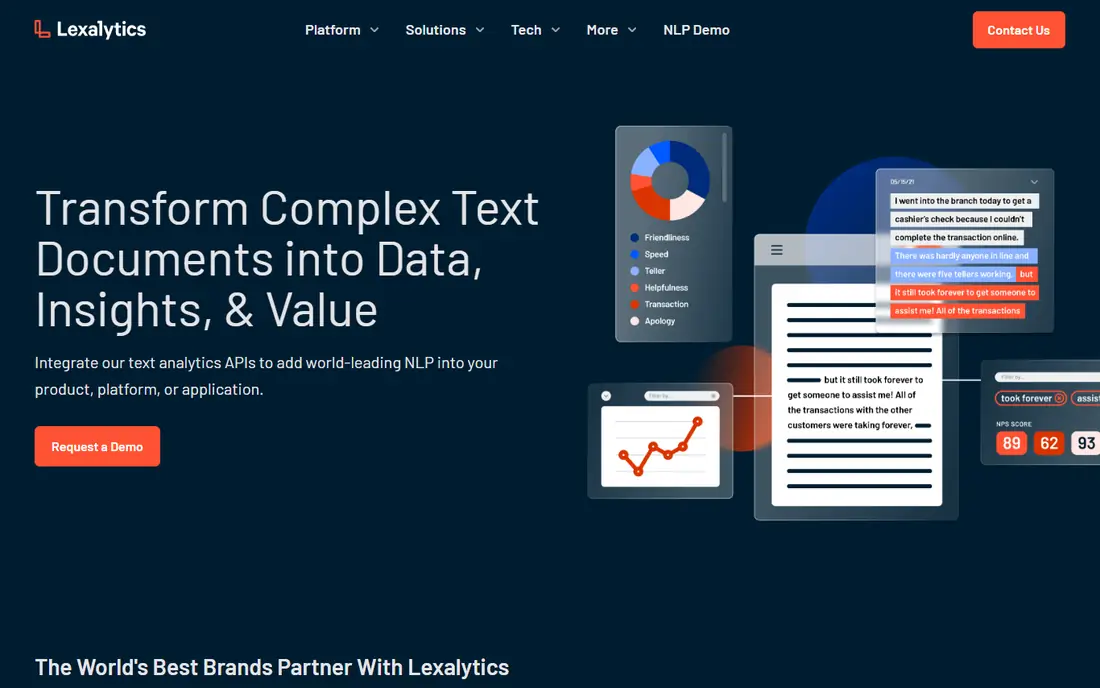
Lexalytics, now part of InMoment, offers Semantria as a text analytics API with multi layer sentiment analysis, categorization, entity recognition, theme analysis, and summarization. That depth suits enterprises that need to analyze large volumes of text in many languages, with consistent results across channels. Deployment options include cloud and on premises, which helps firms with strict data rules.
Semantria is less of a self serve tool for a small team. Pricing is by quote, setup needs technical work to integrate the API, and the full value appears when it feeds a larger customer experience or business intelligence system. For an enterprise that needs accurate, configurable text analytics at scale, Lexalytics is a credible choice.
- Deep sentiment, entity, and theme analysis
- Supports many languages
- Flexible deployment in cloud or on premises
- Enterprise pricing by quote
- Setup is more technical than MonkeyLearn
- Best for larger teams with ongoing needs
NVivo is the standard qualitative analysis tool for many researchers. You import interviews, transcripts, documents, images, and survey responses, code passages by theme, and use queries to compare groups, find patterns, and build reports. That coding workflow is different from automated sentiment analysis, because the researcher defines the codes and interprets the meaning, rather than relying only on a model.
NVivo needs time to learn, and its price reflects its research focus, so it is not the right choice for a business that only wants a quick sentiment score. For a thesis, a market research project, or a program evaluation that depends on careful reading of transcripts, NVivo remains a strong, well supported option.
- Strong coding for interviews and transcripts
- Query and visualization tools
- Widely used in academic research
- Learning curve for new researchers
- Price is higher than a simple feedback tool
- Collaboration needs the right plan
MAXQDA supports mixed methods research, combining qualitative coding with quantitative data, surveys, and statistics. Researchers can code interviews, compare cases, visualize code patterns, and link text findings to survey results in one project. That breadth suits teams that need both stories and numbers from the same study.
The interface is dense, because it covers many methods in one tool, and new users should allow time for training. MAXQDA is not a quick feedback dashboard, and its automated text features are less central than those in a business sentiment tool. For a research team that needs mixed methods in one place, MAXQDA is a strong alternative to NVivo.
- Mixed methods support for text and numbers
- Visual tools for coding and comparison
- Strong for team research projects
- Interface can feel dense
- Price varies by license type
- Automated analysis is less central than in MonkeyLearn
ATLAS.ti is another leading qualitative tool, with flexible coding, network views that show how codes connect, and cloud and desktop versions for different workflows. Researchers can code text, audio, video, and images, then explore relationships between themes in a visual network. AI assisted coding can speed up a first pass, though a researcher should always review AI codes before reporting results.
ATLAS.ti pricing varies by student, academic, and commercial license, so check the plan that matches your use. It is not a business sentiment dashboard, and it needs human judgment at its core. For a researcher who values visual exploration of coded data, ATLAS.ti is a strong choice alongside NVivo and MAXQDA.
- Flexible coding and network views
- Cloud and desktop options
- AI assisted coding to speed up first pass work
- Price varies by license
- AI coding still needs human review
- Learning curve for advanced features
MeaningCloud provides text analytics through an API, including sentiment analysis, topic extraction, entity recognition, text classification, and summarization. Developers can add those features to an app, a dashboard, or a data pipeline without building a model from scratch, and the service supports many languages. A free trial lets a developer test accuracy on real data before committing.
MeaningCloud is not a ready made dashboard for a non technical team. You need code to integrate it, and you should validate results on your own text, because domain terms and slang can affect accuracy. For a developer who wants flexible, API based text analysis, MeaningCloud is a practical, well documented option.
- API for sentiment, topics, entities, and classification
- Supports many languages
- Pay as you go option for developers
- Needs developer integration
- No no code dashboard like MonkeyLearn
- Results need testing on domain text
Thematic is built for product and customer experience teams that need to understand open ended feedback at scale. It analyzes survey responses, reviews, and support tickets, discovers themes, and shows how those themes relate to satisfaction or churn. That feedback focus makes it easier for a product team to decide what to fix first, rather than reading thousands of comments by hand.
Thematic pricing is by quote, and it is not a qualitative coding tool for academic research. Its value appears when feedback volume is high and when the team needs a repeatable theme analysis each month. For a product team drowning in survey comments, Thematic offers a clearer path from text to decision than a generic sentiment score alone.
- Feedback focused analysis with theme discovery
- Integrates with survey and support tools
- Clear reporting for product teams
- Pricing by quote
- Best for feedback, not for academic coding
- Volume and integration limits vary by plan
Dovetail combines a research repository with analysis tools, so a team can store interviews, surveys, and notes in one place, tag key passages, and search across projects. That repository approach helps product and UX teams reuse past research, rather than starting each study from scratch. Sharing, permissions, and search make it easier for a whole team to learn from research, not just the researcher who ran it.
Dovetail analysis is lighter than NVivo or MAXQDA for deep, code heavy research, and pricing rises as the team grows. It suits a product or design team with an ongoing research program, where finding and reusing insights matters as much as coding a single study. For a one off academic project, a dedicated qualitative tool may be a better fit.
- Central repository for research data
- Tagging and analysis for interviews and surveys
- Sharing and search for teams
- Price rises with team size
- Analysis is lighter than NVivo for deep coding
- Best for ongoing research programs
Kapiche analyzes customer feedback from surveys, reviews, and support channels, surfacing themes, sentiment trends, and drivers of satisfaction. It integrates with survey and CRM tools, so feedback can flow into analysis without manual exports, and its reports help customer experience teams track whether a change actually improved what customers say. That trend view is useful for quarterly reporting and for board updates.
Kapiche is priced by quote and is built for ongoing feedback programs, not for a single research project. A small team with a few hundred comments may find a simpler tool sufficient, while a larger team with continuous feedback will benefit from Kapiche automation. For a customer experience team that needs theme trends over time, Kapiche is worth a demo.
- Feedback analysis with theme and sentiment trends
- Integrates with survey and CRM tools
- Reporting for customer experience teams
- Pricing by quote
- Needs a steady feedback feed to show full value
- Less suited to academic coding
How we picked these
We compared official vendor pages, product documentation, and public reviews, focusing on analysis type, ease of use, language support, integration, and pricing model. We included both no code business tools and research coding tools, because text analysis covers both uses, and we noted where a tool needs a developer or a researcher to reach full value. We did not claim hands-on testing, and we wrote See website where pricing is by quote.
How to choose text analysis software for your data
Start with the question you need to answer. If you need to know what customers complain about most, a feedback tool such as MonkeyLearn, Thematic, or Kapiche will give you themes and sentiment quickly. If you need to understand why people act a certain way, a qualitative tool such as NVivo, MAXQDA, or ATLAS.ti will let you code and interpret interviews in depth. If you need to embed analysis in an app, an API such as MeaningCloud or Lexalytics Semantria is the right route.
Next, test the tool on your own data, not on a vendor demo. Upload a sample of your reviews, tickets, or transcripts, check whether sentiment matches human judgment, and see how many themes need manual correction. Pay attention to slang, product names, and domain terms, because those are where generic models fail most often. A tool that scores well on a demo may still need custom training for your industry.
Finally, check the total cost and the workflow. A per analysis price can grow fast with a large feed, while a per user price can grow fast with a large team. Check whether the tool integrates with your survey, CRM, or support system, whether exports are easy, and whether you can share results with colleagues who do not use the tool. Choose the tool that fits your data volume, your team skill, and your reporting needs, not the tool with the longest feature list.
Frequently asked questions
What is the best text analysis software?
For most business teams, MonkeyLearn is the best starting point, because it offers no code sentiment, topic, and intent analysis with ready made models. For researchers, NVivo, MAXQDA, and ATLAS.ti are the strongest choices for coding interviews and documents. For developers, MeaningCloud and Lexalytics Semantria offer flexible API analysis.
What is the best text mining software?
Text mining software overlaps with text analysis, but it often emphasizes large scale extraction from documents, articles, and web content. MonkeyLearn and MeaningCloud suit business and developer text mining, while NVivo and MAXQDA suit research mining of interviews and documents. The best choice depends on whether you need automated extraction at scale or careful human coding.
What are the best text analysis tools for feedback?
MonkeyLearn, Thematic, and Kapiche are strong feedback tools, because they focus on survey responses, reviews, and support tickets, and they surface themes and sentiment trends. Thematic and Kapiche are especially useful for product and customer experience teams with ongoing feedback, while MonkeyLearn suits a team that wants to start quickly with no code models.
What is the best text analysis tool for qualitative research?
NVivo is the most widely used qualitative tool, with strong coding, query, and visualization features for interviews and transcripts. MAXQDA is best for mixed methods work that combines text and numbers, while ATLAS.ti offers flexible coding and visual network views. All three need human judgment, and none should replace careful reading of the source material.
How much does text analysis software cost?
Costs vary widely. Some tools offer a free trial, some charge per analysis or per user, and enterprise tools such as Lexalytics, Thematic, and Kapiche are priced by quote. A small team may pay a monthly subscription, while a large enterprise may pay a custom annual fee based on volume. Check the pricing model before you commit, because a low headline price can rise fast with high volume.
Can text analysis software understand sarcasm and slang?
Only partly. Modern models handle common slang better than older tools, but sarcasm, irony, and domain specific language still cause errors. That is why validation matters: test the tool on your own data, review low confidence results, and use human review for important decisions. A sentiment score should support a decision, not replace reading the underlying comments.
Sources
See where you really rank - block by block
ProMapRanker scans Google Maps across a grid of your service area. Simple monthly plans from $19, white-label on every plan.
Start freeKeep reading
 zscaler alternatives
Best Zscaler Alternatives in 2026
Looking for zscaler alternatives? We compare 9 SASE and zero trust platforms on architecture, data protection, pricing, and fit for your network and team.
Read → zapier alternatives free
Best Zapier Alternatives Free in 2026
Nine automation tools for zapier alternatives free in 2026, all with genuinely free tiers, plus free plan limits, starting prices and upgrade paths explained.
Read → which platform is best for online reputation
Which Platform Is Best for Online Reputation in 2026
Wondering which platform is best for online reputation? We compare 8 review, listing, and response tools for small and multi-location businesses and agencies.
Read →