 ProMapRanker
Best Telehealth Platforms for Therapists in 2026


All-in-one therapy practice · Pricing starts at: $49 per month
Key takeaways
- SimplePractice and TherapyNotes lead for therapists who want video, scheduling, notes, and billing in one place.
- Doxy.me and Carepatron give the lowest-cost starting point when video alone is the main need.
- Check group video, waiting room controls, and claim costs before you commit, since those details change the monthly bill.
- Software alone does not make a practice HIPAA compliant. This article is general information only, not medical advice.
Quick comparison
| Pick | Great for | Pricing starts at | Free tier | |
|---|---|---|---|---|
| SimplePractice | All-in-one therapy practice | $49 per month | Free trial | Visit |
 TherapyNotes | Insurance-heavy practices | $69 per month | Free trial | Visit |
 TheraNest | Budget group practices | $29 per month | Free trial | Visit |
 Doxy.me | Simple browser video visits | Free | Yes | Visit |
 Carepatron | Low-cost solo start | Free | Yes | Visit |
 Practice Better | Coaching and wellness programs | Free | Yes | Visit |
 VSee | Clinic video and intake | See website | Free trial | Visit |
 Mend | Large clinics and groups | See website | No | Visit |
 SecureVideo | Simple secure video sessions | See website | Free trial | Visit |
The best telehealth platforms for therapists
We looked at video quality, scheduling, notes, billing, and privacy controls, and we kept only platforms that therapists can use for real client work today.

SimplePractice suits a solo therapist or a small group that wants one system for bookings, video, notes, and payments. Clients can book, complete intake forms, join a session from a browser link, and pay through the portal, which cuts down on back-and-forth messages. The notes and billing tools are built for therapy workflows, not adapted from a general medical chart.
The trade-off is price creep. AI note help, e-prescribing, and other extras sit outside the base plan, so the final bill can sit well above the starting price. Still, for therapists who want fewer separate tools, our pick for most people is SimplePractice, because the core workflow is complete from day one.
- Built-in video on every plan
- Client portal and scheduling
- Insurance billing tools
- Add-ons can raise the monthly cost
- Higher tiers are needed for some features
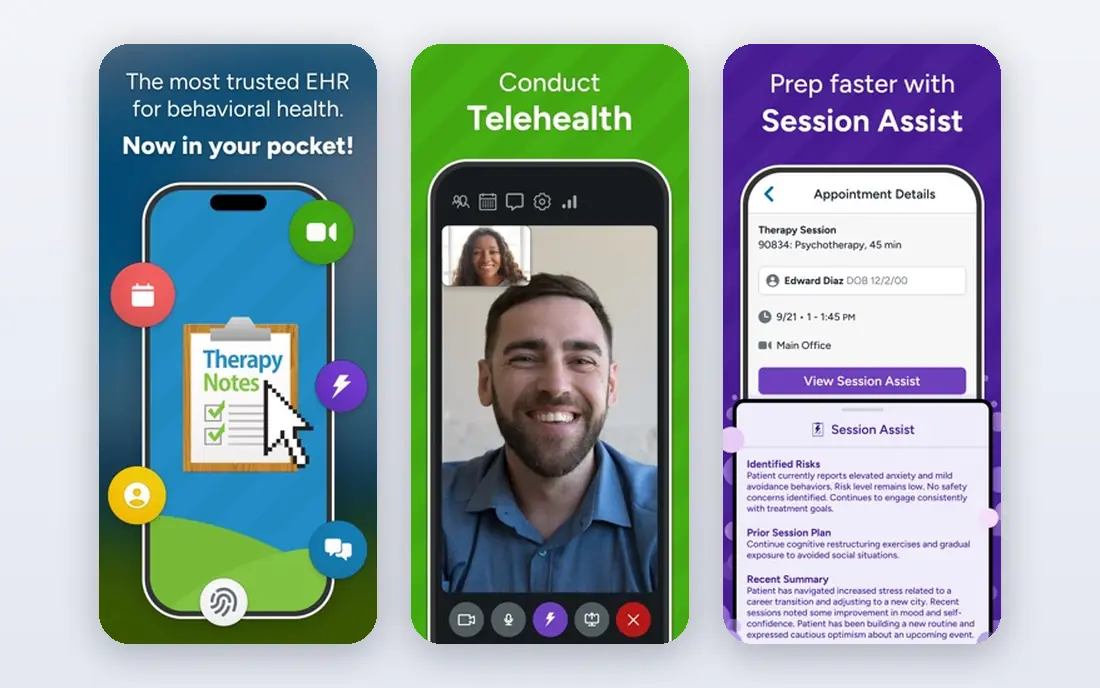
TherapyNotes fits practices that bill insurance often and need clean claim, payment, and eligibility workflows. The note templates cover common therapy formats, and the scheduling and reminder tools keep a busy caseload moving. Basic one-to-one video is included, which covers many individual sessions without a second video tool.
Group video and higher video quality sit on a paid premium tier, so check that cost if you run groups or family sessions. The interface is practical rather than pretty, and some therapists may prefer a more modern design. For billing-first practices, that trade is usually worth it.
- Strong insurance billing and ERA workflows
- Therapy note templates
- Basic video included
- Premium video costs extra
- Mobile app is still catching up on notes
TheraNest, now under the Ensora name in some listings, gives small groups a lower entry price than the two leaders above. You get scheduling, notes, a client portal, and billing tools, with per-therapist pricing that stays manageable as a team grows. It is a sensible choice for a practice that wants structure without paying for features it will not use yet.
Video needs care at checkout. It is an add-on on the lowest tier and included from higher tiers, so a video-first practice should price the tier it actually needs. The lack of a full mobile app may also matter for therapists who work from a phone between sessions.
- Low entry price
- Group-friendly pricing
- Notes, scheduling, and billing in one place
- Video is an add-on on the lowest tier
- No full-featured mobile app
Doxy.me is the simplest option on this list, and that is its strength. Clients open a link in a browser, wait in a virtual waiting room, and join the session without installing an app or creating an account. For a therapist who already has scheduling and billing handled elsewhere, that simplicity removes friction for clients who struggle with technology.
The limit is clear. Doxy.me is a video tool, not a practice system, so notes, claims, and payments need other tools. Paid plans add features such as group calls, screen sharing controls, and custom branding. Pick it when video reliability matters more than an all-in-one suite.
- No download for clients
- Free tier for basic video
- Waiting room controls
- No practice management or billing built in
- Paid tiers needed for extras
Carepatron is a good starting point for a new solo practice that needs scheduling, notes, video, and a client portal without a large monthly bill. The free tier covers a set number of appointments, and the paid tiers stay low compared with larger practice systems. The layout is clear, which helps when you are setting up forms and intake for the first time.
Insurance-heavy therapists may find the billing tools thinner than a dedicated behavioral health system, and claim costs should be checked before switching. For private-pay therapists and small mixed practices, Carepatron covers the daily workflow well and leaves room to grow.
- Free tier with appointments and video
- Clean scheduling and notes
- Low paid tiers
- Insurance billing is less deep than TherapyNotes
- Smaller template library
Practice Better fits therapists, coaches, and wellness practitioners who sell programs and packages alongside sessions. You can build programs, share resources, track client progress, and run one-to-one video from the same account. That program structure is a real difference from note-first systems, which treat every contact as a single appointment.
Therapists who bill insurance often will need a separate claims service, which adds cost and setup. The charting tools are solid for coaching and wellness work but less tuned to insurance-driven therapy notes. Choose it when programs and client engagement matter as much as sessions.
- Free tier for a few clients
- Programs, courses, and packages
- One-to-one video
- Insurance billing needs a separate service
- Less therapy-specific than the leaders
VSee has long served clinics that need dependable video, intake, and waiting room flow without a heavy practice system. Patients join from a browser or app, staff can manage queues, and group sessions are available on suitable plans. That clinic focus shows in the workflow, which handles intake and visit handoffs in a practical way.
The main drawback is pricing clarity. You will need to check the current plan page or speak with sales to confirm what a given tier includes. Therapists who want billing, notes, and claims in the same system may still need another tool. VSee works best as a video-first choice for clinics with existing back-office tools.
- Browser and app video visits
- Waiting room and intake workflows
- Group video options
- Pricing is not fully public
- Practice management features are lighter
Mend targets larger practices and clinics that need scheduling, reminders, intake, and video to work as one patient flow. Automated reminders cut no-shows, and the platform handles group visits and multi-location scheduling better than a solo-focused tool. That scale is useful when front-desk staff manage many providers and locations.
A solo therapist may find Mend heavier than needed, and pricing is often confirmed through sales rather than a simple public tier. Smaller practices should compare the total cost against an all-in-one therapy system before committing. For growing clinics, the engagement and scheduling depth is the reason to shortlist it.
- Scheduling, reminders, and video in one workflow
- Group and multi-location support
- Patient engagement tools
- Quote-based pricing for many teams
- More system than a solo therapist needs
SecureVideo keeps the focus narrow, which some therapists prefer. You get browser-based video, a waiting room, and straightforward session controls, without learning a full practice system. Small teams can set it up quickly and send clients a simple link, and the privacy controls are presented in plain terms for clinic use.
Because it is video-first, scheduling, notes, and billing will live elsewhere unless you pair it with another system. Plan limits and add-ons should be checked against your session volume and group needs. SecureVideo fits therapists who want a dependable video room and already have the rest of the practice covered.
- Browser-based video with waiting room
- Simple setup for small teams
- Session controls
- No full practice management suite
- Feature depth varies by plan
How we picked these
We compared official feature pages, pricing pages, app store listings, privacy pages, and public reviews for each platform. We kept only platforms that offer video visits for therapists in the United States today, and we favored tools with clear waiting room controls, browser access for clients, and a signed business associate agreement option. We did not claim hands-on testing, and we left out any tool that could not show a working video product for therapy work.
What to check before you pay
Start with the session type you run most. Individual video needs are different from group, family, and multi-provider sessions, and some platforms charge extra for group video or higher quality. Check the waiting room, screen sharing, chat, and recording controls, and confirm how clients join when they have a weak connection or an older device.
Next, add up the full monthly cost. Base price, video add-ons, claim fees, reminder costs, and AI note add-ons can double a headline price. Ask about the business associate agreement, data retention, and how session recordings are stored, and remember that software alone does not make a practice HIPAA compliant. Your own policies, device security, and staff training matter just as much.
A simple trial plan
Run two weeks on your real workflow. Book test clients, run a group session if you offer one, send intake forms, and complete a note and an invoice. That trial will surface friction faster than a feature list, and it will show if clients struggle to join. Keep the plan that your clients find easiest, not the one with the longest feature list.
Frequently asked questions
What is the best online platform for therapists?
The best online platform for therapists depends on billing and session mix. SimplePractice fits most all-in-one needs, TherapyNotes fits insurance-heavy work, and Doxy.me fits video-only needs. Compare the full monthly cost, not just the starting price, before you choose.
What is the best telehealth platform for therapists on a budget?
Carepatron and Doxy.me give the lowest starting cost, with free tiers that cover basic video and scheduling. TheraNest is the lowest-cost all-in-one option for groups in this list. Check video add-ons and claim fees, since those costs can change the budget picture.
Do these platforms sign a business associate agreement?
Many therapy platforms offer a business associate agreement on paid plans, and some offer one on free tiers as well. Confirm the agreement terms on the vendor page and in writing before you store client health information. An agreement alone does not make a practice compliant, so pair it with sound privacy practices.
Can I run group therapy sessions on these platforms?
Yes, on many of them, but group video is sometimes a paid tier or an add-on. TherapyNotes premium video, higher TheraNest tiers, and clinic tools such as VSee and Mend cover group work. Test a group session during a trial to confirm participant limits and audio quality.
Is this article medical advice?
No. This article is general information about software for therapists, not medical advice for any person or condition. Therapists should follow their licensing rules, privacy rules, and clinical judgment when choosing tools and delivering care.
Sources
See where you really rank - block by block
ProMapRanker scans Google Maps across a grid of your service area. Simple monthly plans from $19, white-label on every plan.
Start freeKeep reading
 zscaler alternatives
Best Zscaler Alternatives in 2026
Looking for zscaler alternatives? We compare 9 SASE and zero trust platforms on architecture, data protection, pricing, and fit for your network and team.
Read → zapier alternatives free
Best Zapier Alternatives Free in 2026
Nine automation tools for zapier alternatives free in 2026, all with genuinely free tiers, plus free plan limits, starting prices and upgrade paths explained.
Read → which platform is best for online reputation
Which Platform Is Best for Online Reputation in 2026
Wondering which platform is best for online reputation? We compare 8 review, listing, and response tools for small and multi-location businesses and agencies.
Read →