 ProMapRanker
Best Speech to Text Software in 2026

Key takeaways
- Otter.ai is the best meeting tool for most teams, with live transcription, summaries and action items.
- Rev is best when accuracy matters most, because it offers human transcription alongside AI.
- Wispr Flow is the best modern dictation tool for writing into any app, with AI cleanup of spoken text.
- Dictation, meeting transcription and file transcription are different jobs, so pick the tool that matches your main workflow.
Quick comparison
| Pick | Great for | Pricing starts at | Free tier | |
|---|---|---|---|---|
 Otter.ai | Team meetings and summaries | See website | Yes | Visit |
 Rev | Human-accurate transcripts | See website | Yes | Visit |
 Fireflies.ai | Meeting assistant with CRM sync | See website | Yes | Visit |
 Descript | Editing audio and video by text | See website | Yes | Visit |
 Dragon Professional | Long-form Windows dictation | See website | No | Visit |
 Wispr Flow | Dictation into any app | See website | Yes | Visit |
 Notta | Multilingual meeting notes | See website | Yes | Visit |
 Speechnotes | Free browser dictation | See website | Yes | Visit |
The best speech to text software
We compared official product pages, pricing pages and feature documentation for speech to text tools that handle meetings, dictation or file transcription in October 2026. The list covers meeting assistants, a human transcription service, dictation tools and a transcript editor, with free tiers and paid entry prices noted where vendors publish them.
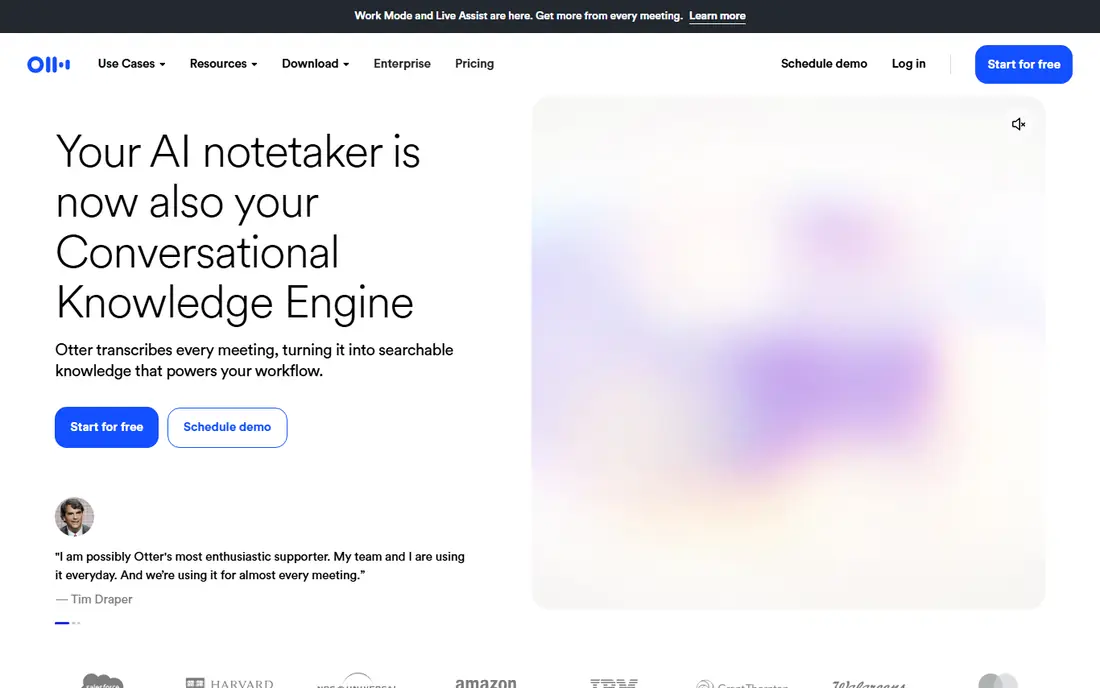
Otter.ai is a meeting assistant that joins Zoom, Google Meet and Microsoft Teams calls, transcribes speech live, and produces summaries with action items after the call. Transcripts are searchable, with speaker labels and highlights, which helps teams find a decision or quote without re-listening to a full recording. File uploads are also supported, with limits by plan.
The free tier is useful for testing, with a monthly minute limit and a small number of lifetime file imports in many listings. Accuracy also depends on audio quality, with background noise, overlapping speech and strong accents causing more errors. For a team that lives in meetings and wants notes without manual typing, Otter is the most complete starting point, provided someone reviews summaries before they are shared as decisions.
- Auto-joins Zoom, Meet and Teams
- Live transcription and summaries
- Searchable transcripts
- Free tier limits minutes and imports
- Accuracy falls with accents, noise or crosstalk
- Summaries need review

Rev offers both AI transcription and human transcription, which makes it the pick when accuracy matters more than speed or cost. AI transcripts suit drafts, interviews and research, while human transcripts suit legal, medical, media or published quotes where an error could change meaning. Transcripts include timestamps, speaker labels and editing tools, with options to highlight clips and share sections.
Cost is the trade-off. Human transcription is charged per minute, so a long recording can cost far more than an AI-only service, and paid AI plans start higher than Otter or Fireflies in many listings. Rev also focuses less on live meeting assistance than Otter. Use Rev when the transcript itself is the deliverable, and use a meeting assistant when live notes and summaries are the main job.
- Human transcription option
- AI transcription for speed
- Timestamped, editable transcripts
- Human transcription is priced per minute
- Paid plans are higher than some rivals
- Meeting assistant features are less central
Fireflies.ai is a meeting assistant that records, transcribes and summarises calls on Zoom, Google Meet, Microsoft Teams and other platforms, with integrations for CRMs, task tools and document apps. It supports a wide range of languages, which helps international teams, and it can search across past meetings for topics, speakers and action items. That search feature is useful for sales, support and research teams who revisit calls often.
The free tier limits storage, and paid plans add more minutes, storage and integrations. A Fireflies bot joining a call can also surprise external guests, so tell participants in advance and follow consent and recording laws in your location. For a team that wants meeting notes linked to a CRM or task system, Fireflies is a strong alternative to Otter.
- Joins major meeting platforms
- Supports many languages
- CRM and task integrations
- Free tier limits storage
- Summaries need review
- Bot joining calls can surprise guests
Descript takes a different approach to speech to text. It transcribes audio or video, then lets you edit the media by editing the transcript, deleting a sentence in text removes it from the recording. That workflow suits podcasters, video creators and educators who produce edited content, with filler word removal, overdub-style voice tools and screen recording built in.
Descript is not a live meeting assistant, and transcription minutes are capped by plan, with a free tier offering a small monthly allowance in many listings. The full editor also takes time to learn. Use Descript when the end product is an edited podcast or video, and use Otter or Fireflies when the end product is meeting notes.
- Edit audio and video by editing text
- Filler word removal
- Studio-quality voice tools
- Transcription minutes are limited by plan
- Learning curve for full editing
- Less suited to live meetings
Dragon Professional, from Nuance, is a long-form dictation tool for Windows, built for professionals who dictate documents, reports and emails at length. It supports custom vocabulary for legal, medical and technical terms, and it works inside many desktop applications, which suits lawyers, clinicians and writers who prefer speaking to typing. Accuracy improves as Dragon learns your voice and vocabulary over time.
Dragon is Windows focused, and pricing varies by reseller and edition, so check the current Nuance or reseller page before budgeting. Setup also takes time, with microphone choice and voice training affecting results. For a Windows user who dictates daily and needs a mature, offline-friendly tool, Dragon remains a serious option, even as newer cloud dictation tools grow.
- Strong long-form dictation on Windows
- Custom vocabulary
- Works in many desktop apps
- Windows focused
- Pricing varies by reseller
- Setup and training take time
Wispr Flow is a modern dictation tool that lets you speak into any app on desktop or mobile, with AI cleanup that turns spoken rambling into clean, formatted text. That design suits writers, managers and developers who want to draft emails, documents and messages by voice without switching to a separate transcription app. It supports a wide range of languages and works across many text fields.
The free tier is limited, and the full Pro tier requires a subscription, with pricing on the Wispr Flow site. Accuracy still depends on microphone quality and background noise, and plans have changed as the tool has grown. For a user who wants dictation everywhere, rather than transcription of meetings or files, Wispr Flow is the most modern choice in this list.
- Dictates into any text field
- AI cleanup for spoken text
- Supports many languages
- Paid plan needed for full use
- Accuracy depends on microphone and noise
- Newer tool with changing plans
Notta is a transcription tool for live meetings, recorded audio and video files, with support for many languages and translation features. It produces transcripts, summaries and action items, and it can transcribe bilingual meetings and interviews where other tools struggle. That multilingual strength suits international teams, researchers and journalists working across languages.
Free minutes are limited, and accuracy varies by language, accent and audio quality, so test Notta with your actual speakers before relying on it for published work. Integrations are fewer than Otter or Fireflies in some areas. For a team that needs meeting notes in several languages, Notta is worth testing alongside Otter.
- Supports many languages
- Live meeting and file transcription
- Summaries and translation
- Free tier limits minutes
- Accuracy varies by language
- Integrations are fewer than Otter
Speechnotes is a free, browser-based dictation tool that turns speech into text without installing software. You open the site, allow microphone access, and dictate into a text area, then copy, download or export the result. That simplicity suits a student, writer or casual user who needs occasional dictation on a shared computer or a Chromebook.
Speechnotes works best in Chrome or a supported browser, and it lacks the AI cleanup, meeting assistant and summarisation features of Wispr Flow, Otter or Fireflies. It also needs an internet connection for full speech recognition in many cases. For free, occasional dictation, Speechnotes is the easiest option. For daily dictation or meeting work, a paid tool will save more time.
- Free dictation in a browser
- No install needed
- Simple export options
- Needs Chrome or a supported browser for best results
- Fewer AI features
- No meeting assistant
How we picked these
We compared official product pages, pricing pages and feature documentation, and kept tools that are actively available in October 2026 and that handle at least one clear speech to text job well. We separated dictation tools, which turn live speech into text as you speak, from transcription tools, which convert meetings or files afterward, because buyers often confuse the two. Pricing changes often, so we used See website where plan prices differ by billing period, seat type or minute allowance.
We also checked free tiers honestly. Otter, Fireflies, Descript, Wispr Flow, Notta and Speechnotes offer free use with limits, while Dragon Professional and some Rev plans are paid from the start. A free tier is useful for testing accuracy with your own voice, accent and meeting style, which matters more than a marketing accuracy claim.
How to get accurate results
Use a good microphone and a quiet room
Accuracy starts with audio. Use a headset or a close microphone, reduce background noise, and avoid talking over other speakers. In a meeting, ask remote participants to mute when not speaking, and use a dedicated meeting microphone for a room rather than a laptop mic at the far end of a table.
Tell participants you are recording
Always tell meeting participants that a transcription bot or recording is running, and follow consent and recording laws in your location. A short note at the start of a call, plus a calendar note, avoids surprise and builds trust. If a guest declines, use manual notes instead of a bot.
Review and correct important transcripts
AI transcripts are drafts, not final records, especially for names, numbers, technical terms and decisions. Review summaries before sharing them as decisions, correct speaker labels, and keep the original audio where possible. For published quotes, legal matters or medical notes, use human transcription or a careful manual check.
Frequently asked questions
What is the best speech to text software?
Otter.ai is best for team meetings and summaries, Rev is best for human-accurate transcripts, and Wispr Flow is best for modern dictation into any app. Descript is best for editing audio and video by transcript. Pick by whether your main job is meetings, dictation, file transcription or edited media.
What is the best free speech to text software?
Speechnotes is the best free browser dictation tool, while Otter, Fireflies and Notta offer free tiers for meeting transcription with minute limits. For free dictation, start with Speechnotes or a Wispr Flow free tier. For free meeting notes, test Otter and Fireflies with a real call before choosing.
Is Dragon still good for dictation?
Yes, Dragon Professional remains strong for long-form Windows dictation, especially for professionals with custom vocabulary needs. It is Windows focused, pricing varies by reseller, and setup takes time. For cross-platform dictation into any app, Wispr Flow is a more modern alternative, while Dragon suits a dedicated Windows dictation workflow.
What is the best voice to text software for meetings?
Otter.ai and Fireflies.ai are the strongest meeting options, because they auto-join calls, transcribe live and produce summaries with action items. Notta is a strong alternative for multilingual meetings. Choose by meeting platform, language needs and CRM or task integrations, and test with a real meeting before paying.
Can speech to text software handle accents?
Modern tools handle many accents better than older software, but accuracy still varies by accent, audio quality and background noise. Otter, Rev, Fireflies and Notta all perform better with a clear microphone and a quiet room. Test any tool with your actual speakers, and allow time to correct names and technical terms in important transcripts.
Sources
See where you really rank - block by block
ProMapRanker scans Google Maps across a grid of your service area. Simple monthly plans from $19, white-label on every plan.
Start freeKeep reading
 zscaler alternatives
Best Zscaler Alternatives in 2026
Looking for zscaler alternatives? We compare 9 SASE and zero trust platforms on architecture, data protection, pricing, and fit for your network and team.
Read → zapier alternatives free
Best Zapier Alternatives Free in 2026
Nine automation tools for zapier alternatives free in 2026, all with genuinely free tiers, plus free plan limits, starting prices and upgrade paths explained.
Read → which platform is best for online reputation
Which Platform Is Best for Online Reputation in 2026
Wondering which platform is best for online reputation? We compare 8 review, listing, and response tools for small and multi-location businesses and agencies.
Read →