 ProMapRanker
Best Software for Moving Companies in 2026

Key takeaways
- SmartMoving and Supermove suit growing movers that want CRM, dispatch, estimates, and payments in one system.
- Movegistics and MoverBase suit smaller movers that want a lower starting price and core job management without a large suite.
- Elromco and MoveitPro suit larger or storage-heavy movers that need detailed warehouse and job controls.
- Pricing is often quote-based in this market, so a demo with your real job types matters more than a published price list.
- Test the crew app on a real job, because a clean office dashboard does not prove the field app works offline or on a phone.
Quick comparison
| Pick | Great for | Pricing starts at | Free tier | |
|---|---|---|---|---|
 SmartMoving | Growing movers | See website | Free trial | Visit |
 Supermove | Modern job management | See website | Free trial | Visit |
 Movegistics | Value and CRM depth | $79 per month | Free trial | Visit |
 MoverBase | Low cost start | $19 per month | Yes | Visit |
 MoveitPro | Dispatch and storage | See website | Free trial | Visit |
 Elromco | Storage and operations | $289 per month | No | Visit |
 MoversSuite | Full moving operations | See website | Free trial | Visit |
 Chariot | AI-assisted moving ops | $254 per month | No | Visit |
 Vonigo | Field service plus moving | See website | Free trial | Visit |
The best software for moving companies
Moving software has to handle leads, estimates, scheduling, dispatch, crew paperwork, storage, and payments without forcing staff back to paper and phone calls. The tools below are built for moving companies, not general field service alone, though some also serve wider field work.

SmartMoving is a good all-in-one choice for a mover that has outgrown spreadsheets and phone dispatch. Leads flow into a CRM pipeline, estimates can be built and sent to customers, jobs are dispatched to crews, and payments and storage are tracked in the same account. That single-system approach cuts down on double entry, which is where many moving companies lose time and make billing errors.
The main caution is pricing. Published third-party listings vary, and current vendor guidance points to a demo and quote, so ask for an itemized price that covers users, messaging, payment processing, and onboarding. A small local mover with one crew may find a cheaper tool enough, but a growing company with several crews and storage will benefit from SmartMoving's breadth.
- CRM, estimates, dispatch, storage, and payments in one system
- Crew app for field staff
- QuickBooks integration for accounting
- Pricing is quote-based in current listings
- Smaller movers may pay for breadth they do not yet need
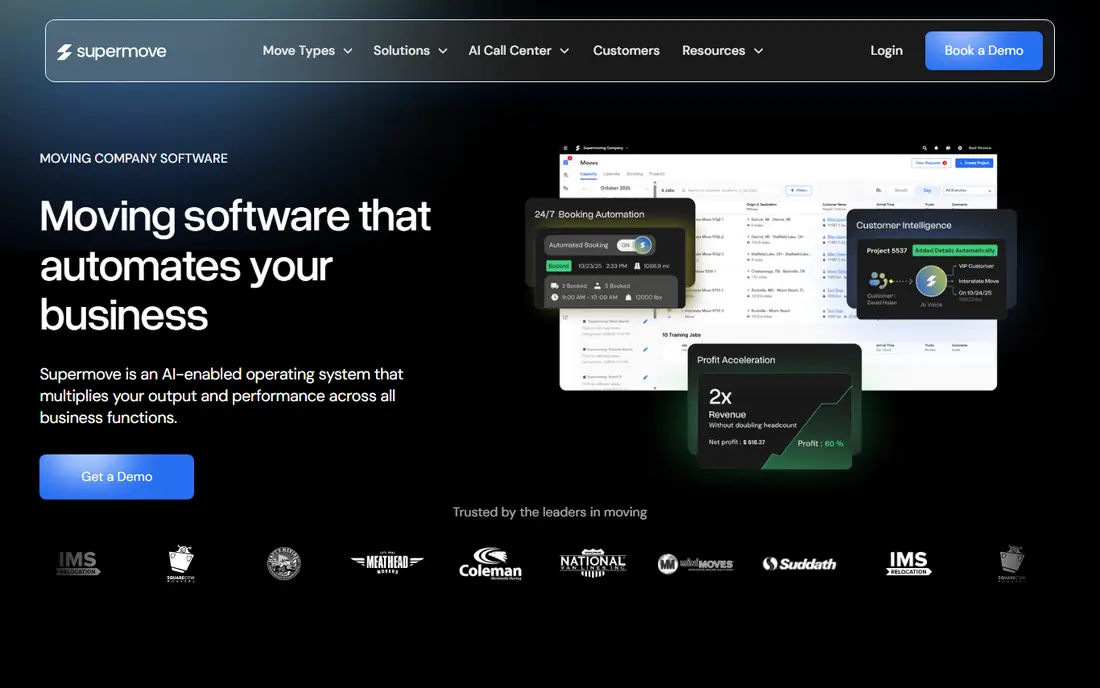
Supermove suits a mover that wants a modern, easy-to-learn system for the whole job lifecycle. Sales teams can manage leads and estimates, dispatchers can assign crews and track jobs, and customers can review details, sign documents, and pay through a portal. That customer-facing polish helps a mover look professional from the first quote to the final invoice.
Pricing is not published as a simple entry price, so a demo and quote are needed for your crew count and job volume. Supermove also works best when the whole team adopts it, including crews in the field, so test the crew workflow during a trial with a real job type. For a mover that values ease of use and a clean customer experience, it is a strong shortlist pick.
- Modern interface for sales, dispatch, and crew workflows
- Customer portal for documents and payments
- Integrations for accounting and lead sources
- Pricing is quote-based
- Some advanced features depend on the plan and setup
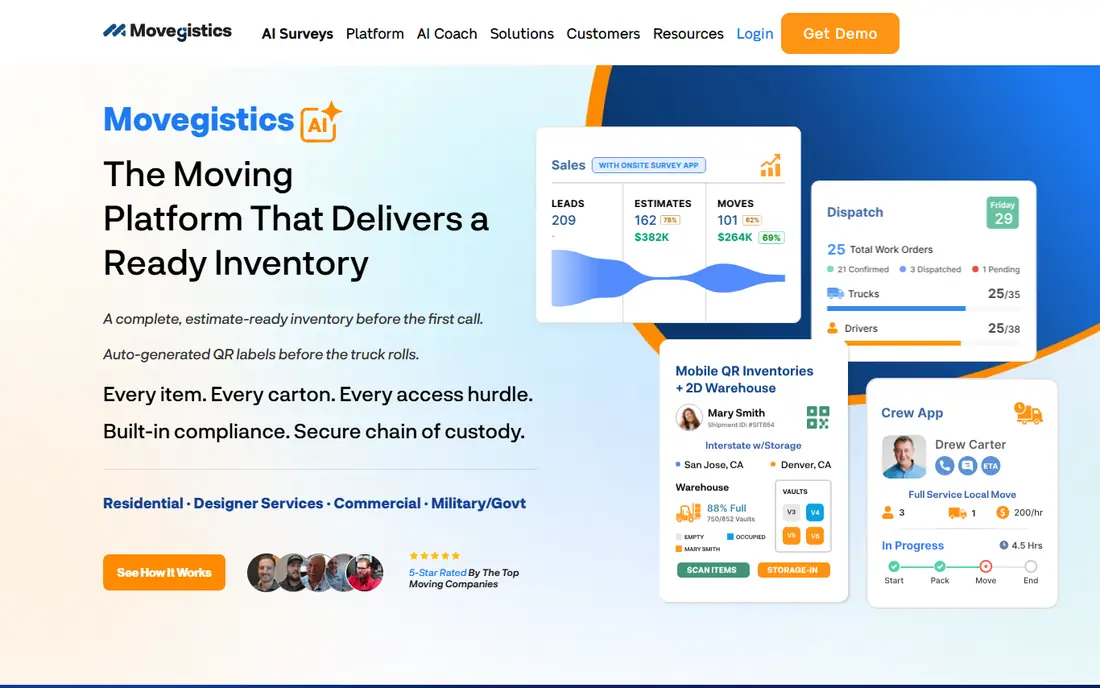
Movegistics is a value pick for a mover that wants real CRM depth without paying enterprise prices. It covers lead management, estimates, dispatch, storage, and customer communication, with a published starting price that undercuts several larger rivals. That makes it attractive for a local or regional mover that needs a proper system but cannot justify a high monthly fee per user.
The trade-off is polish and setup effort. Movegistics has been in the market longer than some newer tools, and its interface may feel less modern in places. Newer AI features help with guidance, but they do not replace a careful setup of rates, tariffs, and job types. If budget matters and you are willing to invest setup time, Movegistics offers strong depth for the price.
- Moving CRM with leads, estimates, dispatch, and storage
- Lower published starting price than many rivals
- AI coaching tools in newer releases
- Interface and setup may feel less polished than newer rivals
- Some features depend on plan and configuration
MoverBase is the lowest-cost way for a small mover to stop running jobs from spreadsheets. The cloud system covers leads, scheduling, dispatch, and job records, and it works on computers, tablets, and phones. Integrations for Stripe, PayPal, QuickBooks, and Google Calendar help a small team keep billing and scheduling in step without extra tools.
The limits are scope. MoverBase does not match the depth of SmartMoving or Supermove for storage, advanced reporting, or AI-assisted sales, and larger movers may outgrow it. For a new or single-crew mover, that is a fair trade: start cheap, learn what your team actually uses, and upgrade when job volume or storage needs demand a larger system.
- Very low starting price with a free option
- Cloud-based job management for movers of all sizes
- Integrations for payments and calendars
- Fewer advanced features than larger suites
- Support and training depth vary by plan
MoveitPro suits a mover with repeatable processes and a need for tight dispatch and storage control. Scheduling and dispatch are core strengths, the customer portal lets clients review job details and pay, and storage tracking covers vault types, quantities, and facility locations. That structure helps a storage-heavy mover keep track of items across jobs and warehouses without separate spreadsheets.
The interface can feel less flexible when a mover's workflow does not match the standard process, and adding or editing inventory items has drawn criticism in public reviews. Pricing is also quote-based, so get a full quote for your user count and storage needs. If your operations follow a fixed pattern and you have staff to learn the system, MoveitPro is a solid operational choice.
- Strong scheduling, dispatch, and customer portal
- Storage and vault tracking
- QuickBooks Online integration
- Interface can feel rigid when workflows differ from the standard setup
- Pricing varies by quote and plan
Elromco is a strong pick for a mover where storage is a major part of the business, not an afterthought. Warehouse mapping, container tracking, barcode scanning, and visual storage layouts help staff find items quickly and bill storage accurately. The wider system also covers CRM, estimates, dispatch, and billing, so storage does not sit apart from job management.
The price reflects that depth, with published professional pricing well above budget tools. Crew access through a mobile web portal may also feel different from a native app for field staff, so test it on a phone during a trial. For a storage-heavy mover, Elromco's warehouse tools can justify the higher monthly cost through fewer lost items and cleaner storage billing.
- Detailed storage management with barcode scanning and visual layouts
- CRM, dispatch, and billing in one system
- Integrations for accounting
- Higher starting price than value rivals
- Crew access is a mobile web portal rather than a full app store app in some setups
MoversSuite covers the full job lifecycle for a moving company, from first lead through estimate, scheduling, dispatch, crew paperwork, and final billing. That end-to-end scope suits a mover that wants one vendor for operations rather than separate tools for CRM, dispatch, and invoicing. Reporting across sales and operations also helps an owner see which lead sources and job types actually make money.
Because pricing is quote-based, you need a demo that uses your real job types, rate structures, and crew sizes to judge value. Setup time will also vary with company size, so ask what onboarding includes and how long it takes before crews can run live jobs. For a mid-size mover that wants a complete system, MoversSuite is worth a demo alongside SmartMoving and Supermove.
- End-to-end moving management from lead to invoice
- Dispatch and crew tools
- Reporting for sales and operations
- Pricing is quote-based
- Setup and training time depend on company size and job types
Chariot is a newer moving platform that pairs core CRM and dispatch tools with AI-assisted sales and voice features. The crew app covers field workflows, while office tools handle leads, estimates, and job management in one place. For a mover that wants to test AI help with calls and sales follow-up, Chariot offers those tools as part of the platform rather than as a separate add-on.
The starting price is higher than budget rivals, and some listings show quarterly or annual billing, so check the billing term and total annual cost. As a newer vendor, Chariot also has a shorter public track record than SmartMoving or Movegistics. Run a trial with your real call volume and job types, and confirm that AI features fit your sales process before you commit.
- Moving CRM with crew app and dispatch
- AI voice and sales tools in newer plans
- QuickBooks integration
- Higher starting price than budget tools
- Pricing is quarterly or annual in some listings
- Newer brand with less long-term track record
Vonigo suits a moving company that also does related field work, or a franchise group that needs multi-location control. Scheduling, dispatch, invoicing, and customer communication are core strengths, and the platform can be configured for moving job types, crews, and service areas. Multi-location and franchise tools help a group keep branding, pricing, and reporting consistent across sites.
The trade-off is that Vonigo is a wider field service platform, not a moving-only tool, so moving-specific workflows need configuration during setup. Ask for a demo that shows a full moving job, from estimate to crew completion and invoice, rather than a generic service job. If your business spans moving and other field services, Vonigo's breadth can be an advantage.
- Field service platform that can be configured for moving jobs
- Scheduling, dispatch, invoicing, and customer portal
- Franchise and multi-location support
- General field service roots mean moving-specific setup takes configuration
- Pricing is quote-based
How we picked these
We compared official feature pages, pricing listings, and public comparisons for software that is live in October 2026 and built for moving companies or configurable for moving work. We kept tools with CRM, estimates, dispatch, and crew workflows, and we left out general CRM tools with no moving job or storage features. Prices shown are starting prices where published, and we used See website where pricing is quote-based or varies by plan.
What to check before you choose moving software
Start with your job types. Local, long-distance, interstate, office, and storage jobs have different estimate rules, paperwork, and crew needs, so test each type in a demo. Next, test the crew app in the field, not just in the office. Check offline access, photo capture, signature capture, payment collection, and GPS, because a crew app that fails on a job site creates more work than it saves.
Then price the total. Ask for software fees, per-user fees, messaging charges, payment processing rates, onboarding fees, and contract terms in one quote. Check integrations for accounting, lead sources, and phone systems, because manual re-entry between tools is a common source of errors. Finally, ask about data export, so your customer and job history remains yours if you switch vendors later.
Do not skip the estimate test
Build estimates for your most common job types, including stairs, long carries, packing, and storage, and check that totals, deposits, and taxes calculate correctly. A system that handles simple local moves well may still struggle with interstate tariffs or complex storage billing, and that gap will show up on real jobs.
Train by role, not by feature list
Office staff, dispatchers, sales staff, and crews need different training. Give each role a short checklist for its daily tasks, run live jobs in parallel with your old system for the first weeks, and assign one internal owner to answer questions. That approach cuts the learning curve more than a long general training session.
Frequently asked questions
What is the best crm for moving company use?
SmartMoving, Supermove, and Movegistics all offer moving CRM features, with SmartMoving and Supermove providing the widest all-in-one coverage and Movegistics offering a lower starting price. The best CRM for your company depends on crew size, storage needs, and if you want payments and dispatch in the same system. Test the CRM with your real lead sources before you choose.
What is the best moving company software for a small mover?
MoverBase is a strong low-cost start, with a free option and a low paid starting price for core job management. Movegistics is the next step up if you need deeper CRM and storage tools at a still modest price. Start small, prove the system works for your crews, and upgrade when job volume demands it.
How much does moving company software cost?
It ranges from free or $19 per month for basic tools to $289 per month or more for professional plans, with many mid-size systems priced by quote. Add messaging charges, payment processing, onboarding, and per-user fees to get the true monthly total. Always ask for an itemized quote for your crew count and job volume.
Does moving software handle storage?
Yes, on suitable plans. SmartMoving, Movegistics, MoveitPro, and Elromco all offer storage tracking, with Elromco providing the most detailed warehouse tools. Check vault tracking, barcode scanning, storage billing, and move-in and move-out workflows in a demo if storage is a major part of your business.
Can crews use moving software on a phone?
Most tools on this list offer a crew app or mobile portal for job details, photos, signatures, and payments. Test the app on the phones your crews actually use, check offline behavior, and confirm that completed job data syncs back to the office without manual re-entry. A field test matters more than a sales demo for this feature.
Sources
See where you really rank - block by block
ProMapRanker scans Google Maps across a grid of your service area. Simple monthly plans from $19, white-label on every plan.
Start freeKeep reading
 zscaler alternatives
Best Zscaler Alternatives in 2026
Looking for zscaler alternatives? We compare 9 SASE and zero trust platforms on architecture, data protection, pricing, and fit for your network and team.
Read → zapier alternatives free
Best Zapier Alternatives Free in 2026
Nine automation tools for zapier alternatives free in 2026, all with genuinely free tiers, plus free plan limits, starting prices and upgrade paths explained.
Read → which platform is best for online reputation
Which Platform Is Best for Online Reputation in 2026
Wondering which platform is best for online reputation? We compare 8 review, listing, and response tools for small and multi-location businesses and agencies.
Read →