 ProMapRanker
Best Software for Consultants in 2026

Key takeaways
- Bonsai is our pick for most solo consultants because it covers proposals, contracts, time tracking, and invoicing in one simple system.
- HoneyBook and Dubsado suit consultants who want a polished client experience, with portals, scheduling, and branded documents.
- SuiteDash suits small firms that want CRM, projects, invoicing, and a client portal without stitching five tools together.
- HubSpot and Pipedrive suit consultants whose main problem is pipeline and follow-up, rather than delivery and billing.
- FreshBooks and Harvest are strong when clean invoicing and time-based billing matter more than a full client portal.
Quick comparison
| Pick | Great for | Pricing starts at | Free tier | |
|---|---|---|---|---|
 Bonsai | Solo consultants, all in one | $15 per month | No | Visit |
 HoneyBook | Client experience and bookings | See website | No | Visit |
 Dubsado | Branded forms and workflows | See website | No | Visit |
 SuiteDash | Small firms, portal plus CRM | See website | No | Visit |
 HubSpot CRM | Free pipeline and contacts | Free | Yes | Visit |
 Pipedrive | Visual sales pipeline | See website | No | Visit |
 FreshBooks | Invoicing and expenses | See website | No | Visit |
 Harvest | Time tracking and hourly billing | See website | Yes | Visit |
 Zoho CRM | Low-cost CRM for growing firms | See website | Yes | Visit |
The best software for consultants
Consulting work spans selling, delivering, and getting paid, and no single tool does all three perfectly for every practice. The list below covers all-in-one platforms, CRMs, and billing tools, so you can match the tool to the part of your practice that currently causes the most friction.

Bonsai is built for independent professionals, and that focus shows in its workflow. You can send a proposal, turn it into a contract with e-signature, track time against the engagement, and invoice from the same record. For a solo consultant, that single chain removes the usual patchwork of a proposal tool, a separate contract tool, and a spreadsheet for invoices. Templates for proposals and contracts also save time on repeat engagements.
The limit is scale. Bonsai handles a solo pipeline well, but a firm with a long sales cycle, multiple partners, and complex deal stages may want a dedicated CRM such as Pipedrive or HubSpot alongside it. Accounting is also lighter than QuickBooks or Xero, so many consultants still use an accountant or accounting tool for year-end work. Pricing starts at $15 per month for the basic tier, with higher tiers adding more features, so check the current page before you choose.
- Proposals, contracts, invoicing, and time tracking in one place
- Simple setup for solo practices
- Templates for common consulting documents
- Less depth than a full CRM for complex pipelines
- Accounting features are lighter than dedicated accounting software

HoneyBook focuses on the client-facing side of consulting. Clients receive branded proposals, contracts, invoices, and scheduling links in a consistent experience, which helps a solo practice look organised from the first enquiry. Payments can be collected through the platform, and automated reminders reduce the chasing that eats into billable time. That polish matters in consulting, where trust is often formed before the first paid session.
The trade-off is depth in delivery. HoneyBook handles bookings and payments well, but it is not a full project management system for multi-month engagements with many deliverables. Consultants with complex delivery work may pair it with a project tool or choose SuiteDash instead. Check current pricing, as HoneyBook plans and promotions change, and test the client view yourself before you commit, because that view is the product your clients will judge.
- Polished client portal and branded documents
- Scheduling, invoices, and payments together
- Good templates for service businesses
- Pricing is subscription based and varies by plan
- Less suited to complex project management than a dedicated PM tool
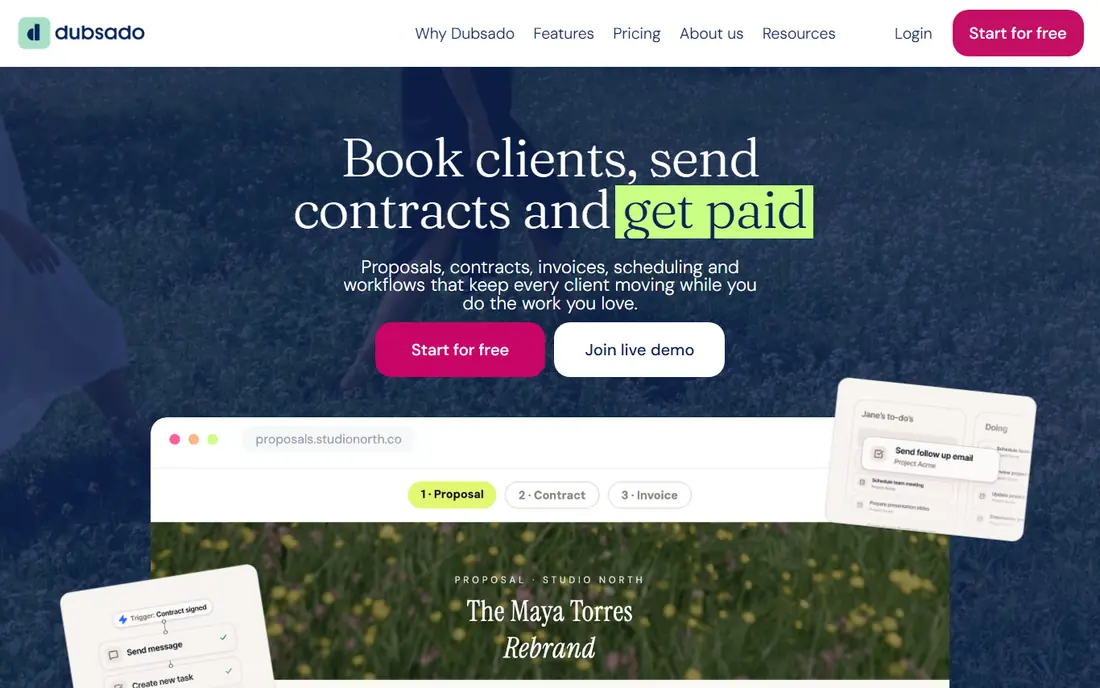
Dubsado appeals to consultants who want control over their intake process. You can build branded lead capture forms, questionnaires, proposals, contracts, and invoices, then link them into workflows that trigger the next step automatically. A discovery call form can lead to a proposal, which can lead to a contract and a first invoice, without manual copying between tools. That automation is valuable once you have a repeatable service offer.
Setup is the honest cost. Dubsado gives you flexibility, but you need to spend time designing workflows and testing them from the client side. New users may find HoneyBook easier on day one, while Dubsado rewards users who enjoy building a system once and reusing it. It suits consultants with a defined offer, a steady flow of enquiries, and the patience to set up workflows properly.
- Flexible forms, questionnaires, and workflows
- Branded client portal
- Contracts and invoices in one system
- Setup takes time to get workflows right
- Interface feels less guided than HoneyBook for new users
SuiteDash is an all-in-one business platform that combines CRM, project management, invoicing, scheduling, and a client portal. For a small consulting firm, that breadth removes several subscriptions at once. Each client gets a portal view of their projects, invoices, files, and messages, which reduces email back-and-forth and keeps deliverables in one place. White-label options also let a firm present the portal under its own brand.
Breadth brings complexity. No single module in SuiteDash is as deep as a dedicated CRM or project tool, and new users may need time to learn where each feature lives. That trade-off suits firms that value one system and one login over best-in-class depth in every area. Compare SuiteDash pricing by user count and features, and run a pilot with one client before moving your whole practice onto it.
- CRM, projects, invoicing, and client portal in one platform
- White-label options for firms
- Good value for small teams
- The breadth of features can feel busy at first
- Some modules are simpler than best-in-class single-purpose tools
HubSpot CRM is the best free starting point for consultants who need to organise leads and follow-ups. The free tier covers contacts, companies, deals, pipelines, and email tracking, plus meeting scheduling, which covers the core of a consulting sales process. You can track a lead from first enquiry through proposal to signed engagement, and set follow-up tasks so no enquiry goes quiet. The integration library also connects HubSpot to many invoicing and calendar tools.
The limit is delivery. HubSpot does not include consulting proposals, contracts, and invoicing in the free CRM, so you will still need Bonsai, FreshBooks, or a similar tool for billing. Paid HubSpot hubs add marketing and sales automation, but costs rise quickly as you add seats and features. HubSpot suits consultants whose main gap is pipeline discipline, not billing, and who want a free, credible CRM to start with.
- Free CRM with contacts, deals, and email tracking
- Strong integrations and meeting scheduling
- Scales into marketing and sales hubs
- Paid hubs get expensive as you add features
- Consulting-specific delivery tools are not built in
Pipedrive is a sales CRM built around a visual pipeline, and it suits consultants who sell through a defined process. You move deals from enquiry to discovery to proposal to signed, and the activity view shows the next step for every deal. That clarity helps solo consultants and small firms who lose deals through slow follow-up rather than weak expertise. Email integration and automation keep the pipeline current without constant manual updates.
Pipedrive does not try to be an all-in-one consulting platform. Invoicing, contracts, and project delivery live in other tools or integrations, so budget for that stack. Pricing varies by tier, with a free trial available, so check the current page. Choose Pipedrive when pipeline visibility is your main problem and you are happy to pair it with a billing tool.
- Clear visual pipeline for deals and proposals
- Easy follow-up and activity tracking
- Good for sales-led practices
- No free plan
- Delivery, invoicing, and project tools require integrations
FreshBooks is a strong choice when getting paid cleanly is the priority. You can create branded invoices, add tracked time and expenses, send payment reminders, and accept online payments, all from a dashboard that stays simple. Clients see a clear invoice and payment link, which reduces the friction that delays payment for many consultants. Expense capture, including receipt photos, also helps at tax time.
FreshBooks is not a full consulting platform. Its CRM and proposal tools are lighter than Bonsai or HoneyBook, so consultants who need strong proposal workflows may prefer those tools. Check current pricing, as FreshBooks plans change and introductory offers vary. It fits consultants who already win work through referrals and need reliable invoicing, time tracking, and expense handling.
- Clean invoicing with payment links
- Time tracking and expense capture
- Client-friendly invoice view
- CRM and proposal features are lighter than Bonsai
- Accounting depth is less than full accounting suites
Harvest focuses on a simple question that matters for hourly and retainer consultants, which is where did the time go. You track time against clients and projects, set budgets, and turn tracked time into invoices with little manual work. The free plan covers one seat and two active projects, which lets a new consultant test real billing before paying. Integrations with accounting and project tools extend it without adding clutter.
The limit is scope. Harvest does not include proposals, contracts, or a client portal, so you will pair it with another tool for the front end of an engagement. That focus is also its strength, because the time tracking stays fast and uncluttered. Harvest suits consultants who bill by the hour, manage retainers against a time budget, or need clean records for client reporting.
- Simple time tracking with project budgets
- Invoicing from tracked time
- A free plan for one seat and two projects
- No built-in proposals or contracts
- Larger firms may need deeper reporting than Harvest provides
Zoho CRM offers a free tier for up to three users, which makes it a low-cost way for a small consulting firm to organise contacts, deals, and follow-ups. Paid tiers add automation, forecasting, and deeper reporting, and integration with Zoho Invoice and Zoho Books covers billing without leaving the Zoho system. That combination suits firms that want one vendor for CRM and billing at a lower price than HubSpot paid tiers.
The interface can feel busy, and consulting workflows such as proposal-to-contract still need configuration rather than working out of the box. Zoho CRM fits small firms that are comfortable setting up their own pipelines and that want a CRM that can grow with them. Test the free tier with real deals before upgrading, and compare the cost of the tier you actually need, not just the entry price.
- Free tier for up to three users
- Broad CRM features including deals, tasks, and email
- Integrates with Zoho Invoice and Books
- Interface can feel busy
- Consulting-specific proposal and delivery workflows need setup
How we picked these
We reviewed vendor homepages and pricing pages in October 2026, and favoured tools that are actively maintained, used by real consulting and independent professional practices, and cover at least one core consulting workflow well, whether that is proposals, pipeline, delivery, or billing. We included all-in-one platforms, CRMs, and billing tools, and we noted where pricing is subscription based or varies by tier rather than publishing a number we could not verify.
How to choose consulting software without overbuying
Start with the bottleneck in your practice. If enquiries go unanswered, fix pipeline first with HubSpot or Pipedrive. If proposals and contracts take too long, fix the front end with Bonsai, HoneyBook, or Dubsado. If invoicing and time tracking cause delays, fix billing with FreshBooks or Harvest. If you run a small firm and want one system, test SuiteDash with one client. Buying a tool for a problem you do not have is the most common waste in consulting software.
Next, test the client view. Send yourself a proposal, a contract, and an invoice, and open them on a phone. Clients judge your practice by that experience, and a tool that looks good to you but confuses clients will cost you work. Finally, check the exit path. Confirm you can export contacts, invoices, and project records, and avoid a tool that locks your client history behind a plan you cannot afford to leave. Start with a free tier or trial, run one real engagement through it, and only then move your whole practice.
Frequently asked questions
What is the best consulting software for a solo consultant?
Bonsai is a strong default for solo consultants because it covers proposals, contracts, time tracking, and invoicing in one system starting at $15 per month. HoneyBook is a good alternative when a polished client portal and booking experience matter more than a simple all-in-one workflow.
Is there free software for consultants?
Yes, HubSpot CRM offers a free tier for contacts and pipeline management, Harvest offers a free plan for one seat and two projects, and Zoho CRM offers a free tier for up to three users. Free tiers cover pipeline or time tracking, but proposals, contracts, and full invoicing usually require a paid plan.
What is the difference between Bonsai and HoneyBook?
Bonsai leans toward a simple all-in-one workflow for solo professionals, with proposals, contracts, time, and invoicing in one chain. HoneyBook leans toward client experience, with branded portals, scheduling, and polished documents, and it suits practices where first impressions and bookings matter most.
Do consultants need a CRM and an invoicing tool?
Many consultants need both, because a CRM tracks leads and follow-ups while an invoicing tool tracks time, expenses, and payments. All-in-one tools such as Bonsai and SuiteDash combine both, while a pairing such as Pipedrive plus FreshBooks gives deeper tools in each area.
Can consulting software handle retainers?
Yes, most tools on this list support recurring invoices or retainer billing in some form, including Bonsai, FreshBooks, Harvest, and SuiteDash. Check whether retainers are billed as recurring invoices, tracked against a time budget, or both, because the right model depends on how you sell retainers.
How do I choose between an all-in-one tool and separate tools?
Choose an all-in-one tool when simplicity and one login matter more than depth, and choose separate tools when one workflow, such as pipeline or time billing, is complex enough to need a dedicated product. Test both approaches with one real engagement before committing your whole practice.
Sources
See where you really rank - block by block
ProMapRanker scans Google Maps across a grid of your service area. Simple monthly plans from $19, white-label on every plan.
Start freeKeep reading
 zscaler alternatives
Best Zscaler Alternatives in 2026
Looking for zscaler alternatives? We compare 9 SASE and zero trust platforms on architecture, data protection, pricing, and fit for your network and team.
Read → zapier alternatives free
Best Zapier Alternatives Free in 2026
Nine automation tools for zapier alternatives free in 2026, all with genuinely free tiers, plus free plan limits, starting prices and upgrade paths explained.
Read → which platform is best for online reputation
Which Platform Is Best for Online Reputation in 2026
Wondering which platform is best for online reputation? We compare 8 review, listing, and response tools for small and multi-location businesses and agencies.
Read →