 ProMapRanker
Best Software for Collaborative Article Creation in 2026

Key takeaways
- Google Docs leads for fast, real-time co-editing, since almost every contributor already knows it.
- Microsoft Word Online suits teams in Microsoft 365 that need formal tracked changes and approval workflows.
- Notion and Coda suit editorial teams that link drafts to calendars, databases, and publishing pipelines.
- Confluence and ClickUp Docs suit larger teams that need docs inside a wider project system.
- Overleaf is the specialist choice for technical articles with equations, citations, and LaTeX formatting.
Quick comparison
| Pick | Great for | Pricing starts at | Free tier | |
|---|---|---|---|---|
 Google Docs | Fast real-time co-editing | Free | Yes | Visit |
 Microsoft Word Online | Microsoft 365 editorial workflows | Free | Yes | Visit |
 Notion | Editorial calendars plus drafts | $10 per user per month | Yes | Visit |
 Coda | Dynamic docs with workflows | See website | Free trial | Visit |
 Confluence | Enterprise knowledge and docs | See website | Free trial | Visit |
 ClickUp Docs | Docs inside project tracking | $7 per user per month | Yes | Visit |
 Zoho Writer | Budget collaborative writing | Free | Yes | Visit |
 Overleaf | Technical and academic articles | Free | Yes | Visit |
The best Software for Collaborative Article Creation in 2026
Article creation is rarely solo work. Editors, writers, reviewers, and fact-checkers need to draft, comment, revise, and approve in one place. The tools below cover that workflow, from quick co-editing to structured editorial pipelines.
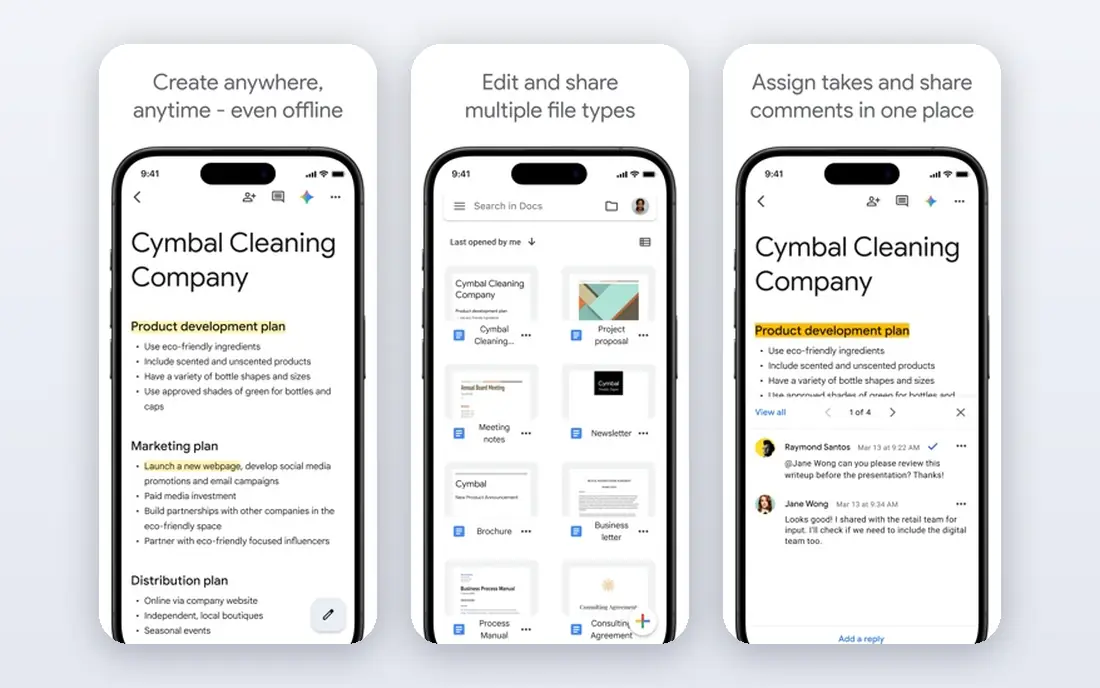
Google Docs remains the easiest way for several people to write one article at once. Real-time editing, suggestion mode, and threaded comments let writers and editors work in the same document without file versions. Sharing by link also helps outside contributors who do not have a paid account.
The limit is structure. Google Docs does not tell you which draft is final, nor does it link drafts to editorial calendars or publishing tasks without add-ons. For a single article with several authors, it is excellent. For a large editorial operation, pair it with a tracker such as Notion or ClickUp.
- Real-time editing and suggestion mode
- Comments and version history
- Easy sharing
- Weak structure for large editorial pipelines
- Formatting can drift in long docs
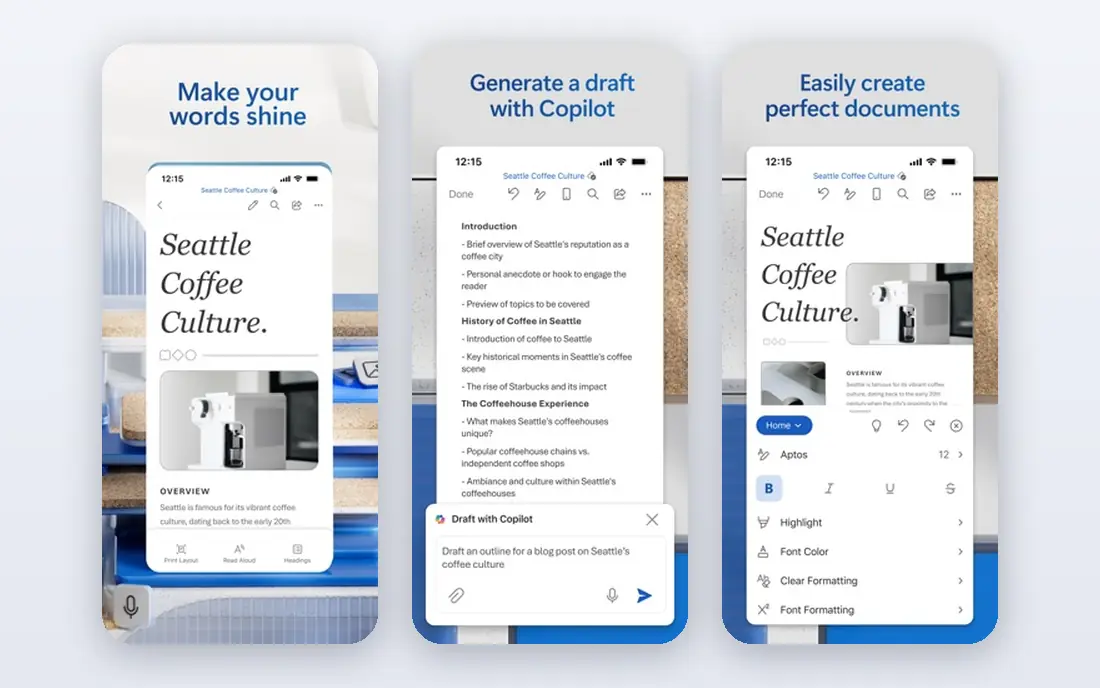
Microsoft Word Online, part of Microsoft 365, suits teams that already work in Word and need formal tracked changes. Co-authoring lets several people edit at once, while comments and tracked changes support editor review and approval. OneDrive storage keeps versions and sharing in one place.
Some advanced features need a paid Microsoft 365 plan, and the web version can feel heavier than Google Docs for a quick draft. For teams that publish in Word format or need strict change tracking for legal or academic review, it is the natural choice.
- Real-time co-authoring
- Tracked changes
- Microsoft 365 sharing and storage
- Full features need a paid plan
- Interface can feel heavy for quick drafts

Notion suits editorial teams that want drafts, calendars, and research in one system. A draft can carry an owner, status, due date, and related sources, while databases track the whole pipeline from pitch to published. Templates keep article structure consistent across writers.
Real-time co-editing can feel slower than Google Docs when several people edit the same block at once. Someone must also design and maintain the workspace, or it can turn into clutter. For teams that value pipeline visibility over raw typing speed, Notion is a strong hub.
- Pages plus databases for editorial pipelines
- Comments and suggested edits
- Templates
- Real-time co-editing can feel slower than Docs
- Workspace needs design
Coda turns documents into dynamic workspaces, with tables, buttons, and automations inside the doc itself. Editorial teams can build briefs, track assignments, collect reviewer scores, and move articles through stages without leaving the document. That flexibility suits teams with custom workflows.
The learning curve is real. New teams need time to learn Coda building blocks, and pricing for larger teams should be confirmed on the vendor site. For teams that want docs plus workflow in one place, Coda offers more than a plain editor.
- Docs with tables and buttons
- Automations
- Publishing workflows
- Learning curve for new teams
- Pricing needs confirmation for larger teams
Confluence suits larger teams that need structured, searchable article libraries alongside project work. Pages live in spaces with permissions, version history, and comments, while links to Jira connect articles to tasks and releases. That structure helps enterprises keep docs findable over time.
Setup is heavier than Google Docs or Notion, and value is highest for teams already using Atlassian tools. Small editorial teams may find it formal for a single article. Larger teams with many contributors and long-lived docs will benefit from the organisation.
- Structured pages and spaces
- Comments and version history
- Jira links
- Heavier setup
- Best value inside Atlassian tools
ClickUp Docs suits teams that already track editorial work in ClickUp. Drafts can sit beside tasks, goals, and deadlines, so writers see the brief, the due date, and the draft in one place. Comments and collaboration support review without switching tools.
The editor itself is simpler than Google Docs or Word, with fewer formatting and tracked-change options. Teams that need formal editing should draft in Docs or Word and track in ClickUp. Teams that value one workspace for tasks and drafts will find the link useful.
- Docs linked to tasks and goals
- Comments and collaboration
- Templates
- Editor features are simpler than Docs or Word
- Workspace needs setup
Zoho Writer gives budget-conscious teams real-time collaboration, comments, and tracked changes without a paid plan for basic use. It suits teams already using Zoho apps for mail, CRM, or projects, since documents link to that wider system. Sharing and offline options cover common editorial needs.
The ecosystem is smaller than Google or Microsoft, with fewer third-party integrations. Formatting for complex layouts can also need care when moving files between Writer and Word. For a low-cost, capable editor, it is a practical choice.
- Real-time collaboration
- Comments and tracked changes
- Zoho app links
- Smaller ecosystem
- Fewer third-party integrations than rivals
Overleaf is the specialist choice for technical articles, papers, and reports that need LaTeX formatting. Real-time collaboration, version history, and templates support multi-author academic work, while citation tools and equation support handle content that plain editors struggle with. Many journals accept LaTeX submissions directly.
The learning curve is the barrier. Co-authors who do not know LaTeX may find it harder than Google Docs, and it is not the right tool for general marketing articles. For STEM and academic teams, however, it remains the clearest collaborative LaTeX option.
- Real-time LaTeX collaboration
- Version history
- Citation and template support
- LaTeX learning curve
- Not suited to general marketing articles
How we picked these
We compared official pricing pages, feature pages, and product documentation for each vendor, and we checked that each homepage belongs to the product named. We favoured tools with real-time or near-real-time collaboration, comments, version history, and sharing controls for multi-author articles. Prices marked See website were not published as a single standard list price at the time of checking.
Choosing by article type and team size
Start with the article type. A news or marketing article with several quick reviewers needs fast co-editing in Google Docs or Word Online. A technical paper needs Overleaf. A long editorial pipeline needs Notion, Coda, or ClickUp Docs to track stages, not only text.
Next, agree roles before you invite contributors. Decide who can edit, who can comment, and who approves the final version. Suggestion mode and tracked changes protect the draft when many people touch it, while clear ownership prevents conflicting edits.
Finally, plan the path to publish. Check how the draft exports to your publishing system, whether formatting survives, and where the final version lives. A tool that writes well but exports poorly will create extra work at the last step, when deadlines are tightest.
Also agree naming and final-version rules before drafting starts. Use one clear file or page name for the live draft, a separate archive for old versions, and a single owner who marks the article as final. Without that rule, teams end up with several copies, conflicting edits, and no clear source for publishing. Keep reviewer comments in the document, not in chat, so the next editor can see why a change was made. Clear ownership at the end saves more time than any single editing feature.
Keep a short style note with each article, covering tone, heading style, and source format. New contributors can then match the house style without long briefings, and editors spend less time fixing formatting. A one-page style note is enough for most editorial teams.
Frequently asked questions
What is the best tool for writing an article together?
Google Docs is the best default for most teams because real-time editing, comments, and suggestion mode work with almost any contributor. Microsoft Word Online is the best choice for teams already in Microsoft 365.
Can several people edit the same article at once?
Yes, in Google Docs, Word Online, Notion, Coda, Zoho Writer, and Overleaf. Real-time editing works best in Google Docs and Word Online, while other tools may feel slower when many people edit the same section.
How do I track changes from editors?
Use suggestion mode in Google Docs, tracked changes in Word Online or Zoho Writer, or version history in Notion and Overleaf. Agree one review method per article so edits do not get lost across comments and chat.
Which tool is best for academic articles?
Overleaf is best for LaTeX-based academic work with equations and citations. Google Docs and Word Online suit non-technical academic articles, especially when co-authors need simple sharing and comments.
Do I need a paid plan to collaborate?
No, for basic collaboration. Google Docs, Word Online, Zoho Writer, and Overleaf offer free collaboration, while Notion and ClickUp Docs offer free plans with limits. Paid plans add storage, admin controls, and advanced features.
Sources
See where you really rank - block by block
ProMapRanker scans Google Maps across a grid of your service area. Simple monthly plans from $19, white-label on every plan.
Start freeKeep reading
 zoro.to alternatives
Best Zoro.to Alternatives in 2026
We compare the best zoro.to alternatives in 2026, listing only legal licensed anime streaming services, from Crunchyroll to free options for fans today.
Read → zip alternatives
Best Zip Alternatives in 2026
We compare the best zip alternatives for buy now, pay later in 2026, covering pay-in-4 plans, fees, spending limits, and credit reporting options today.
Read → yesware alternatives
Best Yesware Alternatives in 2026
Compare the best yesware alternatives for sales email tracking, templates, and sequences, with current pricing and honest tradeoffs for small sales teams.
Read →