 ProMapRanker
Which Serverless Platforms Fits You? 6 Tools Compared

Container-based serverless · Pricing starts at: Pay per use
Direct answer
Start with Google Cloud Run if you need container-based serverless. Alternatives: Azure Functions for serverless on Azure, and AWS Lambda for serverless on AWS. Details, prices and limits for the rest of the 6 tools are below.
Key takeaways
- Google Cloud Run is the opening pick, best for container-based serverless.
- Supabase fits edge functions for Postgres apps.
- The main caution on Google Cloud Run: GCP ecosystem smaller than AWS.
- Free plans are common here: 6 of 6 tools have one, including Google Cloud Run, Azure Functions, AWS Lambda and Netlify.
Quick comparison
| Pick | Great for | Pricing starts at | Free tier | |
|---|---|---|---|---|
| Google Cloud Run | Container-based serverless | Pay per use | Yes | Visit |
 Azure Functions | Serverless on Azure | Pay per use | Yes | Visit |
 AWS Lambda | Serverless on AWS | Pay per use | Yes | Visit |
 Netlify | JAMstack serverless functions | See website | Yes | Visit |
 Vercel | Frontend with serverless functions | See website | Yes | Visit |
 Supabase | Edge functions for Postgres apps | See website | Yes | Visit |
6 serverless platforms in detail
Short on time? The summary and table above give the quick view of 6 serverless platforms, and the profiles that follow give the detail behind each entry.
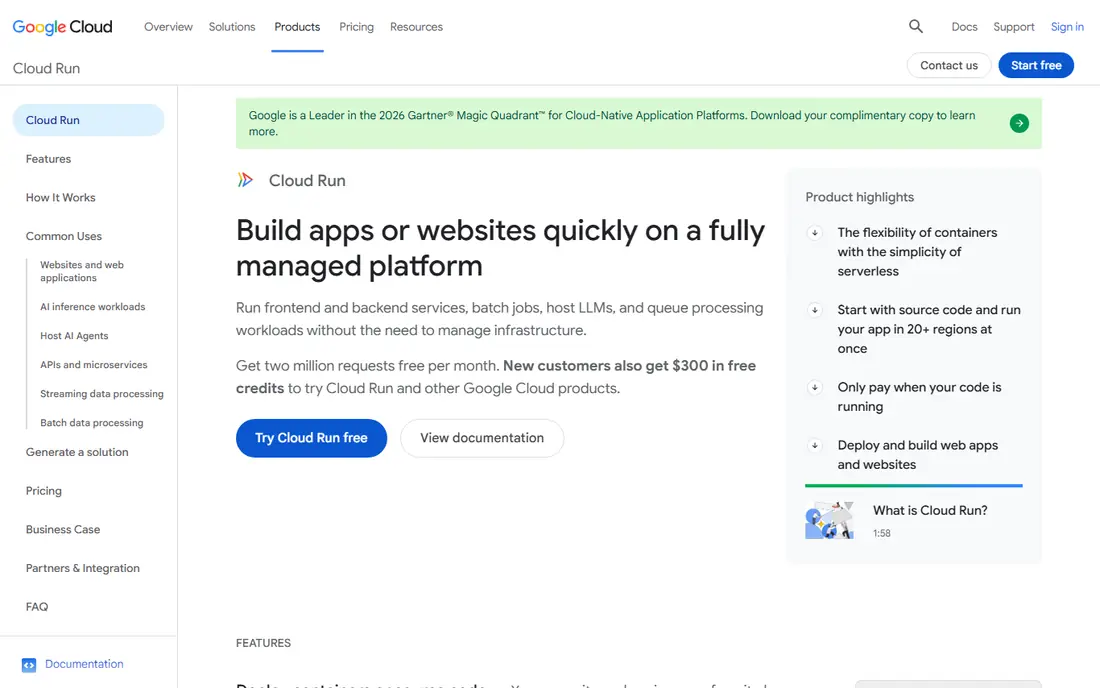
Pick Google Cloud Run if this describes you: container-based serverless. Cloud Run lets teams keep their containers and get serverless scaling. On top of that, scale-from-zero introduces cold starts, mitigated by minimum instances at a cost.
But for container-native teams, Cloud Run is the gentlest path to serverless: same artifact, new scaling model. Package the app as a container, deploy, and it scales to zero when idle and up under load, billed per request. On cost, Google Cloud Run starts like this: Pay per use. Free access exists with Google Cloud Run.
The main drawbacks: Cold starts on scale-from-zero.
- Run any container serverlessly
- Scales to zero
- GCP ecosystem smaller than AWS
Where Azure Functions fits: serverless on Azure. Triggers across Azure services, Durable Functions for stateful workflows, and first-class C# and Visual Studio support make it natural for.NET teams. The portal and documentation experience trails AWS, and the community is smaller.
But organizations standardized on Azure, Active Directory, and Microsoft 365 get serverless that suits their identity and compliance story. Azure Functions is the serverless answer for Microsoft shops. Also, for.NET teams particularly, it is the path of least resistance. Azure Functions pricing: Pay per use. A free plan is available with Azure Functions.
Where it is weaker: Documentation uneven.
- Deep Microsoft integrations
- Durable functions for workflows
- Portal experience lags AWS
Think of AWS Lambda for serverless on AWS. Functions respond to events from nearly every AWS service, scale automatically, and bill per millisecond of execution. From a buyer's view, teams already on AWS get serverless compute that plugs into their databases, queues, and APIs with minimal glue.
What to check first: Complicated pricing.
In practice, the pricing has real edge cases: data transfer, provisioned concurrency, and long-running functions can surprise. As for the details, cold starts still affect latency-sensitive paths on some runtimes. Entry price for AWS Lambda: Pay per use. Free access exists with AWS Lambda.
- Deepest AWS integrations
- Mature tooling
- Cold starts on some runtimes
Netlify is aimed squarely at JAMstack serverless functions. The free level remains genuinely handy. Forms, identity, and split testing handle the typical dynamic needs without a backend server.
Where it is weaker: Enterprise features cost more.
Teams choosing between Vercel and Netlify normally decide on framework preference and pricing details. Beyond that, function execution limits are tighter than Lambda's, and complicated backends outgrow the model. But for marketing sites, documentation, and JAMstack apps with light server-side needs, Netlify's simplicity wins. Check the vendor site for Netlify pricing; none is listed in this comparison. Free access exists with Netlify.
- Straightforward git-based workflow
- Ample free tier
- Function runtime limits
Where Vercel fits: frontend with serverless functions. Push to git and your Next.js app deploys worldwide with serverless functions handling the backend, no infrastructure config required. In daily use, usage-based pricing can surprise teams at scale; heavy function execution or bandwidth gets costly compared with raw cloud.
Downsides: Costs scale with usage.
And you trade control for convenience. But for product teams that want to ship web apps without thinking about servers, Vercel's workflow advantage outweighs the premium. Vercel does not show a starting price in this comparison, so check the vendor site for current pricing. Vercel includes a free tier.
- Very good Next.js integration
- Git-push deployments
- Less control than raw cloud
For edge functions for Postgres apps, Supabase is a natural candidate. It is younger than the cloud giants, and edge functions have execution limits suited to API glue instead of heavy compute.
Downsides: Younger system.
Check the vendor site for Supabase pricing; none is listed in this comparison. Supabase offers a free plan.
- TypeScript-first
- Ample free level
- Edge function limits
How we built this list
Selection started from tools commonly considered for serverless platforms, then narrowed to 6 that have clear pricing information or a clear quote process. Figures are shown as the vendors publish them. Billing terms, seat minimums and add-ons can change the real cost. Position on the page reflects fit for a typical buyer first, with price clarity and free access breaking ties. Treat it as a guide, not a ruling.
Things to verify first
- Confirm the entry price on the vendor page. For Netlify, Vercel and Supabase that means a quote rather than a fixed price.
- Look at free plan limits closely: Google Cloud Run, Azure Functions, AWS Lambda and others have one, and the caps decide whether it is usable for real work.
- Read the limits listed for Google Cloud Run first: GCP ecosystem smaller than AWS.
- Price Supabase for your actual team size; headline prices rarely include add-ons or overage.
- Confirm that Google Cloud Run connects to the apps your team already uses, on the plan you would actually buy.
Frequently asked questions
Can I try these options before paying?
Often, yes. Google Cloud Run, Azure Functions, AWS Lambda and others have a free plan. Use your own data and a real task during the test, and check what the free tier or trial limits before you rely on it.
Is serverless less expensive than traditional hosting?
For variable workloads, normally yes, since idle time costs nothing. The breakeven relies on your traffic pattern: spiky favors serverless, flat and heavy favors dedicated compute.
How are the tools for serverless platforms ordered?
The order follows typical fit for serverless platforms, with Google Cloud Run first and Supabase last, then price clarity and free access. It is editorial judgement, not a score, so another team could rank the tools differently.
Do these tools publish their prices?
Not all of them. Netlify, Vercel and Supabase publish no starting price, so expect a quote request for those. The rest, Google Cloud Run included, show a starting price, though seats and billing terms still change the final cost.
Which options for serverless platforms have a free plan?
On this list, 6 of 6 tools include a free plan, among them Google Cloud Run, Azure Functions, AWS Lambda and Netlify. Caps on seats, usage or features are common, so test the free plan against your real workload.
Sources
See where you really rank - block by block
ProMapRanker scans Google Maps across a grid of your service area. Simple monthly plans from $19, white-label on every plan.
Start freeKeep reading
 zscaler alternatives
Best Zscaler Alternatives in 2026
Looking for zscaler alternatives? We compare 9 SASE and zero trust platforms on architecture, data protection, pricing, and fit for your network and team.
Read → zapier alternatives free
Best Zapier Alternatives Free in 2026
Nine automation tools for zapier alternatives free in 2026, all with genuinely free tiers, plus free plan limits, starting prices and upgrade paths explained.
Read → which platform is best for online reputation
Which Platform Is Best for Online Reputation in 2026
Wondering which platform is best for online reputation? We compare 8 review, listing, and response tools for small and multi-location businesses and agencies.
Read →