 ProMapRanker
Best SDR Software Defined Radio in 2026

Key takeaways
- Most SDR software is free, so the real cost is the receiver hardware, antenna and time to learn the program.
- SDR++ suits most beginners, SDR# suits Windows users who want plugins, and GQRX suits Mac and Linux users.
- GNU Radio and SDRangel suit development and advanced signal work, but they need more learning time.
- Transmitting with SDR hardware requires a license and legal frequency use in most countries, so check local rules before transmitting.
- The antenna matters as much as the program, and a poor antenna will limit even the best software.
Quick comparison
| Pick | Great for | Pricing starts at | Free tier | |
|---|---|---|---|---|
 SDR++ | Beginners on any system | Free | Yes | Visit |
| SDR# | Windows users and plugins | Free | Yes | Visit |
 GQRX | Mac and Linux listening | Free | Yes | Visit |
 SDRangel | Advanced receive and transmit work | Free | Yes | Visit |
 GNU Radio | Signal processing development | Free | Yes | Visit |
 SDR Console | Windows listening and scanning | Free | Yes | Visit |
 HDSDR | Lightweight Windows listening | Free | Yes | Visit |
 SatDump | Satellite decoding | Free | Yes | Visit |
 SDRTrunk | Trunked radio and digital voice | Free | Yes | Visit |
 OpenWebRX | Web-based shared receivers | Free | Yes | Visit |
The best sdr software defined radio
We compared programs that work with common SDR receivers, such as RTL-SDR dongles, Airspy, SDRplay and HackRF hardware, and we judged them on ease of use, hardware support and fit for different tasks. The best sdr software defined radio software for a beginner is not the same as the best program for a developer, so this guide groups tools by the job they do best. All programs here are free for amateur use, with SDR Console requiring a commercial license only for commercial use in the sources we found.
SDR++ is our first suggestion for most newcomers, because it runs on Windows, Linux, macOS and Android, and it works with RTL-SDR, Airspy, HackRF, SDRplay and other common hardware. Its interface is clean, with a spectrum display, waterfall, frequency controls and audio settings that are easy to find. A beginner can plug in a dongle, select the device, tune a local FM station and start listening in a few minutes, without learning a complex workflow first.
The trade-off is plugin depth. SDR++ is less plugin-heavy than SDR#, so users who want a large library of add-on decoders or scanner tools may find fewer ready-made options. Nightly builds also change quickly, which can be a plus for new features but a drawback for users who want a stable, unchanging version. The stable releases are a safer choice for most listeners.
- Fast, modern and cross-platform
- Works with many common receivers
- Clean waterfall and spectrum view
- Fewer plugins than SDR#
- Nightly builds can change quickly
SDR#, also written as SDRSharp, remains one of the most popular SDR programs for Windows users, with a long history in the SDR community. It works especially well with Airspy receivers, but it also supports RTL-SDR, HackRF and other devices through drivers and plugins. Its plugin system lets users add scanners, decoders, frequency managers and recording tools, and its tutorial base is large, which helps when a setup problem appears.
The main limit is platform. SDR# is Windows-focused, so Mac and Linux users will find GQRX or SDR++ a better fit, unless they run Windows in a virtual machine. Plugin management can also be messy, since plugins come from different authors and may need specific versions. A beginner should start with the core program and add only one plugin at a time, testing each change before adding another.
- Very popular on Windows
- Strong Airspy support
- Many plugins and tutorials
- Windows-focused
- Plugin setup can be messy for beginners
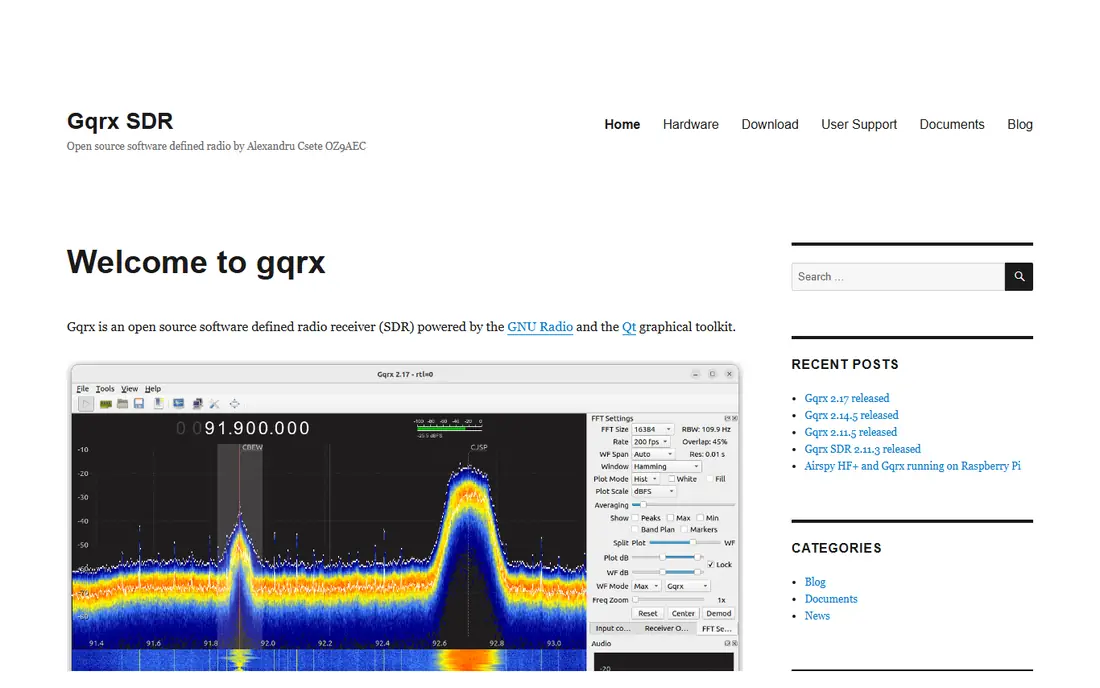
GQRX suits Mac and Linux users who want a native program for listening, without running Windows software in a virtual machine. It supports RTL-SDR, HackRF, Airspy, bladeRF, SDRplay, USRP and other devices, and it offers a clean spectrum, waterfall and demodulator view. Its controls for frequency, gain, mode and audio are straightforward, which helps a listener focus on signals rather than settings.
The trade-off is depth. GQRX has fewer plugins than SDR#, and it is not a full development environment like GNU Radio. Users who want advanced decoding, trunking or custom signal processing will need a second tool. For general listening, FM, airband, amateur bands and ADS-B work, though, GQRX covers the core needs well.
- Native Mac and Linux support
- Clean interface
- Works with many receivers
- Fewer plugins than SDR#
- Less suited to heavy development work
SDRangel suits advanced users who want a single program for many signal types, including digital modes, satellite work and, on capable hardware such as HackRF and PlutoSDR, transmit. It supports RTL-SDR, HackRF, Airspy, bladeRF, LimeSDR, PlutoSDR and other devices, and it offers a large set of demodulators and channel tools. That breadth makes it useful for experimenters who move between bands and modes.
The learning curve is the main drawback. SDRangel has many panels, settings and options, and a beginner may feel lost before finding the first signal. It rewards users who already understand SDR basics, such as gain, sample rate and demodulation, and who want to build a custom receive chain. Transmit also requires legal authority, so users must check license and frequency rules before using any transmit feature.
- Wide device support
- Transmit on capable hardware
- Many demodulators and plugins
- Steeper learning curve
- Interface can feel busy for beginners
GNU Radio is the standard open-source toolkit for building signal processing systems, and it suits developers, students and researchers who want to create their own receivers, decoders and transmitters. Its companion tool lets users build flowgraphs by connecting blocks for sources, filters, demodulators and sinks, without writing all code by hand. That graphical approach makes it possible to test an idea quickly, then move to Python or C++ code for a finished system.
The downside is that GNU Radio is not a simple listener. A user who only wants to tune FM radio will find SDR++ or GQRX faster and easier. GNU Radio also needs time to learn concepts such as sample rate, filtering and signal flow, and a first flowgraph may take hours rather than minutes. That investment pays off for development work, but it is unnecessary for casual listening.
- Standard tool for signal processing
- Graphical flowgraphs
- Huge block library
- Needs learning time
- Not a simple listener out of the box
SDR Console suits Windows users who want a polished listening program with strong scanning, recording and satellite features. It supports RTL-SDR, Airspy, HackRF, SDRplay and other receivers, and it offers a clear spectrum, waterfall and memory system for finding and saving signals. Its satellite tracking and recording tools also make it useful for listeners who follow weather satellites or amateur satellites.
The main limits are platform and licensing. SDR Console is Windows-only, so Mac and Linux users should choose another program, and commercial use requires a paid license, while amateur use is free in the sources we found. That licensing note matters for firms that want to use it at work, since they should check the current terms before deployment.
- Strong Windows interface
- Good for scanning and satellite work
- Supports many receivers
- Windows-only
- Commercial use needs a paid license
HDSDR suits Windows users who want a lightweight program that runs well on older computers and focuses on listening. It supports RTL-SDR, Airspy, HackRF, SDRplay and other devices, and it offers spectrum, waterfall and demodulation controls in a simple layout. Its low resource use makes it useful for a spare laptop or a small single-board computer running Windows.
The trade-off is age and feature depth. HDSDR has an older interface and fewer modern tools than SDR++ or SDR Console, and it lacks some of the plugin and development options found in larger programs. Users who want satellite decoding, trunking or custom processing will need a second tool. For plain listening, though, its simplicity is a strength.
- Lightweight and fast
- Simple interface
- Works with many receivers
- Windows-only
- Older interface
- Fewer modern features
SatDump suits listeners who want to decode weather satellites, amateur satellites and other space signals, rather than only listening to local radio. It provides pipelines for common satellite types, handles demodulation and decoding, and can produce images and data from satellite passes. That focus makes it far more useful for satellite work than a general listener with a few add-ons.
The limit is scope. SatDump is not a general-purpose scanner or chat program, and it needs a suitable antenna, often a directional or high-gain antenna, plus accurate pass predictions. A user with only a small indoor antenna may struggle to get clean satellite signals, even with the best software. That antenna requirement should be planned before judging the program.
- Built for satellite decoding
- Supports many weather and amateur satellites
- Clear pipeline tools
- Focused on satellites, not general listening
- Needs good antenna and tracking data
SDRTrunk suits listeners who want to follow trunked radio systems, where many users share a set of frequencies under a control channel, and digital voice modes used by public safety and business systems. It is a Java application that supports Mac with recent versions, as well as Windows and Linux, and it can decode P25 and other digital systems where monitoring is legal. Its channel and talkgroup views help a listener follow a system rather than a single frequency.
The cautions are setup and law. SDRTrunk needs Java and careful configuration of tuners, channels and talkgroups, and it is only useful for systems that are legal to monitor in the listener location. Some systems are encrypted or restricted, and no software can legally decode encrypted traffic. Users should check local rules before monitoring any public safety or business system.
- Decodes trunked radio systems
- Supports digital voice modes
- Java-based and cross-platform
- Needs Java and setup care
- Only useful where trunked systems are legal to monitor
OpenWebRX suits users who want to share a receiver over a network or access it from a browser, without installing SDR software on every device. It runs on a host computer, such as a Raspberry Pi or a server, and lets users tune, listen and view the spectrum from a web page. That model fits clubs, schools and home stations where one receiver serves several listeners.
The trade-off is hosting. OpenWebRX needs a computer that stays on and is reachable on the network, plus setup for device drivers and user access. It is less suited to portable listening on a laptop in the field, where SDR++ or GQRX on the same machine is simpler. Performance also depends on the host and network, not only on the receiver.
- Runs in a web browser
- Good for shared or remote receivers
- Supports many devices
- Needs a host computer or server
- Less suited to portable use
How we picked these
We compared official project pages, documentation and community guides, and we favored programs that are live in October 2026, work with common SDR hardware, and fit a clear listening, decoding or development job. We excluded programs that could not be verified as current, programs whose former domains now host unrelated content, and tools that only work with a single closed hardware system. Where a program has a commercial license condition, we noted it rather than presenting it as fully free for all uses.
We also weighed hardware support and platform coverage. A program that only works on one system or one receiver is useful for its niche, but it should not top a general list. That is why SDR++ leads for beginners, while specialist tools such as SatDump and SDRTrunk appear for their specific jobs, even though they suit fewer users overall.
What to check before you buy
Start with hardware you already own or plan to buy, then choose software that supports it. An RTL-SDR dongle covers most listening, FM, airband, amateur bands, ADS-B and weather satellites, while Airspy, SDRplay and HackRF offer better performance and wider ranges. Check the program device list before buying hardware, since not every program supports every receiver equally well.
Next, plan the antenna. A small antenna indoors will limit what any program can hear, while a better outdoor antenna, a filter for strong local signals, and a low-noise setup can transform results. Spend on antenna and filtering before buying a more costly receiver, unless a specific project needs wider bandwidth or transmit capability. A good antenna also reduces overload from strong FM, AM or cellular signals.
Finally, learn the legal limits. Listening to public broadcast and amateur signals is widely allowed, but monitoring encrypted, private or restricted systems is not, and transmitting requires a license and legal frequency use in most countries. Check local rules, use only frequencies you are allowed to use, and keep transmit-capable hardware in receive mode until you hold the right authorization. That care keeps a hobby legal and safe for other users.
Frequently asked questions
What is the best sdr software defined radio software for beginners?
SDR++ is a strong first choice for most beginners, because it is free, cross-platform and works with many common receivers. Windows users who want plugins may prefer SDR#, while Mac and Linux users may prefer GQRX. Start with one program, learn tuning, gain and demodulation, and add specialist tools only when a project needs them.
What hardware do I need for SDR software?
An RTL-SDR dongle plus an antenna covers most listening, including FM, airband, amateur radio, ADS-B aircraft and weather satellites. Airspy, SDRplay and HackRF offer better performance and wider frequency ranges, but they cost more and need better antennas to show their advantage. The antenna matters more than the dongle for what you can hear.
Can SDR software transmit?
Some programs, such as SDRangel, support transmit on capable hardware like HackRF and PlutoSDR, while receive-only programs such as SDR#, GQRX and SDR++ do not transmit by design. Transmitting legally requires an amateur radio license in most countries, and license-free operation is limited to specific bands and power levels. Check local rules before using any transmit feature.
Which SDR software works on Mac?
GQRX runs natively on macOS, as do SDR++ and SDRangel, and GNU Radio installs on Mac as well. SDR#, SDR Console and HDSDR are Windows-only, though some users run them in virtual machines. SDRTrunk supports Mac with recent versions through its Java application. For a first Mac program, GQRX or SDR++ is the simplest path.
Is SDR software really free?
Yes, essentially. Every program in this guide is free for amateur use, and most are open source. SDR Console requires a commercial license only for commercial use, so firms should check its current terms before work use. The hardware, dongle and antenna are the main costs, starting around thirty dollars for a basic RTL-SDR kit in the sources we found.
Sources
See where you really rank - block by block
ProMapRanker scans Google Maps across a grid of your service area. Simple monthly plans from $19, white-label on every plan.
Start freeKeep reading
 zoho inventory alternatives
6 Alternatives to Zoho Inventory, Compared on Price and Fit
Zoho Inventory alternatives: 6 tools compared on price, free plans and fit. Katana leads the list for manufacturers. Fit and flaws are laid out for each entry.
Read → zoho crm alternatives
Best Zoho CRM Alternatives (2026)
Need Zoho CRM alternatives? We compare 7 tools on cost, free access and who each suits. Every pick gets a straight assessment. Built for quick decisions.
Read → zelle alternatives
Best Zelle Alternatives in 2026
Compare the best Zelle alternatives for sending money to friends, paying sellers and moving funds abroad, with honest notes on fees, speed and safety in 2026.
Read →