 ProMapRanker
Best Sales Pipeline Management Tools in 2026


Visual pipeline management · Pricing starts at: $14 per user per month
Key takeaways
- Pipedrive is the purest pipeline tool in this list, while HubSpot and Salesforce add marketing and enterprise depth around the pipeline.
- Free tiers from HubSpot and Freshsales suit very small teams, but forecasting and automation usually need a paid plan.
- Per-seat pricing adds up fast, so count every user who needs edit access before you compare monthly totals.
- The best pipeline tool is the one reps actually update daily, so favor a clear board, fast activity logging, and simple reporting.
Quick comparison
| Pick | Great for | Pricing starts at | Free tier | |
|---|---|---|---|---|
| Pipedrive | Visual pipeline management | $14 per user per month | No | Visit |
 HubSpot Sales Hub | All-in-one sales and marketing CRM | Free | Yes | Visit |
 Salesforce Sales Cloud | Enterprise pipeline customization | $25 per user per month | No | Visit |
 Zoho CRM | Value pipeline for growing teams | $14 per user per month | Yes | Visit |
 Freshsales | Budget pipeline with AI features | $9 per user per month | Yes | Visit |
 monday CRM | Custom pipeline boards | $12 per seat per month | No | Visit |
 Close | Inside sales with built-in calling | $29 per user per month | No | Visit |
 Copper | Pipeline for Google Workspace teams | $23 per user per month | No | Visit |
The best sales pipeline management tools
We compared official pricing pages and published plan details for sales pipeline tools available in October 2026. The best software for sales pipeline management is not the one with the most features; it is the one that shows every deal stage clearly, reminds reps of next steps, and gives managers a forecast they can trust.
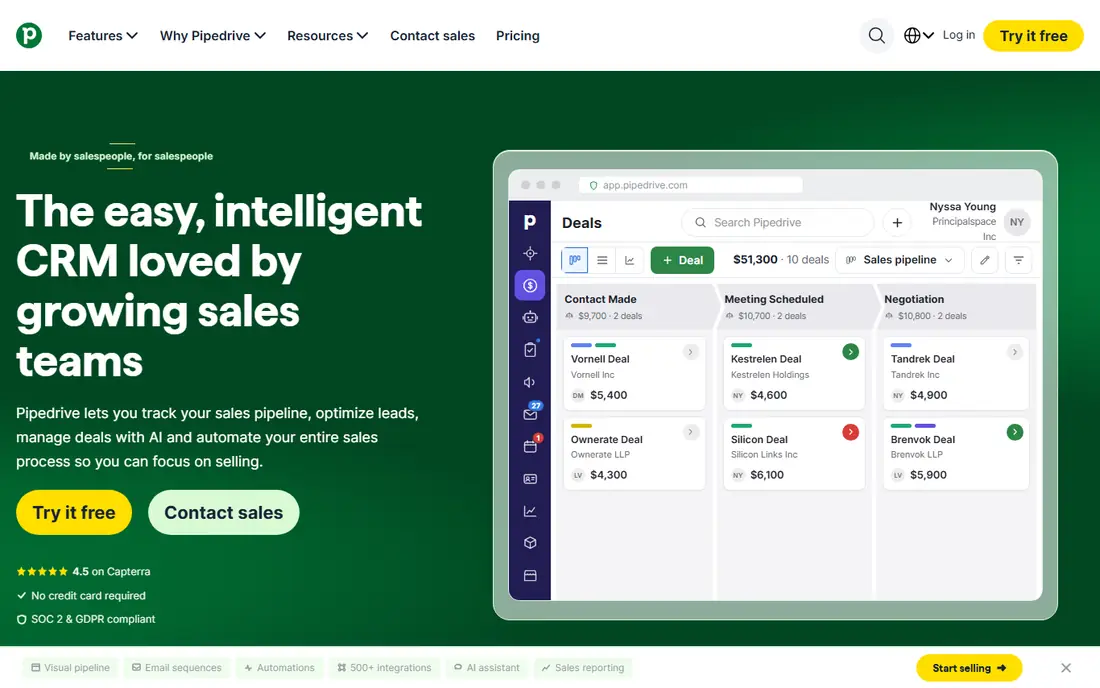
Pipedrive was built as a pipeline tool first, and it still shows. Deals sit on a visual board, activities drive next steps, and a rep can see exactly what to do today without digging through menus. Setup is fast for a small team, and the interface stays focused on deals rather than on a wider platform.
The limits appear as a team grows. Email sync, automations, sequences, and forecasting start on higher tiers, with Lite at $14 per seat per month billed annually, Growth at $39, Premium at $59, and Ultimate at $79. A team that needs those features should price Growth or Premium, not Lite, before comparing Pipedrive with rivals.
- Clear visual pipeline board
- Activity-based selling
- Fast setup for small teams
- No free plan
- Marketing automation needs add-ons
- Forecasting and sequences start on higher tiers

HubSpot Sales Hub suits a team that wants sales and marketing on one record. The free CRM covers contacts, companies, and deals for up to 2 users, with one pipeline, which is enough for a solo founder or a tiny team to start. Paid tiers add sequences, forecasting, and automation, with Starter from about $20 per seat per month at list, Professional at $90, and Enterprise at $150, plus onboarding fees on the higher tiers.
That breadth is both the appeal and the cost trap. A team that only needs a pipeline may pay for platform features it never uses, and contact-tier pricing on Marketing Hub can add more. Choose HubSpot when marketing and sales truly share a funnel; choose a purer pipeline tool when they do not.
- Free CRM for up to 2 users
- Shared contact and deal records
- Strong marketing integration
- Forecasting and sequences need Professional at $90 per seat
- Onboarding fees on higher tiers
- Costs grow with add-ons

Salesforce Sales Cloud is the enterprise standard for pipeline management, with custom objects, approval flows, forecasting, and reporting that can model almost any sales process. Its app ecosystem and integration options are unmatched, and large teams can run complex, multi-team pipelines on one platform.
That power needs staffing. Even a mid-size deployment benefits from an admin, and implementation costs can exceed license costs in the first year. Starter at $25 per user per month is a real entry point, but most growing teams land on Professional or Enterprise tiers. Pick Salesforce when your process is complex and your team can staff it; otherwise, a simpler tool will move faster.
- Deep customization and reporting
- Large app ecosystem
- Enterprise security and scale
- Needs admin time or consultants
- Starter is limited
- Total cost rises with add-ons and implementation
Zoho CRM gives a growing team a lot of pipeline for the price. The free tier covers up to 3 users with basic pipeline features, and paid plans start at $14 per user per month. Workflow automation, forecasting, and AI assistance appear on higher tiers, but even mid-tier plans undercut HubSpot and Salesforce on license cost alone.
The interface is denser than Pipedrive, and new users may need time to learn where pipeline, automation, and reporting settings live. For a cost-conscious team that is willing to invest a day in setup, Zoho is one of the best value picks in this list. For a team that wants the simplest board on day one, Pipedrive still feels lighter.
- Low starting price
- Broad feature set for the cost
- Free tier for up to 3 users
- Interface feels dense
- Advanced automation needs higher tiers
- Support quality varies by plan
Freshsales, from Freshworks, is a budget-friendly pipeline tool with a free tier and paid plans starting at $9 per user per month. Built-in phone, email, and chat tools help a small inside-sales team work deals without buying separate tools. AI scoring and forecasting sit on higher tiers, but the core pipeline, activities, and reporting are solid at the entry price.
The ecosystem is smaller than Salesforce or HubSpot, so a team with unusual integration needs should test connectors before buying. For a small team that wants a low-cost, all-in-one sales workspace, Freshsales is a strong pick, and the free tier makes it easy to test with real deals.
- Free tier available
- Low paid starting price
- Built-in phone and email tools
- Advanced AI and forecasting need higher tiers
- Smaller ecosystem than Salesforce
- Reporting depth varies
monday CRM appeals to teams that want to shape their pipeline their way. Boards, columns, automations, and dashboards can be built without code, and a sales manager can change stages, views, and reports without waiting for an admin. Starting at $12 per seat per month, it is priced for small and mid-size teams.
Pipeline depth is lighter than a dedicated CRM: lead scoring, forecasting, and email sequencing are present but less deep than HubSpot or Salesforce. Teams that already use monday for projects will like the shared workspace, while teams that need deep CRM reporting should test those features closely during a trial.
- Highly custom boards and views
- Automations and dashboards
- Easy for non-technical teams to shape
- No free plan
- CRM depth is lighter than Salesforce
- Per-seat cost grows with viewers who need edits
Close is built for inside sales teams that live on the phone and in email. Calling, SMS, and email are built into the pipeline, so a rep can call, log, and move a deal without switching apps. That tight loop suits high-velocity teams with short cycles and many touches per deal.
Field sales teams and marketing-heavy teams will find less here: territory management, marketing automation, and enterprise reporting are thinner than in HubSpot or Salesforce. Starting at $29 per user per month, Close is priced for teams that will use its communication tools daily. If your reps do not call all day, a cheaper pipeline tool may fit better.
- Built-in calling, SMS, and email
- Fast activity logging
- Pipeline built for high-velocity teams
- No free plan
- Less suited to field sales
- Marketing features are limited
Copper is the natural pipeline pick for a team that lives in Gmail and Google Workspace. Contacts, emails, and calendar events sync into the pipeline with little manual entry, and the interface feels like an extension of Workspace rather than a separate system. Starting at $23 per user per month, it is priced for small and mid-size teams.
Outside Google Workspace, much of that advantage fades, and automation and reporting are more modest than in HubSpot or Salesforce. A Microsoft 365 team should look elsewhere, while a Workspace team that wants a pipeline without a steep learning curve will find Copper a good fit.
- Deep Gmail and Google Workspace integration
- Simple pipeline views
- Fast setup for Workspace teams
- No free plan
- Weaker outside Google Workspace
- Automation depth is modest
How we picked these
We compared official pricing pages and published plan details for sales pipeline tools available in October 2026. We favored tools with a clear visual pipeline, deal stages, activity tracking, and reporting, and with live pricing a buyer can check. We left out prospecting-only tools, email-only tools, and platforms without a real pipeline view. We did not claim hands-on testing; our comparison rests on vendor pages, pricing, and public reviews.
How to choose a pipeline tool for your team
Count seats first, then features. List every rep, manager, and admin who needs edit access, and price that seat count on the tier that actually includes forecasting and automation, not the cheapest tier. A tool that looks cheap at $14 per seat but needs $59 per seat for forecasting is not a $14 tool for your team.
Pipeline stages, adoption, and reporting
Keep stages to the steps a deal truly passes through, and define what moves a deal from one stage to the next. Test activity logging with a real rep: if logging a call takes more than a minute, adoption will slip. Check forecasting reports with your own data during a trial, and confirm that the tool exports deals cleanly if you ever leave.
Frequently asked questions
What is the best sales pipeline management software?
Pipedrive is the best pure pipeline tool for most small teams, thanks to its clear board and fast setup. HubSpot Sales Hub is better when marketing and sales share one system, while Salesforce Sales Cloud suits large teams with complex processes. Pick by team size, process complexity, and the tier that includes the features you need.
Is there a free sales pipeline tool?
Yes. HubSpot offers a free CRM for up to 2 users, Zoho CRM offers a free tier for up to 3 users, and Freshsales offers a free tier as well. Free tiers cover basic pipelines but usually lack forecasting, sequences, and advanced automation. Test a free tier with real deals before you commit to a paid plan.
How much does pipeline software cost per user?
Entry prices in this list range from free to $29 per user per month, while mid-tier plans that include forecasting often cost $39 to $90 per user per month. Enterprise plans can exceed $150 per user per month. Always price the tier that includes your required features, and add onboarding or implementation fees.
Do I need a CRM or just a pipeline tool?
A pipeline tool is enough if your main job is tracking deals through stages and next steps. A full CRM adds contact history, marketing, service, and reporting depth that larger teams need. Small teams often start with a pipeline tool and move to a CRM when marketing, service, and sales need one shared record.
How do I get reps to actually use a pipeline tool?
Keep stages simple, make activity logging fast, and review the pipeline in a short weekly meeting. If reps see that updated deals get help and stalled deals get attention, they will update the board. If the tool only serves managers, reps will treat it as extra admin work and stop using it.
Sources
See where you really rank - block by block
ProMapRanker scans Google Maps across a grid of your service area. Simple monthly plans from $19, white-label on every plan.
Start freeKeep reading
 zoho inventory alternatives
6 Alternatives to Zoho Inventory, Compared on Price and Fit
Zoho Inventory alternatives: 6 tools compared on price, free plans and fit. Katana leads the list for manufacturers. Fit and flaws are laid out for each entry.
Read → zoho crm alternatives
Best Zoho CRM Alternatives (2026)
Need Zoho CRM alternatives? We compare 7 tools on cost, free access and who each suits. Every pick gets a straight assessment. Built for quick decisions.
Read → zelle alternatives
Best Zelle Alternatives in 2026
Compare the best Zelle alternatives for sending money to friends, paying sellers and moving funds abroad, with honest notes on fees, speed and safety in 2026.
Read →