 ProMapRanker
Best Retirement Planning Software for Individuals in 2026

Key takeaways
- Boldin and ProjectionLab give the deepest DIY planning for most households, and both offer a free starting tier.
- MaxiFi takes a different route, working back from a steady lifetime spending level rather than starting with a target portfolio value.
- Free dashboards are useful for a first check, but detailed tax, Roth conversion, and withdrawal-order modeling usually sits in a paid tier.
- This is not financial advice. A planner can show scenarios, but it cannot promise future returns or replace advice for a complex tax or estate situation.
Quick comparison
| Pick | Great for | Pricing starts at | Free tier | |
|---|---|---|---|---|
 Boldin | Detailed household retirement plans | $144 per year | Yes | Visit |
 ProjectionLab | Visual, hands-on scenario modeling | $129 per year | Yes | Visit |
 MaxiFi Planner | A steady lifetime spending target | $149 per year | Free trial (14 days) | Visit |
 Empower Personal Dashboard | Free tracking plus a retirement check | Free | Yes | Visit |
 OnTrajectory | Simple long-range projections | See website | Yes | Visit |
 Fidelity | A free readiness check from a large broker | Free | Yes | Visit |
 Pralana Gold | Spreadsheet-style detail in Excel | $99 per year | No | Visit |
 FIRECalc | Testing a withdrawal rate against history | Free | Yes | Visit |
 Quicken Simplifi | Retirement planning inside everyday budgeting | $6.99 per month | No | Visit |
The best retirement planning software for individuals
We compared tools that an individual can buy or use directly, without going through an adviser. The list below moves from full planners to simpler checks, so you can stop at the level of detail you actually want.
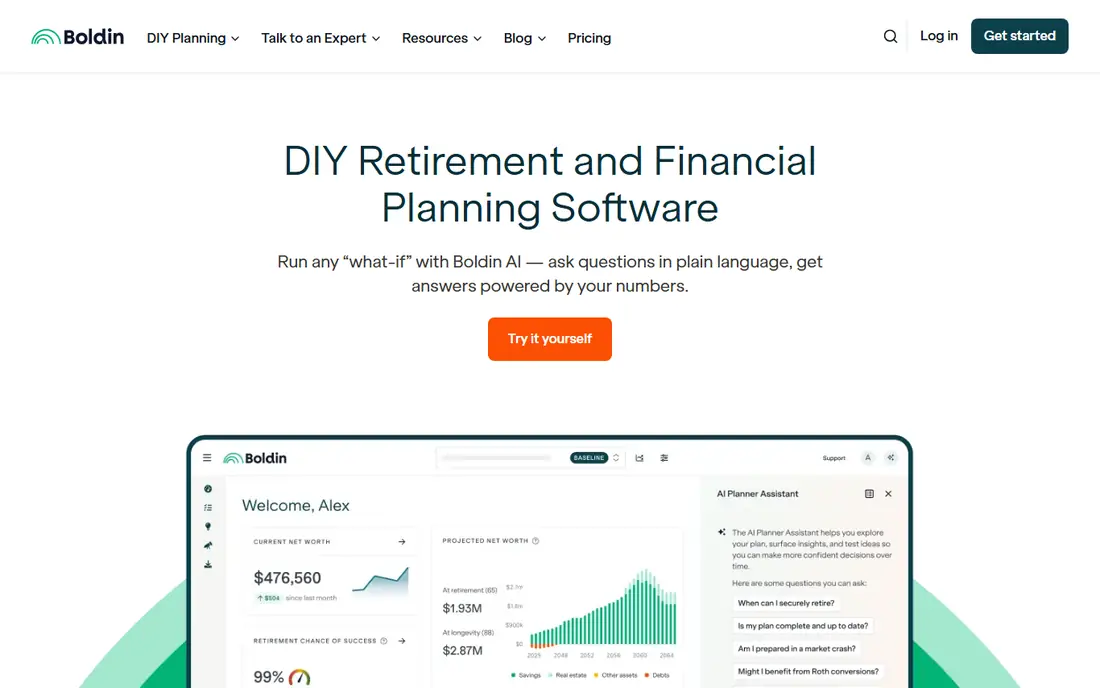
Boldin, formerly NewRetirement, is the fullest DIY planner in this list for a household with several accounts, income sources, and decisions to compare. The free Basic plan lets you build a personal plan and run what-if scenarios, which is enough to see if the broad shape of a plan holds together. PlannerPlus adds Monte Carlo analysis, state and federal tax projections, a Roth conversion explorer, and account linking, plus a larger set of planning inputs.
The trade-off is focus. Boldin is built for retirement decisions, so it is not the best place to run a day-to-day budget or to track every transaction in fine detail. If you want one tool that grows with a plan over years, and you are willing to pay an annual fee for the deeper tools, Boldin is our pick for most people. Start on the free tier, and only pay once you know you need the paid modeling.
- Deep scenario modeling
- Social Security and tax projections
- Account linking on the paid plan
- The free tier leaves out Monte Carlo analysis and the Roth conversion explorer
- Paid features need an annual payment

ProjectionLab suits people who like to move sliders, change a retirement date, and watch the projection change. Its visual timeline makes it easier to see how a career break, a move, or a change in spending could play out over decades. The free Basic tier already includes forecasting, Monte Carlo simulations, and historical backtesting, which is generous for a no-cost start.
Premium adds saved plans, cash-flow views, tax optimization, Roth conversions, withdrawal strategies, and a compare mode. That paid tier is where ProjectionLab becomes a living plan rather than a one-time experiment. The main catch is that the free tier is best for a single session, so serious users should expect to pay. If you enjoy testing ideas yourself, this is the most enjoyable planner here.
- Clear visual timeline
- Monte Carlo simulations and historical backtesting on the free tier
- Saved plans and tax tools on Premium
- The free Basic plan does not save plans
- The interface rewards hands-on users more than set-and-forget users
MaxiFi answers a different question from most planners. Instead of asking how large a portfolio you need, it works out a spending level you can sustain across your lifetime, given your income, taxes, Social Security, and other resources. That framing helps people who worry less about a single retirement number and more about whether spending can stay steady year after year.
The full paid plan includes the Roth Conversion Optimizer, the Social Security Maximizer, a retirement withdrawal optimizer, and Living Standard Monte Carlo analysis. The 14-day trial has limited features, so it is a taste rather than a full test drive. MaxiFi fits disciplined planners who like an economics-based method and who do not need account linking as a core feature.
- Economics-based lifetime spending model
- Social Security maximizer
- Roth conversion optimizer on the full plan
- No permanent free tier
- A credit card is required to start the trial
Empower Personal Dashboard is the best free starting point if you want to see accounts, net worth, spending, and a retirement projection in one place. You can link accounts and run retirement scenarios without paying for the dashboard itself. That breadth makes it a good first check before you commit to a paid planner.
The catch is depth. Its retirement planner is useful for a readiness check and for broad scenarios, but it does not match the detailed tax, withdrawal-order, and Roth conversion modeling in the paid tools above. It also works best when you link accounts, which some people prefer not to do. Use it as a free hub, and move to a dedicated planner when the questions get specific.
- Free dashboard with account aggregation
- Retirement planner alongside net worth and cash-flow views
- No payment needed for the dashboard tools
- Less detailed retirement modeling than Boldin or ProjectionLab
- Paid advisory services are a separate offer with their own fees and minimums
OnTrajectory takes a plain approach: enter income, expenses, and accounts, set goals, and watch a projected path against your actual progress. That simplicity is its strength for people who feel lost in a planner with hundreds of inputs. You can test how a change in saving or spending shifts the path, and you can check in over time to see if you are still on course.
The free plan is limited, so a household with many accounts or many scenarios will likely need the paid plan. The interface and guides take a little learning at first, even though the core idea is simple. OnTrajectory fits patient savers who want a clear trajectory view and who are happy to enter and update figures by hand.
- Straightforward trajectory and progress tracking
- Goal tracking and scenario tools
- A free plan to try the approach
- The free plan limits what you can include
- Pricing and limits should be checked on the vendor site before buying
Fidelity offers free retirement planning tools that give a quick readiness view, including income, savings, and spending assumptions. For many people, that first check is enough to spot a gap: saving too little, retiring earlier than the numbers support, or spending more than the plan can carry. The tools are also easy to reach, since Fidelity is a broker many US savers already use.
The limit is scope. Fidelity is not trying to sell a single deep DIY planner in the same way as Boldin or ProjectionLab, and its most useful views work best inside a Fidelity relationship. Treat it as a strong free second opinion, especially alongside a dedicated planner, rather than as your only planning tool if you need detailed tax or conversion modeling.
- Free planning tools and calculators
- A large, established broker behind the tools
- Useful even if you do not hold all accounts at Fidelity
- The deepest planning features are tied to signing up and to Fidelity accounts
- It is not a standalone paid planner like Boldin or MaxiFi
Pralana Gold is for people who like spreadsheets and want to see, and change, the workings behind a projection. It runs in Excel, so the model is familiar to anyone who already builds financial sheets, and it supports detailed retirement modeling for households that want fine control. That transparency is rare in web planners, where assumptions can sit behind a clean chart.
The price of that control is effort. Pralana Gold has long manuals and a learning curve, and it will feel like overkill if you only want a simple readiness check. It also has no free tier, so you pay before you can judge the full experience. Pick it if you enjoy detailed modeling and you want a tool that shows its workings.
- Very detailed, spreadsheet-style control
- Gold runs in Excel, which many planners already know
- A good fit for people who like to inspect every assumption
- No free tier
- The detail and manuals can feel heavy for a first-time planner
FIRECalc does one job well. It tests whether a spending and portfolio plan would have survived past market history, using historical sequences rather than a single average return. That is a useful stress check for early retirees and for anyone leaning on a fixed withdrawal rate. It is free, fast, and does not ask you to link accounts or pay for a subscription.
Its limits are clear. FIRECalc does not save data, model taxes in detail, or build a full household plan with Social Security timing, Roth conversions, and changing expenses. Use it as a check on a plan built elsewhere, not as the plan itself. If a withdrawal rate fails badly in FIRECalc, that is a signal to revisit spending or timing before you rely on the plan.
- Free and focused
- Tests a plan against historical market sequences
- No account or payment needed for the basic calculator
- No saved data or tax modeling
- A narrow tool, not a full household planner
Quicken Simplifi fits people who want retirement planning connected to real spending. Its retirement planner models a long-term trajectory, while its spending plan and projected cash-flow tools handle the month-to-month picture. That link matters, because a retirement projection is only as good as the spending figure behind it.
The catch is depth. Simplifi looks back at spending and forward at a trajectory, but it does not match Boldin or ProjectionLab for detailed retirement scenarios, tax modeling, and conversion analysis. It also has no free trial in the usual sense, though subscriptions come with a money-back guarantee period stated on the vendor site. Pick Simplifi if everyday money management is the main job and retirement planning is a useful second job.
- Retirement planner alongside spending and cash-flow tools
- Useful for people who want one money app
- Tracks current finances as well as future projections
- No free tier
- More of a budgeting app with a planner than a dedicated retirement planner
How we picked these
We looked for tools an individual can use directly, with a live product and a clear price or free tier in October 2026. We compared official feature pages, pricing pages, and app store listings, and we favored tools that model retirement specifically over generic budget apps. We left out adviser-only software, since this list is for individuals, and we did not list a product whose price we could not place in a fair way. Where a price was unclear, we wrote See website rather than guessing.
What to check before you pay
Start with the spending figure. A planner will project whatever spending number you enter, so check it against a year of real bank and card spending before you trust a result. If the number is a guess, the projection is a guess too, even when the charts look precise.
Next, list the decisions the tool must handle. Social Security timing, Roth conversions, pension choices, health costs before Medicare, and withdrawal order each need different modeling. A free calculator can answer one of those questions, but a household facing several of them at once needs a paid planner that covers them together.
Then test the free tier properly. Build a plan, change the retirement date by two years, and change spending by a realistic amount. Watch whether the tool explains the change or just moves a line on a chart. A good planner should make the cause clear, so you can judge if the result makes sense.
Finally, check what happens to your data. Some tools link accounts, some take manual entry, and some store nothing between sessions on a free tier. Pick the approach you are comfortable maintaining, since a plan you stop updating will drift from reality. This is not financial advice, and past market history does not promise future results.
Frequently asked questions
What is the best retirement software for individuals?
Boldin is our pick for most households because it pairs a free starting tier with deep scenario, tax, and Social Security modeling on the paid plan. ProjectionLab is a close second for people who prefer a visual, hands-on way to test ideas. Try both free tiers before paying, since the best tool is the one you will keep updating.
Is there a free retirement planning tool that is actually useful?
Yes. Empower Personal Dashboard gives a free retirement check alongside net worth and cash-flow views, and ProjectionLab and Boldin both offer free tiers. FIRECalc is also free and useful for testing a withdrawal rate against history. Free tools work best as a first check, while paid tiers add saved plans and detailed tax modeling.
How much does retirement planning software cost?
Most dedicated DIY planners in this list cost about $99 to $149 per year on a paid tier, with free tiers or trials available on several of them. Budgeting apps with a retirement feature, such as Quicken Simplifi, charge a monthly fee instead. Always check the vendor pricing page, since annual billing and trial terms change.
Can retirement software replace a financial adviser?
It can replace much of the number work for a straightforward household plan, but it cannot give personal advice or handle every tax, estate, or benefits question. People with a business, equity pay, a complex estate, or a large tax decision should still talk to a qualified professional. Use software to prepare clear questions, then use an adviser for the decisions that carry real risk.
What should a retirement planner model?
At a minimum, it should model income, spending, savings, Social Security timing, and portfolio growth over time. Stronger tools add taxes, Roth conversions, health costs, pensions, and withdrawal order, plus stress tests against poor market sequences. If a tool only gives a single target number with no way to change assumptions, treat that number with care.
Sources
- https://www.boldin.com/retirement/how-it-works/
- https://www.boldin.com/retirement/newretirement-vs-best-retirement-planning/
- https://thecollegeinvestor.com/44369/projectionlab-review/
- https://www.maxifi.com/pricing
- https://www.quicken.com/blog/cost-effective-personal-finance-apps-for-retirement-planning/
- https://www.quicken.com/blog/top-retirement-planning-software-with-savings-and-retirement-calculators-2026/
- https://ptmoney.com/best-retirement-calculators/
See where you really rank - block by block
ProMapRanker scans Google Maps across a grid of your service area. Simple monthly plans from $19, white-label on every plan.
Start freeKeep reading
 zscaler alternatives
Best Zscaler Alternatives in 2026
Looking for zscaler alternatives? We compare 9 SASE and zero trust platforms on architecture, data protection, pricing, and fit for your network and team.
Read → zapier alternatives free
Best Zapier Alternatives Free in 2026
Nine automation tools for zapier alternatives free in 2026, all with genuinely free tiers, plus free plan limits, starting prices and upgrade paths explained.
Read → which platform is best for online reputation
Which Platform Is Best for Online Reputation in 2026
Wondering which platform is best for online reputation? We compare 8 review, listing, and response tools for small and multi-location businesses and agencies.
Read →