 ProMapRanker
Best Real Time Translation App in 2026

Key takeaways
- Google Translate is the best free all-round choice, with camera, voice, conversation and offline modes in one app.
- DeepL suits written work where natural wording matters, while Microsoft Translator suits group talks and meetings.
- Papago is the specialist pick for Korean, Japanese and Chinese, with strong image and voice handling.
- Apple Translate suits iPhone owners who want on-device translation without an extra account.
- For live conversations, test conversation mode before a trip, since speed, noise handling and language coverage vary by app.
Quick comparison
| Pick | Great for | Pricing starts at | Free tier | |
|---|---|---|---|---|
 Google Translate | Everyday travel | Free | Yes | Visit |
 DeepL | Natural written translation | Free | Yes | Visit |
 Microsoft Translator | Group conversations | Free | Yes | Visit |
 Apple Translate | iPhone privacy | Free | Yes | Visit |
 iTranslate | Travel toolkit | Free | Yes | Visit |
 Papago | Korean, Japanese and Chinese | Free | Yes | Visit |
 SayHi Translate | Simple two-way voice talks | Free | Yes | Visit |
 Reverso Translate | Context and examples | Free | Yes | Visit |
 Yandex Translate | Reading foreign websites | Free | Yes | Visit |
The best real time translation apps
We compared official listings and pricing pages, focusing on live voice translation, camera translation, offline packs, language coverage and price. Our pick for most people is Google Translate, because it covers the most languages for free and works well for signs, menus and short talks. DeepL is our pick when the wording of a message matters more than speed.
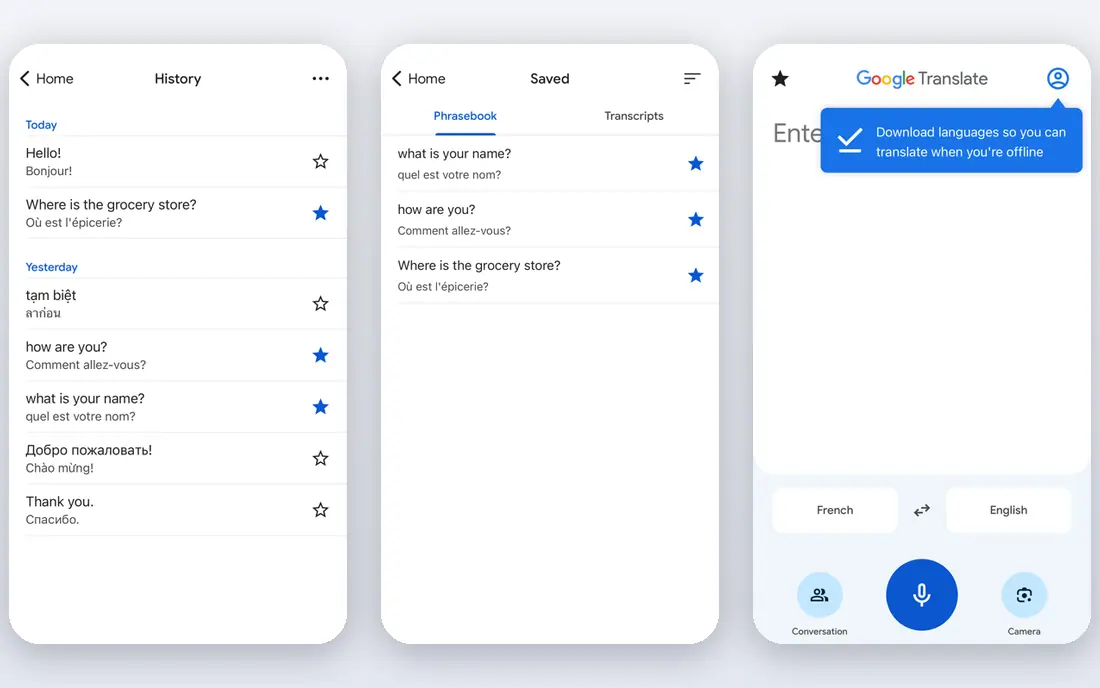
Google Translate remains the default install for travel for a clear reason. It covers about 250 languages in recent guides, and it puts text, voice, camera and conversation translation in one free app. Point the camera at a menu or street sign for an overlay translation, speak in conversation mode for a two-way talk, or download an offline pack before a flight.
Transcribe mode helps with longer speech, such as a tour guide or a lecture, while Lens integration helps with text inside images. The weakness is style. Idioms, jokes and formal documents can read more literally than a DeepL translation, and politeness levels in Japanese and Korean need checking. For everyday travel, though, no other free app matches this breadth, and it costs nothing to keep on your phone as a backup.
- Very wide language coverage
- Camera, voice, conversation and transcribe modes
- Offline packs for many languages
- Nuance in idioms can feel stiff
- Offline coverage is narrower than online coverage

DeepL built its name on translations that read as if a person wrote them. For German, French, Spanish, Polish and other European languages, long paragraphs tend to flow better, with fewer literal word-for-word choices and better handling of register. The app covers text, voice and camera translation, and the web version handles documents well.
Coverage is the limit. DeepL supports roughly 30 to 35 languages in recent guides, far fewer than Google, and the free tier limits how much you can translate each month. DeepL Individual has been listed at 10.49 dollars per user per month on monthly billing in recent checks, with annual billing lowering that figure. Use DeepL for an email, contract summary or message that matters, and keep Google Translate for everything else.
- Natural wording for European languages
- Document and text translation with good tone
- Glossary options on paid plans
- Fewer languages than Google
- Free tier limits monthly characters and files

Microsoft Translator is a strong free choice for meetings and group talks. It supports text, speech and image translation, offers offline packs, and has long offered conversation features that let several people join a translated chat from their own phones. That makes it useful for a classroom, a tour group or a work meeting where not everyone shares a language.
Recent guides note that some multi-device conversation features have changed in current app listings, so test the exact feature you need before you rely on it for an event. Language coverage sits above 70 languages in recent guides, which is ample for most travel and business use but below Google. For Microsoft 365 users, the familiar design and free price make it an easy second app to keep alongside Google Translate.
- Free app with voice, text and camera modes
- Group conversation features for meetings
- Offline packs for many languages
- Some older multi-device features have changed
- Language list is smaller than Google
Apple Translate suits iPhone owners who want a simple, private translator without another account. It translates text, voice and camera input, supports conversation mode, and lets you download languages for on-device use, which helps when signal is weak. The design is clean, with large text and a clear split view for two speakers.
The trade-off is scope. Apple Translate covers about 20 languages in recent guides, which is enough for major European and Asian languages but far fewer than Google. It also needs an Apple device, so Android users should choose Google or Microsoft instead. If you already carry an iPhone, Apple Translate is a good free backup that keeps more processing on the device.
- Free on supported Apple devices
- On-device translation for downloaded languages
- Simple conversation and camera modes
- Apple devices only
- Language list is smaller than Google
iTranslate packages translation as a travel toolkit. The app covers text and voice translation, adds a keyboard for translating inside other apps, and offers camera translation and offline packs on its Pro plan. Dialect handling for some languages helps when a phrase differs by region, which matters for Spanish, Portuguese and Arabic speakers.
The free version covers basic translation, while Pro has been listed at about 5.99 dollars per month in recent guides. That paywall is the main catch. Offline mode, full camera features and some voice features sit behind Pro, so free users get less than Google offers for free. iTranslate fits travellers who like one polished app for text, voice and keyboard use and who are willing to pay for offline packs.
- Voice, camera and keyboard translation
- Offline packs on Pro
- Dialect options for some languages
- Several key features need Pro
- Pro pricing varies by plan
Papago, from Naver, is the specialist pick for East Asia. It handles Korean, Japanese and Chinese with attention to honorifics and context that general translators sometimes miss, and it supports text, voice, image and handwriting input. That range helps with menus, signs, handwritten notes and spoken talks in Seoul, Tokyo or Beijing.
Total language coverage is smaller, at about 14 to 15 languages in recent guides, so Papago works best as a specialist second app rather than your only translator. Offline text and voice cover a smaller set than online mode, and offline conversation mode is excluded in recent guides. For a trip focused on Korea, Japan or China, Papago earns a place on the home screen next to Google Translate.
- Strong Korean, Japanese and Chinese handling
- Image, voice and handwriting input
- Offline text and voice for some languages
- Smaller total language list
- Offline conversation mode is limited
SayHi Translate keeps live talks simple. Open the app, choose two languages, speak, and hear the translation back, with text shown on screen for checking. That direct design helps in a shop, a taxi or a clinic, where you want a fast answer rather than a menu of modes. The app has long been free for core voice translation.
It does not try to match Google on camera translation, offline packs or language count, and it has fewer tools for documents or long text. SayHi fits people who want one job done well: a short, two-way spoken exchange with a stranger. Keep Google Translate for signs and offline use, and use SayHi when a conversation needs to start in seconds.
- Simple two-way voice conversation
- Fast setup with no complex menus
- Free core translation
- Fewer extra features than Google
- No offline packs of the same depth
Reverso Translate helps learners as much as travellers. Instead of giving one translation, it shows real examples of a word or phrase in context, which helps you judge tone, formality and meaning before you use it. That context matters when a single word has several meanings, or when a polite form differs from a casual one.
Live voice and camera features are more limited than Google or Microsoft, and language coverage sits at about 18 languages in recent guides. Premium has been listed at about 4.99 dollars per month in recent guides for extra features. Reverso is best as a learning companion: use Google for a fast live talk, then check Reverso when you want to understand why a phrase works.
- Real examples show how words are used
- Good for learners checking tone
- Free core translation
- Live voice features are more limited
- Fewer languages than Google
Yandex Translate is a solid free general translator, with text, voice and camera modes and offline packs for many languages. Its website translation is useful for reading foreign news, shops and official pages without copying text into an app, and it covers about 100 languages in recent guides.
Live conversation handling is less developed than Google or Microsoft, so it fits reading and short exchanges better than long group talks. Regional strength also varies, with stronger coverage for Russian and neighbouring languages. For travellers and readers who need a free backup translator, Yandex Translate is a useful third option, especially for web content.
- Free text, voice and camera translation
- Website translation in browser
- Offline packs for many languages
- Live conversation features are limited
- Regional language strength varies
How we picked these
We compared official listings and recent pricing guides, and we kept only apps that are live in October 2026 and that offer live or near-live translation, not just dictionary lookup. We favoured free core access, camera and voice modes, and offline options, and we noted where a price came from a recent guide rather than a vendor page. We excluded hardware-only translators and developer localisation tools, since this guide is about apps people use in conversation. Language counts change with app updates, so check the store listing for the languages you need before a trip.
Using a live translator well
Speak in short sentences and pause between them, since long, rambling speech gives any translator more room to go wrong. Show the translated text on screen as well as playing audio, so the other person can correct a mistake. Download offline packs before you travel, test conversation mode with a friend, and carry a second app for the languages that matter most to you.
Also be careful with sensitive material. Do not paste private medical, legal or financial text into a free translator without checking its privacy terms, and do not rely on a live translation for a contract, a medical instruction or a safety warning without a human check. For everyday travel, a live app is excellent. For high-stakes wording, a professional translator is still the right choice.
Frequently asked questions
What is the best real time translation app?
Google Translate is the best free all-round choice for most people, with the widest language coverage and camera, voice and offline modes. DeepL is better for written work where natural wording matters, and Papago is better for Korean, Japanese and Chinese.
Can translation apps work offline?
Yes, in part. Google Translate, Microsoft Translator, Apple Translate, iTranslate Pro and Yandex Translate offer offline packs for selected languages. Offline coverage is usually narrower than online coverage, and conversation mode may be limited offline, so download packs before you travel.
Is DeepL better than Google Translate?
DeepL often sounds more natural for European languages and longer written text, while Google Translate covers far more languages and offers better camera and conversation tools. Many people use both: DeepL for an important message, Google for travel and live talks.
Do I need to pay for a translation app?
No, for most travel use. Google Translate, Microsoft Translator, Apple Translate, Papago, SayHi and Yandex Translate offer free core translation. Paid plans mainly add higher limits, offline packs, document features or extra tools, so start free and pay only if you hit a limit.
Which translation app is best for Korean?
Papago is the specialist pick for Korean, with strong handling of honorifics and context, plus image, voice and handwriting input. Google Translate is a good backup for Korean, with wider language coverage and offline packs.
Can I use a translation app for live meetings?
Yes. Microsoft Translator and Google Translate both offer conversation and transcribe modes for live speech, while DeepL Voice offers paid live audio translation for meetings. Test the feature with your exact languages and devices before an important meeting, since group features change over time.
Sources
See where you really rank - block by block
ProMapRanker scans Google Maps across a grid of your service area. Simple monthly plans from $19, white-label on every plan.
Start freeKeep reading
 zscaler alternatives
Best Zscaler Alternatives in 2026
Looking for zscaler alternatives? We compare 9 SASE and zero trust platforms on architecture, data protection, pricing, and fit for your network and team.
Read → zapier alternatives free
Best Zapier Alternatives Free in 2026
Nine automation tools for zapier alternatives free in 2026, all with genuinely free tiers, plus free plan limits, starting prices and upgrade paths explained.
Read → which platform is best for online reputation
Which Platform Is Best for Online Reputation in 2026
Wondering which platform is best for online reputation? We compare 8 review, listing, and response tools for small and multi-location businesses and agencies.
Read →