 ProMapRanker
Best Price Comparison App in 2026

Key takeaways
- ShopSavvy suits in-store barcode scanning, while Google Shopping suits broad online comparison across many retailers.
- CamelCamelCamel and Keepa suit Amazon shoppers who want price history and drop alerts.
- Honey and Capital One Shopping suit checkout savings, with coupons and rewards alongside price checks.
- Flipp suits grocery and weekly ad planning, while Slickdeals suits deal hunting from a community.
- No tracker replaces the retailer checkout page, so verify seller, shipping, tax, and return terms before paying.
Quick comparison
| Pick | Great for | Pricing starts at | Free tier | |
|---|---|---|---|---|
 ShopSavvy | In-store barcode scanning | Free | Yes | Visit |
 Google Shopping | Broad online comparison | Free | Yes | Visit |
 CamelCamelCamel | Amazon price history | Free | Yes | Visit |
 Keepa | Detailed Amazon price tracking | Free | Yes | Visit |
 Honey | Coupons at checkout | Free | Yes | Visit |
 Capital One Shopping | Coupons and price comparison | Free | Yes | Visit |
 PriceRunner | Clean multi-retailer comparison | Free | Yes | Visit |
 Flipp | Grocery ads and weekly deals | Free | Yes | Visit |
 Slickdeals | Community deals and alerts | Free | Yes | Visit |
 Price.com | Comparison plus cashback-style offers | Free | Yes | Visit |
The best price comparison app
A good price comparison app does more than show a low number. It should confirm the exact product, include shipping and seller details, and warn you when a price is old or from an unreliable seller. The apps below cover in-store scanning, online comparison, price history, and coupons, so pick by where you shop most.

ShopSavvy is the classic in-store price comparison app, because scanning a barcode in a shop gives you online prices at once. That moment, standing in an aisle deciding whether to buy now or order online, is where ShopSavvy earns its place. Price history and alerts add value for items you can wait for, rather than buying on the spot.
Coverage varies by product and retailer, and prices can lag, so treat the app as a guide and check the retailer page before paying. A paid tier adds extra features, but the free tier covers the core scanning and comparison that most shoppers need.
- Barcode and QR scanning in store
- Online price comparison
- Price-drop alerts
- Retailer coverage varies by product
- Some features need a paid tier
- Prices can lag live stock
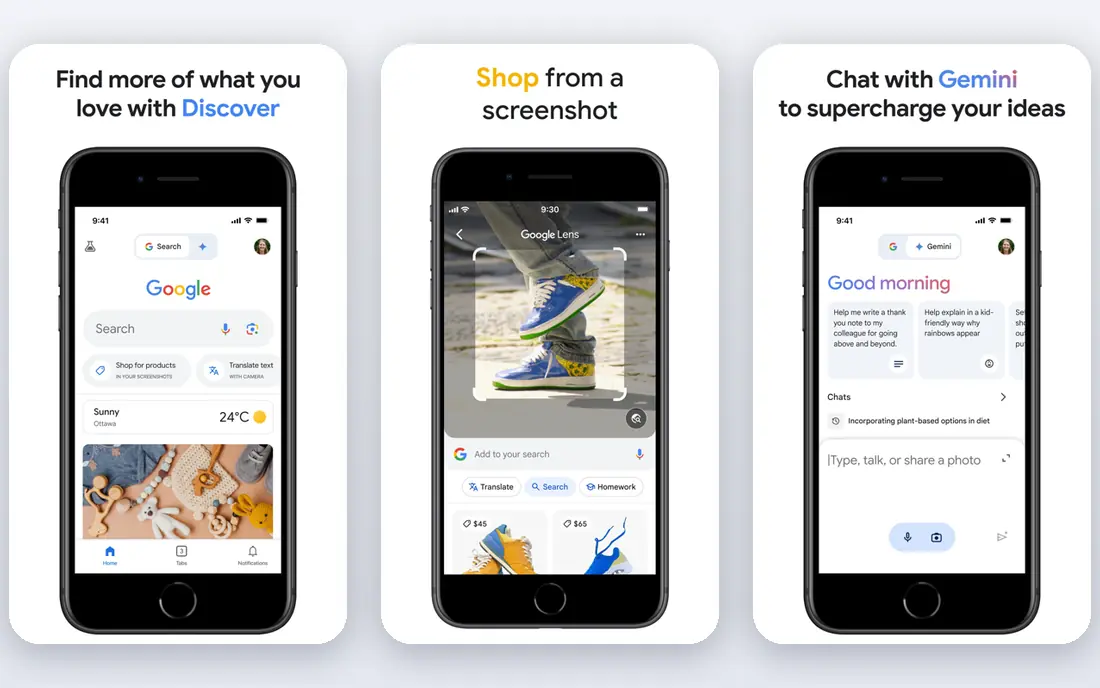
Google Shopping suits online shoppers who want the widest net, since it lists the same product from many retailers in one search. Filters for price, retailer, condition, and shipping help narrow a long list, and price tracking on selected products warns you when a tracked item drops. For a known product with a clear model number, Google Shopping is often the fastest check.
Sponsored listings need care, since placement does not always mean the lowest delivered price. Check the seller, shipping cost, and return policy on the retailer page, and confirm the exact model, color, and size before you buy. Used well, Google Shopping is the best starting point for most online comparison.
- Very broad retailer coverage
- Filters by price, retailer, and condition
- Price tracking on selected products
- Sponsored listings sit near organic results
- Seller quality varies
- Not a dedicated barcode app
CamelCamelCamel is the best tool for Amazon shoppers who want to know whether today price is good or bad. Price history charts show past highs and lows, including third-party seller prices, so you can tell a real deal from a routine discount. Price-drop alerts email you when a tracked item falls to your target.
The limit is scope. CamelCamelCamel covers Amazon only, so use Google Shopping or ShopSavvy for other retailers. The site design is plain and website-first, but for Amazon price history, that plainness is fine, since the chart is the point.
- Amazon price history charts
- Price-drop alerts
- Clear third-party versus Amazon pricing
- Amazon only
- Website-first design
- Alert setup takes a few steps
Keepa suits Amazon shoppers who want deeper price data than a simple history chart. The browser extension puts price history on the Amazon product page itself, with alerts for price drops and stock changes. That in-page view saves switching between sites when you are already browsing Amazon.
Advanced features sit behind a paid tier, and the full chart options take a session to learn. For casual Amazon shoppers, CamelCamelCamel is simpler. For frequent Amazon buyers who track many items, Keepa depth is worth the learning curve.
- Detailed Amazon price history
- Price and availability alerts
- Browser extension for in-page charts
- Amazon only
- Advanced features need a paid tier
- Charts take time to learn
Honey, now part of PayPal, suits shoppers who want savings at checkout rather than before it. The browser extension tests coupon codes automatically when you check out, and it can compare prices across selected retailers. Rewards through PayPal Rewards add value for repeat users, though terms and availability vary by store.
Coupon success is not guaranteed, and some codes fail or save little. Price comparison is also narrower than Google Shopping, so use Honey for coupons and Google Shopping for broad comparison. Together, they cover both stages of buying well.
- Automatic coupon testing at checkout
- Price comparison on selected retailers
- Rewards through PayPal Rewards
- Coupon success varies by store
- Price comparison is narrower than Google Shopping
- Browser-first tool
Capital One Shopping suits online shoppers who want coupons and comparison in one extension, without needing a Capital One card for basic use. The tool tests codes at checkout, compares prices where coverage exists, and offers rewards on selected purchases. For shoppers who buy from many online stores, that mix saves time.
Full features need an account, and coverage varies, so some stores will show little or no data. Rewards terms also need a close read, including expiry and qualifying purchases. Use it alongside Google Shopping for broad comparison, and treat rewards as a bonus, not a reason to buy.
- Automatic coupon testing
- Price comparison tools
- Rewards on selected purchases
- Account needed for full features
- Coverage varies by retailer
- Rewards terms need checking
PriceRunner suits shoppers who want a clean comparison page without sponsored clutter. Product specs, retailer prices, and reviews sit together, which helps when comparing similar models. Filters for price and retailer narrow results fast, and the layout works well on mobile as well as desktop.
US coverage is thinner than Google Shopping, especially for smaller retailers, so check Google Shopping as well for a full picture. Prices also need verification at checkout, since shipping and stock change. For a tidy, readable comparison, PriceRunner is a good second check.
- Clean comparison layout
- Retailer and price filters
- Product reviews and specs
- US retailer coverage is thinner than Google Shopping
- Some categories are limited
- Prices need checkout verification
Flipp suits grocery shoppers who plan around weekly ads. The app gathers store flyers by location, lets you build a shopping list from deals, and shows which nearby store has the item on offer. For a weekly shop, that planning saves more than a single-item price check, since it shapes the whole basket.
Flipp is not a general product comparison app, so electronics, clothing, and home goods need other tools on this list. Ad coverage also varies by region, and in-store prices can differ from flyer prices, so check shelf prices for key items. For grocery planning, Flipp is the best pick here.
- Weekly grocery ads in one app
- Shopping list with deals
- Store flyers by location
- Grocery focus, not general products
- Ad coverage varies by region
- In-store prices can differ
Slickdeals suits deal hunters who want community-found offers, not just a price search. Users post deals, others vote on them, and alerts by keyword warn you when a wanted item appears. For popular electronics, home goods, and seasonal sales, the community often finds offers faster than a single comparison engine.
Deals can sell out quickly, and not every post is a true bargain, so check the retailer price and terms before buying. Slickdeals is best as a deal alert layer on top of Google Shopping or ShopSavvy, rather than a replacement for direct comparison.
- Large community posting deals
- Deal alerts by keyword
- Voting highlights strong offers
- Deals sell out fast
- Not a direct price comparison engine
- Some posts need verification
Price.com combines multi-retailer comparison with coupons and cashback-style offers, which suits shoppers who want comparison and savings in one place. Price alerts track items you are waiting on, and the comparison layout is simple to follow. For a general online shop, it works as a solid all-round check.
Coverage varies by category, and the brand is smaller than Google Shopping, so a second check is wise for niche products. Cashback-style offer terms also need a close read, including payout thresholds and qualifying retailers. Used with that care, Price.com is a useful addition to a comparison toolkit.
- Multi-retailer price comparison
- Coupons and cashback-style offers
- Price alerts
- Smaller brand than Google Shopping
- Coverage varies by category
- Offer terms need checking
How we picked these
We compared official feature pages, app store listings, and current price comparison roundups, and we kept tools that are live in October 2026 with a real price comparison, history, or coupon function for US shoppers. Tools that had closed, or that only list deals without comparison or tracking, were left out. We did not claim hands-on testing, and we did not invent prices, savings figures, or retailer counts. All tools here offer a free tier, so starting price is Free throughout.
What to look for when you compare prices
First, match the exact product, including model number, size, color, and condition, since a cheaper listing for a different variant is not a saving. Second, compare the delivered total, including shipping, tax, and any membership cost, not just the headline price. Third, check seller reputation and return terms, especially for marketplace sellers. Finally, use price history before buying a big-ticket item, since a short wait often beats a small discount.
Frequently asked questions
What is the best price comparison app?
ShopSavvy is the best pick for in-store scanning, Google Shopping is the best pick for broad online comparison, and CamelCamelCamel or Keepa is the best pick for Amazon price history. The best app follows where you shop, so many shoppers use two: one for stores and one for online.
What is the best price comparison software?
Most price comparison tools are apps or browser extensions, not desktop software to install. ShopSavvy and Google Shopping cover mobile and web, while Honey, Capital One Shopping, and Keepa work as browser extensions. Choose by device and shopping habit, not by whether the vendor calls it software or an app.
What are the best price comparison apps?
The best price comparison apps include ShopSavvy, Google Shopping, CamelCamelCamel, Keepa, Honey, Capital One Shopping, PriceRunner, Flipp, Slickdeals, and Price.com. ShopSavvy and Flipp suit in-store and grocery shopping, while the rest suit online comparison, history, and coupons.
What app finds the best price?
No single app finds the best price in every case, because retailer coverage and price freshness vary. Start with Google Shopping for online items, scan with ShopSavvy in store, and check CamelCamelCamel or Keepa for Amazon history. Verify the final price at checkout before you pay.
What is the app to find the best price in store?
ShopSavvy is the best in-store price app on this list, thanks to barcode scanning and online comparison. Flipp also helps for grocery ads by location. In store, check the exact product variant and any in-store-only discounts, since online prices may not include them.
Are price comparison apps free?
Yes, every app on this list offers a free tier that covers core comparison, and several are free only. Paid tiers add extra alerts, history depth, or coupon features, but free tiers suit most shoppers. Avoid any comparison app that charges before showing a single price.
Sources
See where you really rank - block by block
ProMapRanker scans Google Maps across a grid of your service area. Simple monthly plans from $19, white-label on every plan.
Start freeKeep reading
 zscaler alternatives
Best Zscaler Alternatives in 2026
Looking for zscaler alternatives? We compare 9 SASE and zero trust platforms on architecture, data protection, pricing, and fit for your network and team.
Read → zapier alternatives free
Best Zapier Alternatives Free in 2026
Nine automation tools for zapier alternatives free in 2026, all with genuinely free tiers, plus free plan limits, starting prices and upgrade paths explained.
Read → which platform is best for online reputation
Which Platform Is Best for Online Reputation in 2026
Wondering which platform is best for online reputation? We compare 8 review, listing, and response tools for small and multi-location businesses and agencies.
Read →