 ProMapRanker
Best Platforms to Stream On in 2026

Key takeaways
- Twitch remains the best platform for live gaming community, with the largest live audience and mature tools for subs, Bits, and raids.
- YouTube is the best choice if you also make videos, since live streams, Shorts, and long videos feed the same channel and search.
- Kick offers the best subscription split at 95 percent to the creator, but with a smaller live audience than Twitch or YouTube.
- TikTok LIVE suits short, viral, mobile-first streams, while Facebook Live and Instagram Live suit existing social audiences.
- Start where your audience already is, test a second platform with clips, and check monetization rules before you rely on any one income source.
Quick comparison
| Pick | Great for | Pricing starts at | Free tier | |
|---|---|---|---|---|
 Twitch | Live gaming community | Free | Yes | Visit |
 YouTube | Video plus live in one channel | Free | Yes | Visit |
 Kick | Best subscription split | Free | Yes | Visit |
 TikTok LIVE | Viral mobile live streams | Free | Yes | Visit |
 Facebook Live | Existing Facebook audiences | Free | Yes | Visit |
 Instagram Live | Mobile lifestyle and community | Free | Yes | Visit |
 Trovo | Smaller gaming community | Free | Yes | Visit |
 DLive | Blockchain-based rewards | Free | Yes | Visit |
 LinkedIn Live | Professional and business live | Free | Yes | Visit |
The best platforms to stream on
Streaming platforms differ on audience size, discovery, monetization, and rules. The best platform is the one where your viewers already spend time and where you can meet the monetization thresholds without changing your content completely.

Twitch is still the default home for live gaming, with categories, raids, and a chat culture built around live interaction. The Affiliate program opens subs, Bits, and ads once you meet thresholds for followers, hours, days, and average viewers, while Partners gain more tools and higher split options through the Plus Program. For a new gaming streamer, that live community is hard to match elsewhere.
The main drawback is the standard 50 percent subscription split, which is lower than Kick at 95 percent and YouTube memberships at about 70 percent. Twitch also rewards consistency, so irregular streamers may struggle to reach Affiliate. If gaming is your main content and you want the largest live room, Twitch remains the first platform to try.
- Largest live gaming audience and category browsing
- Mature Affiliate and Partner programs with subs, Bits, and ads
- Raids and clips help discovery
- Standard subscription split is 50 percent to the creator
- Affiliate thresholds require regular streaming and average viewers

YouTube suits creators who make videos as well as live streams, since one channel holds everything. A live stream can become a video on demand, clips can become Shorts, and search can bring new viewers long after a stream ends. That long life is a major advantage over platforms where a stream disappears quickly, and it helps gaming, education, and talk creators grow steadily.
The catch is the Partner Program. You need to meet subscriber and watch-hour or Shorts-view thresholds before you open full monetization, which takes longer than starting on Twitch. Live-only creators may also find discovery slower than on Twitch. If you already make videos, or plan to, YouTube is the strongest all-round platform.
- Live, Shorts, and long videos feed one channel
- Search and recommendation help new viewers find you
- Memberships and Super Chat for income
- Partner Program thresholds take time to reach
- Live discovery can be weaker than Twitch for pure live gaming
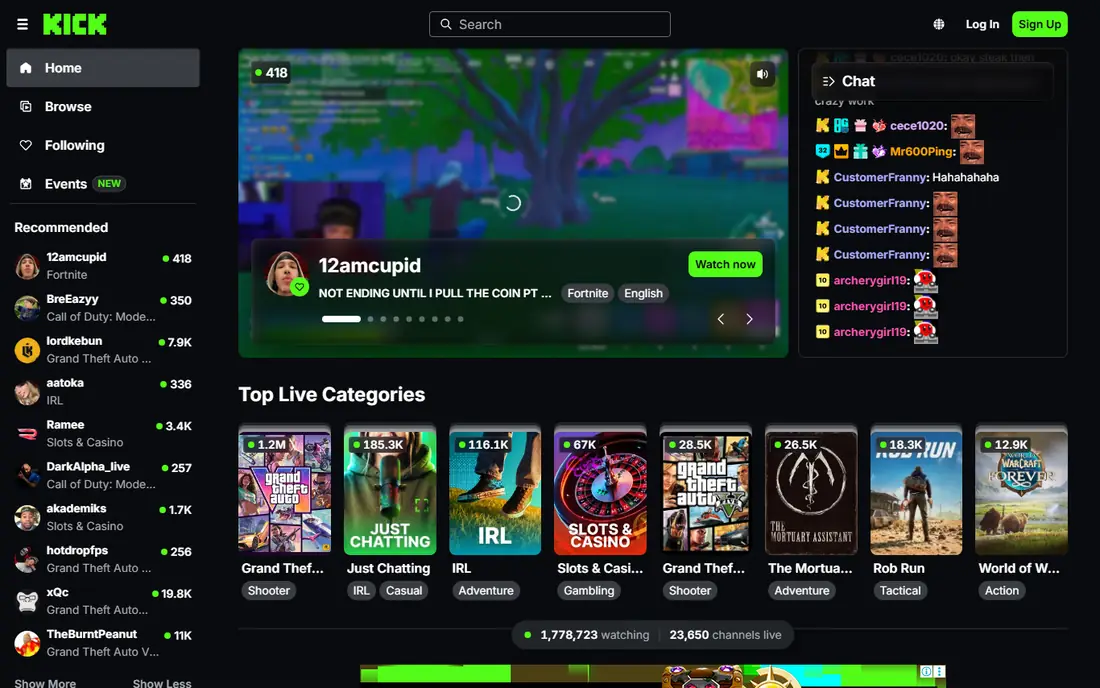
Kick stands out on creator pay. Its advertised subscription split gives creators 95 percent, compared with 50 percent standard on Twitch and about 70 percent on YouTube memberships, and subscriptions can open after only a few hours of streaming in many regions. For a streamer with an existing audience, that split can mean a real income difference at the same subscriber count.
The trade-off is audience size. Kick live viewership is smaller than Twitch, so a new streamer starting from zero may grow slower there. Moderation and content rules are also less settled than on older platforms. Kick works best as a main home for creators with an audience to bring, or as a second platform alongside YouTube clips.
- 95 percent subscription split to creators
- Low barrier to subscriptions in many regions
- Permanent video archives
- Smaller live audience than Twitch or YouTube
- Content mix and moderation are less established
TikTok LIVE suits creators who already make short videos and want to turn that audience into live viewers. The app discovery engine can push a live stream to new viewers fast, and the mobile format suits chat, shopping, music, and short gaming segments. Gifts and subscriptions give eligible creators a direct income path, though gift value is reduced by platform and payment fees.
Access rules matter. You generally need at least 1,000 followers to go live, and sending or receiving gifts requires you to be 18 or over, with regional variations. Long gaming streams fit less well here than on Twitch or YouTube, since TikTok viewers expect fast, mobile-friendly content. Use TikTok LIVE to grow and engage, and pair it with a longer-form platform for full sessions.
- Huge short-video audience and viral discovery
- Mobile-first live format is easy to start
- Gifts and subscriptions for eligible creators
- Live access needs followers and age rules, with gifts for adults 18 and over
- Live streams are less suited to long gaming sessions
Facebook Live is the practical pick if your audience already follows you on Facebook. You can go live from a Page or profile, reach followers and group members without asking them to install a new app, and use Stars, in-stream ads where eligible, and brand deals for income. For local businesses, churches, schools, and community creators, that built-in audience is a major advantage.
For pure gaming growth, Facebook Live is weaker than Twitch or YouTube, with less category browsing and a smaller live gaming community. Monetization also depends on Page standing and region, so check eligibility before you plan income around it. If your community lives on Facebook, start there and use clips elsewhere to grow.
- Free live streaming to Pages and profiles
- Built-in audience from existing followers and groups
- Stars and ads for eligible creators
- Gaming discovery is weaker than Twitch
- Monetization eligibility depends on region and Page standing
Instagram Live suits creators whose audience already follows them on Instagram and who stream lifestyle, fitness, cooking, music, or Q and A content. Going live is simple from the app, viewers can send Badges, and shopping links work well for product streams. The format feels personal and immediate, which suits community building more than long gaming marathons.
The limits are format and production. Instagram Live is portrait and mobile-first, with limited support for desktop streaming setups and pre-recorded loops. Gaming streamers who need overlays, multiple scenes, and desktop capture will find Twitch or YouTube far better. Use Instagram Live for community moments, and keep full sessions on a desktop-friendly platform.
- Easy mobile live from an existing Instagram account
- Badges and shopping links for eligible creators
- Strong for lifestyle, fitness, and Q and A streams
- Portrait mobile format limits gaming and desktop production
- No broad third-party ingest for pre-recorded streams
Trovo is a gaming-focused live platform that offers a familiar streaming setup with subs, rewards, and category browsing, in a smaller community. For a new streamer, a smaller room can feel friendlier, with chat that is easier to read and a community that notices regulars faster. The platform is free to use, and streaming from desktop software is straightforward.
The obvious limit is scale. Trovo audience and discovery are far smaller than Twitch or YouTube, so growth from zero takes longer and income potential is lower. Treat Trovo as a second home or a backup platform, or as a main home only if you already have a community willing to follow you there.
- Gaming-focused live platform with subs and rewards
- Smaller community can mean closer chat
- Free to stream with standard live tools
- Audience is much smaller than Twitch or YouTube
- Monetization and discovery tools are less mature
DLive offers free live streaming with a rewards model that lets viewers and creators earn through platform tokens and support features. For gaming and chat streamers who like alternative reward systems, that model is distinct from the sub and ad models on larger platforms. The basic streaming tools are familiar, and starting costs nothing.
The niche scale is the main drawback. DLive audience is small compared with Twitch, YouTube, or Kick, and token-based rewards can vary in value, so income is less predictable. If you are curious about alternative platforms, DLive is worth a test stream, but do not rely on it as your only audience or income source.
- Free live streaming with a rewards system for viewers and creators
- Gaming and chat categories
- No subscription cost to start
- Audience is small and niche
- Reward value depends on token systems that can change
LinkedIn Live is the business platform on this list, built for talks, panels, demos, and company announcements rather than gaming. A live session on LinkedIn reaches a professional network, supports lead generation, and can sit on a company Page or personal profile as a lasting video. For B2B creators, consultants, and companies, that audience is more valuable than a larger but less relevant gaming room.
Gaming and casual entertainment do not fit here, and access rules are stricter than on social apps, with follower thresholds and scheduled event requirements in many cases. There is no native tipping, so income comes from business value, not gifts. If your content is professional, LinkedIn Live is the right specialist platform.
- Reaches professional audiences and decision makers
- Good for talks, panels, product demos, and company events
- Video can live on a professional profile
- Not suited to gaming or casual entertainment
- Live access needs follower thresholds and, from June 2026, scheduled events in many cases
How we picked these
We compared official platform pages, creator program rules, monetization thresholds, and public audience information for platforms that offer live streaming to US creators in October 2026. We kept only platforms with a live product you can actually start on, and we left out tools that only help you stream, such as broadcast software, since they are not platforms themselves.
How to choose the right platform
Start with your content and your existing audience. Gaming streamers should test Twitch first, video creators should test YouTube, and creators with a social following should test the platform where that following already lives. Run the same content style for a few weeks on one main platform, and use clips on a second platform to see where new viewers actually come from.
Check monetization before you depend on it
Read the current Affiliate, Partner, or creator program rules for your platform, including follower, hour, and viewer thresholds, payout minimums, and revenue splits. Splits and thresholds change, and a platform that pays well at 100 subscribers may pay little at 10. Do not quit other income or buy expensive gear based on a single platform promise, and keep records of payouts for tax reporting.
Grow with clips and community
Live growth rarely comes from live alone. Post clips to short-video apps, keep a regular schedule so viewers know when to find you, and build a community space such as a Discord server or group where viewers can stay in touch between streams. Reply to chat by name, keep a simple set of community rules, and moderate early so new viewers feel welcome. A small, loyal room grows faster than a large, chaotic one.
Frequently asked questions
What is the best platform to stream on for gaming?
Twitch is the best platform for live gaming community, with the largest live audience, category browsing, and mature sub and Bits tools. YouTube is a strong second choice if you also make videos, and Kick offers a better subscription split for creators with an existing audience. Test Twitch first for gaming, and use YouTube clips to grow.
What is the best live streaming platform for gaming beginners?
Twitch is the best starting point for gaming beginners, thanks to its large community and clear Affiliate path, while YouTube suits beginners who also make videos. Kick is worth testing once you have viewers to bring, since its 95 percent split rewards an existing audience. Start on one main platform, keep a regular schedule, and add a second platform only when the first feels stable.
What is the best app to stream on from a phone?
TikTok LIVE and Instagram Live are the best phone-first options, with easy mobile live and built-in social audiences. Twitch and YouTube also offer mobile streaming, with more desktop-style tools when you move to a computer setup. For phone gaming or chat, TikTok LIVE suits viral short streams, while Instagram Live suits lifestyle and community streams.
What is the best streaming platform for gaming income?
Income depends on audience size, not just split. Kick offers the best subscription split at 95 percent, YouTube memberships offer about 70 percent, and Twitch standard subs offer 50 percent, with higher Plus Program tiers for top Partners. A smaller audience on a high-split platform can earn less than a larger audience on a lower split, so weigh audience and split together.
Can I stream on multiple platforms at once?
Yes, on many platforms, though rules differ. YouTube and Kick generally allow multistreaming, while Twitch Affiliate and Partner agreements have historically restricted simulcasting in some cases, so check your current agreement before you multistream. Use broadcast software that supports multiple outputs, and keep chat moderation simple by choosing one main chat to read on air.
Sources
See where you really rank - block by block
ProMapRanker scans Google Maps across a grid of your service area. Simple monthly plans from $19, white-label on every plan.
Start freeKeep reading
 zscaler alternatives
Best Zscaler Alternatives in 2026
Looking for zscaler alternatives? We compare 9 SASE and zero trust platforms on architecture, data protection, pricing, and fit for your network and team.
Read → zapier alternatives free
Best Zapier Alternatives Free in 2026
Nine automation tools for zapier alternatives free in 2026, all with genuinely free tiers, plus free plan limits, starting prices and upgrade paths explained.
Read → which platform is best for online reputation
Which Platform Is Best for Online Reputation in 2026
Wondering which platform is best for online reputation? We compare 8 review, listing, and response tools for small and multi-location businesses and agencies.
Read →