 ProMapRanker
Best Photo Editing Software for Real Estate Photography in 2026

Key takeaways
- Adobe Lightroom remains the default workflow for real estate photographers who shoot, merge and deliver in volume.
- Luminar Neo covers HDR merge, sky replacement and relight in one app for photographers who want fast, polished listings.
- Photomatix Pro still leads on deep tone-mapping control for bracketed exposures, even if its interface feels dated.
- BoxBrownie, PhotoUp and Styldod handle outsourced editing and virtual staging when volume or staging demand exceeds in-house time.
Quick comparison
| Pick | Great for | Pricing starts at | Free tier | |
|---|---|---|---|---|
 Adobe Lightroom | Daily real estate workflow | $11.99 per month | Free trial | Visit |
 Luminar Neo | HDR plus AI finishing in one app | $119 one-time | Free trial | Visit |
 Photomatix Pro | Deep tone-mapping control | $99 one-time | Free trial | Visit |
 Adobe Photoshop | Detailed retouching and clean-up | $19.99 per month | Free trial | Visit |
 BoxBrownie | Outsourced edits and virtual staging | $1.60 per image | No | Visit |
 PhotoUp | Dedicated editor service for photographers | See website | Free trial | Visit |
 Imagen AI | AI editing trained on your own style | See website | Free trial | Visit |
 Aftershoot | High-volume AI culling and editing | See website | Free trial | Visit |
 Styldod | Designer-led virtual staging | See website | No | Visit |
The best photo editing software for real estate photography
Real estate editing has a specific job: bright, straight, natural-looking rooms that still look like the real property. We compared desktop editors for HDR and finishing, plus services that handle volume and virtual staging when a photographer cannot edit every shoot alone.

Lightroom is the workhorse for most working real estate photographers. HDR merge combines bracketed exposures into a balanced interior, lens corrections straighten verticals, and presets apply a consistent look across a whole shoot in seconds. Batch export to MLS sizes, plus cloud sync for culling on a tablet, keeps a same-day delivery schedule realistic.
The risk is over-editing. AI masking, sky replacement and object removal can make a room look better than it is, which creates problems with buyers and listing rules. Use Lightroom for exposure, color, straightening and clean-up, and keep skies, lawns and room contents honest. For volume, consistency and delivery, no other single editor matches it.
- HDR merge, lens corrections and presets in one workflow
- Fast culling and batch export
- Cloud and mobile sync
- Subscription only
- Sky and object tools need care to stay natural
- Virtual staging needs another service

Luminar Neo suits photographers who want HDR and creative finishing without switching apps. Its HDR merge handles bracketed sets in one step, while sky replacement, relight and enhancement tools fix the two most common listing problems: dull skies and uneven interior light. Real estate preset packs speed a consistent look across rooms, which matters when an agent expects the same style every shoot.
Restraint is essential. Default presets can push saturation, skies and grass too far, so dial settings back and check at full size before delivery. Catalog performance also lags Lightroom on very large archives. Use Luminar Neo as a fast finisher for listings, or as a main editor if your volume is moderate and you value its AI tools.
- HDR merge plus sky replacement and relight
- Preset packs for real estate
- One-time purchase option
- Large batches can feel slow
- Default AI settings can oversaturate
- Catalog tools trail Lightroom
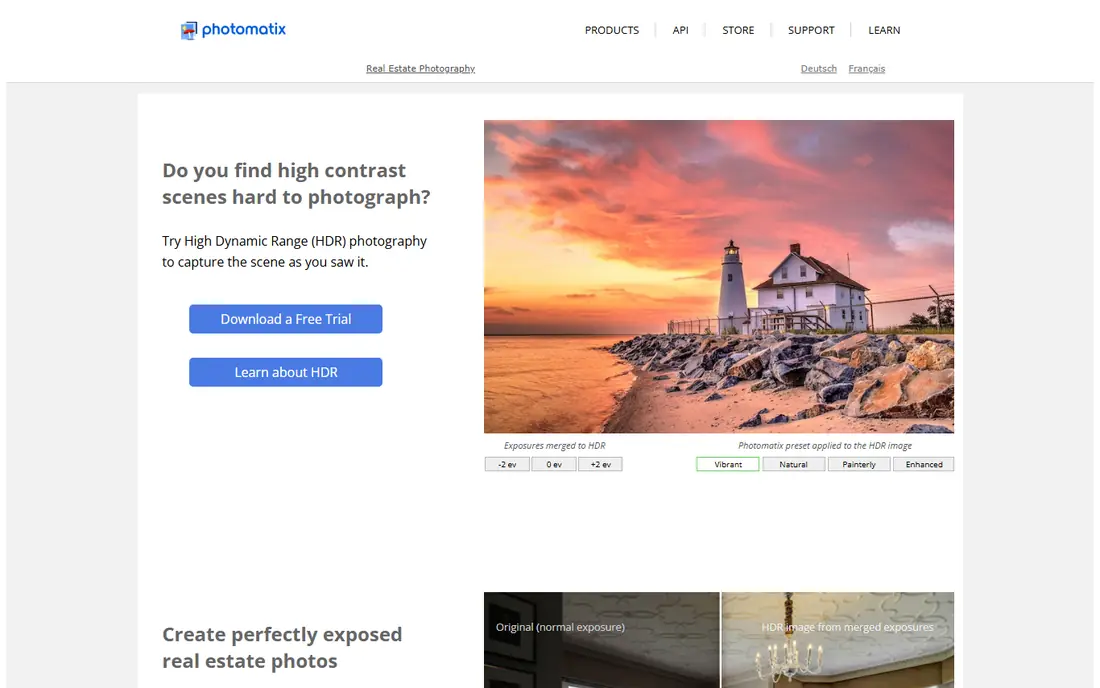
Photomatix Pro remains the specialist for photographers who want control over HDR tone mapping. Bracketed exposures can be merged and tuned with detailed sliders for strength, color, detail and ghost removal, which helps interiors with bright windows and dark corners. Batch processing applies the same settings across a shoot, giving a deterministic result that is easy to repeat for an agent client.
The interface feels older than Lightroom or Luminar Neo, and there is no built-in sky swap or virtual staging. Photographers who need those features must add another tool. If your priority is natural, controlled HDR with a repeatable look, Photomatix Pro still earns its place, especially for photographers who learned HDR on it and trust its output.
- Detailed HDR tone-mapping controls
- Batch processing
- Predictable, repeatable output
- Dated interface
- No sky replacement
- Virtual staging needs another tool
Photoshop is the finisher, not the daily batch editor, for real estate work. It handles window pulls, perspective correction, object removal, lawn and sky clean-up and complex composites that Lightroom handles less precisely. Layers and masks let an editor blend exposures by hand when automatic HDR produces halos or ghosting around moving curtains or trees.
Using Photoshop for every photo in a 40-image shoot would be slow and expensive in time. Reserve it for hero images, tricky windows and problem rooms, and do the bulk edit in Lightroom or Luminar Neo. Also respect listing ethics: remove a hose or a trash bin, but do not remove a permanent defect, a power line or a neighboring building to mislead buyers.
- Precise object removal and perspective tools
- Layer control for complex edits
- Pairs with Lightroom
- Slow for full-shoot editing
- Subscription only
- Easy to over-retouch a listing
BoxBrownie is a service, not a desktop editor, and that distinction helps busy photographers and agents. Upload photos, order image enhancement, virtual staging, day-to-dusk conversion, item removal or floor plan redraws, and receive finished files without editing them yourself. Pricing starts around $1.60 per image for standard enhancement in research, with staging and renovation work priced higher per room or image.
Per-image pricing suits occasional users and solo agents, but high-volume studios may find a dedicated editor service or in-house AI tool cheaper per shoot. Style control also requires clear briefs and examples, since a different editor may handle your files. For agents who need staging and edits without hiring staff, BoxBrownie is a practical, well-known option.
- Pay-per-image with no subscription
- Image enhancement, staging and floor plans
- Consistent 24-hour turnaround in research
- Per-image costs add up at volume
- No rush or refund policy in some comparisons
- Style control is less direct
PhotoUp pairs real estate photographers with a dedicated editor over time, which helps consistency across shoots for the same agent or brokerage. Services include HDR blending, flambient editing, virtual staging, floor plans and property websites, with turnaround commonly around 24 hours. A credit-based subscription model lets regular users plan volume and cost per month.
Occasional users may pay for unused credits, so compare the subscription cost against BoxBrownie pay-per-image pricing for your actual shoot count. Trial edits, offered in some promotions, are worth using to test style match before committing. For photographers who shoot several listings a week and want one editor who learns their style, PhotoUp fits well.
- Dedicated editor model for consistency
- HDR, flambient and staging services
- Property websites and delivery tools
- Subscription and credit model suits regular users more than occasional ones
- Pricing varies by plan
- Turnaround depends on order size
Imagen AI takes a different approach: it trains an AI profile on your own edited catalog, then applies that style to new shoots inside a Lightroom workflow. Photographers who already have a consistent look can cut editing time sharply, since the AI handles exposure, color and cropping choices they would otherwise repeat. Per-image pricing in research sits in the low cents range, which suits volume shooters.
New photographers without a large edited catalog will get weaker results until the profile learns enough examples. Even with a trained profile, check hero images and tricky rooms before delivery, since AI can misjudge mixed lighting or unusual colors. For established real estate photographers with a clear style and high volume, Imagen AI is a strong time saver.
- Learns from your past edits
- Batch editing in Lightroom workflow
- Fast turnaround for high volume
- Needs a catalog of past edits to train well
- Per-image pricing adds up
- Style must be checked before delivery
Aftershoot combines AI culling and editing for photographers who deliver many shoots per week. It selects keepers, applies an editing profile and returns a finished set faster than manual culling and editing, with subscription plans that cover unlimited volume in some tiers. That flat-rate model appeals to studios whose shoot count varies but stays high overall.
Real estate-specific presets are thinner than in Luminar Neo, so photographers should build and test a profile on their own listings before relying on it for client work. Occasional shooters may not use a subscription enough to justify it. For high-volume real estate studios that need speed first and can tune a profile once, Aftershoot reduces the editing bottleneck.
- AI culling plus editing
- Flat-rate subscription options for volume
- Fast batch delivery
- Fewer real estate-specific presets than Luminar
- Style control needs tuning
- Subscription suits regular shooters
Styldod focuses on virtual staging, where designers furnish empty rooms digitally so buyers can picture living there. Designer-led review helps staging look plausible, with furniture scale, lighting and style matched to the room rather than pasted generically. Pricing in research sits in the mid-teens to low twenties per image, with turnaround commonly within a day or two.
Styldod does not replace a photo editor for HDR, color and straightening, so pair it with Lightroom, Luminar Neo or an editing service for the base photos. Empty listings benefit most, since staging an already furnished room adds less value. For agents selling vacant homes, Styldod staging can lift listing views without the cost of physical staging.
- Designer-reviewed virtual staging
- Furniture styles for different buyers
- Fast turnaround for staging orders
- Staging is a service, not an editor
- Per-image pricing for staging
- Edited photos still need a separate editor
How we picked these
We compared official product pages, pricing information and real estate workflows for desktop editors and editing services that are actively available in October 2026. We favored tools with a clear real estate use, published pricing or service detail, and a workflow for HDR, batch delivery or staging. We excluded generic stock photo services and tools with no real estate workflow, and we did not claim hands-on testing.
What to check before you buy
Start with honesty and consistency. Real estate photos must show the property fairly, so avoid sky swaps that change weather, lawn edits that hide condition, or object removal that hides permanent defects. Check your local MLS and brokerage rules, since some allow virtual staging only with disclosure and some restrict certain edits. A consistent, natural look builds agent trust faster than a dramatic look that varies by room.
Next, test your full shoot, not one hero photo. HDR merge, window handling, vertical straightening and batch export all behave differently across a whole listing, especially in mixed light. Finally, compare total cost per listing. Desktop editors cost per month or once, AI tools cost per image, and services cost per image plus staging, so model your shoots per month before choosing a subscription or a pay-per-image service.
Desktop editor or outsourced service
Desktop editors suit photographers who want control, a consistent personal style and no per-image cost. Outsourced services suit photographers and agents who need volume, staging or faster turnaround than in-house editing allows. Many professionals use both, editing standard shoots themselves and outsourcing staging or overflow weeks.
Virtual staging disclosure
Always label virtually staged photos as staged in the listing, and keep an unstaged version available for buyers and agents. Disclosure protects you, the agent and the buyer, and it is required or expected in many markets. Check the exact disclosure wording your MLS or brokerage requires before publishing staged images.
Frequently asked questions
What is the best real estate photo editing software for beginners?
Lightroom is the best starting point for most beginners because it covers HDR, presets, batch export and delivery in one workflow. Luminar Neo is easier for creative finishing and sky work if you want faster results with less learning. Start with Lightroom for volume, then add Luminar Neo or Photoshop for specific finishing jobs.
What is the best photo editing software for real estate photography at volume?
Lightroom plus Imagen AI or Aftershoot covers high volume well, since AI profiles apply your style across many shoots quickly. BoxBrownie and PhotoUp cover volume through outsourcing when in-house time runs out. Your shoots per week and style consistency should decide between AI editing and a human service.
Do I need Photomatix if I already use Lightroom?
No, Lightroom HDR merge covers most real estate interiors well. Photomatix is worth it if you want deeper tone-mapping control, a repeatable batch HDR look or more control over ghosting and detail. Trial it on your hardest window and interior shots to see whether the difference matters for your listings.
How much does real estate photo editing cost per image?
Desktop editors cost a monthly or one-time fee, while AI tools often charge a few cents per image and human services often charge around $1.60 per image or more for enhancement, with staging priced higher. Total cost per listing depends on shoot size, staging needs and whether you edit in-house. Model a full month of listings before choosing.
Is virtual staging allowed in real estate listings?
Virtual staging is widely used, but many MLS systems and brokerages require clear disclosure that a photo is virtually staged. Keep an unstaged original, label staged photos, and do not use staging to hide defects or misrepresent room size. Check your local MLS rules and brokerage policy before publishing.
Can AI editing replace a human real estate editor?
AI editing can replace routine exposure, color and culling work for photographers with a consistent style and high volume. Human editors still handle tricky windows, complex retouching, staging judgment and style consistency for premium listings. Many studios use AI for volume and humans for hero images and problem rooms.
Sources
See where you really rank - block by block
ProMapRanker scans Google Maps across a grid of your service area. Simple monthly plans from $19, white-label on every plan.
Start freeKeep reading
 zscaler alternatives
Best Zscaler Alternatives in 2026
Looking for zscaler alternatives? We compare 9 SASE and zero trust platforms on architecture, data protection, pricing, and fit for your network and team.
Read → zapier alternatives free
Best Zapier Alternatives Free in 2026
Nine automation tools for zapier alternatives free in 2026, all with genuinely free tiers, plus free plan limits, starting prices and upgrade paths explained.
Read → which platform is best for online reputation
Which Platform Is Best for Online Reputation in 2026
Wondering which platform is best for online reputation? We compare 8 review, listing, and response tools for small and multi-location businesses and agencies.
Read →