 ProMapRanker
Best Permitting Software in 2026

Key takeaways
- Large agencies with complex workflows should shortlist Accela and Tyler EnerGov, while small and mid-sized agencies often get faster value from OpenGov, CitizenServe, or GovPilot.
- Online applications only help when inspections, payments, and plan review sit in the same workflow, so test the full permit journey, not just the portal.
- Most permitting pricing is quoted by agency size and scope, so ask for implementation, migration, and payment processing costs together.
- Prices and availability vary by location and organisation, and no tool can guarantee faster approvals, because staffing, code review, and applicant quality also shape timelines.
Quick comparison
| Pick | Great for | Pricing starts at | Free tier | |
|---|---|---|---|---|
 Accela | Large agencies with complex workflows | See website | No | Visit |
 OpenGov | Mid to large agencies wanting modern workflows | See website | No | Visit |
 Tyler EnerGov | Agencies already using Tyler systems | See website | No | Visit |
 CitizenServe | Small to mid-sized cities wanting simplicity | See website | No | Visit |
 GovPilot | Small agencies needing fast digital services | $3,000 per year | No | Visit |
 Cloudpermit | Agencies wanting cloud permitting and inspections | See website | No | Visit |
 Clariti | Agencies modernising permitting and licensing | See website | No | Visit |
 iWorQ | Small to mid-sized cities on a budget | See website | No | Visit |
 CivicPlus | Agencies wanting permitting plus a civic website | See website | No | Visit |
The best permitting software
We compared online applications, plan review, inspections, payments, GIS integration, and published pricing signals, and we kept only tools that still serve government agencies in October 2026.

Accela Civic Platform is the long-established choice for large cities and counties that run permitting, licensing, inspections, and plan review at scale. Its configurable applications let an agency model building, planning, zoning, and environmental health workflows in one system, while residents apply online, pay fees, and track status without visiting a counter. That depth matters when a single project crosses several departments and needs coordinated reviews.
The trade-off is cost and effort. Accela pricing is quote-based, with recent contract signals ranging widely by agency size, and implementation often takes longer than a simpler cloud tool. A small town with a handful of permit types will likely find Accela more system than it needs, while a large agency with complex rules will use its configurability well.
- Highly configurable civic applications
- Strong plan review and inspection tools
- Broad integrations
- Enterprise pricing and longer implementation
- Steeper learning curve for staff
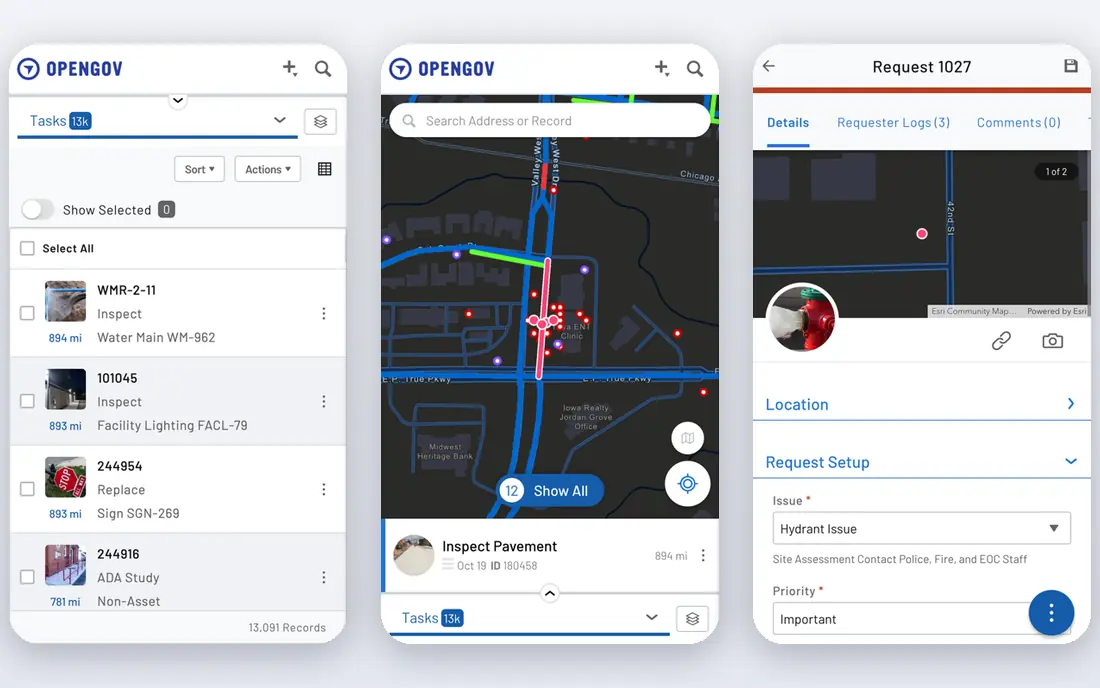
OpenGov Permitting and Licensing gives agencies a modern, cloud-based way to move applications, reviews, inspections, and payments online, with workflows staff can adjust without heavy custom coding. Its citizen portal is clean and mobile-friendly, which helps applicants submit complete applications, and its reporting gives managers a shared view of backlogs, cycle times, and fee collection. Agencies that already use OpenGov for budgeting or procurement gain extra value from shared data.
The limit is price transparency. OpenGov pricing is quoted by agency size and scope, with published contract signals suggesting a wide range, so a small agency should get a written quote that covers implementation and support. For a mid to large agency that wants a modern experience without Accela-level complexity, OpenGov is a strong middle path.
- Modern citizen portal
- Drag-and-drop workflows
- Strong reporting across departments
- Quote-based pricing
- Suite breadth can exceed a small agency need
Tyler Technologies EnerGov, its enterprise permitting and licensing software, suits large agencies that already run Tyler financial, court, or public safety systems. It handles permitting, licensing, inspections, code enforcement, and plan review with strong ties to Tyler ERP data, so fee, parcel, and account information stays consistent across departments. That integration reduces duplicate entry and reconciliation work for finance teams.
The drawback is scale. EnerGov pricing is quote-based and often enterprise-level, and implementation is frequently the longest among tools on this list. An agency without Tyler systems may find a simpler tool faster to launch, while a Tyler agency gains the most from keeping permitting inside the same vendor family.
- Deep ERP and financial integration
- Enterprise permitting and licensing
- GIS support
- Quote-based enterprise pricing
- Often the longest implementation
CitizenServe focuses on small to mid-sized cities and counties that want online permitting without enterprise complexity. Citizens and contractors use the portal for free, staff work from a browser-based system with automated routing and notifications, and mobile inspections support photo upload and automatic reports. Its pricing model is described as a transparent per-user monthly subscription with no hidden upgrade fees, which helps a small agency budget with confidence.
The limit is depth. CitizenServe will not match Accela or EnerGov for the most complex multi-department workflows, and highly custom rules may need vendor assistance. For a city that values simplicity, affordability, and responsive support, that trade is often worth it.
- Intuitive portal for citizens and contractors
- Transparent per-user subscription
- Strong support reputation
- Less enterprise depth than Accela or EnerGov
- Custom needs may need vendor help
GovPilot is a cloud government management platform that helps small agencies digitise permitting, licensing, complaints, and other constituent services in one place. Its published starting price of $3,000 per year makes it one of the few permitting-related tools with a clear entry figure, which helps a small town compare total cost without a long sales process. The platform also supports online forms, payments, and internal workflows that reduce counter visits and paper handling.
The catch is that permitting is one module among many, so depth for complex plan review may be thinner than a permitting-first tool. A small agency that wants several digital services from one vendor will get good value, while a large building department should test plan review and inspection workflows in detail before choosing GovPilot.
- Cloud platform for many government processes
- Published starting price
- Constituent engagement tools
- Permitting depth varies by module
- Larger agencies may need more configuration
Cloudpermit offers cloud-based permitting, planning, and inspection software for local governments, with online applications, status tracking, and mobile inspections in one system. Its community development focus helps building and planning teams coordinate reviews, share documents, and keep applicants informed without separate tools for each step. That clarity suits agencies moving from paper or email-based permitting to a fully online process.
The trade-off is footprint and pricing transparency. Cloudpermit pricing is quoted, and its presence in the United States is smaller than Accela or Tyler, so an agency should check references from similar-sized US jurisdictions. For an agency that wants a cloud-first system and a clean applicant experience, Cloudpermit deserves a demo alongside OpenGov and CitizenServe.
- Cloud-native permitting
- Online applications and inspections
- Community development focus
- Quote-based pricing
- Smaller vendor footprint in the United States
Clariti, formerly BasicGov, provides cloud permitting, licensing, and code enforcement software for state and local agencies. It lets agencies configure application types, fees, inspections, and workflows, while applicants apply and pay online and track progress. That configurability helps agencies that have outgrown spreadsheets but do not want an enterprise implementation project.
The limit is recognition and pricing. Clariti pricing is quoted, and because the brand changed from BasicGov, reference checks should confirm which product version a peer agency actually uses. An agency modernising a mid-sized permitting operation will find Clariti a credible option, provided it tests inspection and payment workflows with its own permit types.
- Modern permitting and licensing workflows
- Configurable for different agency types
- Cloud delivery
- Quote-based pricing
- Newer brand name may confuse reference checks
iWorQ serves small to mid-sized cities and counties with permitting, licensing, asset management, and work order tools at a lower cost range than enterprise vendors. Published contract signals put iWorQ in a roughly $3,500 to $35,000 per year range depending on scope, which makes it attractive for a town that needs online permitting without a large capital project. Its cloud platform covers applications, inspections, and payments in a straightforward interface.
The trade-off is advanced capability. iWorQ offers fewer features for automated plan review and complex multi-department workflows than Accela or EnerGov, so a large building department should not expect the same depth. For a small agency that needs reliable online permitting at a modest price, iWorQ is a sensible shortlist pick.
- Lower cost range for small agencies
- Permitting plus asset and work management
- Cloud access
- Fewer advanced features such as automated plan review
- Pricing varies by package
CivicPlus is best known for municipal websites, and its recreation and permitting-related products let an agency keep its public site, online services, and resident accounts in one vendor relationship. That integration helps residents find permits, facility bookings, and payments from the same civic portal they already use for city news and services. For an agency already running a CivicPlus website, adding permitting through the same vendor can reduce integration work.
The limit is package clarity. CivicPlus pricing is quoted, and permitting capability depends on the exact product and package an agency buys, so a buyer should confirm that plan review, inspections, and fee handling are included in the quote. An agency that values one civic portal above deepest permitting depth will find CivicPlus appealing.
- Recreation and permitting under one civic vendor
- Strong website integration
- Municipal focus
- Quote-based pricing
- Permitting depth depends on the exact product package
How we picked these
We compared official product pages, government contract signals, and agency use cases for applications, plan review, inspections, payments, and integrations, and we kept only tools that still serve US local government in October 2026. We did not run a live permit through any system, and we favoured tools with clear online applicant workflows over tools that only digitise back-office forms.
What to check before you buy
Start by running your five most common permit types through each demo, from application to fee payment to inspection scheduling, and note where staff must still use email or paper. Ask for a total quote covering software, implementation, data migration, training, and payment processing, and ask how long similar-sized agencies took to go live. Check GIS, finance, and payment integrations, confirm who owns applicant data and how it can be exported, and agree on support hours for inspection days, when a system outage hurts most. Finally, plan staff training and public guidance together, because a new portal only shortens timelines when applicants understand what to submit.
Frequently asked questions
What does permitting software actually do?
Permitting software lets applicants apply online, pay fees, upload plans, and track status, while staff route reviews, schedule inspections, record results, and issue permits in one system. It replaces counter visits, email chains, and spreadsheets with a shared workflow for each permit.
How long does implementation take?
Timelines vary widely, from weeks for a small cloud tool with standard permit types to many months for a large enterprise system with custom workflows and data migration. A vendor should give a timeline based on agencies of similar size and permit complexity, not a generic launch date.
Does permitting software speed up approvals?
It can reduce delays from missing documents, lost paperwork, and unclear status, but it cannot guarantee faster approvals. Staffing, code complexity, plan quality, and review workload still shape timelines, and an agency should set expectations with applicants accordingly.
Can residents apply and pay online?
Most tools on this list support online applications and fee payments, with mobile-friendly portals and status tracking. An agency should confirm which payment methods are supported, what processing fees apply, and whether applicants can pay without creating a complex account.
What integrations matter most?
GIS for parcels and zoning, finance for fees and reconciliation, payment processors for online payments, and document or plan review tools for drawings matter most for building departments. An agency should test each integration with its own systems before signing, rather than trusting a logo list.
Is cloud permitting secure for government data?
Reputable cloud vendors offer access controls, audit logs, backups, and compliance documentation, but an agency should still review security, data ownership, retention, and export terms. Ask for the vendor security documentation and confirm where data is hosted before migration.
Sources
See where you really rank - block by block
ProMapRanker scans Google Maps across a grid of your service area. Simple monthly plans from $19, white-label on every plan.
Start freeKeep reading
 what’s the best risk software for enterprises
What Is the Best Risk Software for Enterprises in 2026
We compared what’s the best risk software for enterprises on risk registers, controls, third-party risk, and reporting, with pricing notes for large teams.
Read → what's the best pam software for enterprises
What is the Best PAM Software for Enterprises in 2026
Find what's the best pam software for enterprises, with vaulting, session recording, just in time access and pricing compared for large enterprise IT teams.
Read → what’s the best grc software
What Is the Best GRC Software in 2026
We compared what’s the best grc software on risk, compliance, audit and vendor risk, so teams can pick a platform that fits their frameworks and budget.
Read →