 ProMapRanker
Best Paint Estimating Software in 2026


painting-specific production-rate estimates · Pricing starts at: $99 per user per month
Key takeaways
- PaintScout is the most painting-specific estimator here, with room-by-room and surface-by-surface pricing that general tools do not match.
- Estimate Rocket and QuoteIQ suit smaller shops that need a clean proposal fast without paying for a full field-service platform.
- Jobber and Housecall Pro make more sense when estimating is only one part of scheduling, invoicing, and payments.
- Per-user pricing changes the math fast, so price the plan for your actual estimator count, not for a solo user.
Quick comparison
| Pick | Great for | Pricing starts at | Free tier | |
|---|---|---|---|---|
| PaintScout | painting-specific production-rate estimates | $99 per user per month | Free trial | Visit |
 Estimate Rocket | solo painters and small crews | $59 per month | Free trial | Visit |
 QuoteIQ | self-serve quotes from your website | $29.99 per month | Free trial | Visit |
 Jobber | estimates plus scheduling and invoicing | $29 per month | Free trial | Visit |
 Housecall Pro | mobile estimates, booking, and payments | $59 per month | Free trial | Visit |
 Houzz Pro | estimates inside a contractor business platform | See website | Free trial | Visit |
 Contractor Foreman | low-cost all-in-one contractor management | $49 per month | Free trial | Visit |
 FieldPulse | simple field-service estimates and jobs | See website | Free trial | Visit |
The best paint estimating software
A good painting estimate is more than a total price. It needs surface counts, prep work, paint products, coats, and labor hours that a customer can follow. These tools range from painting-only estimators to general contractor platforms that happen to include estimates.
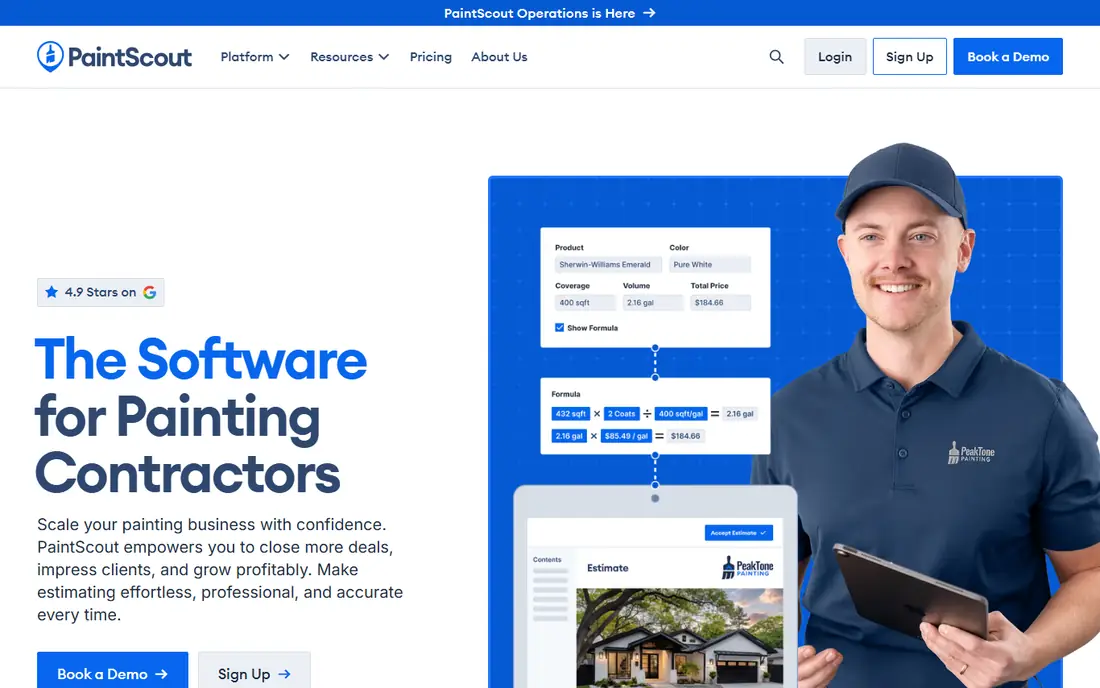
PaintScout is our pick for most painting contractors who estimate every week, because it is built around how painters actually price work. You walk a room, record walls, ceilings, trim, doors, and cabinets, apply production rates, and send a proposal a homeowner can sign on the spot. That structure helps when two painters on the same team need to produce similar numbers for similar rooms.
The honest catch is price and scope. At 99 dollars per user per month, a shop with three estimators pays far more than a solo painter would, and some pipeline and scheduling features sit in separate parts of the product. PaintScout still earns its place for shops where proposal quality wins jobs, but a solo painter doing a few estimates a month should compare Estimate Rocket first.
- Built for painting contractors
- Room and surface pricing
- Branded good, better, best proposals
- Per-user cost adds up with several estimators
- CRM features may cost extra
- More than a small shop may need

Estimate Rocket suits a painter who wants to move past paper estimates without learning a large system. You can build estimates from templates, adjust line items for painting work, send a professional-looking proposal, and turn an approved job into an invoice. For a one or two person crew, that covers the daily work.
The limits show up as the crew grows. Scheduling is basic, with no drag-and-drop crew calendar of the kind larger platforms offer, and job costing does not track margins in real time as deeply as some rivals. If your main pain is slow, messy estimates, Estimate Rocket is a good fit. If your main pain is crew scheduling, look at Jobber or Housecall Pro instead.
- Straightforward estimating templates
- Proposal builder included
- Invoicing and payments in one place
- Scheduling tools are basic
- Mobile experience is limited
- Job costing is lighter than full platforms
QuoteIQ is the budget pick for a small painting business that gets leads online. A visitor can request a quote through your site, and you can turn that request into a proposal without a long back-and-forth. At 29.99 dollars per month for the entry plan, it is easy to justify for a shop that only needs a handful of estimates each month.
The trade-off is depth. QuoteIQ does not give you the same room-by-room production-rate detail as PaintScout, and it is not a full job management system. We would use it when speed and low cost matter more than a highly detailed scope document. For large or complex repaint work, pair it with a careful site walk and a written scope note.
- Low entry price
- Website quote forms
- Quick proposal turnaround
- Less painting-specific depth than PaintScout
- Quoting focus means weaker job management
- Check limits on the entry plan
Jobber is a good choice for a painting business that also needs scheduling, client communication, and invoicing in one system. You can send a quote, get approval online, schedule the crew, and invoice from the same job record, which cuts down on retyping. The entry Core plan starts at 29 dollars per month billed annually for one user, with a 14-day trial.
The catch is that Jobber is built for many trades, so its estimate builder is a general line-item tool rather than a painting production-rate engine. You will need to build your own painting templates and rates. That is fine for many shops, but if your estimates live or die on surface detail, PaintScout still has the edge on the estimate itself.
- Quotes flow into jobs and invoices
- Scheduling and client reminders included
- QuickBooks sync
- Not painting-specific
- Entry plan limits features
- Price rises with team size
Housecall Pro suits a residential painting crew that works mostly from phones in the field. Estimates, scheduling, dispatch, invoicing, and payment collection sit in one mobile workflow, and customers can book online. The Basic plan starts at 59 dollars per month billed annually, with a 14-day trial.
Like Jobber, Housecall Pro is a general home-service platform, so painting templates and production rates are yours to build. Advanced proposal and route tools sit on higher plans, so check which plan holds the features you need before you sign. We like it best for teams that value booking and fast payment collection as much as the estimate itself.
- Mobile-first field workflow
- Online booking
- Payments and financing options
- Not painting-specific
- Entry plan lacks some advanced tools
- Price rises with users and add-ons
Houzz Pro is worth a look for a painting contractor who also wants lead management, project tracking, and a client portal in the same place. You can build an estimate from templates, convert it into a schedule, track job costs, and invoice through the system. That breadth helps a growing firm that is tired of stitching several tools together.
The reason we list the price as See website is that Houzz Pro pricing varies by plan and market, and published third-party figures differ. Ask for the plan, term length, and renewal terms in writing before you commit, since some reviewers report annual commitments. If you only need estimates, a painting-specific tool will be simpler and cheaper.
- Estimates, CRM, scheduling, and invoicing in one system
- Client portal
- QuickBooks Online sync
- Pricing is not a simple public rate card
- Contract terms need careful reading
- Broad scope can feel heavy for estimate-only users
Contractor Foreman appeals to a small painting business that wants one system for estimates, invoices, scheduling, and crew time without a per-user bill that climbs with every hire. The entry plan starts at 49 dollars per month for the whole company, which is a clear contrast with per-user pricing elsewhere in this list.
The trade-off is focus. This is a general contractor platform, so painting production rates and proposal polish depend on how well you set up templates. It is not as painting-specific as PaintScout, and the breadth of features means a longer setup period. For a budget-conscious shop that wants one tool for many jobs, it is a strong value pick.
- Low flat entry price for the whole company
- Estimates, invoices, and time tracking
- QuickBooks integration
- Interface covers many trades, not just painting
- Setup takes time
- Estimate depth varies by how you build templates
FieldPulse fits a small contractor who wants a simple path from estimate to scheduled job to invoice, without a long list of features to learn. The field app helps crews see job details on site, and the office can track estimates, customers, and payments in one place. That simplicity is a real benefit for a shop moving off spreadsheets.
The downside is pricing clarity and painting depth. FieldPulse does not publish a single entry price in the same way as some rivals, so we list it as See website and suggest getting a written quote for your team size. Like other general tools here, it needs your own painting templates to reach the detail PaintScout offers out of the box.
- Job management from estimate to invoice
- Mobile field access
- Customer communication tools
- Pricing requires a quote or demo in many cases
- Not painting-specific
- Smaller ecosystem than larger rivals
How we picked these
We compared vendor pricing pages, feature pages, and public reviews for tools that painting contractors actually use for estimates. We kept tools that can produce a customer-facing proposal, handle line items or production rates, and move an approved estimate toward a job or invoice. General contractor tools were included only when their estimate workflow is strong enough for painting work, and we noted where painting-specific detail is missing.
How to choose paint estimating software for a small painting business
Start with how many estimates you send each month. A solo painter sending a few estimates can do well with Estimate Rocket or QuoteIQ, while a shop sending many estimates each week will get more value from PaintScout, even at a higher per-user price. Count estimators, not total staff, when you compare per-user plans.
Next, test the estimate on a real past job. Enter the rooms, surfaces, prep, and paint products you actually used, and compare the software total with your real total. A tool that looks clean but forces awkward workarounds will cost you time on every job. Also check the proposal your customer sees: clear scope language, paint names, sheen, coats, and exclusions prevent disputes later.
Finally, check the handoff. The best painting estimate app is the one where an approved proposal becomes a scheduled job and an invoice without retyping. If you already use QuickBooks or another accounting tool, confirm the sync works on the plan you will buy, not just on the top plan.
Frequently asked questions
What is the best app for painting contractors?
PaintScout is the best painting-specific pick for estimating, while Jobber and Housecall Pro are better all-round picks for scheduling and payments. The right choice depends on whether estimating or field management is your bigger daily problem.
What is the best software for a small painting business?
Estimate Rocket and QuoteIQ are strong low-cost starts for a solo painter or a two person crew. Contractor Foreman is worth a look if you want one low flat price for estimates, scheduling, and invoicing across the company.
What is the best painting estimate app for on-site proposals?
PaintScout and Housecall Pro both work well on site, with proposals a customer can review and sign without waiting for an office follow-up. PaintScout has deeper painting detail, while Housecall Pro has broader booking and payment tools.
How much does paint estimating software cost?
Entry prices in this list range from 29 dollars per month to 99 dollars per user per month, with several tools priced by quote. Per-user tools cost more as you add estimators, while flat-rate tools can be cheaper for larger crews.
Can paint estimating software replace a site visit?
No, it should support a site visit, not replace it. Surface condition, prep needs, access, and ceiling height all affect the real price. Use the software to record measurements and rates consistently, and confirm unusual conditions in person before you send a final proposal.
Sources
See where you really rank - block by block
ProMapRanker scans Google Maps across a grid of your service area. Simple monthly plans from $19, white-label on every plan.
Start freeKeep reading
 zoho inventory alternatives
6 Alternatives to Zoho Inventory, Compared on Price and Fit
Zoho Inventory alternatives: 6 tools compared on price, free plans and fit. Katana leads the list for manufacturers. Fit and flaws are laid out for each entry.
Read → zoho crm alternatives
Best Zoho CRM Alternatives (2026)
Need Zoho CRM alternatives? We compare 7 tools on cost, free access and who each suits. Every pick gets a straight assessment. Built for quick decisions.
Read → zelle alternatives
Best Zelle Alternatives in 2026
Compare the best Zelle alternatives for sending money to friends, paying sellers and moving funds abroad, with honest notes on fees, speed and safety in 2026.
Read →