 ProMapRanker
Best Open Source SEO Software in 2026

Key takeaways
- Every tool here is genuinely open source, so you can inspect the code, self-host it, and keep your data on your own server.
- No single open source tool replaces a full paid suite, so most teams pair a rank tracker with a crawler and an on-page plugin.
- Rank trackers still need a way to collect search results, through proxies, a scraping service, or a search API, and that cost is separate from the software.
- WordPress plugins on this list are the easiest starting point, while self-hosted crawlers and trackers suit teams with some technical help.
Quick comparison
| Pick | Great for | Pricing starts at | Free tier | |
|---|---|---|---|---|
 Serposcope | Self-hosted rank tracking | Free | Yes | Visit |
 SerpBear | Rank tracking with Search Console data | Free | Yes | Visit |
 SEO Panel | All-in-one SEO control panel | Free | Yes | Visit |
 SEOnaut | Technical site crawling | Free | Yes | Visit |
 Unlighthouse | Site-wide Lighthouse audits | Free | Yes | Visit |
 Yoast SEO | WordPress on-page SEO | Free | Yes | Visit |
 Rank Math | WordPress SEO with more free features | Free | Yes | Visit |
 SEOPress | Lightweight WordPress SEO | Free | Yes | Visit |
 The SEO Framework | Clean WordPress SEO without upsells | Free | Yes | Visit |
 Matomo | Privacy-first analytics to pair with SEO | Free | Yes | Visit |
The best open source seo software
Open source SEO tools reward a little setup work with full data ownership. You host the tool, you keep the history, and you are not charged per keyword. The cost is your time, your server, and, for rank tracking, your method for collecting search results.
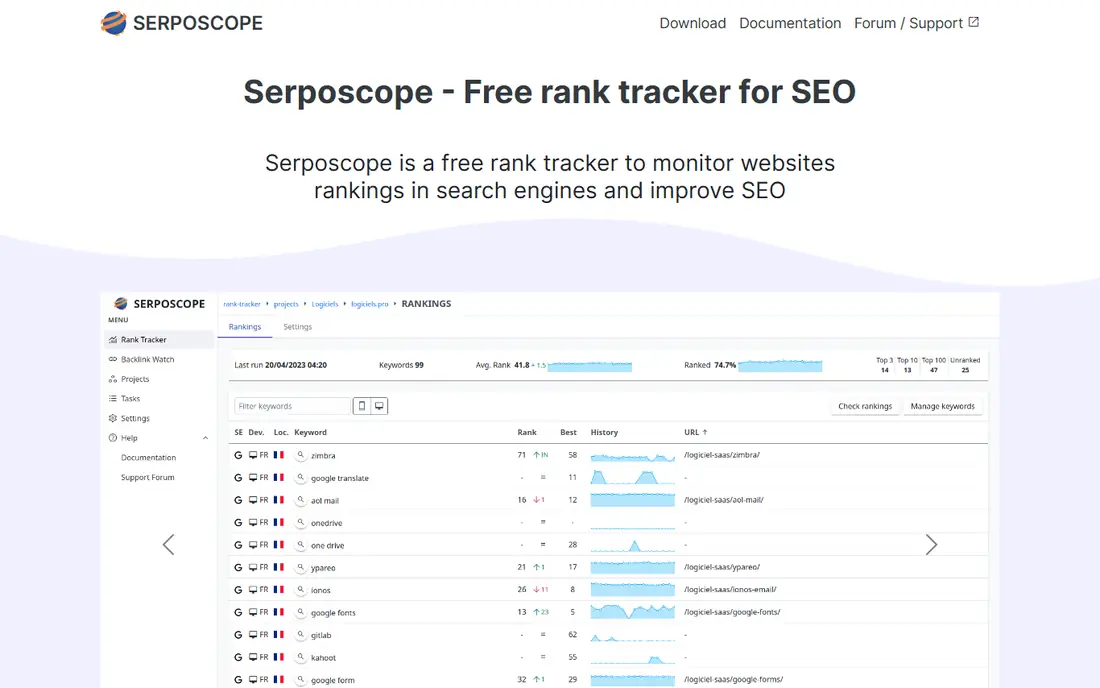
Serposcope is the classic open source rank tracker, and it remains a good pick for teams that want unlimited tracking without a per-keyword bill. You add sites and keywords, it checks positions on a schedule, and it keeps the full search results history so you can look back at competitors as well as your own pages. Geotargeting and mobile versus desktop checks are part of the package.
The honest catch is the collection step. Serposcope does not magically fetch Google results for free at scale, so you need proxies, a scraping service, or your own IP setup, and large keyword sets can be demanding on resources. If you have someone comfortable running a server, that trade is worth it. If you do not, a hosted rank tracker may save more time than Serposcope saves money.
- Unlimited keywords and sites
- Full SERP history
- Runs on desktop or a server
- Setup is technical
- You must arrange proxies or a captcha service
- Interface is plain
SerpBear is a newer open source rank tracker that many small agencies pick for its cleaner setup and its Google Search Console connection. Alongside tracked positions, you can see real impressions and clicks from Search Console, plus top pages and countries, which helps separate a ranking change from a traffic change. Email alerts and CSV export make it usable for client reporting without extra tools.
Like Serposcope, SerpBear needs a scraping strategy, through a third-party service or your own proxies, and that part can cost money even though the software itself is free. Docker deployment keeps installation tidy for technical teams. For a blogger or small agency with a server, SerpBear is one of the easiest self-hosted trackers to live with day to day.
- Unlimited domains and keywords
- Search Console integration
- Email alerts and API
- You still bring a scraper or SERP API
- Docker setup suits technical users
- No built-in paid data

SEO Panel is the closest open source answer to a single SEO dashboard. It bundles keyword position checks, site audits, backlink checks, and scheduled reports, with user management for agencies that handle several clients. If you already run PHP hosting, it can sit on infrastructure you own and give clients regular reports without a monthly platform fee.
The panel shows its age in places, and the interface is not as polished as a modern paid suite. Rank checking also faces the same collection limits as other self-hosted trackers. Still, for agencies that want one self-hosted home for routine SEO reporting, SEO Panel covers more ground in one install than any other tool on this list.
- Rank checks, audits, and reports in one panel
- Multi-site and user management
- Scheduled reports
- PHP hosting setup
- Interface feels dated
- Rank data still depends on search access
SEOnaut is a focused technical crawler for teams that want to find problems before launch or after a site change. It checks pages for broken internal links, title and description issues, heading problems, noindex pages, canonical mismatches, thin content, missing image alt text, and slow responses. That list covers most of what a pre-launch audit needs, without paying for a crawler subscription.
It is not a rank tracker, a keyword tool, or a content optimizer, so pair it with SerpBear or a WordPress plugin for the rest of the job. Setup and reporting are plain compared with paid crawlers. For developers and technical SEOs who already run their own servers, SEOnaut is a fast, honest way to keep a site technically clean.
- Crawls for broken links and on-page issues
- Self-hosted
- Good for pre-launch checks
- Narrower than a full suite
- Needs technical setup
- Reporting is basic
Unlighthouse takes Google Lighthouse, which normally audits one page at a time, and runs it across an entire site. That shift matters, because a homepage can score well while deeper pages carry slow images, poor meta data, or accessibility problems that drag down the whole site. Teams can scan, sort by issue, and work through fixes page by page.
The tool assumes comfort with command-line setup and with reading Lighthouse results, so it suits developers more than beginners. It also does not track rankings or keywords. Used alongside a crawler like SEOnaut, Unlighthouse gives a strong technical picture of a site, built entirely from open source parts.
- Runs Lighthouse across a whole site
- Finds performance and SEO issues at scale
- Open source
- Needs a technical install
- Results need interpretation
- Not a rank tracker
Yoast SEO is the best-known open source SEO plugin for WordPress, and its free version covers the core on-page job well. It handles titles and meta descriptions, sitemaps, schema markup, canonical URLs, and internal link suggestions, with content checks for readability and keyphrase use. Because it is GPL-licensed WordPress software, the code is open and the free version is genuinely usable.
Paid add-ons cover redirect management, extra schema types, and AI features, so teams that need those should budget for Premium. The settings screens can also feel crowded for a simple blog. For most WordPress sites, though, Yoast remains the safest default: well documented, widely supported, and easy for a non-developer to run.
- Widely used WordPress plugin
- Title, meta, and schema controls
- Readability and link checks
- Some features are paid-only
- Can feel busy on small sites
- WordPress only
Rank Math gives WordPress users more in its free version than most rivals, including redirection management, schema controls, and a guided setup wizard that imports settings from other plugins. That generosity is why many site owners switch to it when they outgrow a basic plugin but do not want to pay yet. It also handles sitemaps, titles, and social previews cleanly.
The breadth is also the drawback. New users can face a long settings list before they publish their first post, and it is easy to turn on features you do not need. Rank Math Pro adds rank tracking, analytics integration, and more schema options for teams that want them. For WordPress sites that want a lot of free capability in one plugin, Rank Math is hard to beat.
- Many pro-style features in the free version
- Setup wizard
- Schema and redirection tools
- Feature list can overwhelm beginners
- WordPress only
- Some advanced features are paid
SEOPress is a good pick for site owners who want solid WordPress SEO without a heavy plugin. The free version covers titles and meta descriptions, sitemaps, schema, social sharing data, and content analysis, while keeping the admin area free of ads and upsell banners. Sites that care about speed often prefer it to larger plugins that load more code.
The community and tutorial base is smaller than Yoast or Rank Math, so finding answers can take a little longer. SEOPress Pro adds redirections, broken link checks, and extra schema types for teams that need them. If you value a clean, light plugin and you are comfortable with less hand-holding, SEOPress is a strong open source choice.
- Lightweight and fast
- Titles, sitemaps, and schema
- No ads in the admin area
- Smaller community than Yoast
- Some features are paid
- WordPress only
The SEO Framework takes a different approach from Yoast and Rank Math: it automates much of the on-page work and stays out of your way. Titles, descriptions, canonical URLs, and structured data are generated from sensible defaults, with manual controls when you want them. The plugin carries no ads and no upsell banners in the admin area, which many developers appreciate.
Beginners who want step-by-step guidance and traffic-light scores may miss the coaching features of larger plugins. The ecosystem of extensions is also smaller. For developers and site owners who want correct, automated SEO with minimal noise, The SEO Framework is a principled open source option that does its job quietly.
- Automated SEO defaults
- No ads or upsell banners
- Privacy-focused approach
- Fewer guided features for beginners
- Smaller ecosystem
- WordPress only
Matomo is not an SEO tool by itself, but it belongs in an open source SEO stack because rankings mean little without traffic data you trust. As a self-hosted, open source analytics platform, Matomo gives you page views, referrers, search terms, and conversion data on your own server, with privacy controls and no sampling on self-hosted installs. Pair it with SerpBear and a crawler, and you can check whether a ranking gain actually brought visits.
The cost is hosting and maintenance, plus the learning curve of running analytics yourself. Matomo Cloud is a paid hosted option for teams that do not want to self-host, with some premium features charged separately. For teams that want analytics data they fully own, Matomo is the natural open source partner to the SEO tools above.
- Self-hosted analytics with full data ownership
- No data sampling on self-hosted installs
- Privacy controls
- Not an SEO tool on its own
- Hosting and maintenance are on you
- Some features are paid on cloud plans
How we picked these
We compared official project pages, repositories, and documentation for tools that are genuinely open source, not merely free to use. We kept tools that work today, that cover a real SEO job such as rank tracking, crawling, on-page optimization, or analytics, and that a small team can run without a paid license. We left out closed-source tools with a free tier, including Screaming Frog, and free tools from search engines that are not open source, since the topic here is open source software. Prices are shown as Free where the software itself costs nothing, with hosting or data collection costs noted in the text.
How to build an open source SEO stack
Start with your site type. WordPress sites should pick one on-page plugin, such as Yoast, Rank Math, SEOPress, or The SEO Framework, and stick with it, since running two SEO plugins at once creates conflicting titles and sitemaps. Add Matomo or your existing analytics so you can tie rankings to visits, and add a crawler such as SEOnaut or Unlighthouse for technical checks before and after site changes.
Next, choose a rank tracker only if you will actually use the data. SerpBear suits most small teams, while Serposcope suits teams that want full SERP history and do not mind a plainer interface. Before you install either, decide how results will be collected: your own proxies, a scraping service, or a search API. Budget for that separately, and start with a small keyword set, such as 20 to 50 terms that match real buying or reading intent, so the data stays useful.
Finally, plan maintenance. Self-hosted tools need updates, backups, and someone who can restart a service when it stops. Keep a simple routine: update plugins monthly, run a crawl after any template or navigation change, and review rankings and analytics together once a month. If no one on the team can own that routine, a hosted tool may be cheaper in time than a free tool is in money, and that is a fair trade to make with eyes open.
Frequently asked questions
What are the best open source seo tools for beginners?
Start with a WordPress plugin such as Yoast SEO or Rank Math, plus Google Search Console for real search data, then add Matomo if you want self-hosted analytics. Self-hosted trackers and crawlers are powerful, but they suit beginners only when someone technical can help with setup. Keep the stack small at first and add tools as you learn what data you actually use.
Is open source SEO software really free?
The software itself is free, but hosting, maintenance, and search data collection can cost money. A WordPress plugin costs nothing beyond your existing hosting, while a self-hosted rank tracker needs a server and a way to collect search results, such as proxies or a SERP API. Budget for those running costs before you compare open source tools with a paid subscription.
Can open source tools replace Ahrefs or Semrush?
Partly. Open source tools can replace rank tracking, crawling, on-page optimization, and analytics, but they do not include the large backlink and keyword databases that paid suites sell. Teams that need deep competitor backlink data or huge keyword lists will still need a paid source for that part, even if the rest of the stack is open source.
What is the best open source rank tracker?
SerpBear is our pick for most small teams, thanks to its Search Console integration, alerts, and Docker setup. Serposcope is a strong alternative for teams that want full SERP history and unlimited tracking on a server they control. Both need a scraping strategy, so pick the one your team can maintain rather than the one with the longer feature list.
Do I need to know code to use open source SEO software?
Not for WordPress plugins, which install like any other plugin. Self-hosted trackers, crawlers, and analytics tools do need some technical comfort, such as running Docker or managing a server. If that help is not available, start with the plugins, and add self-hosted tools only when you have someone to maintain them.
Sources
- https://serposcope.serphacker.com
- https://serpbear.com
- https://www.seopanel.org
- https://www.seonaut.org
- https://unlighthouse.dev
- https://yoast.com
- https://rankmath.com
- https://www.seopress.org
- https://theseoframework.com
- https://matomo.org
- https://contentmavericks.com/best-open-source-seo-tools/
- https://xcloud.host/best-open-source-seo-tools/
See where you really rank - block by block
ProMapRanker scans Google Maps across a grid of your service area. Simple monthly plans from $19, white-label on every plan.
Start freeKeep reading
 zscaler alternatives
Best Zscaler Alternatives in 2026
Looking for zscaler alternatives? We compare 9 SASE and zero trust platforms on architecture, data protection, pricing, and fit for your network and team.
Read → zapier alternatives free
Best Zapier Alternatives Free in 2026
Nine automation tools for zapier alternatives free in 2026, all with genuinely free tiers, plus free plan limits, starting prices and upgrade paths explained.
Read → which platform is best for online reputation
Which Platform Is Best for Online Reputation in 2026
Wondering which platform is best for online reputation? We compare 8 review, listing, and response tools for small and multi-location businesses and agencies.
Read →