 ProMapRanker
Best OCR Software for Invoices in 2026


Accountants converting invoices and statements · Pricing starts at: See website
Key takeaways
- DocuClipper and Dext suit bookkeepers and small firms that need clean invoice data in QuickBooks, Xero, or Excel.
- Nanonets and Docsumo suit teams that need custom fields, APIs, and review workflows for varied invoice layouts.
- Rossum and ABBYY suit high-volume AP teams that need enterprise controls and ERP connectors.
- Veryfi and Klippa suit developers and European teams that need API capture plus fraud checks.
- Always test with your worst invoices, including scans, photos, and multi-page layouts, before you commit to a plan.
Quick comparison
| Pick | Great for | Pricing starts at | Free tier | |
|---|---|---|---|---|
| DocuClipper | Accountants converting invoices and statements | See website | Free trial | Visit |
 Nanonets | Custom invoice models and API extraction | See website | Free trial | Visit |
 Rossum | Enterprise AP automation at scale | See website | Free trial | Visit |
 ABBYY Vantage | Enterprise document capture | See website | No | Visit |
 Dext | Receipt and invoice capture for practices | See website | No | Visit |
 Docsumo | Extraction with a built-in review workflow | See website | Free trial | Visit |
 Veryfi | Real-time OCR API for apps | See website | Yes | Visit |
 Klippa | European teams needing fraud detection | See website | Free trial | Visit |
 Parseur | Email-driven invoice parsing | See website | Yes | Visit |
The best OCR tools for invoices
Invoice OCR should capture vendor, invoice number, dates, line items, tax, and totals without manual retyping. The tools below differ in accuracy on messy layouts, review workflows, accounting exports, and price model. We focused on invoice fit, not general document scanning, so each tool here handles invoices as a core use case.
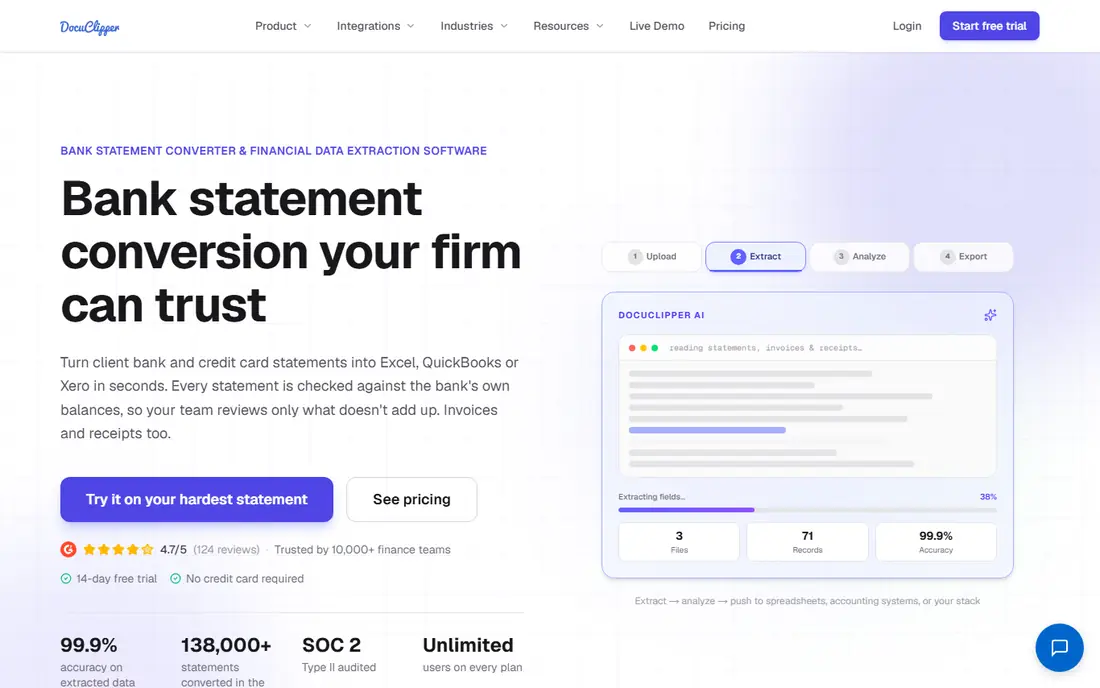
DocuClipper is built for accountants, bookkeepers, and small businesses that convert PDF and scanned invoices into accounting-ready data. It captures vendor details, invoice numbers, line items, tax, and totals, and it exports to QuickBooks, Xero, Sage, and Excel. That direct export path saves the manual step that causes most bookkeeping errors.
It is not a full accounts payable suite with payments and multi-level approvals, so larger AP teams may need a broader platform. Pricing is page-based, which means high monthly volume needs careful counting. For firms that mainly need accurate capture and clean exports, DocuClipper offers a practical balance of accuracy and ease.
- Template-free invoice capture
- Line-item extraction
- QuickBooks and Xero export
- Page-based pricing can rise with volume
- Approval tools are simpler than full AP suites

Nanonets suits teams with varied invoice formats or custom fields that standard templates miss. You can train models for specific vendors or layouts, extract through an API, and send results to accounting or ERP systems. That flexibility helps mid-size companies that receive invoices from many suppliers in different formats.
Custom training needs sample documents and review time, so the first weeks require more work than a template-free tool. Pricing also depends on pages, credits, or plan structure, so confirm the unit you will be billed on. For teams that need control over fields and automation, Nanonets offers depth that simpler capture tools do not.
- Custom field training
- API access
- Accounting integrations
- Setup takes time for custom models
- Pricing varies by usage model

Rossum targets AP teams processing large invoice volumes from many suppliers. Its capture engine learns from corrections, so accuracy can improve over time on recurring layouts. Workflow tools route invoices for approval, flag exceptions, and connect to ERP systems, which reduces manual handling across the AP cycle.
Pricing is quoted and aimed at enterprise budgets, so small firms will likely find cheaper capture options. Implementation also takes planning, including connector setup and approval design. For mid-market and enterprise AP teams that need scale, control, and audit trails, Rossum is a strong shortlist option.
- Strong handling of varied layouts
- Workflow automation
- ERP connectors
- Quote-based pricing
- Heavier setup than small-business tools
ABBYY Vantage is an enterprise document platform with pre-built invoice skills and a long history in OCR. It handles high volumes, varied document types, and regulated settings where deployment control matters. Large organizations can combine capture with classification, validation, and workflow rules in one platform.
The trade-off is complexity and cost. ABBYY pricing is quoted, and tuning models and workflows often needs internal expertise or partner help. Small teams will find simpler tools faster to deploy. For enterprises with strict controls, high volumes, and mixed document types, ABBYY remains a credible, mature choice.
- Mature OCR engine
- Pre-built invoice skills
- On-premise and cloud options
- Quote-based pricing
- Setup and tuning need expertise
Dext is designed for accounting practices and their clients. Clients can photograph receipts and invoices on mobile, and the practice receives organized data ready for bookkeeping in QuickBooks, Xero, or Sage. Supplier rules, bank statement capture, and client management tools support a practice workflow, not just one-off extraction.
Pricing for practices is often per client, so firms should model total cost across their client base rather than judging one user price. Line-item capture depth can also vary, so test with your typical supplier invoices. For practices that want clients to submit documents easily and consistently, Dext is a well-established option.
- Mobile capture
- Practice and client workflows
- QuickBooks and Xero links
- Per-client practice pricing
- Line-item depth varies by document type
Docsumo combines document extraction with a review workflow, so teams only handle exceptions while clean invoices pass through. Validation rules flag mismatches, and API access lets developers embed extraction into internal tools or client portals. That mix suits startups, finance teams, and developers building invoice pipelines.
Entry pricing is higher than simple capture tools, which makes Docsumo a weaker fit for very low volume use. Setup also works best when someone owns field definitions and validation logic. For teams that need both extraction and a controlled review step, Docsumo offers a coherent package.
- API-first extraction
- Review queues
- Validation rules
- Higher entry price for small teams
- Setup benefits from technical help
Veryfi suits product and engineering teams that need invoice and receipt capture inside an app. Its API and mobile SDKs return structured data in real time, which helps expense, bookkeeping, and marketplace products that capture documents at the point of upload. A free tier helps developers test before committing to a paid plan.
Veryfi is not a full AP suite, so approvals, payments, and ERP workflows need separate systems or custom work. Pricing scales with volume, so high-volume apps should model usage carefully. For developers who need reliable capture as a building block, Veryfi is a strong API choice.
- Fast API capture
- Mobile SDKs
- Receipt and invoice support
- Developer focus
- Full AP workflow needs separate tools
Klippa offers invoice and receipt capture with fraud detection features that flag altered or suspicious documents. That focus helps finance teams that handle expense claims and supplier invoices where duplicate or tampered documents pose a risk. The platform also supports mobile capture and API access for integrated workflows.
Pricing is handled through sales, which slows early budgeting, and US accounting integrations are less central than in tools built for QuickBooks-first practices. European teams, and companies with cross-border suppliers, may value the data handling and fraud focus more. For fraud-aware invoice capture, Klippa deserves a place on the shortlist.
- Invoice and receipt capture
- Fraud checks
- European data handling focus
- Pricing is quoted
- Smaller US accounting ecosystem than some rivals
Parseur works well when invoices arrive by email. You forward invoices to a Parseur mailbox, define the fields to extract, and send structured results to Sheets, accounting tools, or other apps through integrations. The free tier covers low volumes, which helps small teams test email automation without a large commitment.
Template-based parsing means new layouts may need setup, unlike fully template-free tools. Parseur also lacks the approval and payment depth of full AP suites. For teams whose main problem is email intake and structured export, Parseur offers a simple, affordable path to automation.
- Email inbox parsing
- No-code field setup
- Sheets and app exports
- Template setup per layout type
- Weaker for complex AP workflows
How we picked these
We compared official pricing pages, product documentation, and public feature descriptions, and we checked that each tool still offers invoice OCR in October 2026. We favored tools that capture line items, not just totals, and that export to accounting systems or APIs. We also balanced price models, from free tiers and page-based plans to enterprise quotes, so small firms and large AP teams can both find a fit.
How to test invoice OCR before you buy
Build a test set before any demo. Include clean PDFs, scanned pages, phone photos, multi-page invoices, credit notes, and invoices with discounts, multiple tax rates, and unusual layouts. Run the same set through each shortlisted tool and score vendor, invoice number, date, line items, tax, and total separately. A tool that gets totals right but misses line items will still create manual work.
Accuracy, workflow, and cost
Check how the tool handles exceptions. Can a reviewer correct a field, approve a batch, and see an audit trail of changes? Confirm export mapping to your accounting system, including tax codes, supplier matching, and duplicate detection. On cost, count pages, documents, or credits in the same way across vendors, and include review time in the total. The cheapest per-page price can cost more if staff must fix every third invoice.
Security and data handling
Invoice data includes supplier bank details, prices, and internal costs, so review security controls before rollout. Check data retention, access controls, encryption, and whether documents are used to train shared models. For regulated industries, confirm deployment options and data residency. Set a retention policy and limit access to finance staff who need the data for their work.
Frequently asked questions
What is the best invoice OCR software for a small business?
DocuClipper, Dext, and Parseur are strong small-business starting points. DocuClipper suits firms converting invoices to QuickBooks or Xero, Dext suits practices with mobile client capture, and Parseur suits email-driven intake. Test each with your real invoices, since layout accuracy matters more than feature lists.
What are the best OCR tools for invoices at enterprise scale?
Rossum and ABBYY Vantage suit high-volume AP teams that need workflow controls, ERP connectors, and audit trails. Both are quote-based and need implementation planning. Docsumo also works for teams that need API extraction plus a review workflow at mid-market scale.
Can invoice OCR handle scanned and handwritten invoices?
Most tools in this list handle scanned PDFs and photos, but accuracy drops on poor scans, skewed pages, and handwriting. Clean scans, good lighting, and flat pages improve results sharply. Test your worst documents, not your cleanest ones, and check how the tool flags low-confidence fields for review.
How much does invoice OCR software cost?
Pricing varies by model: page-based plans, per-document credits, per-client practice pricing, and enterprise quotes. Simple capture tools often start in the tens of dollars per month, while API and enterprise platforms can cost hundreds or more per month at volume. Always compare the same unit, such as pages per month, across vendors.
Do I need to train an invoice OCR model?
Not always. Template-free tools work on many layouts without training, while custom tools such as Nanonets benefit from samples for unusual formats. If your suppliers use standard invoice layouts, start with a template-free option and only move to custom training if accuracy on your test set falls short.
Sources
See where you really rank - block by block
ProMapRanker scans Google Maps across a grid of your service area. Simple monthly plans from $19, white-label on every plan.
Start freeKeep reading
 zscaler alternatives
Best Zscaler Alternatives in 2026
Looking for zscaler alternatives? We compare 9 SASE and zero trust platforms on architecture, data protection, pricing, and fit for your network and team.
Read → zapier alternatives free
Best Zapier Alternatives Free in 2026
Nine automation tools for zapier alternatives free in 2026, all with genuinely free tiers, plus free plan limits, starting prices and upgrade paths explained.
Read → which platform is best for online reputation
Which Platform Is Best for Online Reputation in 2026
Wondering which platform is best for online reputation? We compare 8 review, listing, and response tools for small and multi-location businesses and agencies.
Read →