 ProMapRanker
Best Meme App in 2026: 9 Apps Compared
Key takeaways
- Imgflip is the fastest way to caption a classic meme template, with a huge template library and no install needed.
- Canva is the best pick for polished, on-brand memes, with templates, fonts, and team sharing in one editor.
- Mematic is the best mobile-first meme app, with templates and collages built for quick phone creation.
- Kapwing is the pick for video memes, with timeline editing, captions, and collaboration in the browser.
- Imgur suits browsing, sharing, and community voting on memes, while Supermeme helps when you want AI caption ideas to start from.
Quick comparison
| Pick | Great for | Pricing starts at | Free tier | |
|---|---|---|---|---|
 Imgflip | Fast classic memes | Free | Yes | Visit |
 Canva | Polished, on-brand memes | Free | Yes | Visit |
 Mematic | Mobile meme making | Free | Yes | Visit |
 Kapwing | Video memes | Free | Yes | Visit |
 Imgur | Browsing and sharing memes | Free | Yes | Visit |
 Supermeme | AI caption ideas | Free | Yes | Visit |
 MemeGenerator.net | Simple template memes | Free | Yes | Visit |
 Adobe Express | Clean, high-quality graphics | Free | Yes | Visit |
 Clideo | Quick browser video memes | Free | Yes | Visit |
The best meme apps
A good meme app gets out of the way. You find a template, add text that lands, and share before the joke goes stale. The best apps for memes below cover that job on phone, in a browser, and in video, so you can pick by how you actually post.
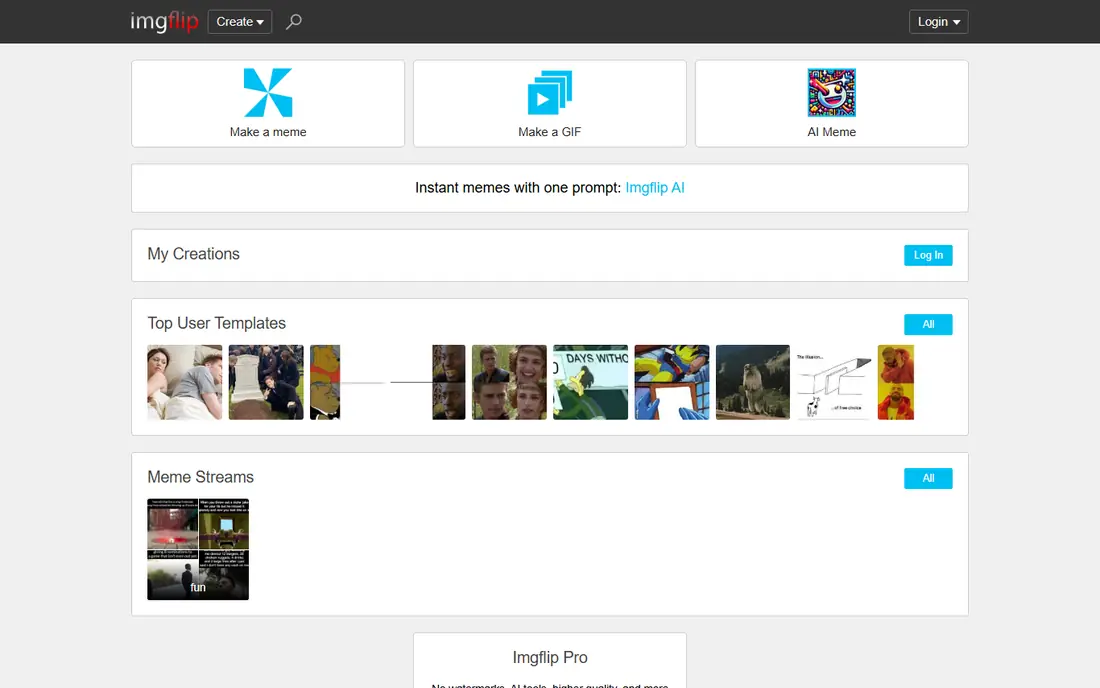
Imgflip is our pick for most meme makers because it is the fastest path from idea to post. Search a template, type top and bottom text, adjust fonts and placement, and download, all in a browser with no install. The library covers classic formats and trending templates, which matters when a format peaks for a single day.
Free exports carry an Imgflip watermark, and the deeper editing tools sit behind paid plans. For quick, classic image memes, that trade is easy to accept. If you make memes daily, the paid plan removes the watermark and opens longer video exports.
- Huge template library with trending formats
- Fast caption editing in a browser
- GIF and video meme options included
- Free exports carry a watermark
- Advanced editing features need a paid plan

Canva suits memes that need to look clean, especially for brands, creators, and small teams. Templates give you a fast start, and the full editor adds custom fonts, stickers, layouts, and brand colors when a plain caption is not enough. Sharing straight to social platforms saves an export step.
The trade-off is speed. Canva can do far more than a meme needs, and that range can slow a five-minute joke. For polished posts, team memes, or a consistent visual style, Canva is the best meme app in this list. For a fast classic caption, Imgflip is quicker.
- Hundreds of meme templates plus full design tools
- Custom fonts, stickers, and brand kits
- Easy sharing to social platforms
- Full design power can slow a quick joke
- Premium elements and background removal need a paid plan

Mematic is the best mobile-first pick. The app is built around quick phone creation, with templates, text tools, and a collage maker that handles multi-panel jokes well. One-tap sharing sends the finished meme to your social apps without saving and re-uploading by hand.
The free version includes ads and a small watermark, which is the usual price for a free mobile editor. Paid access removes both and opens more templates. If most of your memes start and end on your phone, Mematic is the simplest tool here.
- Thousands of templates built for phones
- Collage maker for multi-image memes
- One-tap sharing to social apps
- Free version includes ads and a small watermark
- Advanced features need a paid plan
Kapwing is the pick when the joke needs motion. Its browser editor lets you trim a clip, add captions and subtitles, layer text and stickers, and export a short video meme without installing software. Teams can edit the same project together, which helps social managers who post several variations a day.
Free exports carry a watermark, and longer or higher-quality exports need a paid plan. For still image memes, Kapwing is more tool than you need. For video memes, reaction clips, and captioned shorts, it is the strongest editor here.
- Browser timeline editor for video memes
- Captions, subtitles, and stickers included
- Collaboration for teams
- Free exports carry a watermark
- Longer exports and premium tools need a paid plan
Imgur is less a meme maker and more the place memes circulate. Its community feed surfaces trending formats quickly, and posting an image with a caption takes only a few steps. Voting and comments show which jokes land, which helps you learn what works before you make your next one.
For complex, layered memes, a full editor like Canva or Kapwing works better. For the daily work of finding formats, sharing a finished meme, and seeing reactions, Imgur is unmatched. Keep it alongside a maker app, and you cover both making and sharing.
- Huge community feed of memes to browse and share
- Simple image posting with captions
- Voting surfaces trending formats fast
- Creation tools are simpler than a full editor
- Best for sharing and discovery rather than building complex memes
Supermeme helps when you have a topic but not a punchline. Type a short prompt, and the tool suggests captions and matches them to templates, which breaks the blank-page problem fast. Multi-language support also helps creators who post for audiences in more than one language.
AI captions are a starting point, not a finished joke. Some suggestions miss the context or land flat, so edit before posting. Free credits limit how many ideas you can generate, and heavier use needs a paid plan. Used as a brainstorming partner, Supermeme is a handy addition to Imgflip or Canva.
- AI suggests captions from a short topic prompt
- Supports many languages
- Fast template matching for ideas
- Free credits are limited
- AI captions sometimes miss context and need editing
MemeGenerator.net has been around for years, and its strength is simplicity. Pick a popular template, add top and bottom text, and share. There is no account maze, no design suite, and no learning curve, which is exactly right for a quick joke.
Customization is basic compared with Canva or Kapwing, and the interface looks dated. If you want stickers, layers, or video, look elsewhere. If you want the classic meme workflow with nothing extra, MemeGenerator.net still does it well.
- Long-running template library
- Very simple pick, caption, and share flow
- No install needed
- Interface feels dated next to newer editors
- Customization options are basic
Adobe Express suits memes that need to look sharp, especially for brands and creators who already use Adobe tools. Templates are clean, exports are high quality, and the font and asset library beats most quick meme apps. Drag-and-drop editing keeps the workflow simple despite the design depth.
Like Canva, it is more design tool than quick joke machine, so a fast caption takes a few more clicks than in Imgflip. For polished social posts where quality matters, Adobe Express is a strong pick.
- Clean templates with high-quality exports
- Drag-and-drop editing
- Good font and asset library for polished posts
- Premium assets and features need a paid plan
- More design tool than quick meme maker
Clideo is the lighter browser alternative to Kapwing for video memes. Upload a clip or GIF, add captions, trim the length, and export, all without installing software. That simplicity suits occasional video memes when a full timeline editor feels like overkill.
Customization is lighter, and free exports may carry a watermark. For frequent video meme work, Kapwing's deeper editor wins. For a quick video joke in a browser, Clideo gets it done with less fuss.
- Simple browser tools for video and GIF memes
- No install needed
- Easy caption and trim workflow
- Free exports may carry a watermark
- Customization is lighter than Kapwing
How we picked these
We compared official product pages, app store listings, and current meme maker comparisons, and we kept only tools that still work in 2026 for making or sharing memes. We weighed template range, editing speed, export quality, watermark rules, and free-tier honesty, and we favored tools that let you test the core workflow free. We also kept the list to meme making and sharing, not general photo editing, so each pick earns its place for this job.
How to make a meme that actually lands
Start with the joke, not the template. Write the caption in plain words first, then find a template whose image already carries half the meaning. If you have to explain the template, pick a simpler one. Short text beats long text on a phone screen, and one punchline beats three.
Match the tool to the format
Classic image macros point to Imgflip or MemeGenerator.net. Phone-first creation points to Mematic. Polished brand posts point to Canva or Adobe Express. Video points to Kapwing or Clideo, and browsing and sharing point to Imgur. Picking by format first saves you from fighting a tool built for a different job.
Check the export before you post
Watermarks, cropped text, and low resolution ruin an otherwise good meme. Preview the export at full size, read the text on a phone screen, and check that nothing important sits under a watermark or a platform crop. If the free export carries a mark you dislike, switch tools or pay for the month you post most.
Frequently asked questions
What is the best app for making memes?
Imgflip is the best pick for fast classic memes, Canva is the best pick for polished memes, and Mematic is the best pick for phone-first creation. Kapwing wins for video memes, and Imgur wins for browsing and sharing memes.
What are the best meme apps for iPhone and Android?
Mematic is the strongest mobile-first meme app on both platforms. Canva and Adobe Express also work well on phones, and Imgflip, Kapwing, and Clideo work in a mobile browser without an install.
What is the best free meme app?
Imgflip, Canva, Mematic, and Imgur all offer free tiers that cover everyday meme making. Free tiers usually add a watermark or limit premium templates, so check the export before sharing somewhere important.
Can AI make memes for me?
Yes, with editing. Supermeme suggests captions from a topic prompt and matches them to templates, which helps when you are stuck. AI captions often need a human edit for timing and context, so treat them as a first draft.
How do I make a meme without a watermark?
Use a tool whose free tier exports clean, or pay for a month on Imgflip, Mematic, or Kapwing when you post often. Imgur and MemeGenerator.net also offer simple free sharing, though features vary by format.
Sources
See where you really rank - block by block
ProMapRanker scans Google Maps across a grid of your service area. Simple monthly plans from $19, white-label on every plan.
Start freeKeep reading
 zscaler alternatives
Best Zscaler Alternatives in 2026
Looking for zscaler alternatives? We compare 9 SASE and zero trust platforms on architecture, data protection, pricing, and fit for your network and team.
Read → zapier alternatives free
Best Zapier Alternatives Free in 2026
Nine automation tools for zapier alternatives free in 2026, all with genuinely free tiers, plus free plan limits, starting prices and upgrade paths explained.
Read → which platform is best for online reputation
Which Platform Is Best for Online Reputation in 2026
Wondering which platform is best for online reputation? We compare 8 review, listing, and response tools for small and multi-location businesses and agencies.
Read →