 ProMapRanker
Best Live Translation Apps in 2026


Free everyday live translation · Pricing starts at: Free
Key takeaways
- Google Translate is our pick for most people, because it is free, covers many languages, and handles live conversation, camera text, and offline packs.
- Apple Translate and Samsung Interpreter are the best free built-in options when you already own the matching phone and earbuds.
- Maestra Live and JotMe are stronger for meetings and events, where captions, shared links, and multi-language output matter more than a quick chat.
- No live tool is perfect for legal, medical, or safety-critical talks. Accuracy drops with noise, accents, and fast overlapping speech, so confirm key details in writing.
Quick comparison
| Pick | Great for | Pricing starts at | Free tier | |
|---|---|---|---|---|
| Google Translate | Free everyday live translation | Free | Yes | Visit |
 Apple Translate | iPhone and AirPods users | Free | Yes | Visit |
 Microsoft Translator | Free group conversations | Free | Yes | Visit |
 DeepL Voice | Careful, high-quality speech translation | See website | No | Visit |
 Maestra Live | Meetings and events | $15 per month | No | Visit |
 JotMe | Live meeting translation and notes | $10 per month | Yes | Visit |
 iTranslate | Simple travel translation | See website | Yes | Visit |
 Naver Papago | Korean, Japanese, and Chinese conversations | Free | Yes | Visit |
 Samsung Interpreter | Galaxy phone and earbud translation | Free | Yes | Visit |
The best live translation apps
We compared live conversation modes, meeting support, language coverage, offline use, and price. Free phone tools now cover a lot, so paid tools need to earn their fee with captions, sharing, or meeting features.
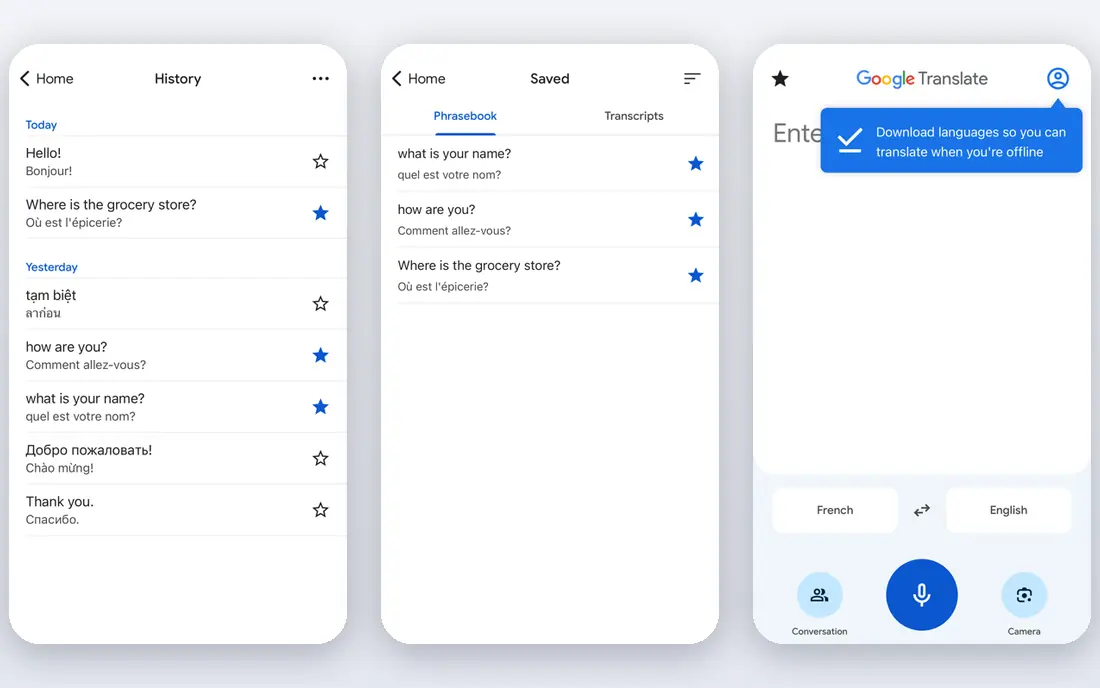
Google Translate remains the default live translation app for most travelers and casual users. The conversation mode lets two people speak in turn and hear the translation aloud, while camera mode translates signs and menus on the spot. Offline packs help when you have no signal, which is common on trips and in large buildings.
The main limit is pace. Because it works in turns rather than true simultaneous speech, a fast back-and-forth chat will pause often. It is excellent for directions, shopping, hotel check-in, and simple questions, but it is not the right tool for a live lecture or a multi-person meeting where everyone talks at once.
- Free live conversation mode
- Camera and offline translation
- Very wide language coverage
- Turn-based conversation can feel slow
- Accuracy varies by language pair and noise
Apple Translate is the easiest choice if you already use an iPhone, because there is nothing extra to buy and no new account to learn. On supported devices, Live Translation can interpret speech in Messages, FaceTime, and phone calls, and with compatible AirPods it can play the translation in your ear. That private, hands-free flow is genuinely useful in shops, stations, and clinics.
The trade-off is coverage. Apple supports fewer languages than Google, and the fullest live features need recent hardware and software. If your language pair is covered and you live in the Apple system, start here before paying for another app. If it is not covered, Google Translate is the better free fallback.
- Built into iOS
- Live translation with compatible AirPods
- On-device processing for privacy
- Fewer languages than Google Translate
- Best experience needs recent Apple hardware

Microsoft Translator is underrated for groups. One person starts a conversation and shares a code, then everyone joins from a phone or browser and reads or hears the translation in their own language. That setup works well for classrooms, tours, small meetings, and family gatherings where not everyone shares a language.
It does not match Maestra Live or JotMe for polished meeting captions, speaker handling, or event sharing. For a free group tool, though, it is hard to fault. Download offline packs before you travel, and keep sentences short and clear for the best results in a noisy room.
- Free group chat with a shared code
- Works across phones and browsers
- Offline packs on mobile
- Voice quality varies by language
- Meeting features are simpler than paid rivals
DeepL Voice suits people who care more about wording than speed. DeepL has a strong record for written translation quality, and its voice product aims to bring that care to spoken meetings and conversations. It is a sensible pick for a prepared talk, a client call, or a training session where a mistranslated term could cause real confusion.
It is not a free travel app, and its live language list is narrower than the free giants. Check the current language list and pricing on the DeepL site before you buy, and test it with your actual language pair. For casual travel, a free app will do the same job for less money.
- Strong translation quality for prepared speech
- Clear voice output
- Good for business talks
- Live voice coverage is narrower than Google
- Pricing is aimed at teams and businesses
Maestra Live is built for rooms, not just two-person chats. A host can share a room link or QR code, and listeners pick their own language for captions or voice. It also works with Zoom and Microsoft Teams, and it can feed livestreams through common broadcast tools. That makes it a practical choice for conferences, webinars, church services, and hybrid classes.
The personal plan has session limits, so check the length and viewer limits against your event before you rely on it. For a one-off short conversation, a free phone app is cheaper and simpler. For a recurring meeting or a public event, Maestra Live earns its fee by letting many people follow along at once.
- Live captions and voice in many languages
- Shareable room links and QR codes
- Works in the browser
- Paid plans needed for longer sessions
- Event features sit on higher tiers
JotMe is aimed at people who live in Zoom, Google Meet, Microsoft Teams, and similar calls. It captures system audio and translates speech in real time, then adds AI meeting notes and searchable recall after the call. Because no bot joins the meeting, participants do not see a third-party attendee, which some teams prefer for client calls.
The free plan gives a limited number of translation minutes per month, and paid plans raise that cap. That metered model suits regular meeting users, but it can feel tight if you only need translation once in a while. If your main need is a face-to-face travel chat, use a free phone app instead and save JotMe for work calls.
- Live translation across major meeting apps
- AI meeting notes
- No bot joining the call
- Minutes are capped by plan
- Best value needs regular meeting use
iTranslate is a clean travel companion for people who want one app for voice, text, and camera translation. The interface is easy to learn, and the phrasebook helps with common travel phrases when you do not want to speak aloud. Offline mode on paid plans helps in areas with weak signal, which is a real advantage abroad.
The free tier covers the basics but not the full feature set, and iTranslate does not try to be a meeting platform. Treat it as a travel app, not a conference tool. If you travel often and prefer a simple, focused app over Google Translate, it is worth trying the free tier first.
- Simple voice and camera translation
- Offline mode on paid plans
- Phrasebook for travelers
- Free tier is limited
- Live features are simpler than meeting tools
Papago is the app to check first for Korean, Japanese, Chinese, and Vietnamese conversations. It is built by Naver for those language pairs, and users often find its phrasing more natural there than a general tool. It covers voice, text, image, and website translation, so it works for travel, study, and everyday messages.
Outside its strongest pairs, Papago is less compelling than Google Translate, and some features vary by region. If your trip or work centers on Korea, Japan, or China, install Papago alongside Google Translate and compare the two for your exact phrases. For most other language pairs, start with Google.
- Strong for Korean, Japanese, and Chinese
- Image and voice translation
- Free to use
- Less useful outside its strongest language pairs
- Some features are region dependent
Samsung Interpreter is the Galaxy answer to Apple Live Translation. It offers a two-person conversation mode, a listening mode for lectures and tours, and call translation on supported devices. With Galaxy Buds, the translation can play privately in your ear, which is helpful in a shop, a clinic, or a busy station.
The catch is hardware. You need a compatible Galaxy phone, and the full feature set depends on your model and software version. If you already own a recent Galaxy device, Interpreter costs nothing extra and is worth learning before a trip. If you do not, do not buy a phone for this feature alone, because free apps cover the same basic job.
- Free on supported Galaxy devices
- Listening mode for lectures
- Earbud output for private translation
- Needs a compatible Galaxy phone
- Language list is narrower than Google
How we picked these
We compared official feature pages, app store listings, and pricing pages for live conversation, group, and meeting translation. We favored tools that are live in October 2026, clearly state their language support, and offer a real live mode rather than text-only translation. We left out hardware-only earbuds as separate products, except where a phone feature is the product itself, and we did not treat marketing latency claims as measured facts.
How to get better live translation
Speak in short, complete sentences and pause between thoughts. Live tools handle clear, single ideas far better than long, rambling sentences with several clauses. Avoid slang, idioms, and names that the tool may not know, and spell out numbers, dates, and addresses when they matter. In a noisy place, move closer to the phone or use earbuds, because background noise is the fastest way to ruin a translation.
For meetings, test before the real event. Run a short test call in the same app, with the same language pair, and check captions, audio delay, and sharing links. Have a written backup for key terms, such as product names, technical terms, and place names, so the speaker can type them if the voice tool mishears them. For medical, legal, or safety talks, use a human interpreter. A live app is a helper for everyday talk, not a substitute for professional interpreting when accuracy is critical.
Frequently asked questions
What is the best live translation app for travel?
Google Translate is the best travel pick for most people, because it is free, covers many languages, and adds camera and offline modes. Apple Translate and Samsung Interpreter are excellent free alternatives when you already own the matching phone. Papago is worth adding for Korean, Japanese, or Chinese trips.
What is the best app for live translation in meetings?
Maestra Live and JotMe are the strongest meeting picks here. Maestra Live is better for events with many listeners and shared captions, while JotMe is better for work calls that also need notes and recall. Microsoft Translator is the best free group option when budget matters more than polish.
Are live translation apps free?
Many are free for basic use, including Google Translate, Apple Translate, Microsoft Translator, Papago, and Samsung Interpreter on supported devices. Paid tools such as Maestra Live and JotMe charge for longer sessions, more minutes, or event features. Check the free tier limits before you rely on a paid tool for a long event.
How accurate is live translation?
Accuracy is good for everyday topics in major language pairs and quiet settings, but it drops with noise, accents, fast speech, and technical terms. Short, clear sentences help a lot, and confirming numbers and names in writing helps even more. Do not rely on a live app alone for medical, legal, or safety-critical decisions.
Can live translation apps work offline?
Some apps offer offline packs for downloaded languages, including Google Translate, Microsoft Translator, and iTranslate on paid plans. Offline mode usually covers text and basic conversation, not the full live meeting feature set. Download packs before you travel, and test them while you still have signal.
What is the best live translation app for iPhone users?
Apple Translate is the best built-in iPhone option, especially with compatible AirPods for private, hands-free translation. Google Translate is the best fallback on iPhone when Apple does not cover your language pair. Try both with your actual phrases before a trip, because coverage and phrasing vary by language.
Sources
See where you really rank - block by block
ProMapRanker scans Google Maps across a grid of your service area. Simple monthly plans from $19, white-label on every plan.
Start freeKeep reading
 zscaler alternatives
Best Zscaler Alternatives in 2026
Looking for zscaler alternatives? We compare 9 SASE and zero trust platforms on architecture, data protection, pricing, and fit for your network and team.
Read → zapier alternatives free
Best Zapier Alternatives Free in 2026
Nine automation tools for zapier alternatives free in 2026, all with genuinely free tiers, plus free plan limits, starting prices and upgrade paths explained.
Read → which platform is best for online reputation
Which Platform Is Best for Online Reputation in 2026
Wondering which platform is best for online reputation? We compare 8 review, listing, and response tools for small and multi-location businesses and agencies.
Read →