 ProMapRanker
Best Light Meter App in 2026: 8 Apps Compared


Film and digital exposure control · Pricing starts at: $4.99
Key takeaways
- myLightMeter PRO is our pick for film photographers who want full exposure control, while Photone is the clear pick for plant growers.
- Phone meters are useful, but accuracy varies by phone, so test any app against a known exposure before a paid shoot.
- Reflected metering reads light bouncing off a subject, while incident metering reads light falling on it, and not every app offers both.
- Free apps cover basic readings well, while paid apps add logging, reciprocity correction and session tools.
Quick comparison
| Pick | Great for | Pricing starts at | Free tier | |
|---|---|---|---|---|
| myLightMeter PRO | Film and digital exposure control | $4.99 | No | Visit |
 LightMeter | Simple film metering on Android | See website | Yes | Visit |
 Photone | Plant light and grow light readings | Free | Yes | Visit |
 Light Meter LM-3000 | Lux and colour temperature readings | Free | Yes | Visit |
 Pocket Light Meter | Simple reflected metering on iPhone | See website | No | Visit |
 PocketMeter Pro | Stills and cine metering on iPhone | See website | No | Visit |
 Light Meter Street | Fast, simple film metering | See website | No | Visit |
 LuMe | Modern, simple metering with extras | Free | Yes | Visit |
The best light meter apps
We looked for apps that are still available in 2026, that give a usable exposure or light reading, and that fit a clear use, from film photography to plant growing. A phone app will not replace a dedicated handheld meter in every case, but it is a practical tool for many shoots.
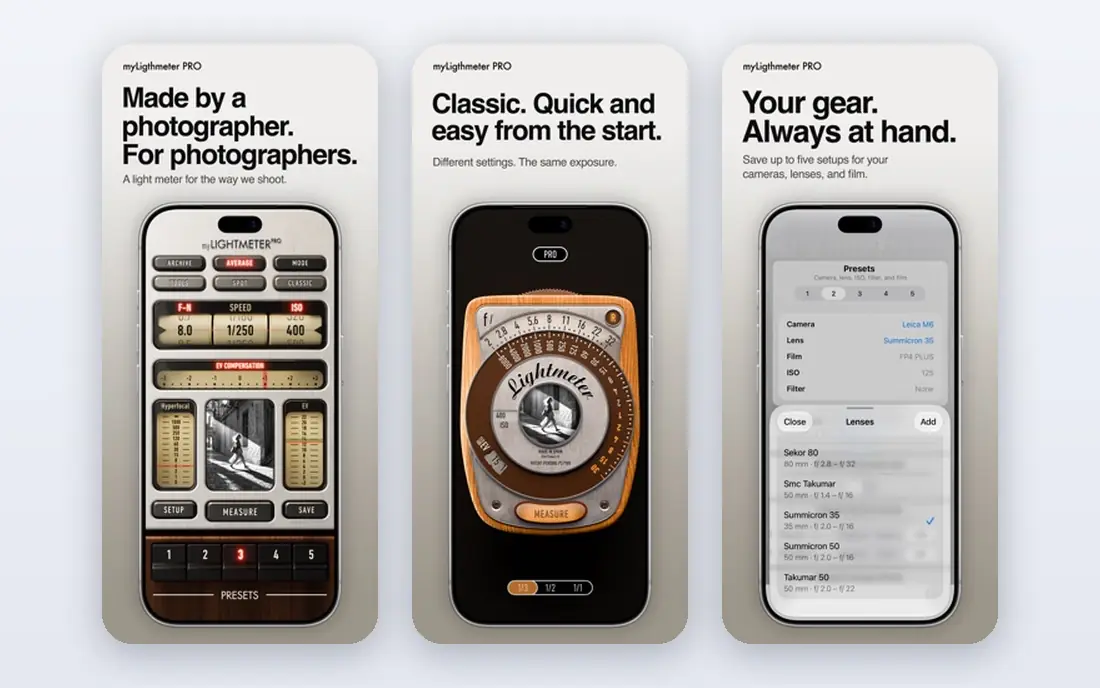
myLightMeter PRO, by David Quiles, is the most complete photography meter on this list. It offers incident and reflected metering, full control over aperture, shutter speed and ISO, and reciprocity correction for long film exposures. Sessions let you store readings with photos, camera and lens details and notes, which is useful when you return to a roll of film weeks later and want to know what you metered.
The price is modest for a photography tool, but the depth of features means a beginner may feel lost at first. Start with one mode, lock the settings you use most, and add presets as you learn. For film shooters who meter every frame, the control and logging are worth the small cost and the learning time.
- Incident and reflected metering
- Reciprocity correction
- Session logging with photos and notes
- Paid app
- Best features need time to learn
LightMeter is the lighter sibling of myLightMeter PRO, made by the same developer for photographers who want a simple meter in their pocket. It offers reflected metering through the camera and incident metering through the light sensor, with an ISO range that covers most film stocks. Calibration settings let you adjust readings to match your camera or a trusted meter.
Device support is the main limit. Reflected metering works only where the phone supports it, while incident metering works on most devices, so your results may differ from another phone. That is normal for phone meters, and it is why a quick calibration check matters. For a simple, low-cost film meter, LightMeter is a sensible starting point.
- Reflected and incident modes
- Calibration settings
- Simple, focused interface
- Reflected metering depends on device support
- Fewer logging features than the Pro version

Photone is a different kind of light meter, built for growers rather than camera exposure. It measures PAR and PPFD, daily light integral and lux, which are the numbers plant growers use to judge grow lights and window light. The app is calibrated per device model, and it offers logging and charts so you can track light over a day or a growing season.
Do not buy Photone expecting a camera exposure meter. Its strength is plant light, and its readings are presented in plant terms, not aperture and shutter speed. For indoor gardeners, greenhouse growers and houseplant owners, that focus is exactly right, and the free version covers basic readings well.
- PAR, PPFD, DLI and lux readings
- Calibrated per device model
- Logging and charts
- Focused on plants, not camera exposure
- Full features need a paid upgrade
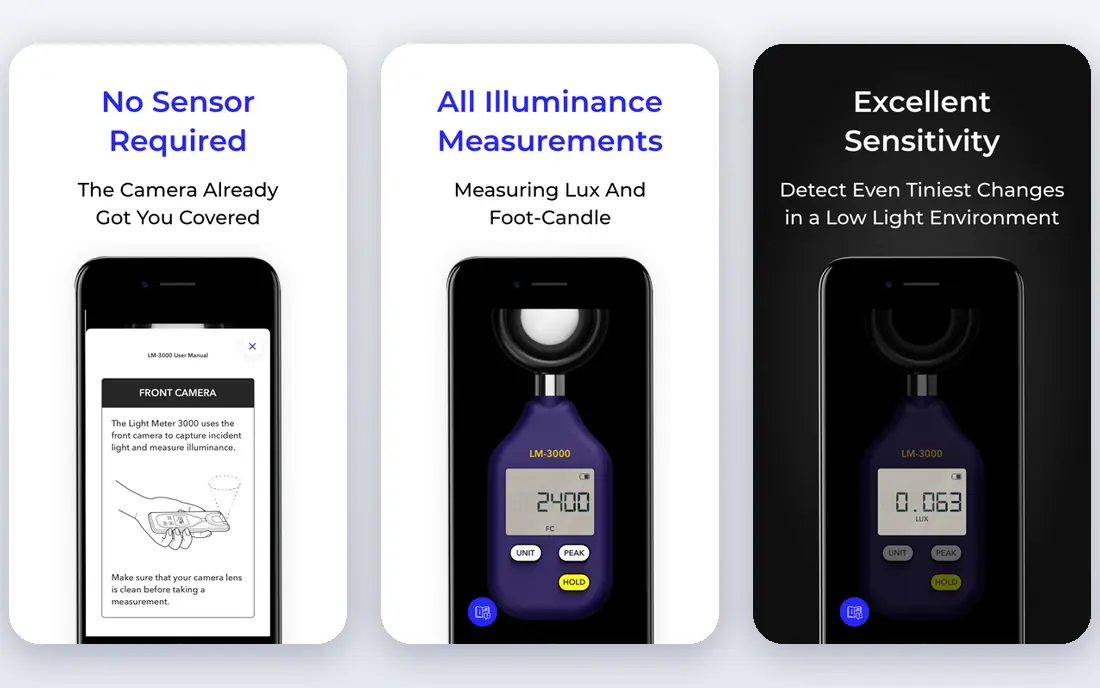
Light Meter LM-3000, also from Lightray Innovation, covers the general light readings that photographers and homeowners often need. It measures lux and colour temperature, which help when you are checking room light, studio light or grow light brightness in general terms. The app works without an account, and camera images are not sent off the device, according to its privacy policy.
It is not a substitute for a camera meter with aperture and shutter controls. Think of LM-3000 as a handy lux and colour tool for checking light levels, and pair it with a photography meter when you need exposure settings. For quick checks of brightness and colour, it is simple and free.
- Lux and colour temperature readings
- Works without an account
- Privacy-focused design
- Not a camera exposure tool
- Readings depend on phone sensor
Pocket Light Meter, by NuWaste Studios, has been a film photography staple for years, and its appeal is simplicity. It measures reflected light, lets you spot meter by tapping on the screen, and includes reciprocity calculations for long exposures. The interface is plain, but that plainness is the point: you point, read and set your camera.
The app is paid, with extra in-app options, so check the current store price before you buy. It also lacks the session logging depth of myLightMeter PRO, so it suits shooters who want a quick reading rather than a full shoot log. For a no-fuss iPhone meter, it still earns its place.
- Reflected metering with spot metering by tapping the screen
- Reciprocity calculations
- Simple interface
- IPhone focus
- Paid app with in-app options
- Interface is plain
PocketMeter Pro, from Studio C-41, is a newer iPhone meter that covers both stills and motion work. For stills, it offers spot metering, false colour views and an exposure log with geotags. For cine work, it switches to shutter angle, iris and frame rate, with ND filter support, which is a rare combination in a phone app.
Being iPhone only and newer than some rivals are real limits. There are fewer long-term user reports to draw on, and Android shooters need a different app. If you shoot both stills and video on iPhone and want one meter for both, PocketMeter Pro is worth a close look, with a calibration check against a known exposure first.
- Stills and cine modes
- Spot metering and false colour
- Exposure log with geotags
- IPhone only
- Newer app with a smaller user base
Light Meter Street is built for speed. Instead of showing one exposure combination at a time, it shows many matching time and aperture combinations at once, so you can pick the one that fits your camera and your subject. You dial in ISO, read the exposure value, and highlight a preferred time or aperture for faster reading next time.
That speed comes with limits. Values are shown in full stops only, and the app does not try to match the calculator depth of larger meters. For street and film shooters who want a fast reading and a sunny 16 reference for training, that trade is fair. For studio or long-exposure work, a fuller app will serve you better.
- Shows many exposure combinations at once
- Simple, fast workflow
- Sunny 16 reference
- Full-stop values only
- Fewer advanced calculators than larger apps
LuMe is a modern, clean meter that covers the core well and adds useful extras. The free version includes matrix and centre-weighted metering, a flash calculator, a depth of field calculator, exposure compensation, ND filter compensation and reciprocity correction. Viewfinder overlays, including a histogram and clipping warning, help you judge a scene before you shoot.
Pro features, such as spot metering and custom camera profiles, are a separate one-time purchase, so check what is included in the free version for your needs. LuMe suits photographers who want a modern interface and a solid free starting point, with the option to pay once for more control later.
- Free core metering
- Flash, depth of field and reciprocity tools
- Viewfinder overlays
- Pro features are a separate purchase
- IPhone focus in its current listing
How we picked these
We compared official developer pages, app store listings and privacy pages for light meter apps that were still available in October 2026. We favoured apps with a clear metering purpose, whether camera exposure, lux or plant light, and we left out apps that had been removed from stores or that were only a flashlight or a brightness tool. We also checked that each app had a real developer page, not just a store listing with no support contact.
We did not claim hands-on testing that did not happen. Our notes are based on published features, store listings and developer pages, not on lab measurements. Phone sensors differ, so a reading that is accurate on one phone may differ on another, and we say that plainly wherever it matters.
How to choose a light meter app
Start with your subject. Film photographers need aperture, shutter and ISO controls, plus reciprocity correction for long exposures. Plant growers need PAR, PPFD and DLI, which only a plant meter such as Photone provides in useful form. Homeowners and studio users checking brightness need lux and colour temperature, which LM-3000 covers well.
Next, decide between reflected and incident metering. Reflected metering reads light bouncing off your subject through the camera, which is convenient but can be fooled by very bright or dark subjects. Incident metering reads light falling on the subject, which is often more consistent for portraits and product work, but it needs a light sensor or a diffuser. Apps that offer both give you more options, and a calibration setting helps you match readings to your camera.
Finally, test before you trust. Meter a scene with the app, meter the same scene with a known-good exposure or a trusted handheld meter, and note any offset. Use that offset as a calibration adjustment if the app allows it. Also check battery use and screen brightness, since a meter app that drains your phone on a long shoot is less useful than a simpler app that lasts.
Frequently asked questions
What is the best light meter app?
For film and digital photography, myLightMeter PRO is our pick for full control, while LightMeter is a simpler, lower-cost option from the same developer. For plant growing, Photone is the clear pick, and for lux checks, Light Meter LM-3000 is a good free option. The best app depends on whether you need camera exposure, plant light or general brightness.
Are light meter apps accurate?
They can be useful, but accuracy varies by phone sensor, camera and lighting conditions. Phone meters are best treated as a guide, checked against a known exposure or a handheld meter before important work. Calibration settings in many apps help you correct a consistent offset for your phone.
What is the difference between reflected and incident metering?
Reflected metering reads light bouncing off the subject, as seen by the camera, while incident metering reads light falling on the subject, usually through a light sensor or diffuser. Reflected readings can be fooled by bright or dark subjects, while incident readings are often more consistent for portraits. Some apps offer both, and some offer only one.
Are there free light meter apps?
Yes. Photone, Light Meter LM-3000 and LuMe offer free core metering, and LightMeter offers a free version. Paid apps such as myLightMeter PRO add logging, reciprocity correction and session tools. Start free if you only need basic readings, and pay only if you use the extra features often.
Do light meter apps work for film photography?
Yes, many are made for film, with ISO, aperture and shutter controls, plus reciprocity correction for long exposures. Film shooters should check that the app covers their film speed, their aperture range and their longest exposure times. A quick test roll, metered with the app, will show whether the readings match your camera and film.
Sources
See where you really rank - block by block
ProMapRanker scans Google Maps across a grid of your service area. Simple monthly plans from $19, white-label on every plan.
Start freeKeep reading
 zscaler alternatives
Best Zscaler Alternatives in 2026
Looking for zscaler alternatives? We compare 9 SASE and zero trust platforms on architecture, data protection, pricing, and fit for your network and team.
Read → zapier alternatives free
Best Zapier Alternatives Free in 2026
Nine automation tools for zapier alternatives free in 2026, all with genuinely free tiers, plus free plan limits, starting prices and upgrade paths explained.
Read → which platform is best for online reputation
Which Platform Is Best for Online Reputation in 2026
Wondering which platform is best for online reputation? We compare 8 review, listing, and response tools for small and multi-location businesses and agencies.
Read →