 ProMapRanker
Best Law Firm Practice Management Software in 2026

Key takeaways
- Clio suits firms that want the largest integration ecosystem, while MyCase suits firms that want one predictable bill.
- PracticePanther is a strong mid-market pick for code-free automation, and CosmoLex leads for firms where trust accounting is the main pain.
- Filevine and Smokeball use quote-based pricing, so budget a sales conversation and confirm what modules are included.
- Almost every tool here charges per user per month, so model the cost for your full team, not just attorneys.
- Use free trials against real matters, not demo data, before you commit to a migration.
Quick comparison
| Pick | Great for | Pricing starts at | Free tier | |
|---|---|---|---|---|
 Clio | Largest ecosystem and broad fit | $49 per user per month | Free trial | Visit |
 MyCase | Solo and small firms wanting simplicity | $49 per user per month | Free trial | Visit |
 PracticePanther | Growing firms wanting automation | $49 per user per month | Free trial | Visit |
 Smokeball | Document-heavy firms | See website | Free trial | Visit |
 Filevine | Litigation and high-volume practices | See website | Free trial | Visit |
 CosmoLex | Accounting and trust compliance | $49 per user per month | Free trial | Visit |
 Rocket Matter | Easy setup and low learning curve | See website | Free trial | Visit |
 LEAP | Firms wanting built-in forms and content | $129 per user per month | Free trial | Visit |
 Zola Suite | Firms wanting email inside the platform | $59 per user per month | Free trial | Visit |
The best law firm practice management software
We compared matter management, time and billing, trust accounting, document handling, client communication, and pricing across the leading cloud platforms. Here are the nine that cover the widest range of firm sizes and practice areas.

Clio is the default shortlist entry for most firms, and for good reason. Clio Manage covers matters, contacts, calendars, documents, time tracking, billing, and a client portal in one cloud system, and Clio Payments keeps trust and operating payments separate. The integration catalog is the largest in this market, so intake tools, document automation, dialers, and reporting add-ons usually connect to Clio first.
The catch is total cost. Entry plans start near $49 per user per month, and higher tiers with advanced reporting, workflows, and intake features cost materially more, before add-ons. Clio added its own accounting module aimed at very small firms, but firms that need accrual books or a CPA working in a familiar ledger often still pair Clio with QuickBooks. For a firm that values breadth and integrations, Clio is still our pick for most people.
- Very large integration catalog
- Strong matter, calendar, and billing tools
- Built-in payments and client portal
- Costs rise quickly with tiers and add-ons
- Built-in accounting suits smaller firms best
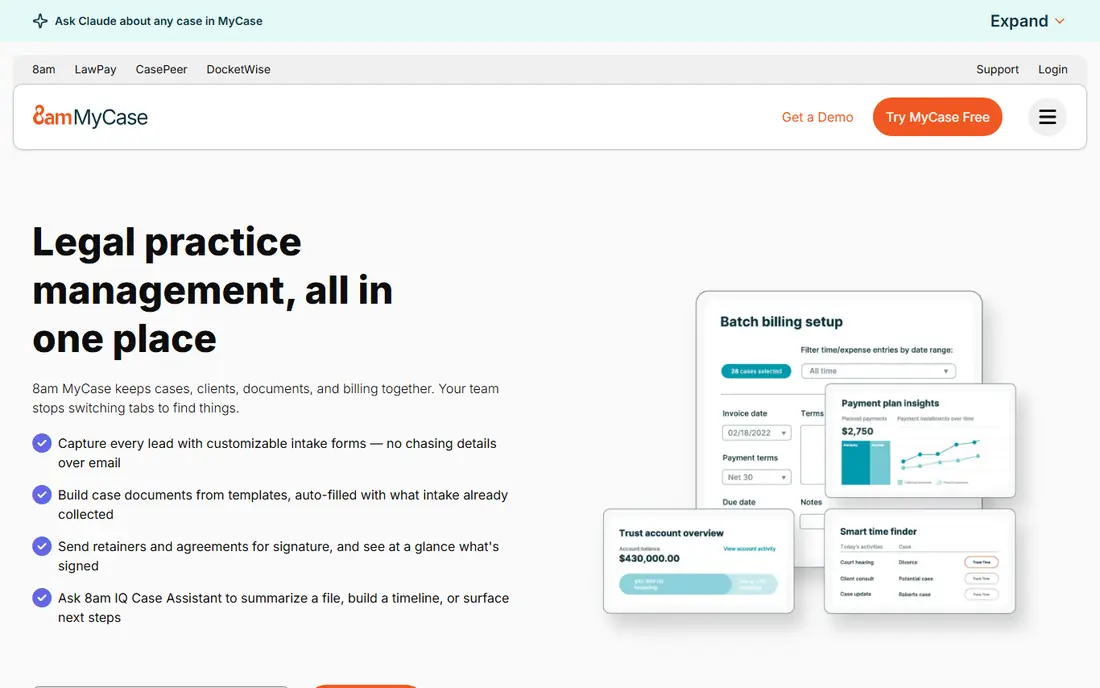
MyCase suits solo attorneys and small firms that want one system without a long setup project. The Basic plan covers case and contact management, tasks, a client portal, time and expense tracking, billing and online payments, calendaring, and document storage. The interface groups tasks, communications, and billing around each case, which keeps day-to-day work predictable.
Higher tiers add two-way texting, eSignature, intake management, document automation, and conflict checking, so firms that need those features should price the Pro or Advanced plan, not the entry plan. MyCase Accounting is also an add-on. If you want a straightforward, well-priced system and you do not need a huge integration catalog, MyCase is easy to recommend.
- Clear tier pricing
- Case, billing, and client portal in one place
- Unlimited document storage on entry plans
- Advanced automation and intake sit on higher tiers
- Accounting is a paid add-on
PracticePanther is built for growing firms that want to automate routine work without hiring a developer. Workflow templates can move a matter forward, assign tasks, send reminders, and trigger billing steps with little manual effort. The Solo plan starts at $49 per user per month on annual billing, with Essential at $69, Business at $89, and Business Pro at $114 per user per month.
Business Pro adds trust and operating accounting with guided three-way reconciliations and a full set of accounting reports, which matters for firms that want finance inside the same system. The reporting templates are less flexible than some enterprise rivals, and firms with very complex custom views may need help. For a firm moving from spreadsheets to a real system, PracticePanther balances ease of use with room to grow.
- Strong code-free workflow automation
- Transparent tier pricing
- Trust accounting on higher tiers
- Custom reporting is narrower than Filevine
- Costs climb on Business Pro
Smokeball fits firms where documents drive the work and billable time leaks away in drafting and review. Its automatic time capture records work done in documents, which helps firms bill more of the time they actually spend. Document automation, matter management, billing, and trust accounting sit in one platform, and the interface is designed around daily firm work rather than admin screens.
Pricing is the main hurdle. Smokeball uses quote-based pricing that depends on user count, plan, term, and optional products, so you cannot compare it to a published rival price without a written quote. Upper tiers with full automation are costly. Firms that live in Word documents and want to recover lost billable time should still get a quote, but budget for implementation and training as well.
- Automatic time tracking from document work
- Strong document automation
- Trust accounting built in
- Pricing is quote-based
- Upper tiers are costly
Filevine is the pick for litigation, personal injury, and high-volume practices that need to manage many matters with tight deadlines. Custom workflows, deadline management, document auto-tagging, and reporting through its analytics tools help larger teams see caseload, bottlenecks, and outstanding work. Separate Intake, Signatures, and AI products can extend the core Matters package.
That depth comes with a longer setup and a quote-based price, so smaller firms may find simpler tools faster and cheaper. Implementation partners help with onboarding and customization, which is worth budgeting for. If your firm runs on data, handles high case volume, and needs rule-based deadlines, Filevine earns its place on the shortlist despite the sales-led pricing.
- Deep reporting and custom workflows
- Strong deadline and document tools
- AI document handling
- Quote-based pricing
- Longer setup than simpler tools
CosmoLex takes a different approach from most rivals: legal accounting is built into the core product, not bolted on. Trust accounting, operating accounting, billing, and matter management share one cloud ledger, so a trust deposit, a fee transfer, and the resulting journal entries form one traceable record. Native three-way reconciliation compares the bank balance, the trust journal, and client-ledger totals in one workflow.
That focus makes CosmoLex the best fit for firms where trust compliance is the main worry, such as firms with high IOLTA volume or multi-state exposure. The trade-off is a smaller third-party integration catalog and a narrower feature set outside accounting. Entry pricing starts near $49 per user per month, rising toward higher tiers. Firms replacing both a practice tool and a separate bookkeeping stack often find the combined cost favorable.
- Native legal accounting and three-way reconciliation
- One ledger for trust and operating funds
- Matter-linked reporting
- Smaller integration catalog than Clio
- Outside accounting, features are narrower
Rocket Matter suits firms that want practice management without a steep learning curve. Matters, billing, time tracking, documents, and client communication are laid out in a way that new staff can learn quickly, and onboarding help shortens the move from an old system. A CRM option adds intake and marketing features for firms that want client development in the same vendor system.
Pricing is less transparent than Clio or MyCase, with published figures varying across comparison sources, so treat any single number as a starting point and confirm a current quote. Some add-ons, such as CRM onboarding, carry extra fees and minimums. For a small firm that values simplicity over deep customization, Rocket Matter remains a sensible, low-friction choice.
- Quick to learn
- Billing, CRM, and matter tools in one place
- Helpful onboarding
- Pricing varies by source, so confirm a quote
- Some add-ons carry extra fees
LEAP stands apart because it ships with a large library of legal forms and content built into the matter workflow. Attorneys can generate documents from matter data without hunting for templates or maintaining a separate forms library, which saves time in common practice areas. Matter management, time and billing, document handling, and client communication round out the platform.
The entry price, near $129 per user per month, is higher than most tools here, so LEAP makes sense when the forms library and content genuinely replace work your firm would otherwise do by hand. Guided trials help firms test the content against their own practice areas. Firms that rarely use standard forms will get better value from a cheaper, more general platform.
- Built-in legal forms and content library
- Matter, billing, and document tools in one system
- Cloud and mobile access
- Higher entry price than most rivals
- Setup benefits from guided onboarding
Zola Suite is the pick for firms whose work lives in email. Messages can be filed to matters inside the platform, so case correspondence, documents, billing, and calendars stay together without constant switching between an inbox and a case system. That single-view approach helps email-heavy practices keep a complete matter record.
Entry pricing starts near $59 per user per month, with higher tiers adding advanced features. The integration ecosystem is smaller than Clio, and firms with unusual workflow needs should check add-on coverage during a trial. If email is where your matters actually happen, Zola Suite removes a daily source of friction that other tools only partly address.
- Email built into matter files
- Matter, billing, and calendar tools in one place
- Strong for email-heavy practices
- Smaller ecosystem than Clio
- Advanced features need higher tiers
How we picked these
We compared official product pages, pricing pages, and public reviews for the leading cloud practice management platforms, and kept tools that cover the full firm workflow: matters, time, billing, documents, and client communication. We favored tools that are live and actively maintained in October 2026 and that serve different firm profiles, from solo practices to high-volume litigation teams. Quote-based tools stayed on the list where their fit is strong, but we marked their pricing as See website rather than guessing a number.
What to check before you choose practice management software
Start with trust accounting and billing rules for your state, since those are the hardest features to work around. Confirm three-way reconciliation, IOLTA handling, LEDES billing if you bill insurers or corporate clients, and payment processing fees. A tool that handles your billing model cleanly will save more time than a prettier dashboard.
Next, test the tool on your own matters. Import or recreate two or three real cases, run time entry through billing, and check document handling, deadline alerts, and client portal messages. Watch how long setup takes and whether staff adopt the system without constant help. A trial on demo data hides the friction that appears with real files and real deadlines.
Finally, model the full cost for your whole team, including attorneys, paralegals, and admin staff, plus add-ons for accounting, intake, document automation, and eSignature. Ask about contract terms, migration help, and data export, so you are not locked in if the firm outgrows the tool. The cheapest entry plan is rarely the cheapest year once add-ons are included.
Frequently asked questions
What is the best law practice management software?
Clio is the best all-round pick for most firms because of its breadth and integration catalog. MyCase suits solo and small firms that want simplicity, PracticePanther suits growing firms that want automation, and CosmoLex suits firms where trust accounting is the priority. The right pick depends on firm size, practice area, and billing model.
What is the best software for lawyers in a small firm?
MyCase and PracticePanther are strong small-firm picks, with clear pricing and a complete case, billing, and client portal workflow. Clio EasyStart is also worth a trial if you want a larger integration catalog. Compare entry plans on your actual user count, since per-user pricing changes the total quickly.
What is the best cloud based legal practice management software?
All nine tools here are cloud based, so the choice comes down to fit rather than hosting. Clio, MyCase, PracticePanther, CosmoLex, and Rocket Matter are proven cloud options for small to mid-size firms, while Filevine and LEAP suit larger or more specialized practices. Check security certifications and data export during your trial.
How much does law firm practice management software cost?
Most tools charge per user per month, with entry plans from about $49 per user per month and higher tiers from $89 to $149 or more. Filevine and Smokeball use quote-based pricing, so get a written quote for your user count and modules. Add payment processing, accounting, and intake add-ons to the total before you compare.
Does practice management software handle trust accounting?
Many tools do, but the depth varies. CosmoLex builds legal accounting into its core ledger, PracticePanther Business Pro adds trust and operating accounting, and Clio, MyCase, Smokeball, and Filevine all cover trust accounting in some form. Confirm three-way reconciliation and your state rules during a trial, since compliance details matter more than a feature checklist.
Can I switch practice management software later?
Yes, but plan for it as a project. Moving years of matter data, documents, billing history, and trust ledgers takes time and care, and vendors vary in migration help. Ask about export formats and migration support before you sign, and keep a backup of your data in a form you can read outside the new system.
Sources
See where you really rank - block by block
ProMapRanker scans Google Maps across a grid of your service area. Simple monthly plans from $19, white-label on every plan.
Start freeKeep reading
 outreach alternatives
Outreach Alternatives in 2026
Compare outreach alternatives for 2026, from Salesloft and Apollo to HubSpot and Lemlist, with pricing, channels, features, limits, and honest trade-offs.
Read → best web conference tools
Best Web Conference Tools in 2026
Compare the best web conference tools for meetings, webinars and team calls, with current pricing, free plans and honest limits for each option here today.
Read → best voice cloning tools
Best Voice Cloning Tools in 2026
Compare the best voice cloning tools in 2026, from ElevenLabs and Descript to Resemble and Cartesia, with consent rules, pricing, licenses, and limits.
Read →