 ProMapRanker
Best Laser Cutting Software in 2026


All-in-one design and control · Pricing starts at: $99 one-time
Key takeaways
- LightBurn is the most complete paid option for makers who run several machine brands.
- LaserGRBL and RDWorks are strong free control options, but both are Windows-only.
- XTool Creative Space is free and well matched to xTool machines.
- Inkscape and Illustrator handle design work, while control software drives the machine.
- Check controller support before buying, because the wrong software will not talk to your laser.
Quick comparison
| Pick | Great for | Pricing starts at | Free tier | |
|---|---|---|---|---|
| LightBurn | All-in-one design and control | $99 one-time | Free trial | Visit |
 LaserGRBL | Free GRBL machine control | Free | Yes | Visit |
 xTool Creative Space | xTool owners | Free | Yes | Visit |
 Inkscape | Free vector design | Free | Yes | Visit |
 Adobe Illustrator | Professional vector artwork | $22.99 per month | Free trial | Visit |
 RDWorks | Free Ruida controller control | Free | Yes | Visit |
 EZCad2 | Fiber and galvo marking control | Free | Yes | Visit |
 CorelDRAW | Technical illustration and layout | See website | Free trial | Visit |
The best laser cutting software
Laser work needs two kinds of software: design software that creates artwork, and control software that sends the job to the machine. Some tools do both, while others do one job well. We compared official pricing and feature pages for tools live in October 2026, and we note where a tool is bundled with a machine.

LightBurn is the tool most serious laser owners settle on, because it covers vector design, image preparation, layout, and machine control in one desktop app. It supports a wide range of diode, CO2, and, with Pro, fiber and galvo machines, so one purchase can serve several machines in a shop. Camera support helps with alignment, and layer controls make cut and engrave settings easy to manage.
The price is a one-time purchase, with Core at $99 and Pro at $199, and a 30-day trial lets you confirm your machine connects before paying. Updates after the first year need a renewal, though the version you own keeps working. For a maker who runs lasers weekly, that cost is easy to justify against time saved.
- Design, layout, and machine control in one app
- Broad controller support
- Windows, Mac, and Linux versions
- Paid license with renewal for updates
- Fiber and galvo support needs the Pro license

LaserGRBL is the free standard for hobby diode lasers that run GRBL controllers. It sends jobs to the machine, handles image engraving with dithering options, and stays light enough for an older Windows PC in a workshop. Many beginners start here because there is no cost and no account setup.
It is a control tool, not a design studio. Artwork usually comes from another program, and the interface is plain compared with paid tools. Mac and Linux users need another option, and owners of Ruida or galvo machines need different control software. For a Windows GRBL laser, though, it is hard to beat free.
- Free and open source
- Image engraving and dithering
- Light and simple for diode lasers
- Windows only
- GRBL machines only
- Design tools are basic
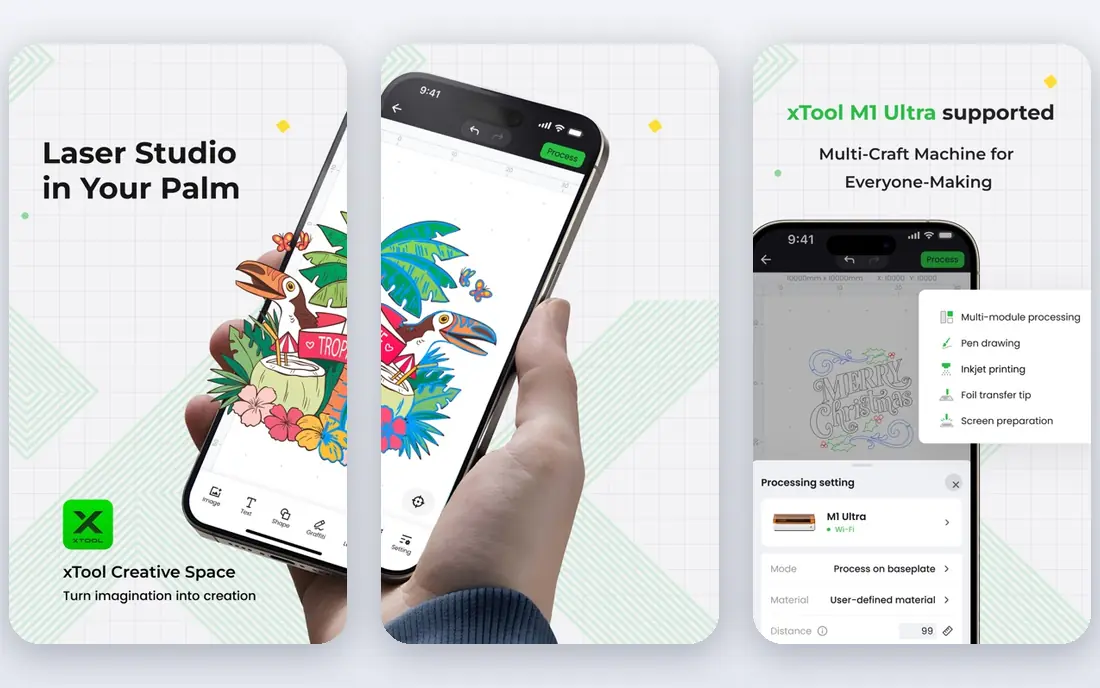
XTool Creative Space, also called XCS, is the free software that ships with xTool lasers, and it covers design, layout, and machine control for those machines. Beginners benefit from guided material settings and ready project files, while more experienced users can import vector and image files and set layers manually. It runs on Windows, Mac, and mobile platforms for many models.
The limit is hardware scope. XCS is designed for xTool machines, so owners of other brands will need LightBurn or a vendor tool instead. For an xTool owner, there is little reason to pay for control software until a specific feature, such as advanced camera work, is missing.
- Free for xTool machines
- Design and control in one app
- Guided setup for beginners
- Built for xTool hardware
- Less useful for other machine brands
Inkscape is a free vector editor that many laser users pair with a control program. It creates clean SVG paths for cutting, traces bitmap images into vectors, and handles text and node editing well. A maker can design in Inkscape, export an SVG, and send it to LightBurn, LaserGRBL, or a vendor app for cutting.
Inkscape does not control the laser itself, so it is one half of a workflow, not a complete solution. The interface also takes time to learn for someone new to vector work. For a budget setup, Inkscape plus a free control tool covers design and cutting at no software cost.
- Free and open source
- SVG-first vector editing
- Good tracing and path tools
- Does not drive a laser directly
- Learning curve for new vector users
Adobe Illustrator is the professional choice for vector artwork destined for a laser. Precise drawing, type controls, and export options help when a design must cut cleanly at a specific size, and print and packaging workflows benefit from the same file. Many professional shops already use Illustrator, so laser files fit an existing design process.
Illustrator is a design tool, not machine control, so the file still goes to LightBurn or a vendor app for the actual cut. The monthly subscription is also a real cost for a hobby user. For commercial design work, the precision and file control justify it. For simple hobby cuts, Inkscape is enough.
- Industry-standard vector tools
- Precise path and type control
- Strong file export options
- Subscription cost
- Does not drive a laser directly
- More depth than many hobby jobs need
RDWorks is the free control software bundled with many Ruida DSP CO2 lasers. It talks directly to the controller, manages cut and engrave layers, and handles machine parameters without a paid license. Shop owners with a Ruida machine often keep RDWorks even after trying other tools, because it is matched to the hardware.
The interface looks dated, and the learning curve is steeper than modern apps. It is also Windows-only, which matters for Mac-based shops. For a Ruida owner on Windows, RDWorks is a solid free control option, and LightBurn is the paid upgrade for a cleaner workflow.
- Free and bundled with many Ruida machines
- Direct DSP control
- Layer and parameter controls
- Windows only
- Dated interface
- Learning curve for beginners
EZCad2 is the standard control software for JCZ-based fiber and galvo lasers, and it usually ships free with the machine. It handles high-speed marking, hatch patterns, and laser parameters for metal and plastic marking jobs. Small businesses that mark tools, tags, and parts rely on it daily.
It is not a general sheet-cutting tool, and the interface assumes some technical knowledge. Beginners may need vendor guides or training to set parameters safely. For a fiber laser owner, EZCad2 is the bundled starting point, with LightBurn Pro as a possible alternative for a more modern workflow.
- Bundled with many fiber lasers
- Fast galvo marking controls
- Hatch and parameter tools for metal marking
- Windows only
- Marking focus rather than sheet cutting
- Interface is technical
CorelDRAW suits sign makers, engravers, and technical illustrators who need vector design plus page layout in one program. Text handling, dimension tools, and file support help for shop work that mixes signs, labels, and cut files. Many engraving shops have used CorelDRAW for years, and laser workflows often start there.
Like Illustrator, CorelDRAW designs the file but does not drive most lasers directly, so a control tool is still needed. Pricing varies by subscription and suite, so check the current offer before buying. For a shop that already designs in CorelDRAW, it remains a practical design choice for laser work.
- Strong vector and layout tools
- Good for signs and technical work
- Broad file support
- Subscription or suite pricing varies
- Does not drive a laser directly
How we picked these
We compared official pricing pages, feature pages, and product documentation for laser software live in October 2026. We kept tools that are used for laser cutting, engraving, or design for laser output, and we noted whether each tool designs, controls, or does both. We did not claim hands-on machine testing, and we did not invent prices or machine compatibility. Where a tool is bundled free with hardware, we say so.
How to choose the right software
Start with your controller, not the feature list. A GRBL diode laser, a Ruida CO2 laser, and a galvo fiber laser each need different control software, and buying the wrong tool wastes money. Check the vendor list for your exact controller before paying.
Next, separate design from control in your budget. A free design tool plus a free control tool can cover hobby work, while a paid all-in-one tool saves time for a shop running daily jobs. Trial the control tool with your own machine and a real file, not just a demo file.
Check operating system support early. Several free control tools are Windows-only, which is a problem for Mac shops. LightBurn and xTool Creative Space cover Mac users better, while Inkscape and Illustrator cover design on most systems.
Finally, follow laser safety rules. Use proper ventilation, eye protection rated for your laser type, and material settings from the machine vendor. Software settings do not replace safe setup, and unknown materials should never be cut without checking vendor guidance.
Frequently asked questions
What is the best laser engraving software for beginners?
LightBurn is the best paid all-in-one choice for beginners who want design and control together. LaserGRBL is the best free start for Windows GRBL diode lasers, and xTool Creative Space is the best free start for xTool owners.
What is the best software for laser engraving photos?
LightBurn and LaserGRBL both handle image engraving with dithering, while Inkscape and Illustrator help prepare artwork. For photos, test dithering settings on scrap material, because results vary by material and power.
What is the best laser software for a CO2 laser?
LightBurn Pro and RDWorks both suit Ruida CO2 lasers. RDWorks is free and bundled with many machines, while LightBurn Pro offers a cleaner interface and broader machine support for a one-time price.
Is free laser cutting software good enough for a small business?
For many small shops, yes, especially when the free tool is matched to the controller. Paid software earns its price when it saves setup time, supports several machines, or adds camera alignment and job management.
What is the best laser engraver software for Mac users?
LightBurn is a strong Mac option for control, and Inkscape or Illustrator cover design on Mac. Windows-only tools such as LaserGRBL and RDWorks need a Windows PC or a virtual machine setup.
Sources
See where you really rank - block by block
ProMapRanker scans Google Maps across a grid of your service area. Simple monthly plans from $19, white-label on every plan.
Start freeKeep reading
 zscaler alternatives
Best Zscaler Alternatives in 2026
Looking for zscaler alternatives? We compare 9 SASE and zero trust platforms on architecture, data protection, pricing, and fit for your network and team.
Read → zapier alternatives free
Best Zapier Alternatives Free in 2026
Nine automation tools for zapier alternatives free in 2026, all with genuinely free tiers, plus free plan limits, starting prices and upgrade paths explained.
Read → which platform is best for online reputation
Which Platform Is Best for Online Reputation in 2026
Wondering which platform is best for online reputation? We compare 8 review, listing, and response tools for small and multi-location businesses and agencies.
Read →