 ProMapRanker
Best Japanese Translator Apps in 2026

Everyday travel and camera translation · Pricing starts at: Free
Key takeaways
- Google Translate is the safest first install for travel, because it is free and covers text, camera, voice and offline translation.
- Papago and DeepL are the strongest pair for Japanese specifically, with Papago handling casual conversation and DeepL handling formal written text.
- Yomiwa is the best extra app for learners, because it explains kanji rather than only giving a finished translation.
- No app is a substitute for a human translator on legal, medical or contract documents, so check high stakes text with a professional.
- Offline packs matter more than language counts, so download Japanese before a trip rather than trusting airport Wi-Fi.
Quick comparison
| Pick | Great for | Pricing starts at | Free tier | |
|---|---|---|---|---|
| Google Translate | Everyday travel and camera translation | Free | Yes | Visit |
 DeepL | Formal and business writing | See website | Yes | Visit |
 Papago | Casual Japanese conversation | Free | Yes | Visit |
 Microsoft Translator | Group conversations | Free | Yes | Visit |
 Apple Translate | Private on device translation | Free | Yes | Visit |
 iTranslate | Quick lookups and phrasebooks | See website | Yes | Visit |
 Reverso | Learning from real examples | Free | Yes | Visit |
 Yomiwa | Reading kanji and learning Japanese | Free | Yes | Visit |
 SayHi Translate | Fast voice translation | Free | Yes | Visit |
The best japanese translator apps
We compared official feature pages, app store listings and pricing pages for apps that translate between English and Japanese in both directions. The list below mixes broad tools with Japanese focused options, so you can pick one main app and one specialist backup.
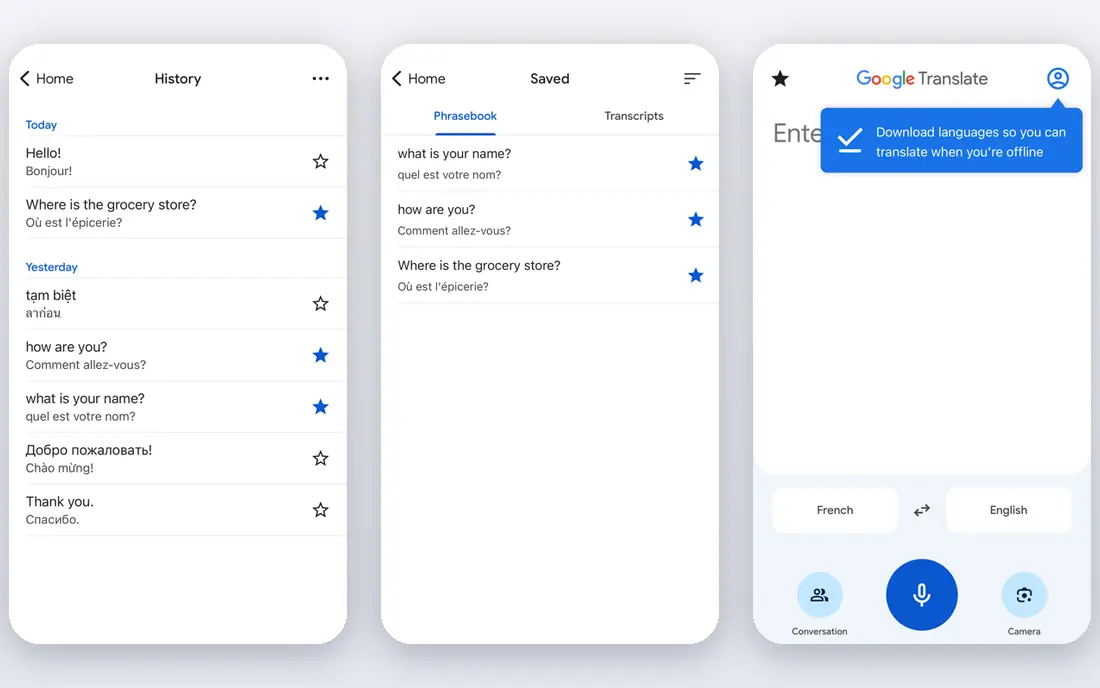
Google Translate is our pick for most people because it does everything well enough and costs nothing. Point the camera at a menu, a station sign or a product label and the translated text appears over the original, which is the feature travelers use most in Japan. Conversation mode lets two people take turns speaking, and downloaded language packs keep basic translation working without a connection.
The catch is tone. Japanese changes a lot with politeness level, and Google Translate sometimes picks a level that sounds blunt in a business message or oddly stiff in a chat with a friend. We suggest using it for understanding and for travel, then switching to DeepL or Papago when the wording itself matters. For a first trip, install it, download Japanese offline, and keep a second app below as a cross check.
- Free across text, voice, camera and conversation modes
- Offline Japanese packs for trips
- Very broad language support for multi country travel
- Formal Japanese can read stiff or awkward
- Nuance in honorifics is weaker than specialist apps

DeepL is the app we reach for when a Japanese email, report or application needs to sound professional. Its translations of longer written text tend to read more naturally than the general purpose apps, especially where sentence structure and polite forms matter. Document translation is a real time saver for work, because you can translate a file without rebuilding its layout by hand.
The trade off is breadth. DeepL is built for text and documents first, so it is not the best tool for pointing a phone at a street sign or holding a spoken conversation in a shop. Use it at your desk and keep Google Translate or Papago on your phone for the street. If you translate Japanese for work every week, the paid plan is worth checking against the free limits.
- Natural sounding formal Japanese for emails and documents
- Document translation keeps formatting
- Glossary controls on paid plans
- Free use has limits
- Camera and conversation features are thinner than Google Translate
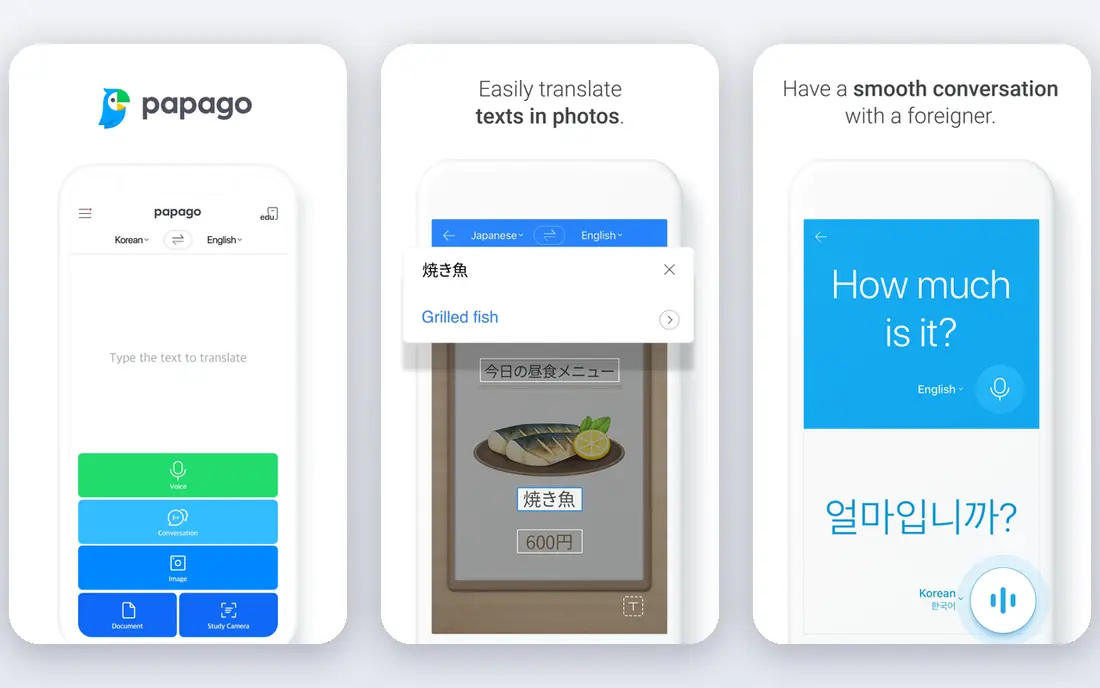
Papago is made by Naver and built around East Asian languages, and that focus shows in Japanese results. Casual phrases, slang and polite forms often come out sounding closer to how a person would actually say them, which matters when you are messaging a friend or chatting with a host. Handwriting input is handy for a kanji character you cannot type, and image translation covers menus and signs.
The limit is scope. Papago is not the app to pick if you also need strong European language pairs on the same trip, so pair it with Google Translate for other languages. For English to Japanese and Japanese to English specifically, it belongs on the shortlist, and it costs nothing to try alongside your main app.
- Strong Japanese, Korean and Chinese handling from Naver
- Voice, image and handwriting input
- Built in dictionary and conversation mode
- Weaker outside East Asian languages
- Some features vary by device
Microsoft Translator is easy to overlook, and that is a mistake for group travel or classes. Its conversation mode lets up to 100 people join a translated chat from their own phones, each reading in their own language, which suits tour groups, school trips and multilingual meetings. The app also includes a phrasebook for common situations such as food, directions and medical needs.
For one to one Japanese translation it is a solid all rounder rather than a specialist. Results are clear and usable, but if you are polishing a business message, DeepL will usually do a better job. Pick Microsoft Translator when the group feature or the Microsoft ecosystem is the deciding factor, and keep it free.
- Free with camera, voice and offline packs
- Multi person conversation mode with a shared code
- Works across Windows, Office and mobile
- Japanese nuance trails Papago and DeepL
- Offline packs cover fewer languages than Google Translate
Apple Translate suits iPhone owners who want translation without another account or subscription. It handles text, voice, camera and conversation translation, and because much of the work happens on the device, your phrases are not sent away for processing in the same way as cloud tools. That privacy point matters for personal messages and work notes.
The drawback is the platform lock. Android users and Windows users cannot use it, and travelers who need many languages may still want Google Translate as a backup. If you already carry an iPhone, though, there is no reason not to use Apple Translate as your quick daily tool and add Papago for Japanese nuance.
- Built into iPhone and Mac at no extra cost
- On device processing keeps translations private
- Clean text, voice and camera modes
- Apple devices only
- Japanese support is good but the language range is narrower than Google Translate
iTranslate has been around for years, and its strength is speed for simple jobs. Type or speak a phrase, get a clear result, and save useful phrases for later. The phrasebook helps on a trip when you keep asking the same kinds of questions about transport, food and directions, and the interface stays out of the way.
The honest catch is value. The free tier covers basic translation, but offline mode and the fuller feature set need a paid plan, and at that price you should compare it directly with the free depth of Google Translate and Papago. Pick iTranslate if you like its phrasebook and keyboard tools enough to pay for them, not as a default.
- Fast text and voice translation
- Phrasebook and dictionary features
- Offline mode on paid plans
- Best features sit behind a subscription
- Japanese quality is good but not class leading
Reverso is the learner's app on this list. Instead of giving only a bare translation, it shows how a word or phrase appears in real sentences, which helps you judge if a term is formal, casual, polite or slang. That context is exactly what beginners miss when they copy a single translated word into a message and get the tone wrong.
It is not a travel first app. Camera translation and live conversation are not its strengths, so use it at study time rather than at a train station. Pair Reverso with Papago or Google Translate and you get both understanding on the go and learning when you sit down to review.
- Shows words in real example sentences
- Strong dictionary and conjugation help
- Useful for learners checking tone and usage
- Less suited to live conversation or camera translation
- Free use has limits
Yomiwa is different from the rest of this list, and learners should not skip it. Point the camera at Japanese text and it breaks down kanji with readings, meanings and stroke order, turning a confusing sign or manga panel into a study moment. The dictionary goes deeper than a one line translation, which helps when the same kanji changes meaning with context.
It will not replace a conversation app. Yomiwa is for reading and learning, while Papago or Google Translate handle speaking and listening. If you are studying Japanese, install Yomiwa next to your main translator and use both every day.
- Camera based kanji recognition with readings and stroke order
- Dictionary entries explain words in depth
- Offline dictionary support
- Not a general conversation translator
- Some advanced features are paid
SayHi keeps voice translation simple. Speak, hear the translation, and hand the phone over so the other person can reply. That low friction design works well in shops, taxis and restaurants, where you want a short exchange rather than a long conversation with menus and settings in the way.
The limit is depth. SayHi does not offer the document tools of DeepL, the kanji study of Yomiwa or the offline breadth of Google Translate, so it works best as a second app for spoken moments. Keep it on your phone for voice chats and use a stronger app for written work.
- Simple voice to voice translation
- Quick switching between languages
- Easy interface for short spoken exchanges
- Fewer learning and document features
- Accuracy varies with background noise
How we picked these
We compared official feature pages, app store listings and pricing pages, and we kept only apps that translate between English and Japanese today and are actively available on iOS or Android. We favored apps with camera or voice modes for travel, strong written Japanese for work, and clear free or paid terms, and we dropped tools that only translate web pages or that had no working Japanese support. We did not claim hands on testing; our comparisons rest on published features, pricing and public reviews.
What to check before you rely on a translator in Japan
Start with your main use. Travelers need camera translation and offline packs first. Students need dictionary depth and kanji help. Workers need formal tone and document handling. Pick the app that matches the job you do most, then add one backup for cross checking.
Download the Japanese language pack before you leave home, and test camera translation on a photo of Japanese text while you still have Wi-Fi. Check how each app handles politeness by translating the same sentence in a formal and a casual version, and notice which app keeps the tone right. For medical instructions, legal forms or contracts, use a professional human translator, because even the best app can miss a detail that changes the meaning.
Privacy is worth a minute too. Cloud translators send your text to a server, so avoid typing passwords, medical details or sensitive work documents into a free app. Apple Translate and offline modes reduce that exposure for everyday phrases. Finally, keep two apps installed. When translations disagree, the difference usually points to a tone or wording choice you should think about before sending.
Frequently asked questions
What is the best app to translate Japanese to English?
For most people, Google Translate is the best starting point because it is free and handles text, camera, voice and offline use. Papago is a strong second choice for casual Japanese, and DeepL is better for formal written text. Install two apps and compare results when the wording matters.
What is the best English to Japanese translator app for travel?
Google Translate leads for travel because its camera mode reads menus and signs and its offline packs work without a connection. Papago is a good travel companion for spoken Japanese, and Apple Translate covers iPhone owners who want on device privacy. Download Japanese offline before your trip in either case.
Is there a free Japanese translation app that works offline?
Yes. Google Translate offers free offline Japanese packs, and Microsoft Translator and Apple Translate also offer offline support on supported devices. Offline quality is usually good for common phrases but weaker for long or formal sentences, so check important messages online when you can.
Which app is best for learning Japanese, not just translating it?
Yomiwa is the best learning companion here, because it explains kanji with readings and stroke order instead of only giving an answer. Reverso adds real example sentences that show tone and usage. Use either one alongside a main translator such as Papago for speaking and listening practice.
Can I use a translator app for Japanese business emails?
Yes for drafts, with care. DeepL is the strongest choice for formal business writing, and it handles longer text and documents well. Read the result back, check names, dates and polite forms, and have a fluent colleague or professional translator review anything that carries legal or financial weight.
Does Papago translate Japanese better than Google Translate?
For casual Japanese conversation, Papago often sounds more natural, because it was built with East Asian grammar and honorifics in mind. Google Translate wins on language range, camera features and offline depth. Many travelers keep both and compare when a translation looks off.
Sources
See where you really rank - block by block
ProMapRanker scans Google Maps across a grid of your service area. Simple monthly plans from $19, white-label on every plan.
Start freeKeep reading
 zscaler alternatives
Best Zscaler Alternatives in 2026
Looking for zscaler alternatives? We compare 9 SASE and zero trust platforms on architecture, data protection, pricing, and fit for your network and team.
Read → zapier alternatives free
Best Zapier Alternatives Free in 2026
Nine automation tools for zapier alternatives free in 2026, all with genuinely free tiers, plus free plan limits, starting prices and upgrade paths explained.
Read → which platform is best for online reputation
Which Platform Is Best for Online Reputation in 2026
Wondering which platform is best for online reputation? We compare 8 review, listing, and response tools for small and multi-location businesses and agencies.
Read →