 ProMapRanker
Best Issue Tracking Tool in 2026

Key takeaways
- Jira suits large, configurable agile programmes, while Linear suits fast product teams that want speed over configuration.
- GitHub Issues and GitLab Issues suit teams that want tracking beside code, with no separate tool to maintain.
- ClickUp, monday dev, and Asana suit cross-functional teams that track bugs alongside wider work.
- Free plans from Jira, Linear, ClickUp, and YouTrack cover small teams well, but check user and issue limits.
- The best platform for issue tracking is the one your team actually updates daily, not the one with the most fields.
Quick comparison
| Pick | Great for | Pricing starts at | Free tier | |
|---|---|---|---|---|
 Jira | Configurable agile tracking | $7.91 per month | Yes | Visit |
 Linear | Fast product and engineering teams | $10 per month | Yes | Visit |
 GitHub Issues | GitHub-native tracking | Free | Yes | Visit |
 ClickUp | All-in-one work tracking | $7 per month | Yes | Visit |
 monday dev | Visual sprint and product work | $9 per month | No | Visit |
 Asana | Cross-functional issue work | $10.99 per month | Yes | Visit |
 YouTrack | Customisable agile tracking | $4.50 per month | Yes | Visit |
 Zoho BugTracker | Simple small-team bug tracking | $4 per month | Yes | Visit |
 GitLab Issues | DevOps-native tracking | $29 per month | Yes | Visit |
 Trello | Simple kanban issue boards | $5 per month | Yes | Visit |
The best issue tracking software
Issue tracking software records bugs, tasks, feature requests, and incidents, assigns owners, tracks status, and links work to code and releases. The best issue tracking software tools differ by team type: engineering-led teams want speed and Git integration, while cross-functional teams want visual boards and wider work management. We compared both types.

Jira fits large software teams and enterprises that need structured agile work. It supports Scrum and Kanban boards, backlogs, sprints, roadmaps, and custom workflows for bugs, tasks, stories, and incidents. Permissions and fields can match complex organisational rules, which matters for regulated or multi-team programmes.
The catch is weight. Jira rewards teams that invest in administration and standards, and it can feel slow for a small team that just needs a list of bugs. Its free plan covers up to 10 users, which makes it a low-risk trial for small teams before paid tiers begin.
- Deep workflow, field, and permission configuration
- Strong agile boards, backlogs, and reporting
- Large marketplace of integrations
- Setup and administration take real time
- Small teams can find it heavier than they need

Linear fits product and engineering teams that value speed and focus. Issues, cycles, triage, and roadmaps work with minimal configuration, and the interface stays fast even with large backlogs. Integrations with GitHub, GitLab, Slack, and Figma keep issue status close to code and design work.
The trade-off is opinion. Linear deliberately limits configuration compared with Jira, which speeds up engineering teams but frustrates teams that need highly custom fields or service-desk workflows. If your team wants a fast, opinionated tracker, Linear is a strong pick.
- Fast interface with keyboard-first workflows
- Opinionated issue model that needs little setup
- Strong Git and pull request integration
- Less flexible for non-engineering workflows
- Free plan limits teams and issues
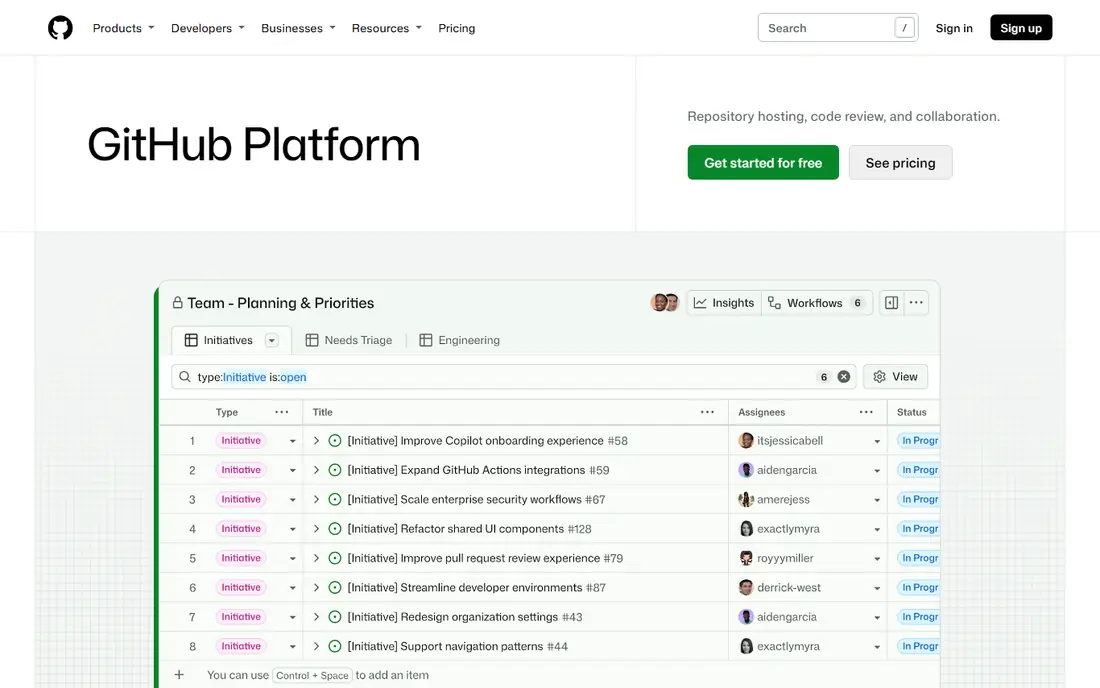
GitHub Issues fits teams that already work entirely in GitHub. Bugs can link directly to commits and pull requests, so the path from report to fix stays visible in one place. For open-source projects and small product teams, that closeness is hard to beat, and the free tier covers unlimited issues for many teams.
The limit is depth. Teams that need complex workflows, SLAs, time tracking, or service management will outgrow GitHub Issues and need Jira, Linear, or a dedicated service tool. For code-led bug tracking, however, it remains one of the most practical free options.
- Issues live beside code, pull requests, and releases
- No extra tool to buy or maintain for GitHub teams
- Labels, milestones, and project boards included
- Limited workflow and SLA features for support teams
- Reporting is simpler than Jira or Linear
ClickUp fits cross-functional teams that track bugs alongside marketing, operations, and product work. It combines tasks, docs, goals, and automations in one workspace, so a bug, a launch task, and a support request can live in related spaces without separate tools. Custom fields and statuses adapt to many workflow types.
The honest catch is clutter. ClickUp offers so many views and options that teams need standards for spaces, statuses, and automations, or the workspace becomes hard to navigate. With those standards in place, it is a strong value pick, especially for teams that want one tool for the whole company.
- Many views including list, board, timeline, and docs
- Free plan with unlimited tasks
- Automations and custom fields included
- Feature breadth can feel cluttered
- Performance and setup need discipline at scale
monday dev fits teams that plan visually and want dashboards without heavy setup. It supports sprint planning, bug tracking, roadmaps, and release tracking, with automations that move items, notify owners, and update status. For product managers and cross-functional teams, the visual layout makes progress easy to share.
The trade-off is price structure. Paid plans start at $9 per seat per month billed annually, with minimum seat counts that raise the entry cost for very small teams. Teams already on monday.com will get the most value, since issue tracking sits inside a familiar workspace.
- Visual boards, timelines, and dashboards
- Sprint planning and product roadmaps
- Automations for routine updates
- No free plan, only a trial
- Per-seat pricing with a minimum seat count on some plans
Asana fits teams where bugs and requests come from marketing, operations, customer success, and engineering together. It handles intake forms, assignments, timelines, and workload views well, so non-technical requesters can file issues without learning a developer tool. That breadth makes it a good choice for companies where issue tracking is a shared job.
The limit is engineering depth. Asana tracks work well, but it lacks the code-linked workflow depth of Jira, Linear, or GitHub Issues. Pair it with a code tool, or accept that code links will be manual, if engineering depth matters to your team.
- Clear timelines, boards, and workload views
- Strong for cross-team requests and follow-ups
- Good integrations with common tools
- Less engineering depth than Jira or Linear
- Paid tiers rise per user
YouTrack fits agile software teams that want Jira-style customisation at a lower price. From JetBrains, it supports custom issue types, workflows, agile boards, time tracking, and knowledge base pages. Its free plan covers small teams, and paid plans start at a lower per-user price than several rivals.
The catch is ecosystem size. YouTrack has integrations and an API, but its marketplace is smaller than Atlassian. Teams that rely on many Jira marketplace apps should check equivalents before switching. For teams that value customisation and price over marketplace depth, YouTrack is a strong option.
- Strong custom fields, workflows, and agile boards
- Low entry price
- Free plan for small teams
- Smaller marketplace than Jira
- Interface takes time to learn
Zoho BugTracker fits small development teams and SMBs that need a straightforward bug tracker without enterprise complexity. It covers bug submission, assignment, status, severity, and basic reporting, with a clean workflow that small QA teams can adopt quickly. Zoho suite users get extra value from shared accounts and integrations.
The limit is scale. Large teams with complex sprints, roadmaps, and cross-project reporting will need a deeper tool. For a small team that mainly needs to log, assign, and close bugs reliably, Zoho BugTracker gives good value at a low price.
- Simple bug lifecycle for small teams
- Low entry price
- Works inside the wider Zoho suite
- Less depth for large agile programmes
- Reporting is simpler than Jira or Linear
GitLab Issues fits DevOps teams that already use GitLab for code, pipelines, and releases. Issues link to merge requests and pipelines, so the path from bug report to deployed fix stays in one system. Labels, milestones, boards, and service desk features support both engineering and support-led issue work.
The trade-off is paid tier pricing. The free tier covers core issue tracking, while Premium, which adds deeper planning and DevOps features, starts at a higher per-user price than Jira Standard or Linear. Teams that use the full GitLab platform will see value beyond issues alone.
- Issues beside merge requests, pipelines, and security scanning
- Self-managed option
- Strong for DevOps teams
- Paid Premium tier starts higher than several rivals
- Full platform takes time to learn
Trello fits small teams and non-technical groups that need a simple visual issue board. Cards move across lists for triage, in progress, and done, with checklists, attachments, and comments for context. Setup takes minutes, and templates cover common bug and request workflows.
The limit is depth. Trello works for straightforward tracking, but it lacks the workflow rules, sprint planning, and code integration of dedicated trackers. Use it when simplicity and adoption matter most, and move to Jira, Linear, or YouTrack when workflow depth becomes the bottleneck.
- Simple kanban boards that anyone can use
- Free plan for small teams
- Fast setup with templates
- Limited workflow, reporting, and code integration
- Needs Power-Ups for deeper features
How we picked these
We compared official feature pages, pricing pages, documentation, and public reviews for issue tracking tools active in October 2026. We kept only products that are live and usable for real bug and task tracking today. We included engineering trackers, DevOps-native tools, and cross-functional work tools, because issue tracking spans all three audiences.
We did not claim hands-on testing that did not happen. Where pricing varies by billing period, we used the commonly published annual or monthly starting figure and noted the free plan status. Prices change, so check the vendor pricing page linked in Sources before you budget.
What to check before you choose
Match the tracker to who files issues
If engineers file most issues, GitHub Issues, Linear, or Jira will feel natural. If customers, support, and operations file most issues, Asana, ClickUp, or Trello may get better adoption. Adoption matters more than feature count, since an unused tracker helps no one.
Test workflow, not just boards
Create a bug, assign it, change priority, link code, and close it, then check reporting. That short test reveals workflow limits, permission friction, and reporting gaps that a demo board hides. Pay attention to how long each step takes for a new team member.
Check free plan limits before you commit
Free plans differ on user count, issue count, storage, and automation limits. Jira free covers up to 10 users, Linear free limits teams and issues, and YouTrack free covers small teams. Model your team size at six months, not just today, so a free start does not force a rushed migration.
Keep fields and statuses small at launch
Start with a short status set, a few priority levels, and required fields only for reproduction steps and owner. You can add fields later, but removing fields from a live tracker is harder. A clean tracker gets updated, while a cluttered one gets ignored.
Frequently asked questions
What is the best issue tracking tool overall?
The best issue tracking tool overall for software teams is Jira for large configurable programmes and Linear for fast product teams. GitHub Issues leads for GitHub-native teams, while ClickUp leads for cross-functional teams that want one workspace. Pick by team type and workflow depth, not by brand alone.
What is the best free issue tracking software?
The best free issue tracking software includes GitHub Issues for code teams, Jira free for up to 10 users, Linear free for small product teams, and YouTrack free for small agile teams. Check user, issue, and storage limits, since free plans differ in ways that matter as teams grow.
What is the best platform for issue tracking in agile teams?
The best platform for issue tracking in agile teams is Jira for Scrum and Kanban at scale, Linear for fast cycles and triage, and YouTrack for custom agile boards at a lower price. All three support sprints, backlogs, and boards, but they differ on configuration depth and speed.
What are the best issue tracking software tools for small teams?
The best issue tracking software tools for small teams are Trello for simple kanban, Zoho BugTracker for simple bug lifecycles, and Linear or Jira free plans for engineering teams. Small teams should favour speed and adoption over configuration, and upgrade only when workflow limits appear.
How is issue tracking different from project management?
Issue tracking focuses on individual bugs, tasks, and requests, with status, owner, priority, and links to code or releases. Project management covers wider planning, timelines, budgets, and resources across many workstreams. Many tools do both, but engineering teams usually need issue depth, while cross-functional teams need project breadth.
Should I use GitHub Issues or Jira?
Use GitHub Issues if your team lives in GitHub and needs simple, code-linked tracking with no extra cost or setup. Use Jira if you need custom workflows, agile reporting, permissions, and scale across many teams. Many teams use both, with GitHub Issues for code bugs and Jira for programme-level tracking, but that split needs clear ownership to avoid duplication.
Sources
- https://www.atlassian.com/software/jira/pricing
- https://linear.app/pricing
- https://github.com/pricing
- https://clickup.com/pricing
- https://monday.com/pricing
- https://asana.com/pricing
- https://www.jetbrains.com/youtrack/buy/
- https://www.zoho.com/bugtracker/pricing.html
- https://about.gitlab.com/pricing/
- https://trello.com/pricing
See where you really rank - block by block
ProMapRanker scans Google Maps across a grid of your service area. Simple monthly plans from $19, white-label on every plan.
Start freeKeep reading
 zscaler alternatives
Best Zscaler Alternatives in 2026
Looking for zscaler alternatives? We compare 9 SASE and zero trust platforms on architecture, data protection, pricing, and fit for your network and team.
Read → zapier alternatives free
Best Zapier Alternatives Free in 2026
Nine automation tools for zapier alternatives free in 2026, all with genuinely free tiers, plus free plan limits, starting prices and upgrade paths explained.
Read → which platform is best for online reputation
Which Platform Is Best for Online Reputation in 2026
Wondering which platform is best for online reputation? We compare 8 review, listing, and response tools for small and multi-location businesses and agencies.
Read →