 ProMapRanker
Best iPhone Apps in 2026: 9 Apps Compared

Key takeaways
- Google Maps, Google Photos and Todoist give most people a strong free starting point, with no payment needed for core daily use.
- Notion and Todoist cover planning in different ways, so pick Notion for linked notes and Todoist for fast task capture.
- Spotify and Duolingo work well on a free tier, while paid plans mainly remove limits and add offline or advanced features.
- 1Password is the clearest paid pick here for people who want one place for passwords and passkeys across devices.
- Our pick for most people is a small set: Maps, Photos, Todoist and one password app, plus Spotify or Duolingo for leisure and learning.
Quick comparison
| Pick | Great for | Pricing starts at | Free tier | |
|---|---|---|---|---|
 Google Maps | Navigation and local places | Free | Yes | Visit |
 Spotify | Music and podcasts | Free | Yes | Visit |
 Notion | Notes and linked planning | Free | Yes | Visit |
 Todoist | Fast task capture | Free | Yes | Visit |
 Duolingo | Daily language practice | Free | Yes | Visit |
 1Password | Passwords and passkeys | See website | No | Visit |
 Overcast | Podcast listening | Free | Yes | Visit |
 Fantastical | Calendar planning on Apple devices | See website | Yes | Visit |
 Google Photos | Photo backup and search | Free | Yes | Visit |
The best iPhone apps
These picks cover the jobs an iPhone handles every day, from getting somewhere to remembering a task, learning a language and keeping photos safe. We focused on apps with a clear free tier or a fair paid plan, plus a record of regular updates on iOS.
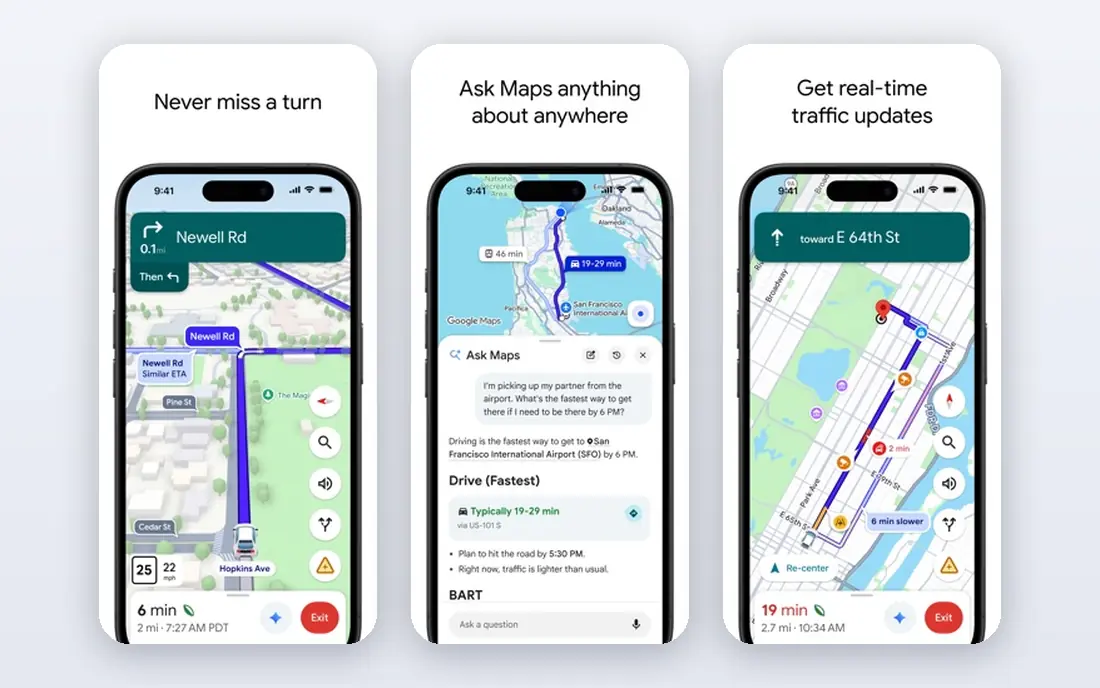
Google Maps stays on most iPhones for a simple reason: it answers the next question fast. It shows routes, arrival times, traffic and nearby places in one view, and it handles walking and transit well in larger cities. Saved places and lists make repeat trips easy, and offline maps help when signal is weak.
The trade-off is mostly about battery and privacy settings. Long navigation sessions drain power, so a car charger helps on road trips. People who want tighter location control should check the location history and timeline settings before relying on saved trips. For most drivers and walkers, though, the free app covers the core job with no subscription.
- Detailed driving, walking and transit directions
- Live traffic and place details
- Offline maps for saved areas
- Heavy battery use on long trips
- Some local details vary by area
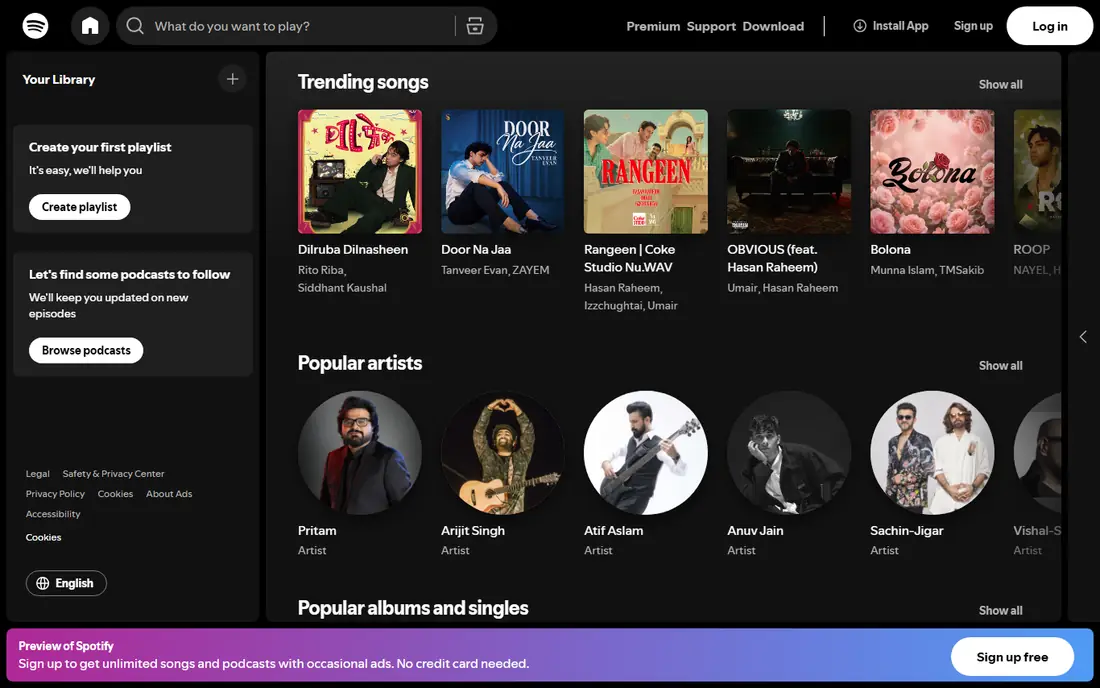
Spotify is the easy default for music and podcasts on iPhone because the catalog is broad and the app is present on almost every speaker and car system. Playlists, daily mixes and podcast playback sit in one place, and downloads on paid plans make offline listening simple. The free tier is usable, but ads and playback limits are the main friction.
Paid plans start with Individual at $12.99 per month in the United States, based on pricing pages checked in October 2026. That step removes ads and opens full playback control. If two people share a home, Duo and Family plans can lower the per-person cost, but check the address rules before choosing one.
- Large music and podcast catalog
- Strong playlists and discovery
- Works across phones, speakers and cars
- Free tier includes ads and shuffle limits on mobile
- Audiobook hours are limited on paid plans

Notion suits people who want notes, tasks and reference pages in one workspace rather than in separate apps. A trip plan, a reading list and a work project can link together, and templates give a starting point without building from a blank page. The free plan covers individuals well, with paid Plus plans from $10 per member per month when billed yearly.
The catch is setup. Notion rewards a little planning, and a workspace built for a team can feel heavy on a small phone screen. We suggest starting with one simple system, such as a daily note and a task database, and adding structure only after that habit sticks. For pure task speed, Todoist below is faster.
- Flexible pages, databases and templates
- Strong free plan for individuals
- Good sync across phone and desktop
- Setup takes time
- Large workspaces can feel slow on a phone
Todoist is for people who want to capture a task in seconds and trust it will show up at the right time. Typing a plain sentence can set a date, project and priority, and the Today view keeps the day short and readable. Widgets and Shortcuts make it easy to add tasks without opening a long list.
The free plan is generous for basic lists, with five projects and basic features. Paid Pro, at $5 per month when billed yearly, adds reminders, filters and calendar views. If your work lives in documents and linked notes, Notion fits better. If speed matters more than structure, Todoist is the better daily tool.
- Quick natural language task entry
- Clear Today view
- Strong widgets and Shortcuts support
- Free plan limits projects and filters
- Advanced views need a paid plan
Duolingo works best as a daily habit builder rather than a complete language course. Short lessons, streaks and quick review sessions make it easy to practice for ten minutes on a commute or during a break. It covers reading, listening and speaking in small steps, which helps beginners stay consistent.
Paid Super plans remove ads and lift some limits, but the free tier is enough to test a language and build a routine. Serious learners should pair it with conversation practice, reading or a tutor, since app lessons alone rarely build fluent speech. As a first step, though, it is hard to beat for price and consistency.
- Short daily lessons that build a habit
- Many languages
- Listening, speaking and reading practice in one app
- Free tier includes ads and limited mistake retries
- Depth is lower than a full course
1Password is the pick for people who reuse passwords or share logins with family. It stores passwords, passkeys, secure notes and cards in one vault, and it can generate strong passwords when you sign up for a new site. Family sharing keeps shared accounts separate from private ones, which matters in a household.
There is no free tier, so check current pricing on the vendor site before subscribing. The setup cost is real: you need one session to import passwords and turn on two-factor authentication where it matters. After that, daily use is mostly autofill on iPhone, and the security gain is worth the short setup for most people.
- Strong vault organization and passkey support
- Family and team sharing
- Travel mode and watchtower alerts
- No free plan
- Setup takes a short session to move old passwords
Overcast is a podcast app built for listening, not for a large media store. Smart Speed trims silences, Voice Boost levels quiet voices, and playlists keep episodes in order without extra menus. The design stays focused on the next episode, which makes it easy to use while driving or walking.
The main limit is platform: it is an Apple-only app, so Android users need another choice. A paid patronage option removes some limits and supports development, but the free version covers core playback well. If podcasts are a daily habit, Overcast is a better listening tool than a general music app.
- Smart Speed and Voice Boost improve spoken audio
- Clean queue and playlist controls
- Simple, focused design
- IOS only
- Some advanced features need a paid patronage option
Fantastical earns its place for people who live by a calendar. Typing a sentence such as a lunch next Tuesday creates an event without tapping through fields, and calendar sets let you switch between work, family and personal views. Widgets and Apple Watch complications keep the day visible without opening the app.
Apple Calendar covers basic scheduling for free, so Fantastical is a paid upgrade for heavy users rather than a must-have for everyone. Check current pricing on the vendor site, since premium features sit behind a subscription. For people who juggle many events each week, the faster entry and clearer day view justify the cost.
- Natural language event entry
- Strong widgets and Apple Watch support
- Calendar sets for work and personal life
- Best features need a paid plan
- Apple only, so cross-platform households may need another app
Google Photos solves a quiet problem: finding a photo months later. Automatic backup keeps pictures safe if a phone is lost, and search by place, person or object helps locate a specific shot without scrolling for minutes. Shared albums make family photos simple, and the web view helps when sorting on a larger screen.
The limit to watch is storage. Backup counts toward Google account storage, so heavy photo users may need a paid Google One plan at some point. That cost is separate from the app itself, which is free to download and use. For most iPhone users, Photos is a useful second home for pictures alongside Apple Photos.
- Automatic backup and strong search
- Shared albums for family
- Easy access across phone and web
- Free storage is shared with Google account storage
- Full resolution backup can fill storage faster
How we picked these
We compared official feature pages, pricing pages and App Store listings, plus public reviews, and we favored apps that are actively maintained on iOS in October 2026. We looked for a clear core job, a fair free tier or price, and a fit for ordinary daily use rather than a narrow niche. We did not claim hands-on testing; our comparison rests on published features, pricing and documented limits.
What to check before you install
Start with the job, not the app store chart. A task app that you open daily beats a powerful workspace you avoid, and a podcast app you enjoy beats a music app with a larger catalog you never browse. List the three jobs your phone must handle well, then pick one app for each and give it two weeks before adding more.
Check price and storage before you commit. Free tiers often cover core use, but photo backup, music downloads and large workspaces can add a subscription later. Read the free plan limits, check whether a plan bills monthly or yearly, and confirm family sharing rules if more than one person will use it. Also check privacy settings for location, photo access and contact access, and grant only what the app needs for its main job.
Keep the home screen simple. Put the daily apps on the first screen, move the rest into folders, and turn off notifications for apps that do not need your attention. A smaller set, used well, gives more value than ten apps competing for the same job. If an app stops earning its place after a month, delete it and keep the one that stayed useful.
Frequently asked questions
What are the best iPhone apps for most people?
Start with Google Maps, Google Photos, Todoist and a password app such as 1Password. Add Spotify for music and podcasts or Duolingo for language practice based on your daily habits. This small set covers travel, photos, tasks, security and leisure without crowding the home screen.
Are there good best iPhone 17 apps that work on older iPhones too?
Yes. The apps in this list run on recent iOS versions and most also work on older supported iPhones, though some features may need a newer iOS release. Check the App Store listing for the required iOS version before installing. If an app needs a newer version, the vendor page usually lists the minimum supported release.
Is Spotify free on iPhone?
Yes, Spotify has a free tier with ads and some playback limits on mobile. Paid Individual plans remove ads and give full playback control and downloads. Check the current price on Spotify's pricing page, since plan prices and offers change over time.
Is Notion free on iPhone?
Yes, Notion has a free plan for individuals that covers pages, databases and basic collaboration. Paid plans add larger uploads, longer history and team controls. Most solo users can start free and upgrade only when workspace limits start to slow their work.
Should I pay for 1Password when Apple has built-in passwords?
Apple's built-in password tools cover basic storage well, especially for people who stay inside Apple devices. 1Password adds stronger sharing, vault organization and cross-platform access for households and teams. If you share logins across Apple and non-Apple devices, the paid app is easier to manage.
How do I keep iPhone apps from draining battery and storage?
Turn off background refresh for apps you rarely use, limit location access to while using the app, and review photo and video storage each month. Delete apps you have not opened in 30 days and move large downloads to a paid plan only when free storage runs out. These small steps usually help more than buying a new app.
Sources
See where you really rank - block by block
ProMapRanker scans Google Maps across a grid of your service area. Simple monthly plans from $19, white-label on every plan.
Start freeKeep reading
 zscaler alternatives
Best Zscaler Alternatives in 2026
Looking for zscaler alternatives? We compare 9 SASE and zero trust platforms on architecture, data protection, pricing, and fit for your network and team.
Read → zapier alternatives free
Best Zapier Alternatives Free in 2026
Nine automation tools for zapier alternatives free in 2026, all with genuinely free tiers, plus free plan limits, starting prices and upgrade paths explained.
Read → which platform is best for online reputation
Which Platform Is Best for Online Reputation in 2026
Wondering which platform is best for online reputation? We compare 8 review, listing, and response tools for small and multi-location businesses and agencies.
Read →