 ProMapRanker
Best In App Generative AI Tools for Digital Media in 2026

Commercially safe image and video generation · Pricing starts at: $9.99 per month
Direct answer
Adobe Firefly leads the list, best for commercially safe image and video generation. Listed starting prices: Adobe Firefly from $9.99 per month and Runway from $12 a month. Look at Runway for Generative video and AI video editing, and at Picsart AI for mobile AI photo edits and social content. All 7 tools are compared below on price, free plan and limits.
ProMapRanker compared 7 tools for in app generative AI tools for digital media. The goal is a practical shortlist: published prices, free plan facts, best-fit use cases and honest limits for every entry.
Key takeaways
- Adobe Firefly sits first on this list: commercially safe image and video generation.
- The lowest published monthly entry price here is $9.99 per month, from Adobe Firefly.
- A fair warning about Runway: credit math takes learning.
- CapCut AI suits short form video with AI captions and effects.
- 7 out of 7 tools include a free plan, among them Adobe Firefly, Runway, Picsart AI and Canva Magic Studio.
Quick comparison
| Pick | Great for | Pricing starts at | Free tier | |
|---|---|---|---|---|
| Adobe Firefly | Commercially safe image and video generation | $9.99 per month | Yes | Visit |
 Runway | Generative video and AI video editing | $12 a month | Yes | Visit |
 Picsart AI | Mobile AI photo edits and social content | See website | Yes | Visit |
 Canva Magic Studio | Everyday design, social posts and presentations | See website | Yes | Visit |
 PhotoDirector AI | AI photo repair and enhancement | See website | Yes | Visit |
 Descript AI | Editing audio and video by editing text | See website | Yes | Visit |
 CapCut AI | Short form video with AI captions and effects | See website | Yes | Visit |
The 7 tools in detail
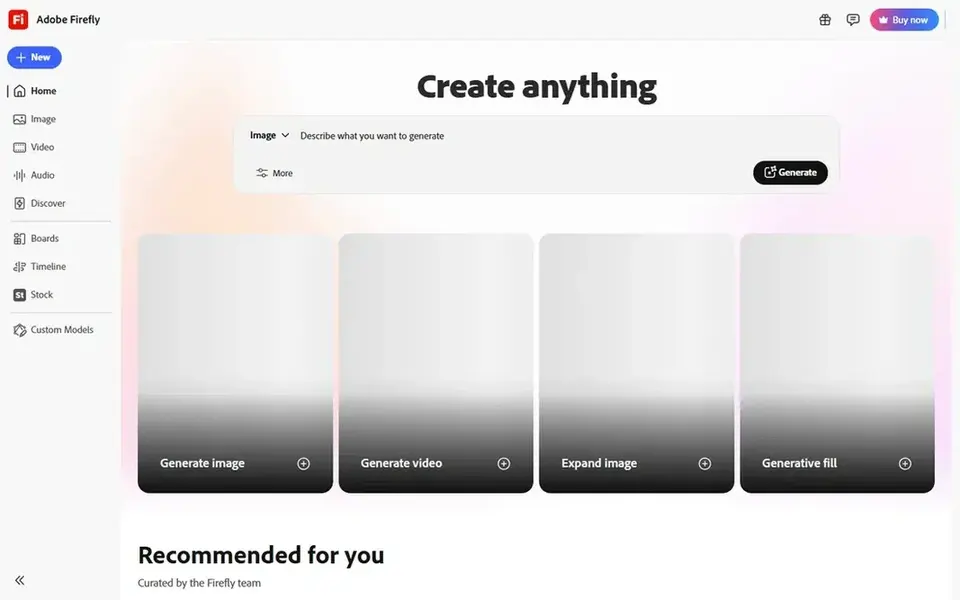
Adobe Firefly targets commercially safe image and video generation. If you plan to create video daily, check the higher levels before you commit.
Beyond that, the main limit is credits. If you only need a handful of images per month, it is decent value. Adobe Firefly cost at the entry level: $9.99 per month. Adobe Firefly includes a free tier.
Honest limits: Artistic styles can trail specialist image models.
- Capable Generative Fill in Photoshop
- Clear commercial terms
- Credit limits bite for heavy video use
Runway is aimed squarely at Generative video and AI video editing. You can create clips from text or an image, remove backgrounds, animate a face and cut the lead to the same workspace.
Most generated clips are short, so a longer video still needs real editing, and credits vary by model and resolution. On cost, Runway starts like this: $12 per month. Runway has a free plan.
Honest limits: Short clips need editing together for longer scenes.
- Commercial use on plans including free
- Built in video editor
- Credit math takes learning
Picsart AI is a good fit for mobile AI photo edits and social content. The trade off is the same as with the central Picsart app.
What to check first: Plenty of AI features need a subscription.
Check the vendor site for Picsart AI pricing; none is listed in this comparison. A free plan is available with Picsart AI.
- Background removal and cartoon styles on mobile
- Web version too
- Mobile first design limits in-depth desktop work
Canva Magic Studio is built with everyday design, social posts and presentations in mind. That matters since the hardest part of media work is commonly the last ten percent, resizing, fixing text and exporting for each channel, and Canva keeps all of it in one place.
Drawbacks to consider: Image quality can feel generic for high end campaigns.
Best features of Canva Magic Studio: Magic Design.
Pricing for Canva Magic Studio is not stated here, so ask the vendor for current figures. You can start on Canva Magic Studio without paying.
- Magic Write and Magic Media in one editor
- Brand kits keep output consistent
- AI uses are restricted on free and lower plans
Pick PhotoDirector AI if this describes you: AI photo repair and enhancement. Removing a stray object, replacing a dull sky or cleaning up a background can save a shoot, and doing it inside the editor keeps the workflow straightforward.
PhotoDirector AI is less about inventing an image from a prompt and more about fixing and improving a photo you already have. PhotoDirector AI shows no starting price here, so confirm the cost on the vendor site. You can start on PhotoDirector AI without paying.
Downsides: Some tools need a premium plan.
- AI object removal
- Desktop and mobile versions
- Generative features are narrower than Firefly or Runway
For editing audio and video by editing text, Descript AI is a natural candidate. For podcasts, courses and training videos, that is quicker than scrubbing a timeline, and tools for filler removal and voice cleanup help a rough recording sound presentable.
It is not a general video effects tool, so creators who require heavy motion graphics will still need another app. Descript changes how editing feels. Descript AI shows no starting price here, so confirm the cost on the vendor site. A free plan is available with Descript AI.
Where it falls short: Ramp-up time for video effects.
- AI voices
- Edit media by editing a transcript
- Free plan is restricted for regular publishing
CapCut AI makes the most sense for short form video with AI captions and effects. The free level includes plenty of everyday posting, which is why it stays widely used.
Watch-outs: Some AI features and exports need a premium plan.
On top of that, CapCut is where most short form creators meet generative AI first, since the AI sits inside the editor they already use for vertical video. Check the vendor site for CapCut AI pricing; none is listed in this comparison. Free access exists with CapCut AI.
- Reels and Shorts
- Desktop and mobile
- Commercial terms need checking for client work
Picking the right in app generative AI tools for digital media
A social post needs Canva or CapCut, a client image needs Firefly, a spoken video needs Descript, and a generated clip needs Runway. Buying the most feature-rich tool for a straightforward job normally wastes credits and time. Count the credits used, check the export quality, and read the commercial terms.
For everyday use, Generative tools can invent text, distort hands and faces, and misstate facts in copy.
How we compared the tools
The comparison looks at four things: starting price, free access, how well the feature set matches in app generative AI tools for digital media, and the main limit of each tool. Where a price is missing, the vendor does not list one publicly or ties it to a quote. Always confirm before budgeting. The ranking is editorial: typical fit first, then clear pricing, then free access. If your needs are unusual, read the profiles rather than relying on position.
A buyer's checklist
- Confirm the entry price on the vendor page. For Picsart AI, Canva Magic Studio, PhotoDirector AI and others that means a quote rather than a fixed price.
- Look at free plan limits closely: Adobe Firefly, Runway, Picsart AI and others have one, and the caps decide whether it is usable for real work.
- Read the limits listed for Adobe Firefly first: credit limits bite for heavy video use.
- Confirm the exact Picsart AI plan that includes your must-have features.
- Confirm you can export your data from Runway, so leaving later does not mean losing records.
Frequently asked questions
Can I try these tools before paying?
Often, yes. Adobe Firefly, Runway, Picsart AI and others have a free plan. Use your own data and a real task during the test, and check what the free tier or trial limits before you rely on it.
Are these tools free?
Most offer a free level, but AI generations, high resolution exports and commercial features frequently need a premium plan. Credit allowances differ, so check the pricing page for the plan you would actually use.
What are in-app generative AI tools?
They are generative features built into a media app, such as image generation inside Canva, Generative Fill inside Photoshop, or captions inside CapCut. You produce and edit in the same workspace rather than exporting between tools.
Do I still need a designer or editor?
For everyday content, commonly not. As for the details, for brand campaigns, print work and complicated video, a human designer or editor still brings judgment, consistency and quality control that a prompt alone cannot supply.
Which options for in app generative AI tools for digital media have a free plan?
7 of the 7 tools have a free plan, including Adobe Firefly, Runway, Picsart AI and Canva Magic Studio. Free plans usually cap users, projects or features, so check the limits on the vendor page.
How are the tools for in app generative AI tools for digital media ordered?
The order follows typical fit for in app generative AI tools for digital media, with Adobe Firefly first and CapCut AI last, then price clarity and free access. It is editorial judgement, not a score, so another team could rank the tools differently.
Sources
See where you really rank - block by block
ProMapRanker scans Google Maps across a grid of your service area. Simple monthly plans from $19, white-label on every plan.
Start freeBrowse all guides
← Best GTM AI Agent Software (2026)LLM Software in 2026: Top 8 Compared →
 best ai tools for freelancers
Top 7 AI Tools for Freelancers, Compared on Price (2026)
Best AI tools for freelancers: 7 contenders ranked by fit, with entry costs and free tiers. Each listing flags where it falls short. Budget notes included.
Read → best ai thumbnail generators
Best AI Thumbnail Generators in 2026
Best AI thumbnail generators: 6 contenders ranked by fit, with entry costs and free tiers. With pricing notes and limits. A comparison table is included.
Read → best ai roleplay platform for life sciences
Best AI Roleplay Platform for Life Sciences (2026)
Best AI roleplay platform for life sciences: 6 contenders ranked by fit, with entry costs and free tiers. Prices and drawbacks included. Compare quickly.
Read → best cursor ai alternatives
Top 7 Cursor AI Alternatives to Shortlist in 2026
Shortlisting the best cursor ai alternatives? 7 products compared on cost, free access and ideal buyer. Clear notes on pricing gaps and limits. Pick by budget.
Read → best ai chat app
Best AI Chat App in 2026: 9 Apps Compared
Compare the best ai chat app options in 2026, from ChatGPT and Claude to Gemini, Perplexity, DeepSeek, and free AI chat tools for daily work and study.
Read → best ai virtual receptionist with 24/7 service
Best AI Virtual Receptionist With 24/7 Service in 2026
Compare the best AI virtual receptionist with 24/7 service for small business, with flat and per-minute pricing, booking, human backup, and setup trade-offs.
Read →More in AI Tools · All guides A to Z by date · Latest guides