 ProMapRanker
The 8 Best Home Firewall Software Options to Shortlist in 2026


Controlling how much bandwidth each app uses · Pricing starts at: See website
Key takeaways
- NetLimiter is the opening pick, best for controlling how much bandwidth each app uses.
- Check the limits for GlassWire before you commit: Free version limits blocking to a couple of apps.
- Free access is easy to find: 7 of the 8 tools have a free plan, for example Windows Firewall Control, Privatefirewall, GlassWire and TinyWall.
- Expect to ask for a quote from NetLimiter and GlassWire; the other tools show a starting price.
Direct answer
Our first pick is NetLimiter, best for controlling how much bandwidth each app uses. Look at Windows Firewall Control for making the built-in firewall usable, and at Privatefirewall for basic protection with zero configuration. All 8 tools are compared below on price, free plan and limits.
Quick comparison
| Pick | Great for | Pricing starts at | Free tier | |
|---|---|---|---|---|
| NetLimiter | Controlling how much bandwidth each app uses | See website | Free trial | Visit |
 Windows Firewall Control | Making the built-in firewall usable | Free | Yes | Visit |
 Privatefirewall | Entry-level protection with zero configuration | Free | Yes | Visit |
 GlassWire | Seeing exactly what your PC sends and receives | See website | Yes | Visit |
 TinyWall | Quiet, no-nonsense allow-list protection | Free | Yes | Visit |
 simplewall | Open-source minimalists | Free | Yes | Visit |
 ZoneAlarm Free Firewall | Traditional two-way firewall protection | Free | Yes | Visit |
 Comodo Firewall | Users who want every knob to turn | Free | Yes | Visit |
Tool-by-tool breakdown
Short on time? The summary and table above give the quick view of 8 tools for home firewall software, and the profiles that follow give the detail behind each entry.

NetLimiter is a good fit for controlling how much bandwidth each app uses. If your actual problem is "which app is eating my bandwidth and how do I stop it," NetLimiter answers both questions in one window better than any free firewall here.
The main drawbacks: More of a traffic shaper than a pure firewall.
It sets per-application upload and download limits, presents live per-app statistics, and comes with firewall rules to block apps outright. Check the vendor site for NetLimiter pricing; none is listed in this comparison. Free access: Free trial.
- Firewall-style blocking included
- In-depth connection statistics
- Premium software
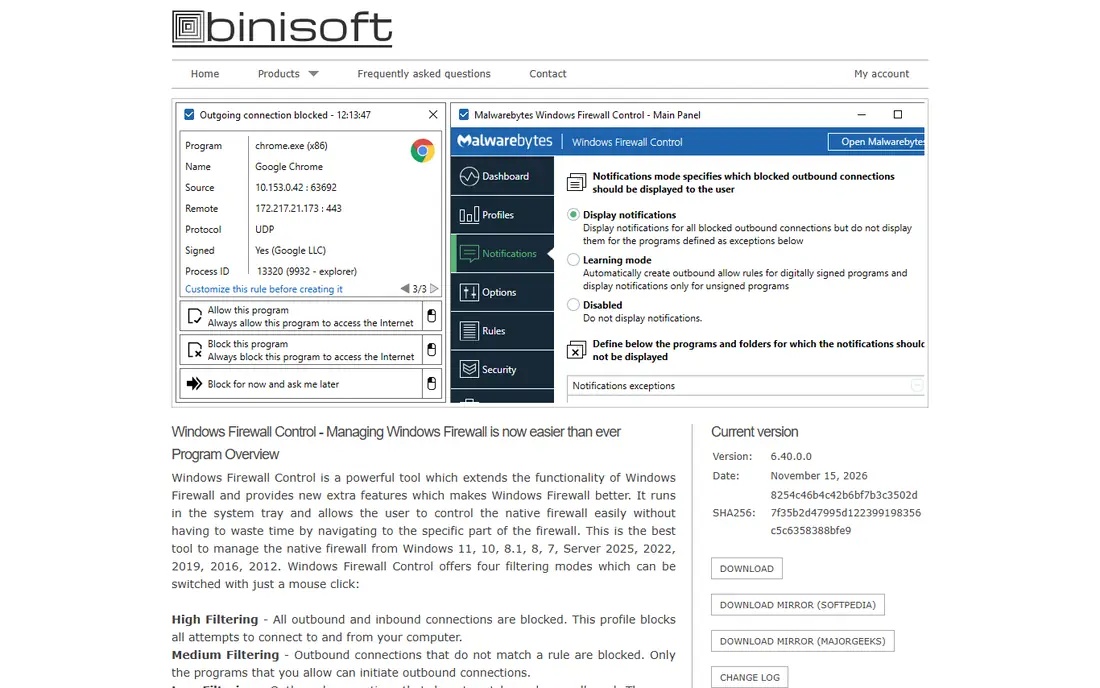
Windows Firewall Control targets making the built-in firewall usable. Windows Firewall Control does not add a new firewall; it layers on the interface Microsoft never built.
Honest limits: Still depends on Windows Firewall engine.
Worth adding: if you trust the Windows engine but hate its interface, this is the smallest, safest upgrade you can install. Price to start with Windows Firewall Control: Free. Windows Firewall Control includes a free tier.
- Tiny and stable
- Notifications for outbound blocks
- Interface assumes some networking knowledge
Privatefirewall is a good fit for entry-level protection with zero configuration. Privatefirewall from Privacyware is one of the quiet veterans of the free firewall world.
It offers inbound and outbound filtering, application control and intrusion detection in a small package that stays out of the way. The honest caveats: the interface looks its age, updates are infrequent, and it lacks the network visualization or sandboxing of flashier rivals. On cost, Privatefirewall starts like this: Free. Privatefirewall has a free plan.
Points against: Development appears slow.
- Low resource use
- Straightforward interface
- Dated interface
Choose GlassWire for seeing exactly what your PC sends and receives. That visibility-first approach makes it the friendliest tool on this list for non-technical users.
Check the vendor site for GlassWire pricing; none is listed in this comparison. GlassWire includes a free tier.
What to check first: Free version limits blocking to a couple of apps.
- Alerts on new apps and suspicious hosts
- Beautiful live traffic graphs
- Full firewall rules need a premium plan
TinyWall is a good fit for quiet, no-nonsense allow-list protection. Version 3.5, released in June 2026, moved it to a standalone WFP-based firewall with ARM support and a dark interface, and the project documents no data collection.
Price to start with TinyWall: Free. Free access exists with TinyWall.
Limits to weigh: Minimal hand-holding for new users.
- Tiny resource footprint
- No pop-ups by design
- Default-deny can confuse beginners
For open-source minimalists, simplewall is a natural candidate. simplewall is a free, open-source WFP-based firewall with a deliberately spartan interface: a list of apps, checkboxes for internet access, and one big button to enable filtering.
What to check first: Stark interface.
Enabling filters with the default allow-list blocks everything unchecked, which is the point, but new users should start with temporary rules until the allow-list spans their daily apps. simplewall cost at the entry level: Free. Free access exists with simplewall.
- Temporary or permanent rules
- Clear per-app allow list
- Simple to lock yourself out if careless
ZoneAlarm Free Firewall is designed for traditional two-way firewall protection. It is completely compatible with Windows 10 and 11 and works alongside most antivirus products.
But as a pure firewall it remains competent and genuinely free, which is why it still appears in every roundup. Entry price for ZoneAlarm Free Firewall: Free. You can start on ZoneAlarm Free Firewall without paying.
What to check first: Free version lacks newer premium features.
- Long track record and solid inbound/outbound control
- From Check Point
- Upsells to premium security suites
Pick Comodo Firewall if this describes you: users who want every knob to turn. Beyond standard inbound and outbound filtering, it gives you application sandboxing that runs unknown files in isolation, in-depth rule sets, and leak-test-beating outbound control that stops malware from sneaking data out through trusted apps.
Price to start with Comodo Firewall: Free. A free plan is available with Comodo Firewall.
Honest limits: Can conflict with other security software.
- Capable leak protection
- Deep rule customization
- Frequent pop-ups in strict modes
Selection criteria
Selection started from tools commonly considered for home firewall software, then narrowed to 8 that have clear pricing information or a clear quote process. Where a vendor does not publish a price, the entry says quote. Where a price depends on seats or billing term, the entry says so. Order on the page follows fit for the typical buyer first, then price transparency and free access. Your own requirements should decide the final pick.
Before you commit
- Get a written quote from NetLimiter and GlassWire; the list shows no starting price for them.
- Check what the free option really includes: Windows Firewall Control, Privatefirewall, GlassWire and others offer a free plan, and usage caps differ.
- Take the trial from NetLimiter and push a live task through it before you pay.
- Before choosing NetLimiter, weigh its main limit: premium software.
- Ask the daily users to test Privatefirewall on a live task before you roll it out to everyone.
- Confirm you can export your data from Windows Firewall Control, so leaving later does not mean losing records.
Frequently asked questions
Do these tools publish their prices?
Not all of them. NetLimiter and GlassWire publish no starting price, so expect a quote request for those. The rest, Windows Firewall Control included, show a starting price, though seats and billing terms still change the final cost.
Is NetLimiter the right pick for everyone comparing home firewall software?
No single tool suits every team. NetLimiter comes first because it fits controlling how much bandwidth each app uses, while Windows Firewall Control suits making the built-in firewall usable and Privatefirewall suits basic protection with zero configuration. Match the tool to your own size, budget and workflow before deciding.
Can I try these options before paying?
Often, yes. Windows Firewall Control, Privatefirewall, GlassWire and others have a free plan and NetLimiter offers a free trial. Use your own data and a real task during the test, and check what the free tier or trial limits before you rely on it.
Which free firewall is a good match for beginners?
Start with NetLimiter if you need controlling how much bandwidth each app uses. Windows Firewall Control is the better match for making the built-in firewall usable, and Privatefirewall for entry-level protection with zero configuration. The best choice depends on budget, team size and workflow.
Are free firewalls safe to use?
The established free firewalls here, ZoneAlarm, Comodo, TinyWall, simplewall, GlassWire Free, come from known vendors or open-source projects with long track records. Stick to the vendor's own download page and avoid repackaged installers from download portals.
Which options for home firewall software have a free plan?
On this list, 7 of 8 tools include a free plan, among them Windows Firewall Control, Privatefirewall, GlassWire and TinyWall. Caps on seats, usage or features are common, so test the free plan against your real workload. One other tool offers a trial instead.
Sources
See where you really rank - block by block
ProMapRanker scans Google Maps across a grid of your service area. Simple monthly plans from $19, white-label on every plan.
Start freeKeep reading
 zscaler alternatives
Best Zscaler Alternatives in 2026
Looking for zscaler alternatives? We compare 9 SASE and zero trust platforms on architecture, data protection, pricing, and fit for your network and team.
Read → zapier alternatives free
Best Zapier Alternatives Free in 2026
Nine automation tools for zapier alternatives free in 2026, all with genuinely free tiers, plus free plan limits, starting prices and upgrade paths explained.
Read → which platform is best for online reputation
Which Platform Is Best for Online Reputation in 2026
Wondering which platform is best for online reputation? We compare 8 review, listing, and response tools for small and multi-location businesses and agencies.
Read →