 ProMapRanker
Best Gratitude Journal App in 2026


All-round journaling with gratitude · Pricing starts at: $49.99 per year
Key takeaways
- Presently is the strongest free starting point, with no subscription and entries kept on your device.
- Day One suits people who want one journal for gratitude, photos, and longer writing, with a paid plan for sync and media.
- The Five Minute Journal app suits a fixed morning and evening routine, with the same prompts each day.
- Apple Journal is the best no-cost choice for iPhone and iPad owners who want simple, private entries.
- A short daily habit matters more than a long feature list, so pick the app you will open tomorrow.
Quick comparison
| Pick | Great for | Pricing starts at | Free tier | |
|---|---|---|---|---|
| Day One | All-round journaling with gratitude | $49.99 per year | Yes | Visit |
 Presently | Simple free gratitude journal | Free | Yes | Visit |
 Five Minute Journal | Fixed morning and evening routine | See website | Free trial | Visit |
 Gratitude Plus | Shared gratitude with others | $10.99 per month | Yes | Visit |
 Apple Journal | Free journaling on Apple devices | Free | Yes | Visit |
 Journey | Cross-platform journaling | $49.99 per year | Yes | Visit |
 Grid Diary | Prompt grids instead of blank pages | $2.99 per month | Yes | Visit |
 Daylio | Fast mood and gratitude check-ins | See website | Yes | Visit |
 Stoic | Guided reflection and prompts | See website | Yes | Visit |
The best gratitude journal apps
We looked for apps that make a short gratitude habit easy to keep, with clear pricing and a way to find old entries later. The apps below cover free, simple, guided, and full journaling options.
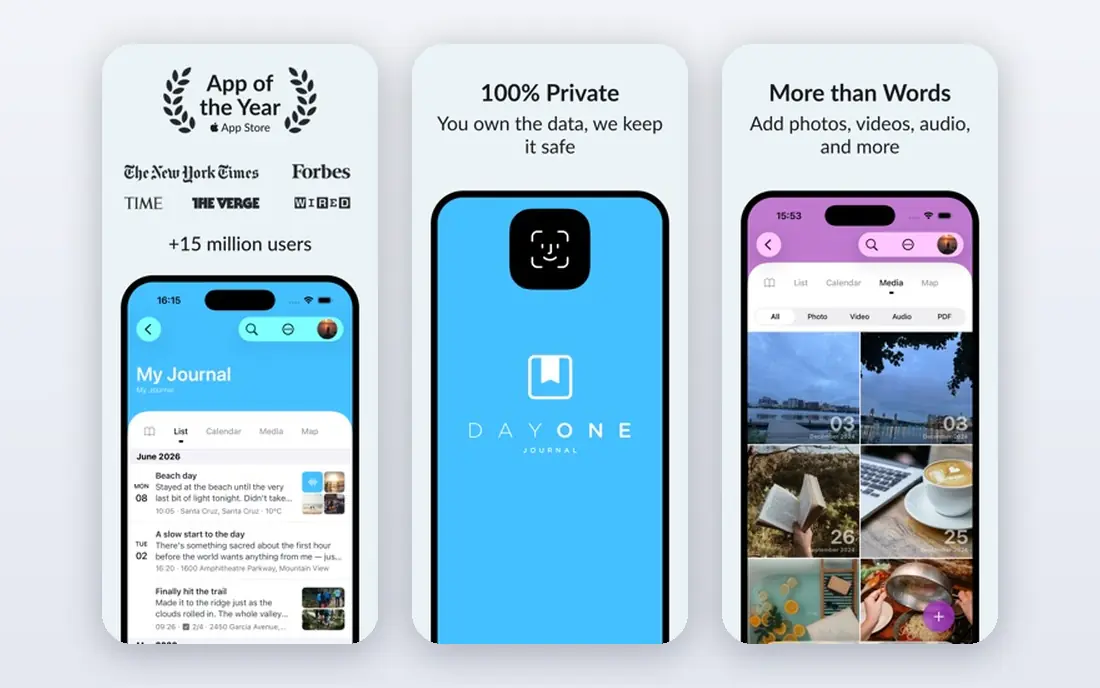
Day One works well if gratitude is one part of a wider journal. You can keep a separate gratitude journal beside a daily journal, a travel journal, or a work journal, and you can add photos and location details to an entry. Templates and daily prompts help on days when a blank page feels hard, and the Today view gathers recent entries in one place.
The catch is cost and scope. The free plan covers basic entries, while unlimited sync, video, audio, and drawing sit on the Silver plan at 49.99 dollars per year, with Gold at 74.99 dollars per year for added AI features. If you only want three lines of gratitude each night, that may be more than you need. If you want one long-term home for writing, Day One is a strong pick.
- Multiple journals
- Photos, audio, and video support
- End-to-end encryption on paid plans
- Full sync and media features need a paid plan
- The price is higher than a simple gratitude app
Presently is a plain, focused gratitude journal. You open it, write what you are grateful for, and move on. It includes reminders, quotes and prompts, a lock with fingerprint or face recognition on supported devices, and search across old entries. Export and import give you a way out if you change phones.
The trade-off is that privacy and simplicity come from keeping entries on your device rather than syncing them everywhere. That suits people who mainly journal on one phone. It suits less well a household that shares devices or a writer who wants the same journal on phone, tablet, and computer. For a free daily habit with no subscription, Presently is hard to beat.
- Free with no ads
- Entries stay on your device
- Reminders, search, and export
- No cloud sync for multi-device use
- Fewer guided prompts than paid rivals

The Five Minute Journal app follows a set routine. In the morning you list three things you are grateful for, note what would make the day great, and write an affirmation. In the evening you list three good things from the day and note how the day could have been better. That structure removes the daily decision about what to write.
This is a good fit if you like routine and a short time limit. It is less suited to free-form writing, long reflections, or a journal that also holds photos and travel notes. Check the price in your app store before you commit, since app pricing can differ by platform and region. The paper journal from the same maker is a separate product, so do not confuse the two when you compare prices.
- Clear morning and evening structure
- Short daily format
- Affirmation prompt
- The fixed format may feel rigid
- App pricing varies by store and region
Gratitude Plus adds a social layer to a private journal. You can keep personal entries, join or create gratitude circles with a partner, family, or friends, and look back at shared memories from past entries. Mood tracking and personal insights help you spot patterns over time, and prompts give you a starting point on quiet days.
That social side is the main reason to choose it, and also the main reason to skip it. If you want a strictly private journal, the circles and public feed may feel like extra noise. The subscription is listed at 10.99 dollars per month or 39.99 dollars per year in app store terms, so try the free version first and check whether the shared features earn their place in your routine.
- Gratitude circles for family and friends
- Mood tracking
- Daily affirmations and prompts
- Subscription is pricey for a simple journal
- Some features suit social users more than private writers
Apple Journal is the easiest start for iPhone and iPad owners. It is free, it is already tied to your Apple account, and it can suggest moments from your photos, workouts, and places visited. Entries can be locked, and iCloud sync keeps them across your Apple devices. For a simple gratitude note each day, it asks for nothing extra.
The limit is the ecosystem. If you use Android, Windows, or the web as your main device, Apple Journal is not a practical home for your journal. It also lacks the deep templates and gratitude-specific circles found in dedicated apps. Still, for Apple users who want a free, private, low-friction start, it is our first suggestion before paying for anything.
- Free with no subscription
- Suggestions from photos and activity
- Lock and iCloud sync
- Apple devices only
- No Android or web version for most users
Journey suits people who move between devices during the day. You can start an entry on your phone, finish it on a computer, and read it later on the web. It includes mood tracking, templates, and a coaching-style assistant on membership plans, which can help if you want prompts and reflection in the same place as your gratitude notes.
The free plan is useful for trying the writing experience, but membership at 6.99 dollars per month or 49.99 dollars per year, with a lifetime option listed at 199 dollars, opens up the fuller sync and export options. That is a fair price for a cross-platform journal, but it is more than a simple gratitude app needs to charge. Choose Journey if device coverage matters more to you than a minimal design.
- Works on phone, tablet, desktop, and web
- Mood tracking
- Templates and coaching features
- Cloud sync and export sit behind membership
- The app covers more than gratitude alone
Grid Diary replaces the blank page with a grid of prompt cells. One cell can hold gratitude, another can hold a highlight, and another can hold a lesson from the day. That visual structure helps people who freeze when faced with an empty page, and it keeps each day short. Membership is listed at 2.99 dollars per month or 22.99 dollars per year.
The grid is also the limit. If you want to write a long, open entry about a difficult or joyful day, the cells can feel cramped. Cross-device sync and passcode lock sit on the membership plan, so the free version works best on one device. For a structured, low-cost daily check-in, Grid Diary is a good middle ground between a blank journal and a fixed routine app.
- Grid prompts for gratitude, goals, and highlights
- Low monthly price
- Sync on membership
- Grid format limits long writing
- Some features need the membership plan
Daylio is built for speed. You pick a mood, tap the activities that shaped your day, and add a short note about what you are grateful for. That takes under a minute on most days, which makes it easier to keep a streak going when life is busy. Charts over weeks and months show how mood and habits move together.
Daylio is not the best place for long journal entries. It shines as a micro-journal and a mood log, with gratitude as one part of the daily check-in. Premium pricing is shown in app stores and varies by plan and region, so check the current offer in your store before you pay. If a one-minute habit is what will actually stick, Daylio deserves a trial.
- Very fast daily entries
- Mood and activity tracking
- Streaks and stats
- Better for short entries than long writing
- Premium features vary by store
Stoic pairs gratitude with a wider morning and evening routine. Morning prompts cover gratitude, intention, and mood, while evening prompts ask you to reflect on the day. It also includes habit tracking, quotes, and breathing exercises, so it works as a small daily reflection space rather than a single-purpose gratitude log.
That breadth helps if you want one app for reflection, and it hurts if you want only gratitude. The subscription opens the full set of prompts and tracking, and pricing is shown in the app store. Try the free version for a week and see whether the extra reflection steps feel supportive or feel like homework. For guided users, Stoic is a calm, structured choice.
- Morning and evening guided prompts
- Mood and habit tracking
- Quotes and breathing exercises
- Broader than gratitude alone
- Full features need a subscription
How we picked these
We compared official feature pages, pricing pages, and app store listings for apps that offer a clear gratitude feature, not just a blank notes page. We kept apps that exist and work in October 2026, with a real way to write, find, and keep gratitude entries. We checked free plans, subscription prices where vendors publish them, and whether an app works on the devices most readers use. Where pricing was only shown in an app store, we wrote See website rather than guess a number.
What to check before you pay
Start with the habit, not the price. Pick a time you already have, such as after breakfast or before bed, and attach the gratitude note to it. A one-minute entry you keep beats a ten-minute routine you drop after a week. Set a reminder in the app, and keep the first week short on purpose.
Next, check privacy and export. Read whether entries live on your device, in the vendor cloud, or both, and whether you can export them as text or PDF. A journal holds personal writing, so a lock, a clear privacy policy, and an export option matter more than extra themes. If you share entries with family or friends, check exactly what is shared and what stays private.
Then match the format to your style. Fixed routines suit people who want no daily choice. Grids suit visual thinkers who like short prompts. Full journals suit people who also write travel notes, work notes, or longer reflections. Free plans from Presently, Apple Journal, and Daylio let you test the format before you pay. If a paid app does not make the habit easier in the first two weeks, cancel it and keep the free one that did.
Frequently asked questions
What is the best gratitude journal app for beginners?
Presently is a strong start because it is free, simple, and focused only on gratitude. Apple Journal is also strong for iPhone and iPad owners, since it costs nothing extra. Try one of those for two weeks before paying for a larger journal app.
What are the best gratitude apps for daily prompts?
Grid Diary, Stoic, and the Five Minute Journal app all give you prompts instead of a blank page. Grid Diary uses prompt cells, Stoic uses morning and evening reflection, and the Five Minute Journal app uses the same morning and evening questions each day. Pick the prompt style that feels least like work.
Are there good free gratitude journal apps?
Yes. Presently is free with no ads, Apple Journal is free on Apple devices, and Day One, Journey, Grid Diary, and Daylio all offer free plans with limits. Free plans usually limit sync, media, or advanced features, but they are enough to build the habit.
How is a gratitude journal app different from a general journal app?
A gratitude app centers on short, regular entries about what you appreciate, often with prompts, reminders, and mood tracking. A general journal app, such as Day One or Journey, also handles long writing, photos, and multiple journals. If gratitude is your main goal, a focused app keeps the habit smaller and easier.
Can I use a gratitude app with my partner or family?
Gratitude Plus is built for that, with gratitude circles for shared entries and memories. Most other apps on this list are private by default, so check sharing settings before you invite anyone. Keep personal entries private unless you mean to share them.
Sources
See where you really rank - block by block
ProMapRanker scans Google Maps across a grid of your service area. Simple monthly plans from $19, white-label on every plan.
Start freeKeep reading
 zoro.to alternatives
Best Zoro.to Alternatives in 2026
We compare the best zoro.to alternatives in 2026, listing only legal licensed anime streaming services, from Crunchyroll to free options for fans today.
Read → zip alternatives
Best Zip Alternatives in 2026
We compare the best zip alternatives for buy now, pay later in 2026, covering pay-in-4 plans, fees, spending limits, and credit reporting options today.
Read → yesware alternatives
Best Yesware Alternatives in 2026
Compare the best yesware alternatives for sales email tracking, templates, and sequences, with current pricing and honest tradeoffs for small sales teams.
Read →