 ProMapRanker
Best Free Online Watermark Remover Tools in 2026


Automatic removal from photos and video · Pricing starts at: Free
Key takeaways
- WatermarkRemover.io and Media.io are good first tries for automatic photo cleanup in a browser.
- Free tiers are often capped by credits, downloads, or resolution, so check the limit before a large batch.
- Manual brush tools suit small marks on simple backgrounds, while AI tools handle larger and messier marks better.
- Only remove a watermark from your own images, or from images you have clear permission to edit, and never use these tools to pass off someone else's work as your own.
Quick comparison
| Pick | Great for | Pricing starts at | Free tier | |
|---|---|---|---|---|
| WatermarkRemover.io | Automatic removal from photos and video | Free | Yes | Visit |
 Media.io | Fast browser-based photo cleanup | Free | Yes | Visit |
 Apowersoft Online Watermark Remover | Photo and video watermark removal | Free | Yes | Visit |
 HitPaw Online Watermark Remover | Beginners who want a simple online tool | Free | Yes | Visit |
 InPaint | Precise manual cleanup on desktop | See website | Free trial | Visit |
 Aiseesoft Free Watermark Remover Online | Free online photo cleanup without a download | Free | Yes | Visit |
 PicWish | Photo cleanup with extra editing tools | Free | Yes | Visit |
 Dewatermark | AI removal for photos in a browser | Free | Yes | Visit |
 Cleanup.pictures | Brushing away marks and unwanted objects | Free | Yes | Visit |
The best free online watermark remover tools
We focused on tools you can use in a browser without installing software, with a real free tier for photos, and in some cases video. Free does not mean unlimited, so we note where a credit cap, a download cap, or a watermark on the output changes the value.
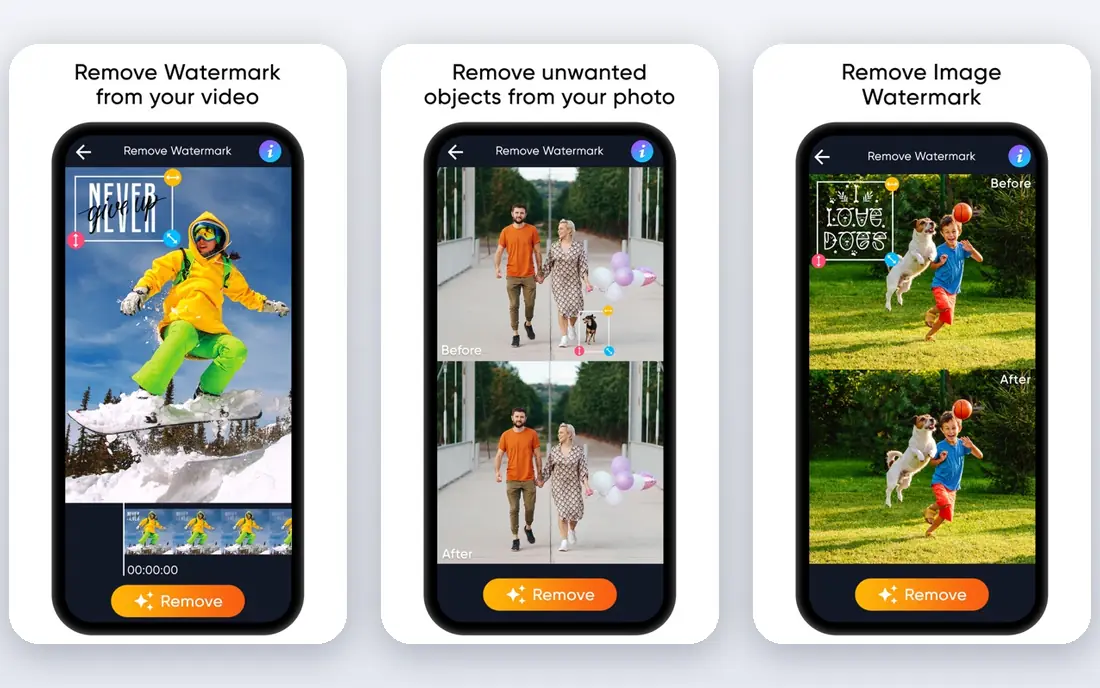
WatermarkRemover.io is the easiest starting point in this list, because it tries to find the watermark itself rather than asking you to paint over it. Upload a photo, check the preview, and download the result if the fill looks clean. It also handles video and PDF files, which most free photo-only tools do not.
The free tier gives a small number of credits and downloads each month, so it suits occasional cleanup rather than a large archive. Paid credit packs and annual plans exist for heavier use. Keep the original file until you have checked the result at full size, since a preview can hide a soft patch.
- Automatic detection
- Supports images, video, and PDF files
- Preview before download
- Free credits are limited each month
- Complex marks may need more than one try

Media.io works as a general online media toolkit, and its watermark remover fits the same pattern: upload, process, and download. It is a good choice when you need one clean image quickly and do not want to learn a desktop editor. The interface stays simple, which helps if you only do this job now and then.
As with most free online tools, expect limits on free processing and on output quality for larger jobs. If the mark sits over a face, fine text, or a busy pattern, try a second tool and compare results before you settle on one version.
- No install needed
- Simple upload and download flow
- Useful for single photos
- Free use is limited
- Results vary on textured backgrounds
Apowersoft Online Watermark Remover
Great for: Photo and video watermark removal

Apowersoft's online remover is useful because it covers both stills and video in one place. For photos, you mark the watermark area and let the tool fill it. For video, you select the area across the clip, which takes more patience but avoids a separate video app for a simple job.
The honest catch is time. A small logo in a corner is quick. A moving watermark, or one that crosses a subject, will need careful selection and a close check of the finished clip. Use it for your own footage, such as removing a trial watermark from a draft you own.
- Handles both photos and video
- Lets you select the marked area
- No install for the online tool
- Manual selection takes care on video
- Free processing has limits
HitPaw keeps the online workflow short, which is why it suits first-time users. You upload a photo or video, mark or confirm the watermark area, and preview the result. If you later need batch work or offline editing, HitPaw also sells desktop tools, so the online tool can act as a test of the approach.
Free online processing is not meant for bulk work, and semi-transparent marks over detailed areas are the hardest case for any automatic tool. Zoom in on the repaired area before you publish, and keep a copy of the original in case you need to redo it.
- Clear upload flow
- Automatic and manual options
- Desktop tools available for larger jobs
- Free online use is limited
- Large or semi-transparent marks can leave a faint trace
InPaint is different from the automatic tools above, because you paint over the mark yourself and the tool fills the area from the surrounding pixels. That control helps when an automatic tool keeps missing part of a mark, or when the mark sits in a simple area such as sky, a wall, or a plain background.
It is a desktop program, not a purely online free tool, so it fits people who clean up photos often enough to want control. A trial lets you test it, and paid licences are listed on its site. It rewards patience, and it is less appealing if you want a one-click result for dozens of images.
- Brush control over the exact area
- Good for objects as well as marks
- One-time licence model
- No ongoing free plan
- Manual work takes longer than automatic detection
Aiseesoft Free Watermark Remover Online
Great for: Free online photo cleanup without a download
Aiseesoft's free online tool is a plain, practical option for a single photo. You brush over the watermark, process the image, and download the result. There is no software to install, which makes it handy on a shared or borrowed computer.
The limits are the usual ones for a free online tool. It is photo-focused, and it works best when the mark sits on a fairly even background. For video, or for a batch of product photos, one of the tools above that handles video or bulk work will save time.
- Free online use
- Simple brush selection
- Supports common photo formats
- Photo only in the free online tool
- Quality drops on busy or detailed areas
PicWish is a broader photo toolkit, and watermark removal sits alongside background removal, enhancement, and retouching. That mix helps when a photo needs more than one fix, such as a mark removed and a background tidied in the same session. The workflow stays in the browser, and previews help you judge the result before spending credits.
Free use is capped, so reserve it for photos that matter rather than testing every image you own. If you only need watermark removal, a simpler single-purpose tool may use fewer credits for the same result.
- Watermark and object removal
- Background and enhancement tools in the same account
- Preview before download
- Free credits are limited
- Some features sit behind paid plans
Dewatermark focuses on AI-based photo watermark removal, with an emphasis on speed. Upload a photo, let the model find the mark, and download the cleaned version if the result holds up at full size. It is a good second try when another automatic tool leaves a faint outline.
As with every tool here, the background decides the result. A mark on a plain area cleans up well. A mark over text, a face, or a detailed pattern may need manual repair in a photo editor after the automatic pass. Check the free allowance before you start a batch.
- AI detection for common watermarks
- Fast online workflow
- No install needed
- Free allowance is limited
- Results vary with mark size and placement
Cleanup.pictures lets you brush over anything you want gone, including a watermark, a stray object, or a blemish, and it fills the area from nearby pixels. It is satisfying for small fixes, and it gives you more control than a fully automatic tool when the mark is in an awkward spot.
The free version suits occasional use, with resolution and feature limits that paid plans remove. For a large mark, work in small brush strokes and check the result often, since one large brush pass can smear a detailed background.
- Simple brush workflow
- Good for small marks
- Works in a browser
- Free version limits resolution on some exports
- Manual work for large areas
How we picked these
We compared official product pages, free-tier terms, and help pages, and we kept only tools that work online in October 2026 with a real free option for photo cleanup. We favoured automatic detection for speed and brush tools for control, and we left out tools that required a paid download before any test was possible.
What to check before you use a free remover
First, confirm you have the right to edit the image. Removing a watermark from stock photos, press photos, or another creator's work to use it without a licence is not a fair use shortcut, and it can create legal trouble. These tools are best for your own photos, drafts with trial marks you own, and images you have licensed for editing.
Second, test on a copy. Check the repaired area at full size, on a plain background and on a busy one, and compare two tools on the hardest image in your set. Third, watch the export terms. Some free tiers limit resolution, add their own mark, or cap monthly downloads, and those limits matter more than the headline claim of free.
Frequently asked questions
What is the best free online watermark remover tool?
WatermarkRemover.io is a strong first try for automatic cleanup, and Media.io is a close second for single photos. If automatic detection misses the mark, try a brush tool such as Cleanup.pictures or InPaint for manual control.
What are the best free watermark remover tools online for video?
WatermarkRemover.io, Apowersoft, and HitPaw all offer online video options, but free video processing is more limited than photo processing. For long or high-resolution video, a desktop editor may give a cleaner result.
What is the best free watermark remover app for photos?
The browser tools in this list work on phones as well as desktops, and WatermarkRemover.io also offers mobile apps. For phone-only work, check the app store listing for free limits and export quality before you rely on one app.
Can a free tool remove a watermark completely?
Sometimes, yes, especially on plain backgrounds. On faces, text, and busy patterns, a faint trace or soft patch is common. A manual second pass in a photo editor often finishes what an automatic tool starts.
Is it legal to remove a watermark?
It depends on rights, not on the tool. Removing a mark from your own work, or from work you have permission to edit, is a normal editing job. Removing a mark to use someone else's copyrighted work without permission is not. When in doubt, get a licence or use a different image.
Why do free watermark removers limit downloads?
Free processing costs the provider money for servers and AI models, so credits, resolution caps, and monthly limits keep the free tier sustainable. Paid plans and credit packs exist for people who need volume or higher resolution.
Sources
See where you really rank - block by block
ProMapRanker scans Google Maps across a grid of your service area. Simple monthly plans from $19, white-label on every plan.
Start freeKeep reading
 zscaler alternatives
Best Zscaler Alternatives in 2026
Looking for zscaler alternatives? We compare 9 SASE and zero trust platforms on architecture, data protection, pricing, and fit for your network and team.
Read → zapier alternatives free
Best Zapier Alternatives Free in 2026
Nine automation tools for zapier alternatives free in 2026, all with genuinely free tiers, plus free plan limits, starting prices and upgrade paths explained.
Read → which platform is best for online reputation
Which Platform Is Best for Online Reputation in 2026
Wondering which platform is best for online reputation? We compare 8 review, listing, and response tools for small and multi-location businesses and agencies.
Read →