 ProMapRanker
Best Free AI Tools to Animate Photos in 2026

Key takeaways
- Only animate photos you own or have permission to use, and never animate a real person without consent. Do not use these tools for undressing, sexual content or non-consensual imagery.
- MyHeritage Deep Nostalgia is the most focused free option for old family portraits, while CapCut and Canva suit social and design animations.
- Free plans vary widely: some give a small one-time credit pack, some give daily credits, and some give a free account with paid credits needed to generate.
- Runway offers the most control for creators who want camera and motion direction, but its free credits do not renew in current listings.
- Check watermark, download and usage rights before sharing, because free exports are not always cleared for commercial or client work.
Quick comparison
| Pick | Great for | Pricing starts at | Free tier | |
|---|---|---|---|---|
 MyHeritage Deep Nostalgia | Old family portraits | Free | Yes | Visit |
 CapCut | Social photo animations | Free | Yes | Visit |
 Runway | Controlled image to video | Free | Yes | Visit |
 LeiaPix Converter | Depth and 3D-style motion | Free | Yes | Visit |
 Canva | Design animations for posts | Free | Yes | Visit |
 Pika | Short effects and social clips | Free | Yes | Visit |
 Hailuo | Character and face animation | Free | Yes | Visit |
 HeyGen | Photo avatars with voice | Free | Yes | Visit |
 Remini | Restoring and animating old photos | Free | Yes | Visit |
The best free AI tools to animate photos
We compared official feature pages, pricing pages and public documentation for tools live in October 2026. Our pick for most people is MyHeritage Deep Nostalgia for family photos, with CapCut as the easiest social option. Please read the consent warning above before using any tool here: only animate photos you own or have permission to use, never a real person without consent, and never use animation tools for undressing or non-consensual imagery.
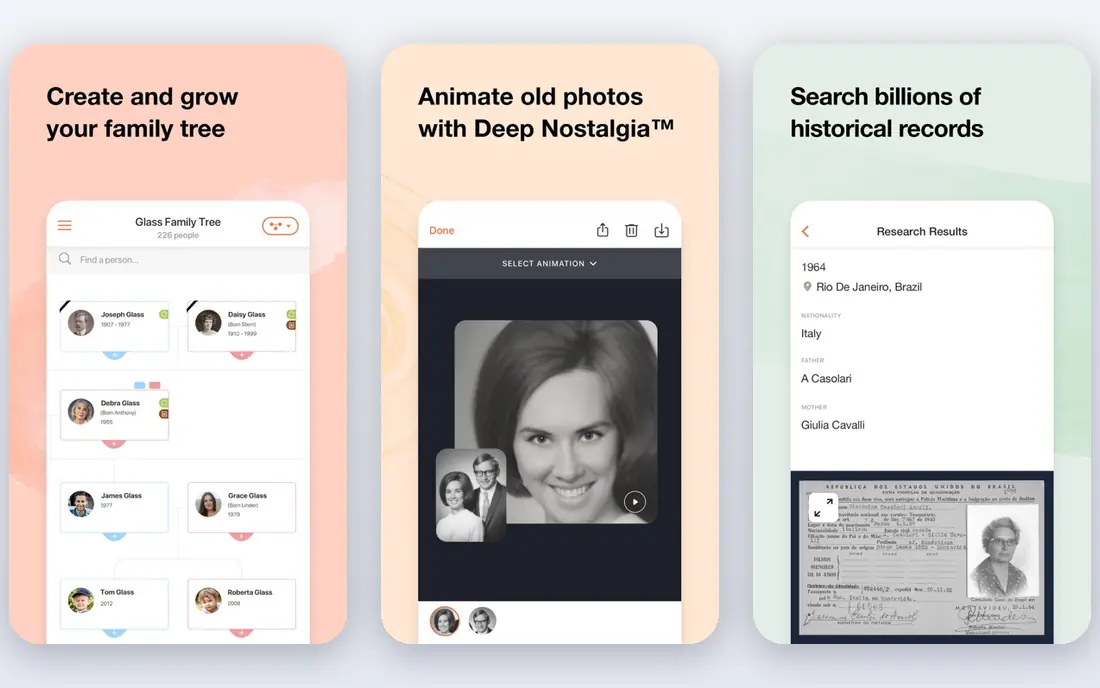
MyHeritage Deep Nostalgia animates faces in still photos with natural movements such as blinking, smiling and head turns. It is built for family history, so old portraits work well even when the source photo is faded or damaged, and photo enhancement runs before animation in current listings. For a family historian or teacher sharing an archive photo with permission, it is the most direct free route.
The free tier is limited. Users can animate a small number of photos for free, with free animations carrying a watermark in current listings, while unlimited animations need a paid MyHeritage Complete plan. It also adds no audio or speech, which limits misuse for fake speech while keeping the focus on gentle portrait motion. Use it only for photos you own or have clear permission to animate.
- One-click facial animation for old portraits
- Photo enhancement before animation
- Simple web workflow
- Free animations are limited and may carry a watermark
- Unlimited use needs a paid MyHeritage plan
CapCut suits creators who want to animate a photo and finish the clip in the same editor. Its free tier covers basic editing, templates, auto-captions and background tools in current listings, while talking photo features help turn a portrait into a short social clip. The mobile-first workflow makes it easy to start on a phone and finish on the web.
The catch is the Pro boundary. Advanced AI features, premium templates and a commercial license sit on the Pro plan, listed at $9.99 per month in some listings, so free users should check which features and exports are included. CapCut is best for personal and social animations from your own photos, not for a commercial project without checking the current license terms.
- Free tier with editing and templates
- Talking photo features for social clips
- Mobile and web editing in one workflow
- Advanced AI features sit on the Pro plan
- Export and license terms need checking for commercial work
Runway is the professional pick in this list. You can turn a photo into video, guide motion in regions of the image, and adjust camera direction, which gives far more control than a one-click portrait preset. For a creator animating a scenic photo, product photo or illustration, that control produces more intentional results.
The free plan is a trial in practice. It gives 125 one-time credits in current listings, with no renewal, and free videos carry a watermark. Paid plans start at $15 per month in current listings, with $12 per month on annual billing. Use the free credits to test whether Runway's control fits your style, then decide whether paid credits are worth it for regular work.
- Image to video with motion controls
- Strong visual quality for creators
- Useful for testing a professional workflow
- Free plan gives 125 one-time credits that do not renew
- Free videos carry a watermark in current listings
LeiaPix Converter turns a still photo into a short clip with depth-based movement, giving a gentle 3D-style effect without a full video model. It works well for scenic views, architecture and product photos, where the sense of depth adds interest without changing the subject. The upload and export flow is simple, which suits users who want a quick result.
The limit is range. LeiaPix does not generate new scenes, dialogue or complex character motion in the way a full image-to-video model does. It is best for subtle motion that keeps the original photo recognizable. Check current free export limits and watermark terms before using a clip in a public post.
- Converts a photo into depth-based motion
- Simple upload and export flow
- Good for scenic views and product shots
- Motion is depth-based rather than full AI video generation
- Free export limits need checking
Canva suits users who want to animate a photo as part of a design, not as a standalone video project. Its free plan includes animation options, templates and social exports, so a photo can become an animated post, story or presentation slide in minutes. For small businesses and creators who already use Canva, that integration saves time.
The trade-off is depth. Canva animation is template-based and design-led, rather than a full AI model that invents new motion from a prompt. Advanced AI features sit on paid plans in current listings. Use Canva when the goal is a polished social design from your own photo, and use Runway or Pika when you need model-generated motion.
- Free plan with animation and design templates
- Easy social exports
- Huge template library for posts and presentations
- Animation is template-based rather than full AI video generation
- Advanced AI features need a paid plan
Pika is known for short, effect-driven clips from photos, including playful effects and lip sync in current listings. Its interface suits social creators who want a quick, shareable result from a single image. Recent listings show a free account with model access, which makes it easy to explore the tool before paying.
The important catch is credits. Recent listings show the free plan at zero monthly credits, with packs only, so a free account alone does not guarantee free generations. Paid plans start at $10 per month in current listings. Check the credit balance shown in your own account before planning a project, and use only photos you own or have permission to animate.
- Free account with access to models
- Short effects and social clips
- No-watermark downloads listed on the free plan in recent listings
- Free plan lists zero monthly credits in recent listings, so generation needs a credit pack or subscription
Hailuo, also known as MiniMax Hailuo, suits short character and face animation from a photo, with consistent facial movement in current listings. New users receive a one-time welcome package in current listings, which gives a way to test the tool before paying. For creators making short character clips, its facial quality is a real draw.
The limits are time and watermark. The welcome package expires three days after it is granted in current listings, and free downloads include a watermark. That makes Hailuo a good test tool rather than a long-term free production tool. Plan your test clips within the welcome window, and check paid pricing if you need regular, watermark-free exports.
- Strong facial and character animation
- Welcome package for new users in current listings
- Good for short character clips
- Welcome package expires after a short period in current listings
- Free downloads include a watermark
HeyGen turns a photo into an avatar that can speak from text, with templates, voices and brand controls for business use. That makes it useful for training clips, product explainers and presentations where a presenter image helps. The output is polished, and the template flow keeps production fast for teams.
Consent is critical here. Never create a speaking avatar of a real person without that person's clear permission, and never use an avatar to imply words a real person did not say. The free plan allows only a small number of videos per month in current listings, with paid plans starting at $29 per month. Use HeyGen for your own avatar, a licensed character, or a clearly fictional presenter.
- Photo avatars with text to speech
- Templates and multi-language voices
- Polished business outputs
- Free plan allows only a small number of videos per month
- Avatar use needs clear consent for any real person
Remini helps with the step before animation: restoring and enhancing an old or low-quality photo so the animated result looks cleaner. Its mobile app is easy to use, and its enhancement tools can sharpen faces and details that would otherwise animate poorly. For family photos that need both restoration and motion, Remini pairs well with a dedicated animation tool.
The free tier is limited, and the strongest restoration features sit on paid plans. Remini is also best seen as a restoration companion, not a full video model. Use it to improve your own photos, then animate them in MyHeritage or another tool here, always with permission for any real person in the image.
- Photo restoration and enhancement
- Simple mobile animation for old photos
- Good for improving low-quality sources
- Free use is limited
- Advanced restoration and animation features need a paid plan
How we picked these
We compared official feature pages, pricing pages and public documentation for tools live in October 2026, and we favored legitimate creative tools with a free route, a clear homepage, and a use case for animating photos you own. We excluded tools marketed for undressing, sexual content or non-consensual imagery, and we did not list any tool whose main purpose is to create misleading images of real people. We noted where free credits are one-time, daily or pack-based, because that difference decides whether a tool is truly free for ongoing use.
What to check before you animate
Start with permission and source, not with effects. A tool that works well is still the wrong choice if the photo is not yours to use or the person in it has not consented.
Get consent and keep it simple
Only animate photos you own or have permission to use, and never animate a real person without consent. For family archives, check who owns the photo and whether living relatives are comfortable with animation and sharing. For client or commercial work, get written permission and keep a record of it.
Check credits, watermark and rights
Open your account and check the credit balance, watermark rule and usage rights for your plan before you generate. Free exports may be personal use only, watermarked, or limited in resolution. Do not assume a free clip is cleared for advertising, client deliverables or monetized posts.
Label AI animation when sharing
When you share an animated photo, say that it was animated with AI, especially for historical or family images. A clear label prevents confusion, protects the people in the photo, and keeps the work honest for viewers who may otherwise think the motion is real footage.
Frequently asked questions
What is the best free AI tool to animate a photo?
For old family portraits, MyHeritage Deep Nostalgia is the most focused free option. For social clips, CapCut is easiest, while Canva suits design-led posts and Runway suits creators who want more motion control. The best choice depends on whether you want a portrait, a social clip or a designed post.
Can I animate a photo for free without a watermark?
Some free plans offer watermark-free exports in current listings, while others watermark free clips, including Runway and Hailuo in current listings. Pika lists no-watermark downloads on its free plan in recent listings, but its free credits are limited, so check your own account terms before promising a clean export.
Is it safe to animate photos of real people?
Only with permission and care. Animate only photos you own or have permission to use, never a real person without consent, and never use animation for undressing, sexual content or misleading speech. For historical figures, consider the archive, the context and whether the animation could mislead viewers, and label it as AI animation.
How many photos can I animate for free?
It varies by tool. MyHeritage allows a small number for free, Runway gives 125 one-time credits, HeyGen allows a small number of videos per month, and Pika's free plan lists zero monthly credits in recent listings, with packs needed to generate. Daily-credit tools and welcome packages also expire or reset on different schedules, so check your account.
What is the best free AI tool to animate a photo for social media?
CapCut and Canva are the simplest social options, because editing, templates and exports sit in the same workflow. Pika suits short effects, while Runway suits higher-quality clips when you are willing to use paid credits. For all of them, start from your own photos and label AI animation when you share.
Sources
See where you really rank - block by block
ProMapRanker scans Google Maps across a grid of your service area. Simple monthly plans from $19, white-label on every plan.
Start freeKeep reading
 zscaler alternatives
Best Zscaler Alternatives in 2026
Looking for zscaler alternatives? We compare 9 SASE and zero trust platforms on architecture, data protection, pricing, and fit for your network and team.
Read → zapier alternatives free
Best Zapier Alternatives Free in 2026
Nine automation tools for zapier alternatives free in 2026, all with genuinely free tiers, plus free plan limits, starting prices and upgrade paths explained.
Read → which platform is best for online reputation
Which Platform Is Best for Online Reputation in 2026
Wondering which platform is best for online reputation? We compare 8 review, listing, and response tools for small and multi-location businesses and agencies.
Read →