 ProMapRanker
7 Best Drag and Drop Website Builder Software for 2026
Direct answer
GoDaddy comes first here, mainly for quick setup with built-in marketing. Listed starting prices: WordPress.com from $4 per month, Hostinger from $1.99 a month (48-month term) and Duda from $19 a month. WordPress.com is the stronger choice for blogs on the WordPress product, while Hostinger suits tight budgets and small sites. Prices, free plans and limits for all 7 tools follow.
If you are comparing drag and drop website builder software, this page covers 7 tools in one place: what each is best for, what it costs to start, whether it has a free plan, and the main limit to know about.
Key takeaways
- GoDaddy is the opening pick, best for quick setup with built-in marketing.
- Hostinger is the lowest-priced starter here at $1.99 per month.
- WordPress.com comes with a trade-off: $4 figure rests on a stale vendor page copy from 14 August 2026, not a fresh read.
- 4 of 7 tools offer a free plan: GoDaddy, WordPress.com, Wix, Weebly.
- Weebly is the one to check for simple small business sites.
Quick comparison
| Pick | Great for | Pricing starts at | Free tier | |
|---|---|---|---|---|
 GoDaddy | Quick setup with built-in marketing | Quote only | Yes | Visit |
 WordPress.com | Blogs on the WordPress product | $4 per month (billed annually) | Yes | Visit |
 Hostinger | Tight budgets and small sites | $1.99 a month (48-month term) | No | Visit |
 Duda | Agencies building client sites | $19 a month (billed annually) | Free trial (14 days) | Visit |
 Squarespace | Image-led brands and portfolios | $19 a month (billed annually) | Free trial (14 days) | Visit |
 Wix | Beginners who want the fastest start | $17 a month | Yes | Visit |
 Weebly | Straightforward small business sites | $13 per month | Yes | Visit |
Drag and Drop Website Builder Software compared in detail
GoDaddy is aimed squarely at quick setup with built-in marketing. An AI flow asks a handful of questions, drafts a site, and the owner edits it with a straightforward drag-and-drop editor.
From a buyer's view, marketing tools, email and social posting sit in the same dashboard. A domain bought from GoDaddy links without DNS work. GoDaddy does not publish a starting price; ask for a quote. Free access exists with GoDaddy.
Where it is weaker: editor is less adaptable than Wix.
- Domain and hosting in one account
- Quick AI setup flow and built-in marketing tools
- Pricing page opened today showed no dollar figures, so the entry price is quote only here
WordPress.com works best for blogs on the WordPress product. The system fits writers and publishers who want the WordPress ecosystem, including its SEO tools and its large plugin library on higher plans.
Trade-offs to know: full design freedom needs higher plans.
WordPress.com pricing: $4 per month. WordPress.com offers a free plan.
- Free plan to start
- The WordPress editor with a huge theme and plugin library
- Not a fresh read

Hostinger works best for tight budgets and small sites. The number to watch is the renewal: the low intro price only lasts for the first term.
So the cost over four years is far higher than $1.99 a month recommends. The starting price for Hostinger: $1.99 per month. There is no free plan with Hostinger.
The main drawbacks: renewal price jumps to $10.99 a month.
- Text and images
- AI tools draft layouts
- No permanent free plan to test the editor
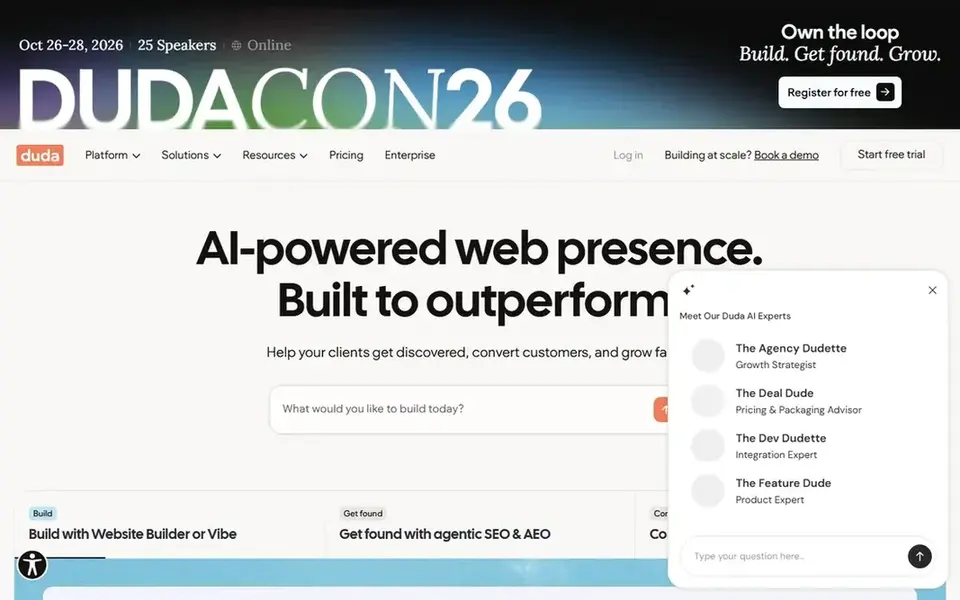
Duda serves agencies building client sites. The Basic plan costs $19 a month billed yearly, or $25 a month billed monthly, verified on the Duda pricing page on 13 November 2026.
Where it is weaker: agency tools add cost a single owner will not use.
The starting price for Duda: $19 per month. Free access: Free trial (14 days).
- White label editing and team permissions built in
- Client billing
- Template range is smaller than Wix

Pick Squarespace if this describes you: image-led brands and portfolios. Its Fluid Engine editor lets you move blocks freely, but it keeps spacing and alignment tidy.
Watch-outs: only a 14 day trial.
So a page seldom ends up looking broken. Selling, scheduling, donations and member areas are built in instead of added through plugins. On cost, Squarespace starts like this: $19 per month. On free options: Free trial (14 days).
- Selling
- Scheduling and donations built in
- No permanent free plan

Wix targets beginners who want the fastest start. The free plan lets you test the editor with Wix branding and a Wix subdomain before you spend anything.
Where it falls short: pricing page opened today showed plan names without dollar figures.
The Core plan figure of $17 a month rests on the Wix blog and earlier vendor reads, since the Wix pricing page opened on 13 November 2026 showed plan names and features without dollar figures in the page text. Wix starts at: $17 per month. Wix has a free plan.
- The most direct drag-and-drop editor in this list
- Large template library and app market
- Switching templates after launch is restricted

Weebly targets straightforward small business sites. The Personal plan figure of $13 a month rests on vendor-derived reads from earlier checks, not on a vendor pricing page opened in this run, so confirm it at checkout.
Beyond that, Weebly fits an entry-level brochure site or a small store, and it is a weaker pick for a site that needs advanced design, a CMS or a large template range, where Wix and Squarespace offer more. Square owns Weebly, so selling online links to Square payments and point of sale tools, which fits a shop that already uses Square at the counter. Price to start with Weebly: $13 per month. Weebly offers a free plan.
Limits to weigh: $13 figure rests on vendor-derived reads.
- One of the simplest editors in this list
- Square integration for selling
- Not a fresh vendor page open today
What went into this list
ProMapRanker looked at what each vendor publishes: pricing, plan limits, feature coverage for drag and drop website builder software and stated drawbacks. No hands-on testing is claimed. Where a vendor does not publish a price, the entry says quote. Where a price depends on seats or billing term, the entry says so. The ranking is editorial: typical fit first, then clear pricing, then free access. If your needs are unusual, read the profiles rather than relying on position.
Pre-purchase checklist
- Ask GoDaddy for a written quote, since no starting price is shown.
- Check what the free option really includes: GoDaddy, WordPress.com, Wix and Weebly offer a free plan, and usage caps differ.
- Take the trial from Duda and Squarespace and push a live task through it before you pay.
- Read the limits listed for GoDaddy first: pricing page opened today showed no dollar figures, so the entry price is quote only here.
- Involve the people who will use Hostinger daily; a short pilot beats a long feature checklist.
- Check the integration list for Weebly against the tools you run today, and note which ones need a higher plan.
Frequently asked questions
What is the cheapest option for drag and drop website builder software in this list?
On published monthly entry prices, Hostinger is the lowest here at $1.99 per month. Entry price is only part of the cost, because seats, add-ons and billing terms can change the total. Prices, free plan details and limits for all 7 tools in this drag and drop website builder software roundup sit on the individual cards above.
Do these tools publish their prices?
Not all of them. GoDaddy publishes no starting price, so expect a quote request for it. The rest, WordPress.com included, show a starting price, though seats and billing terms still change the final cost.
How are the tools for drag and drop website builder software ordered?
GoDaddy sits first and Weebly last because the order follows typical fit for drag and drop website builder software, then price clarity and free access. It is a judgement call, so read each profile for fit and limits.
Is GoDaddy the right pick for everyone comparing drag and drop website builder software?
No single tool suits every team. GoDaddy comes first because it fits fast setup with built-in marketing, while WordPress.com suits blogs on the WordPress platform and Hostinger suits tight budgets and small sites. Match the tool to your own size, budget and workflow before deciding.
Sources
See where you really rank - block by block
ProMapRanker scans Google Maps across a grid of your service area. Simple monthly plans from $19, white-label on every plan.
Start freeBrowse all guides
← WordPress Hosting for Agencies: 6 Options Compared in 20266 Best Magento Hosting for 2026 →
 best wordpress backup plugin for agencies
2026 Guide to the Best WordPress Backup Plugin for Agencies
Weighing the best WordPress backup plugin for agencies? We lined up 5 products by cost, free access and fit. With pricing notes and limits. Straight answers.
Read → best website backup plugin for agencies
2026 Guide to the Best Website Backup Plugin for Agencies
Compare 5 best website backup plugin for agencies, with prices, free plans and who each fits. Trade-offs are spelled out for each entry. Details below.
Read → best white-label website builder for agencies
5 Best White-Label Website Builder for Agencies in 2026
Need the best White-Label website builder for agencies? We compare 5 tools on cost, free access and who each suits. Real limits included. Pick by budget.
Read → best website translation tools
Best Website Translation Tools in 2026
Compare the best website translation tools for WordPress, Shopify, and custom sites, with current pricing, free plans, SEO handling, and human-review advice.
Read → best log analysis software
Best Log Analysis Software in 2026
Best log analysis software in 2026 compared: Splunk, Datadog, Elastic, Grafana Loki and more on search, pricing and self-hosting fit for ops and security teams.
Read → best dedicated server hosting company
Best Dedicated Server Hosting Company in 2026
We compared the best dedicated server hosting company options for managed and unmanaged servers, covering hardware, support, and monthly cost for your business.
Read →More in Websites & Hosting · All guides A to Z by date · Latest guides