 ProMapRanker
Best Database Software for Small Business in 2026

Key takeaways
- Airtable is the safest first upgrade from spreadsheets for most small teams, thanks to linked records and views.
- Knack and Tadabase win when customers need their own portal, since they do not charge per user in the same way.
- Zoho Creator suits process-heavy work with approvals and workflows, while Ninox suits offline and mobile field work.
- Price the record cap and the guest or portal cost early, since those limits often decide the real annual bill.
Quick comparison
| Pick | Great for | Pricing starts at | Free tier | |
|---|---|---|---|---|
 Airtable | Shared team databases | $20 per user per month | Yes | Visit |
 Zoho Creator | Workflow and approval apps | $12 per user per month | Yes | Visit |
 Knack | Customer portals without per-user pricing | $59 per month | Free trial | Visit |
 Ninox | Offline and mobile databases | $12 per month | Free trial | Visit |
 Caspio | Large-scale database apps with strong security | $300 per month | Free trial | Visit |
 Tadabase | Relational apps with client portals | $50 per month | Free trial | Visit |
 Stackby | Spreadsheet-style databases with APIs | $10 per user per month | Yes | Visit |
 Softr | Polished portals on your data | $59 per month | Yes | Visit |
 Baserow | Open source database control | See website | Yes | Visit |
The best database software for small business
A small business database replaces scattered spreadsheets with linked tables for customers, orders, stock and jobs, plus forms, views and permissions. We compared official pricing, record limits, portal features and ease of use. Our pick for most teams is Airtable, with Knack as the customer-portal alternative.

Airtable looks like a spreadsheet and behaves like a database, which is why non-technical teams adopt it fast. Linked records connect customers to orders without copied names, views show the same data as a grid, calendar or kanban board, and Interface Designer builds simpler screens for staff who should not touch raw tables. Automations handle routine updates in the background.
The free plan covers up to 1,000 records per base and five editors, which suits a very small team. Team costs $20 per user per month billed annually, with 50,000 records per base, and Business costs more for 125,000 records. A Portals add-on for outside guests starts at a further monthly fee, so price client access early. For an internal team database, Airtable remains the safest first pick.
- Familiar grid with linked records
- Interface Designer for custom screens
- Wide integrations
- Per-seat pricing grows with hiring
- Record caps bite on larger bases
- Client portals need a paid add-on
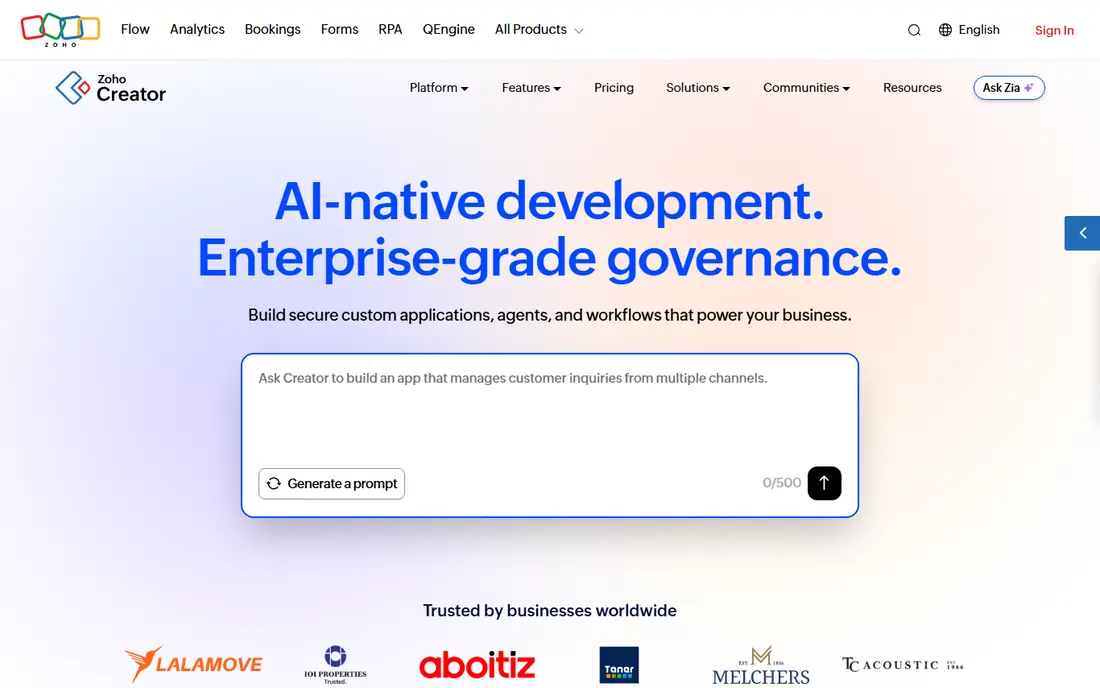
Zoho Creator suits a business whose database is really a process: a job that needs approval, a leave request that needs a manager sign-off, or an order that moves through stages. Its low-code builder handles forms, workflows and approval logic without a developer, and it links to the wider Zoho suite for CRM, books and mail. That process depth is its edge over a simple grid tool.
The interface takes longer to learn than Airtable, and the free edition is limited to one custom app, so it is a trial rather than a long-term free plan. Paid plans start at $12 per user per month in recent comparisons. For a process-heavy small business already using Zoho, Creator is a natural fit.
- Workflow and approval logic
- Low-code app building
- Broad Zoho ecosystem links
- Interface takes learning
- Free edition covers only one custom app
- Advanced features need higher tiers

Knack wins when the database audience is your customers, not just your staff. It builds portals where clients can log in, see their own orders or cases, submit forms and update details, without charging for every outside user in the way per-seat tools do. Plans start at $59 a month in recent comparisons, which can be cheaper than per-seat pricing once many clients need access.
Design control is narrower than a custom app builder, and the record pool that portal users sit in needs watching as an app grows. For a business that needs a client portal first and a database second, Knack is the most cost-predictable option on this list.
- No per-user pricing
- Auto-generated portals
- Forms and roles for outside users
- Design flexibility is narrower than Airtable interfaces
- Record pool needs watching on larger apps
Ninox suits teams that work away from a desk: field staff, market traders and small workshops that need a database on a phone or tablet with patchy signal. Its offline mobile support, Mac app and web version cover most working patterns, and templates for CRM, stock and invoicing give a fast start. The Starter plan costs $12 per licence per month billed annually.
The ecosystem is smaller than Airtable or Zoho, so teams that need dozens of native integrations may need workarounds. Per-licence pricing also adds up as a team grows. For a mobile-first small business that values offline access, Ninox is a strong specialist pick.
- Works offline on mobile
- Mac, web and mobile apps
- Templates for common business uses
- Smaller integration ecosystem
- Per-licence pricing adds up for larger teams
Caspio is for a small business that has already decided to pay for a serious database app. Paid plans start at $300 a month for the Team plan, with unlimited users, which changes the maths for a business with many staff or clients who need access. Security, compliance and scalability features suit firms handling sensitive or high-volume data.
There is no free plan, only a trial, and the learning curve is steeper than Airtable or Stackby. A five-person team with a simple customer list should not start here. A business building a customer-facing database app that must scale and stay secure will find Caspio worth the price.
- Unlimited users on paid plans
- Strong security and compliance features
- Scalable database apps
- High starting price
- No free plan
- Steeper learning curve than grid tools
Tadabase builds relational database apps with client portals, roles and per-record rules that control who sees which rows. That matters when clients, staff and managers all use the same system but should see different data. Forms write straight into tables, and portals give outside users a clean view without a spreadsheet export.
The community and template library are smaller than Airtable, and polished design takes more manual work. Plans start at $50 a month in recent comparisons. For a business that needs a portal with proper record-level permissions at a moderate price, Tadabase is a strong alternative to Knack.
- Relational apps with portals
- Roles and per-record rules
- Forms that write straight to tables
- Smaller community than Airtable
- Design polish needs more manual work
Stackby suits teams that think in spreadsheets but need live data in columns. API-connected columns can pull data from other tools into the grid, which helps marketing, sales and operations teams that track campaigns, leads and content in one place. Templates give a fast start, and the free plan lets a small team try the core grid.
The ecosystem is smaller than Airtable, and advanced automation sits on higher tiers. Plans start at $10 per user per month in recent comparisons. For a spreadsheet-loving team that wants API data without a developer, Stackby is a good low-cost option.
- Spreadsheet-style grid
- API-connected columns
- Templates for marketing, sales and operations
- Smaller ecosystem than Airtable
- Advanced automation needs higher tiers
Softr is not a database itself, but it earns a place here because many small businesses use it as the front end for their database. It turns Airtable or Google Sheets data into polished client portals, internal tools and membership sites without code. That polish matters when clients judge your business by the portal they log into.
The catch is the stack: you still pay for the underlying data source, plus Softr from $59 a month, so total cost is higher than a single tool. For a business that already runs on Airtable and needs a client-facing portal that looks professional, Softr is the fastest route to it.
- Polished client portals and internal tools
- Builds on Airtable or Google Sheets data
- No code needed
- Needs a data source such as Airtable
- Portal pricing rises with users and features
Baserow suits teams that want control over their data and the option to self-host. Its open source version can run on your own server, which appeals to firms with data residency or lock-in concerns, and the cloud version offers a familiar spreadsheet-style database with linked tables. A free tier lets a small team start without a card.
Paid pricing has varied across listings, so we list it as See website and recommend checking the current plan page for your team size. The template and integration library is smaller than Airtable. For a team that values open source control over the largest ecosystem, Baserow is the principled pick.
- Open source and self-hostable
- Spreadsheet-style interface
- European hosting options
- Smaller template and integration library
- Paid pricing has changed across listings
How we picked these
We compared official pricing pages, record and user limits, portal and permission features, offline support and ease of use for non-technical teams. We kept only tools that are live in October 2026 and that a small business can run without a developer, apart from Caspio and Baserow self-hosting, which we flag clearly. Prices are starting figures from vendor pages or recent vendor-checked comparisons, and plans change, so confirm limits before importing your data.
What to check before you buy
Start by mapping your tables and links on paper: customers, orders, jobs and stock, and how they connect. A tool that cannot link those tables cleanly will force copied data and errors, no matter how pretty its grid looks. Then test permissions with a real outside user: can a client see only their own rows, and can staff edit without seeing payroll or pricing data they should not see.
Next, price the limits that bite. Record caps, attachment storage, API calls and portal guest fees often decide the real bill, and a free plan that caps at 1,000 records will block a growing business fast. Finally, test import and export with your real spreadsheet. Import one tab, rebuild one link, and export the result, so you know you can leave if the tool stops fitting.
Frequently asked questions
What is the best database software for small business owners leaving spreadsheets?
Airtable is our first suggestion because its grid feels familiar while linked records, views and interfaces fix the copied-data problem of spreadsheets. Stackby is a cheaper spreadsheet-style alternative, and Knack is better if customers need portal access.
What is the best customer database software for small business?
For a customer database with a client portal, Knack and Tadabase lead because they handle outside users and per-record permissions without per-seat pricing for every client. For an internal customer list, Airtable or Zoho Creator may be simpler and cheaper.
Do I need a developer to set up database software?
No, for the tools here apart from self-hosted Baserow. Airtable, Knack, Zoho Creator and Ninox are built for non-technical users, with templates and drag-and-drop builders. A developer helps only for complex workflows, custom integrations or a self-hosted setup.
How much does small business database software cost?
Entry prices here run from free plans to $300 a month for Caspio, with most small-team options between $10 and $59 a month or per user. Per-seat tools cost more as you hire, while flat-rate portal tools cost more upfront but stay steadier as clients join.
Can I import my Excel data into these tools?
Yes, most tools here import CSV files, which Excel can export. Expect to rebuild links between tables after import, since a spreadsheet tab does not carry relational links with it. Test the import with one tab during the trial before moving your full history.
Sources
See where you really rank - block by block
ProMapRanker scans Google Maps across a grid of your service area. Simple monthly plans from $19, white-label on every plan.
Start freeKeep reading
 zscaler alternatives
Best Zscaler Alternatives in 2026
Looking for zscaler alternatives? We compare 9 SASE and zero trust platforms on architecture, data protection, pricing, and fit for your network and team.
Read → zapier alternatives free
Best Zapier Alternatives Free in 2026
Nine automation tools for zapier alternatives free in 2026, all with genuinely free tiers, plus free plan limits, starting prices and upgrade paths explained.
Read → which platform is best for online reputation
Which Platform Is Best for Online Reputation in 2026
Wondering which platform is best for online reputation? We compare 8 review, listing, and response tools for small and multi-location businesses and agencies.
Read →