 ProMapRanker
Best Construction Management Companies in 2026

Key takeaways
- Procore and Autodesk suit large commercial work, while Buildertrend, JobTread and Houzz Pro suit residential builders and remodelers.
- Fieldwire is the most field friendly low cost entry, with a free basic plan for small crews and plans for drawings and punch lists.
- Contractor Foreman offers broad features at a low published starting price, which makes it worth a close look for budget conscious firms.
- Price alone misleads, since Procore and Autodesk quote by project volume and scope, while residential tools often charge a flat monthly rate.
Quick comparison
| Pick | Great for | Pricing starts at | Free tier | |
|---|---|---|---|---|
 Procore | Large commercial projects | See website | No | Visit |
 Autodesk Construction Cloud | Design build firms using Autodesk tools | See website | No | Visit |
 Buildertrend | Residential builders wanting an all in one tool | See website | No | Visit |
 Fieldwire | Field teams needing drawings and tasks | See website | Yes | Visit |
 Contractor Foreman | Budget conscious contractors wanting broad features | $49 per month | Free trial | Visit |
 JobTread | Builders tying estimates to job costs | See website | No | Visit |
 Houzz Pro | Remodelers wanting leads plus management | $99 per month | Free trial | Visit |
 Sage Construction | Accounting led construction firms | See website | No | Visit |
The best construction management companies
We compared official product pages, pricing pages and public feature descriptions for construction management software companies that are live in October 2026, and we weighed project control, field usability, cost tracking and client communication.

Procore is the standard shortlist pick for large general contractors because it brings office and field work into one system. Drawings stay current, RFIs and submittals move through approvals, and budgets, change orders and daily logs connect to the same project record. Subcontractors can access what they need without a separate tool for each trade.
Cost is the honest barrier. Procore quotes by annual construction volume rather than a simple per user price, so smaller firms may find it hard to justify. Companies running large commercial projects with many parties usually get the most value, while a small residential builder may find a simpler tool faster and cheaper.
- Drawings, RFIs, submittals, budgets and daily logs in one place
- Unlimited users on many plans
- Large integration marketplace
- Pricing is quote based and can be high for smaller firms
- Implementation takes planning
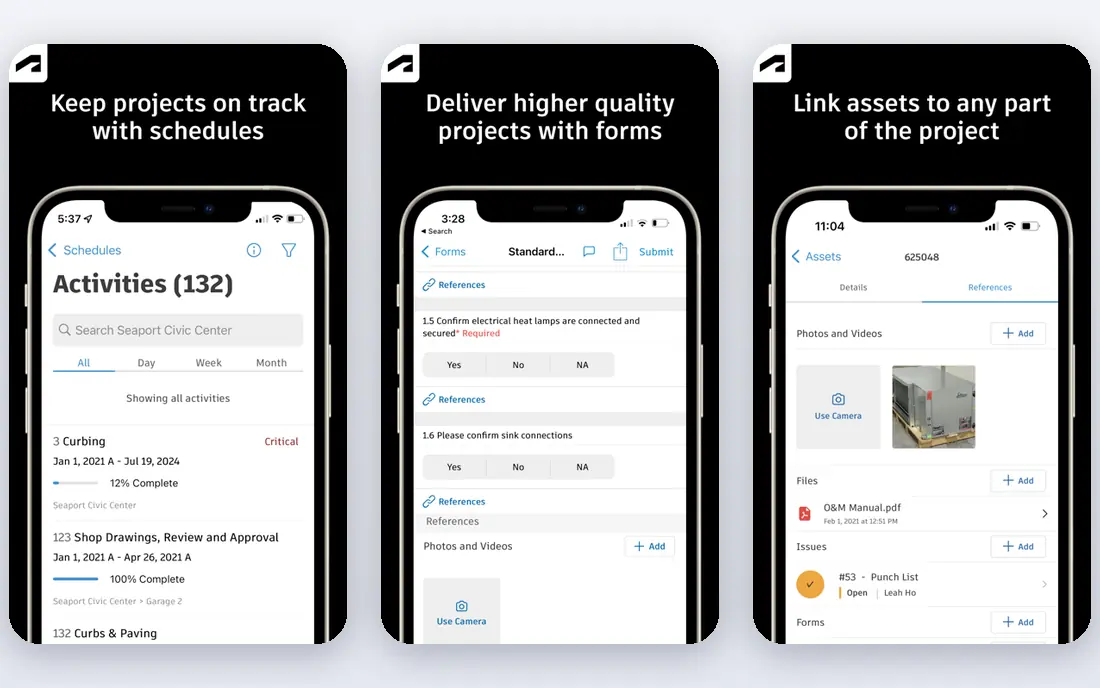
Autodesk Construction Cloud, now closely tied to Autodesk Forma, suits design build teams that already work in Revit or AutoCAD. Models, drawings and project documents stay linked, so design changes flow into field workflows with fewer version errors. Cost management, scheduling and safety tools sit alongside document control, which helps larger teams keep one record.
That power brings complexity. Firms without BIM experience may find setup and training heavy, and pricing is quote based by product and user count. For design led firms that already use Autodesk tools, the connected workflow is a strong reason to choose it. For field only teams, a lighter tool may be enough.
- Strong BIM and document control
- Links to Revit and AutoCAD
- Cost, schedule and field tools in one suite
- Pricing is quote based
- Complex for firms without BIM workflows
Buildertrend dominates residential building for a practical reason, which is its client portal. Homeowners can check schedules, approve selections, view invoices and message the builder in one place, which cuts phone calls and confusion. Behind that portal, builders get scheduling, estimating, daily logs, financial tools and a lead CRM.
Pricing has varied across third party listings, so treat any single number with care and ask Buildertrend for a current quote. Buildertrend is also built for homes and remodels, not for large commercial projects with complex BIM needs. For residential firms that want one system for clients and crews, it remains a top pick.
- Client portal for schedules, selections and payments
- Scheduling, estimating and job costing
- Unlimited users on many plans
- Published prices vary by source, so confirm a quote
- Less suited to heavy commercial work
Fieldwire, now part of Hilti, is the field first choice on this list. Crews can open current drawings on a phone or tablet, create tasks and punch items, attach photos and track progress without returning to the office. A free basic plan covers small teams and a limited number of projects, which makes it easy to trial on a live job.
The limit is back office depth. Fieldwire does not replace full job costing, estimating or accounting software, so larger firms often pair it with another system. For teams whose main problem is getting the right drawings and tasks to site, that focus is a strength, not a flaw.
- Free basic plan for small teams
- Strong mobile drawings, tasks and punch lists
- Easy for field crews to learn
- Limited job costing compared with full project platforms
- Paid tiers are per user
Contractor Foreman
Great for: Budget conscious contractors wanting broad features
Contractor Foreman packs an unusually wide set of tools into a low published starting price of $49 per month. Contractors get project scheduling, estimates, invoices, client management, daily logs and time cards in one place, which can replace several separate subscriptions. That breadth makes it attractive to small and mid sized firms watching costs.
The trade off is polish and depth in some areas. Some users find the interface crowded, and advanced commercial features may not match Procore or Autodesk. For a contractor that wants solid coverage at a low monthly cost, and is willing to spend time learning the system, Contractor Foreman offers strong value.
- Broad feature set for the price
- Scheduling, estimates, invoices and time tracking
- Published low starting price
- Interface feels busy to some users
- Support and setup help vary by plan
JobTread appeals to builders who lose money when estimates, change orders and actual costs drift apart. Estimates turn into budgets, purchase orders and job cost reports, so a project manager can see margin pressure early. Scheduling, selections and client messaging sit in the same system, which helps custom builders and remodelers keep clients informed.
JobTread is not a full commercial ERP, and pricing varies by seats and features, so get a current quote for your team size. For residential and light commercial builders that care most about job profitability, its estimate to cost workflow is a clear advantage over a general task tool.
- Estimates flow into budgets and job costs
- Scheduling and client communication
- Suits custom builders and remodelers
- Pricing depends on users and plan
- Smaller feature set than the largest platforms
Houzz Pro combines lead generation with project management, which suits remodelers and design build firms that need both work and workflow. A Houzz profile can bring homeowner enquiries, while the software handles estimates, invoices, schedules and client messages. The Essential plan is listed from $99 per month in recent comparisons, with a free trial on paid plans.
Lead quality is the caveat. Houzz leads vary by location and trade, so a firm should not buy Houzz Pro for leads alone without checking local demand. As a combined tool for remodelers that already value Houzz visibility, it offers a useful mix of marketing and management in one subscription.
- Lead generation from Houzz plus project tools
- Estimates, invoicing and client communication
- 3D floor planner on some plans
- Lead quality varies by market
- Management depth is lighter than specialist builders tools
Sage Construction, including Sage 300 Construction and Real Estate and related suites, suits firms where accounting accuracy drives project decisions. Job costing, payroll, billing and financial reporting are built for construction workflows, including retainage, change orders and subcontractor management. That depth helps firms that need clean audit trails and tight margin control.
Small field teams may find Sage heavy to set up and learn, and pricing is quote based. Sage makes most sense when finance, estimating and project teams need one trusted cost record. Pair it with a field tool such as Fieldwire if site crews need a simpler mobile experience.
- Strong construction accounting and job costing
- Payroll and reporting depth
- Suits firms where finance leads projects
- Pricing is quote based
- Interface and setup feel enterprise heavy for small crews
How we picked these
We compared official product pages, pricing pages and public feature lists for construction management software that is live in October 2026. We excluded PlanGrid as a standalone buy, since Autodesk no longer sells it separately, and we favoured tools with current pricing or clear quote models, real field usability and a defined audience, whether commercial, residential or accounting led.
How to choose construction management software
Start with your project type and your biggest pain point. A commercial general contractor needs RFIs, submittals and budget control across many subcontractors, while a residential builder needs client communication, selections and schedule clarity. A field crew needs fast mobile drawings, while an accounting led firm needs job costing it can trust at month end.
Next, run a pilot on one live project with office staff, field staff and, where relevant, a client. Check drawing updates, change order flow, invoice accuracy and mobile performance in poor signal areas. Confirm pricing for your user count, data migration from current tools and export options if you leave. A tool that office staff love but field crews avoid will fail, no matter how strong its feature list looks.
Frequently asked questions
What is construction management software?
It is software that helps builders plan, run and track construction projects, including drawings, schedules, budgets, change orders, daily logs and client communication. Some tools focus on field work, others on accounting, and full platforms such as Procore cover both. The right choice depends on project type and team size.
How much does construction management software cost?
Costs range from a free basic plan at Fieldwire to quote based enterprise pricing at Procore and Autodesk. Published examples include Contractor Foreman from $49 per month and Houzz Pro from $99 per month, while Buildertrend and JobTread require a current quote. Always confirm whether pricing is per user, per project or flat rate.
Is Procore worth it for small builders?
Usually not, unless project volume and complexity justify quote based pricing. Small residential builders often get better value from Buildertrend, JobTread, Houzz Pro or Contractor Foreman. Procore earns its cost on larger commercial projects with many subcontractors and strict document control needs.
Can field crews use these tools without office training?
Field tools such as Fieldwire are built for quick mobile use, but every system needs some onboarding. Choose a tool with a simple mobile app, offline friendly drawings where offered and clear task workflows. A short pilot with real crew members will show adoption problems faster than a sales demo.
Do these tools replace accounting software?
Not always. Full platforms include job costing and invoicing, but many firms still use QuickBooks, Xero or Sage for final accounting. Check integrations before buying, and decide which system owns invoices, payroll and tax records so data does not split across tools.
Sources
See where you really rank - block by block
ProMapRanker scans Google Maps across a grid of your service area. Simple monthly plans from $19, white-label on every plan.
Start freeKeep reading
 worlds best local seo company
8 Worlds Best Local SEO Companies for Map Pack Growth in 2026
Compare the worlds best local seo company options for Google Business Profile work, citations, reviews, and multi-location rankings and reporting in 2026.
Read → world's best web hosting company
World's Best Web Hosting Company in 2026
Searching for the world's best web hosting company? We compared 10 hosts on price, renewal rates, speed, and support to help you choose well today in 2026.
Read → who's got the best nanny tax services
Who's Got the Best Nanny Tax Services in 2026
We answer who's got the best nanny tax services, comparing full filing, back taxes, software, and pricing so families can handle nanny taxes correctly.
Read →