 ProMapRanker
Best Coin Scanner App in 2026

Key takeaways
- CoinSnap is the easiest starting point for beginners, while Coinoscope is the strongest free choice for world coins.
- CoinKnow and CoinHix suit US collectors who want more detail on grading and errors.
- App values are estimates only, and they vary by condition and market, so confirm any valuable coin with a price guide or dealer.
- Never clean a coin that might be valuable, since cleaning can reduce its collector value sharply.
Quick comparison
| Pick | Great for | Pricing starts at | Free tier | |
|---|---|---|---|---|
 CoinSnap | Beginner photo identification | Free | Yes | Visit |
 Coinoscope | Free world coin identification | Free | Yes | Visit |
 CoinIn | Fast scanning in sequence | Free | Yes | Visit |
 Coin ID | Guided photo identification | Free | Yes | Visit |
 CoinKnow | US grading and error detail | Free | Yes | Visit |
 CoinHix | Market tracking for US coins | Free | Yes | Visit |
 PCGS CoinFacts | Checking US coin prices by grade | Free | Yes | Visit |
 Coin Scanner | Coins, banknotes, and medals | Free | Yes | Visit |
 Numista | Catalog research and collections | Free | Yes | Visit |
The best coin scanner app
This guide covers physical coin identification apps: tools that identify a real coin from a photo of its front and back. It is not crypto price or trading advice, and none of these apps replaces a professional grader. Use them to identify a coin, organize a collection, and get a first estimate, then confirm value before you buy or sell.
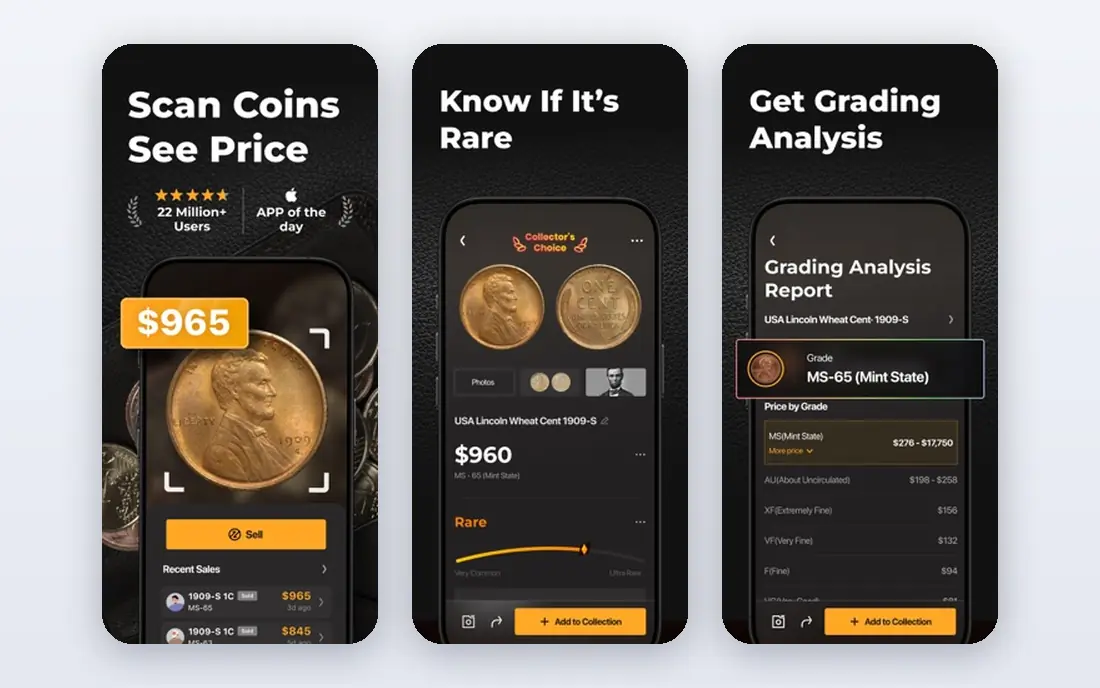
CoinSnap is the app we would hand to a beginner first. You photograph the front and back of a coin, and the app returns a match with country, year, and an estimated value range, plus a place to save the coin in a collection. That simple flow matters when you are sorting a jar of coins and do not yet know the names, dates, or terms to search for.
The free tier is the limit to watch. Store listings show in-app purchases from $3.99 to $39.99, with an annual Premium plan and a 7-day trial in the US App Store, and recent reviews note that free scans run out faster than some users expect. Start with a few coins, check that the matches look right, and cancel a trial at least a day before it renews if you do not want it. Treat every value as an estimate, not a sale price.
- Fast photo workflow
- Large catalog for US and world coins
- Built-in collection area
- Free scans are limited
- Premium pricing varies by store and plan
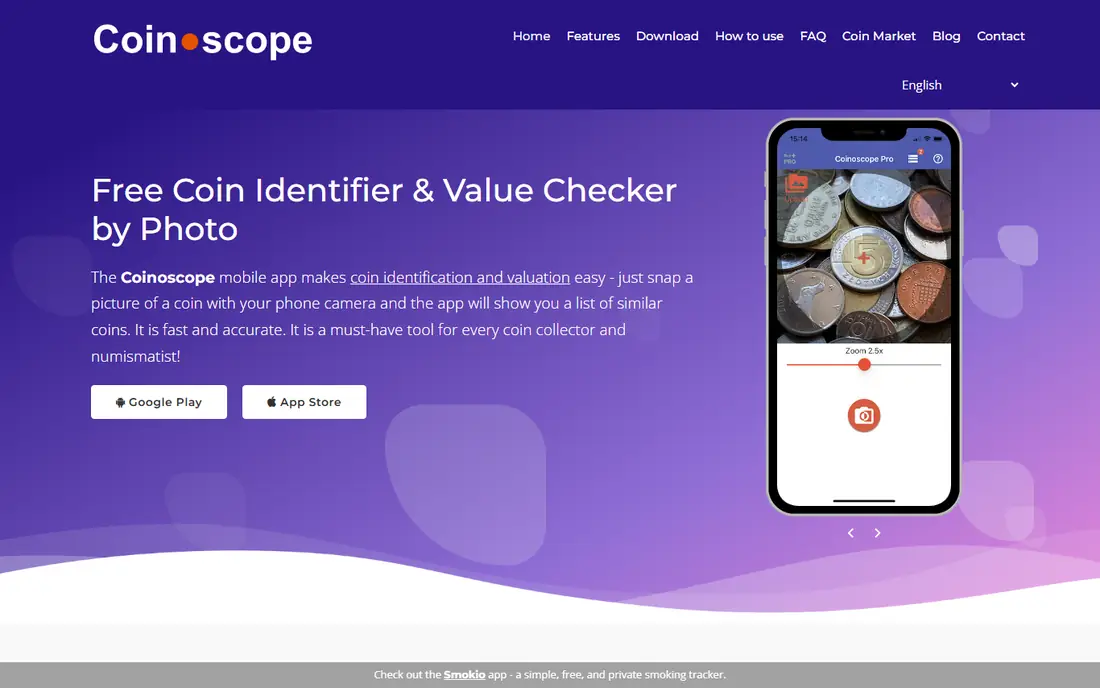
Coinoscope takes a research-minded approach. Instead of only giving one answer, it shows visually similar coins from its database, which helps when you have a foreign coin with unfamiliar script or a worn design. That visual step is slower than CoinSnap, but it is useful for world coins, where a single automatic answer can be wrong and a human check matters.
The app is free to use for identification, with extra features such as value estimates and advanced image analysis free within daily limits, and an optional Pro version that removes ads and limits. For a collector with international coins, Coinoscope is the best free starting point, and it pairs well with a catalog such as Numista for confirmation.
- Free identification for world coins
- Visual matching for research
- Optional Pro removes limits
- Results need more checking than a simple answer app
- Value features have daily limits on free use
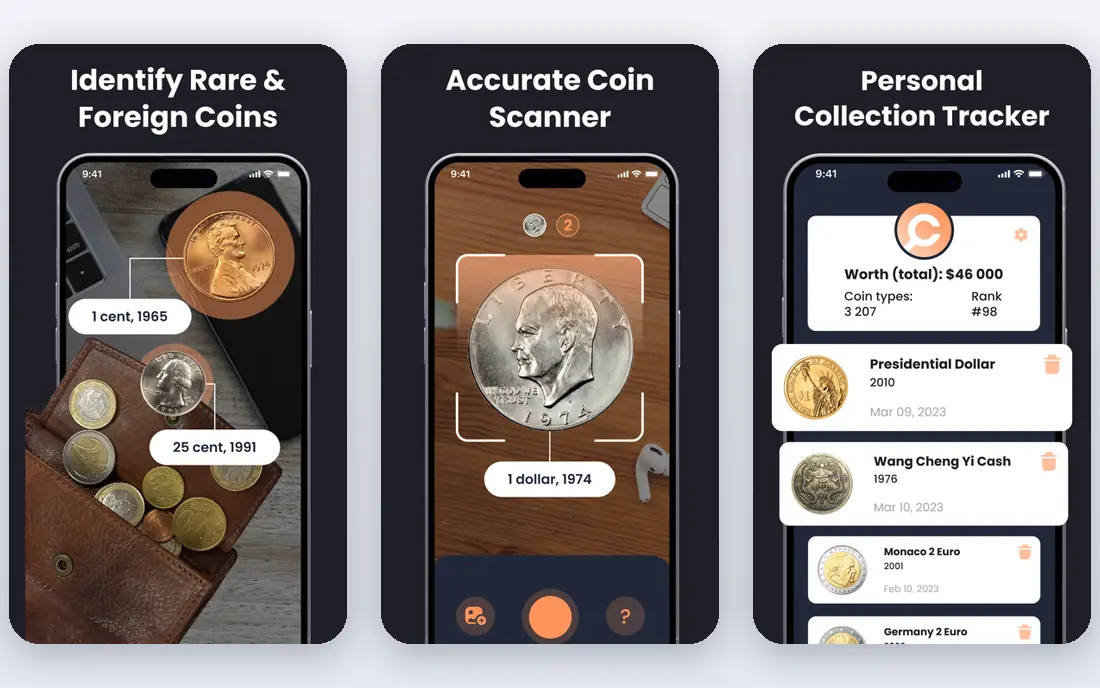
CoinIn suits readers who want to work through a pile of coins without stopping to read a long guide after each scan. The app is built around scanning coins in sequence and building a collection as you go, which helps when you inherit a box of coins or buy a mixed lot at a market. It is available on both iOS and Android, and it is free to download with in-app purchases.
As with every app here, the value shown after a scan is an estimate for the coin type, not a grade for your specific coin. A worn coin, a cleaned coin, and a mint-state coin can have very different values even when they share a date and design. Use CoinIn for identification and sorting, then check price guides for anything that looks promising.
- Quick scan flow for many coins
- IOS and Android support
- Collection tracking
- Paid plans vary by store
- Value estimates still need independent checking
Coin ID, listed in stores as Coin ID Scanner and related names, follows a clear two-photo workflow: photograph the front, photograph the back, and review the match. That guidance helps beginners, since a single blurry photo is the most common reason for a wrong match. The app also offers ready-made collection views, which make it easy to see what you have already identified.
Accuracy is still the honest limit. Modern, well-lit coins identify well, while ancient, heavily worn, or rare foreign coins can return a close match rather than the right one. Photograph the coin outside any plastic holder when you can, use even light, and compare the match details, such as date, mint mark, and design, before you save it.
- Guides you to photograph both sides
- Ready-made collection views
- Broad coin coverage
- Free tier limits
- Accuracy drops on worn or unusual coins
CoinKnow is the more serious US collector app on this list. It aims to do more than name a coin: it gives grading context, flags possible errors, and adds market pricing detail that helps a collector decide whether a coin deserves a closer look. For US coins, that depth is a real advantage over a general scanner that only returns a name and a rough value.
The trade-off is scope. World coin collectors will find Coinoscope or Numista more useful for international material, and CoinKnow still cannot grade a coin from a phone photo with the certainty of a professional service. Use it to shortlist interesting US coins, then confirm grading and value through PCGS or NGC guides or a local dealer.
- Detailed US coin focus
- Grading and error detection features
- Market pricing context
- Less broad for world coins
- Paid features vary by plan
CoinHix, formerly known as CoinValueChecker, suits collectors who track what their coins do over time. Alongside identification, it offers price trend charts, auction tracking alerts, and portfolio views, which help a collector follow a specific series rather than checking one coin at a time. It also includes automatic error detection, which is rare in this category.
Casual users may find the analytics more than they need, and the same value warning applies: trends and estimates do not set the price a dealer will pay for your coin in its actual condition. For a collector building a US set and watching the market, CoinHix is a strong second app after a simple scanner.
- Automatic error detection
- Price trend and auction tracking
- Portfolio views
- Analytics suit committed collectors more than casual users
- Values remain estimates
PCGS CoinFacts is not a photo scanner, and that is why it belongs here. Once another app identifies your US coin, CoinFacts lets you check the PCGS price guide by grade, see auction prices, and compare reference photos to judge wear. That step turns a rough app estimate into a more grounded range, and it is free with no in-app purchases listed in the stores.
The limits are clear. You need to know which coin you have, or scan a barcode on a coin already sealed by PCGS or NGC, and the app covers US coins only. Use it as the confirmation step after CoinSnap, CoinKnow, or CoinHix, not as the first scan tool.
- Price guide by grade
- Auction prices
- Reference photos for comparison
- Does not identify from a photo
- US coins only
- IOS version updates have been infrequent
Coin Scanner, listed under several similar names in the stores, broadens the job beyond coins to banknotes and medals, with a collection area to register what you find. That range helps readers who collect paper money and medals alongside coins, and who want one app for a mixed collection rather than three separate tools.
Store listings show in-app purchases in a wide range, with unlimited-reading subscriptions listed from $7.99 to $59.99 in some summaries, so check the price on your own store page before you subscribe. As with other scanners, photograph both sides, check the match details, and treat values as estimates that vary by condition and market.
- Covers coins plus banknotes and medals
- Collection registration
- Simple scan flow
- Store pricing varies widely
- Accuracy needs checking on older items
Numista is the catalog every coin scanner should be checked against. It is a large, community-maintained catalog of world coins, with detailed entries for dates, mint marks, metals, and designs, plus collection and swap tools for collectors. When a scanner gives you a possible match, Numista lets you confirm the details and see related issues from the same series.
It is not a photo scanner, so it will not name a coin from a picture on its own. That slower, manual step is the point: for a coin that might be valuable, a catalog check plus a price guide is far more reliable than a single app estimate. Keep Numista in your routine for confirmation, especially for world and older coins.
- Large catalog of world coins
- Collection and swap features
- Detailed catalog entries
- Not a photo scanner
- Research takes more time than an automatic match
How we picked these
We compared official app pages, publisher sites, and app store listings, and we favored apps that are live and working in October 2026 for physical coin identification. We kept a mix of simple scanners, US-focused tools, a price-guide reference, and a catalog, because identification, valuation, and confirmation are three different jobs. We did not claim hands-on testing that did not happen, and we based the notes on published features, store pricing, and coverage.
We also kept the value warning front and center. Every scanner estimate assumes a coin type and a typical condition, while the real value depends on grade, variety, eye appeal, and current market demand. That gap is why the guide pairs scanners with PCGS CoinFacts and Numista, rather than presenting any app value as a final price.
How to scan a coin well, and what to do next
Start with light and a plain background. Place the coin flat, photograph the front in even light without flash glare, then do the same for the back. Avoid photographing through plastic when you can, since glare and reflections cause wrong matches. If the first result looks wrong, retake both photos rather than accepting a close match.
Next, check the details, not only the name. Compare the date, mint mark, portrait, and reverse design with the catalog entry, and note any damage, cleaning, or wear. A coin that looks like a match but has a different mint mark can be a different issue with a different value, and a worn date can mislead a scanner.
Then confirm value in two places. Check a price guide by grade, such as PCGS CoinFacts for US coins, and look at recent sold listings for the same coin in similar condition. If the coin looks rare or valuable, visit a local dealer or coin club for a free opinion before you sell, and consider professional grading through PCGS or NGC for a coin that could justify the cost.
Finally, handle coins with care. Hold them by the edges, store them in proper holders, and never clean a coin that might be valuable. Cleaning strips the original surface and can cut collector value sharply. An untouched coin in honest condition is almost always worth more than a cleaned one.
Frequently asked questions
What is the best coin app for identifying coins by photo?
CoinSnap is the easiest photo identification app for beginners, with a fast two-photo flow and a collection area. Coinoscope is the strongest free choice for world coins, since its visual matching helps with unfamiliar designs. For US coins with more grading detail, CoinKnow is the deeper pick.
What is the best coin scanner app for free?
Coinoscope and Numista are the strongest free combination: Coinoscope for free visual identification, and Numista for free catalog confirmation. CoinSnap, CoinIn, and Coin ID are also free to download, but their free scans are limited and their full features need a subscription. Check the store page for your region before you rely on a free tier.
Are coin scanner app values accurate?
Values are estimates, and they vary by condition and market. A scanner can identify a coin type fairly well, especially a modern US coin, but it cannot grade your specific coin from a photo with professional certainty. Confirm any promising coin against a price guide by grade and recent sold listings, and get a dealer opinion before you sell.
Can a coin app grade my coin?
No app can replace professional grading. Apps can give grading context and flag possible errors, but grade depends on fine surface details, luster, and contact marks that a phone photo cannot capture reliably. For a coin that could be valuable, professional grading through PCGS or NGC is the reliable route.
Should I clean an old coin before scanning it?
No, do not clean a coin that might be valuable. Cleaning can damage the surface and reduce collector value sharply. Scan the coin as it is, handle it by the edges, and let a dealer or grader assess it if it looks promising. A dirty but original coin is usually worth more than a cleaned one.
What should I do if an app says my coin is worth a lot?
Treat the figure as a starting clue, not a sale price. Confirm the identification in Numista, check the price guide for the actual grade, and look at recent sold listings for coins in similar condition. Visit a local dealer or coin club for an opinion, and do not pay for grading or a subscription until you have that second check.
Sources
See where you really rank - block by block
ProMapRanker scans Google Maps across a grid of your service area. Simple monthly plans from $19, white-label on every plan.
Start freeKeep reading
 zoho inventory alternatives
6 Alternatives to Zoho Inventory, Compared on Price and Fit
Zoho Inventory alternatives: 6 tools compared on price, free plans and fit. Katana leads the list for manufacturers. Fit and flaws are laid out for each entry.
Read → zoho crm alternatives
Best Zoho CRM Alternatives (2026)
Need Zoho CRM alternatives? We compare 7 tools on cost, free access and who each suits. Every pick gets a straight assessment. Built for quick decisions.
Read → zelle alternatives
Best Zelle Alternatives in 2026
Compare the best Zelle alternatives for sending money to friends, paying sellers and moving funds abroad, with honest notes on fees, speed and safety in 2026.
Read →