 ProMapRanker
Best Chore App for Kids in 2026

Key takeaways
- OurHome is our pick for a free start, because it covers chores, points, and rewards without a subscription.
- Homey and S'moresUp suit families who want allowance tracking alongside chores.
- Greenlight and BusyKid suit older children who are ready for a supervised debit card and real spending.
- Parents should check privacy settings, child accounts, and approval controls before a child uses any app.
Quick comparison
| Pick | Great for | Pricing starts at | Free tier | |
|---|---|---|---|---|
 OurHome | Free chores and rewards | Free | Yes | Visit |
 Homey | Chores and allowance | Free | Yes | Visit |
 S'moresUp | Points and family rewards | Free | Yes | Visit |
 ChoreMonster | Younger kids and monsters | Free | Yes | Visit |
 RoosterMoney | Pocket money tracking | Free | Yes | Visit |
 Greenlight | Debit card and chores | $5.99 per month | No | Visit |
 BusyKid | Allowance, saving, and investing | $48 per year | No | Visit |
 GoHenry | Debit card for kids | See website | No | Visit |
 Cozi | Family calendar and lists | Free | Yes | Visit |
The best chore app for kids
A good chore app for kids does more than list tasks. It shows each child what to do, gives a clear reward for finishing, and lets a parent approve work before money or privileges change hands. We compared apps for younger children, for teens, and for families who want allowance tools, and we kept privacy in mind throughout. For any app that handles children's data, parents should read the privacy policy, use a parent-controlled account, and avoid sharing a child's full name, school, or photos beyond what the app needs.
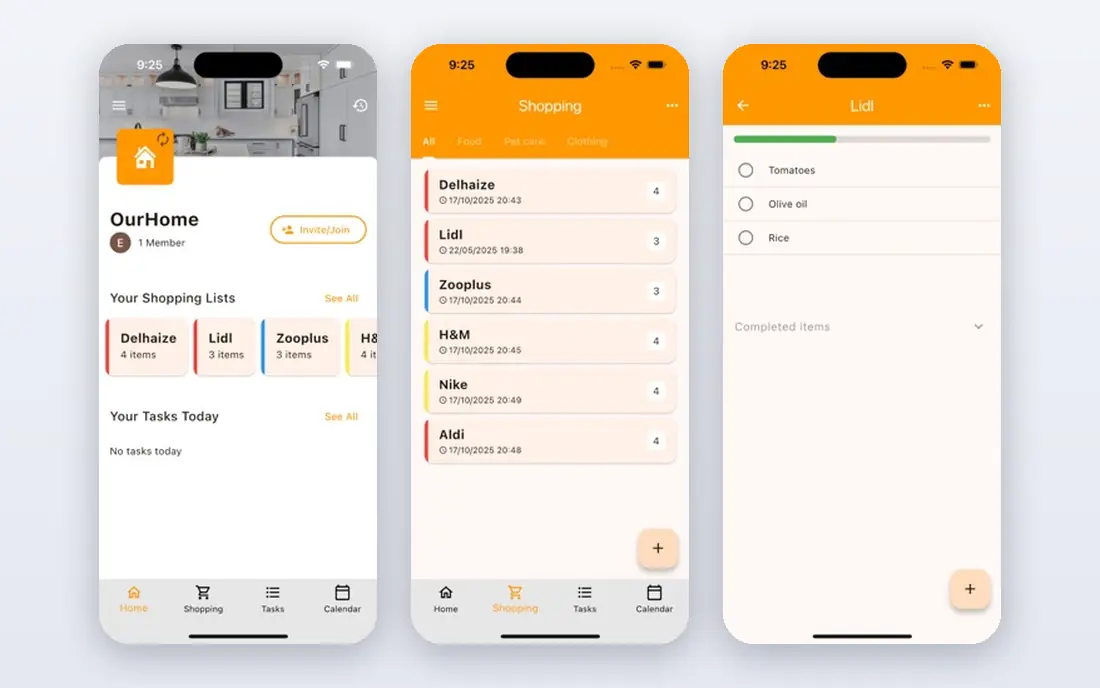
OurHome lets parents assign chores with point values, and children redeem points for rewards that parents set, such as screen time or a family outing. The app also includes a shared grocery list and a family calendar, so chores sit inside the wider household routine. It is free, with no ads in its core description, which makes it an easy first test for a family.
The limit is age range and money. OurHome does not link to a bank or issue a card, so cash allowance must be handled outside the app. Older children may also find the design simple. For a free, low-pressure start, it is still the app we would try first.
- Free with no ads in core use
- Points and a parent-set reward store
- Shared grocery list and calendar
- Design feels dated
- No debit card or bank link
- Best for younger children
Homey separates everyday responsibilities from paid work, which helps families teach the difference between helping at home and earning money. Parents can approve a completed chore before it counts, set savings jars, and track allowance in the app. The basic version is free for up to three family member accounts, and paid plans start at $4.99 per month in recent listings, with $49.99 per year also listed in some summaries.
The paid plan adds unlimited members and bank-linked transfers, but families who pay in cash can use the free tier well. Parents should check which transfer options work in their country before they promise a child a bank payout.
- Free for up to three accounts
- Parent approval for completed chores
- Savings jars and allowance tracking
- Full features need a paid plan
- Bank transfer features are limited by region
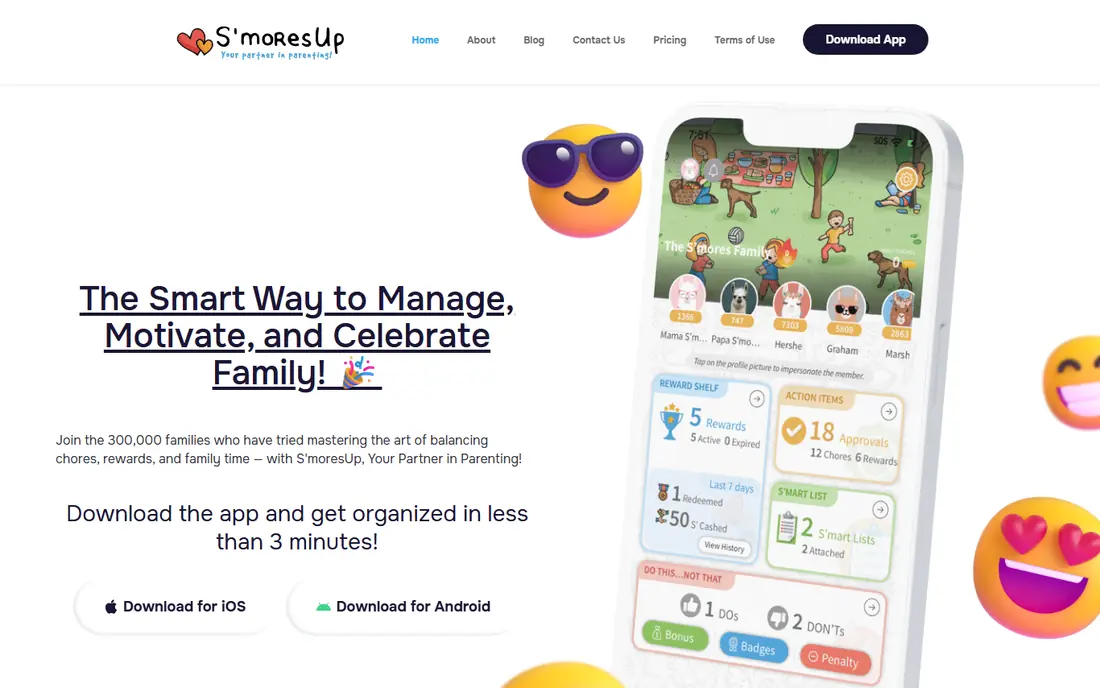
S'moresUp combines chores, points, scheduling, and rewards in one family app. Parents assign tasks, children earn points, and points can convert to rewards the family agrees on. The app also covers family scheduling, which helps when chores need to fit around school and activities. Recent listings show a free plan with a trial, and paid plans from $7.99 per month.
The cost is the main drawback, since paid plans run higher than OurHome or Homey. Families who want one app for chores, rewards, and scheduling may still find the price fair, but families who only need a chore list should start free elsewhere.
- Points that convert to rewards
- Family calendar and scheduling
- Free plan with trial options
- Paid plan is higher than some rivals
- Design and setup take a little learning
ChoreMonster turns chores into a game for younger children, with monster characters that grow as tasks are completed. Parents set tasks and rewards in a dashboard, and children see their own progress in a playful view. The game layer helps with the hardest part of chores, which is getting a young child to start.
Teens will likely outgrow the monster theme, and families who want bank links or investing tools should look at Greenlight or BusyKid instead. For ages where play still motivates, ChoreMonster is a strong, simple choice.
- Monster characters and rewards that appeal to young children
- Parent dashboard
- Simple task flow
- Less suited to teens
- Fewer money tools than allowance apps
RoosterMoney starts as a free pocket money tracker, where children can split allowance into save, spend, and give pots and watch progress toward a goal. Parents control allowance and approve moves, which keeps the system safe for younger children. In some countries, a Rooster Card adds real spending for eligible children, with card plans priced separately.
The free tracker is the main reason to try it first. Families who want a card should check age rules, country availability, and current card pricing on the official site, since those details vary and change.
- Free tracker for pocket money
- Save, spend, and give pots
- Parent-controlled allowance
- Card features depend on country and age
- Full card plans cost extra
Greenlight pairs a debit card for kids with chores, allowance, and parent controls. Parents can automate allowance when chores are marked done, set spending controls, and watch transactions. Plans start at $5.99 per month for up to five children, based on the company's own comparison pages, with higher tiers adding protections and family safety features.
Greenlight suits families whose children are ready for real spending with guardrails. It is less suited to a young child who only needs a sticker-style chart, and it has no free plan. Parents should also note that card availability and features are US-focused, so families outside the United States should check eligibility first.
- Debit cards for up to five kids
- Chore and allowance automation
- Parent controls on spending
- No free plan
- Card and investing features are US-focused
- Monthly cost adds up
BusyKid teaches money habits through chores and allowance, with earnings split across spend, save, and donate buckets. Parents can match savings, set auto-allowance, and approve charity donations. The service costs $48 per year in recent listings, billed annually, and includes prepaid cards for eligible US families.
The annual-only billing and lack of a free plan make BusyKid a commitment. Families who want a full money system, including investing for older children, may find it worth the cost. Families who only need a chore chart should start with a free app instead.
- Spend, save, and donate splits
- Parent matching on savings
- Prepaid card for eligible US families
- Annual billing only in recent listings
- No free plan
- Investing needs a separate account setup
GoHenry gives children a debit card with an app, where parents can automate allowance, set spending rules, and follow spending in real time. Children can set savings goals and see their own balance, which helps turn allowance into a habit rather than a one-time gift. The card also blocks overspending, since a child can only spend what is loaded.
Pricing and availability vary by country, and some plans charge per child, so parents should check the official GoHenry site for their region before they sign up. GoHenry fits families ready for supervised real spending, not families who only need a free chore list.
- Debit card with parent controls
- Automated allowance
- Savings goals and spending alerts
- Monthly fee per child in many plans
- Availability and pricing vary by country
Cozi is a family organizer first, with a shared calendar, shopping lists, and to-do lists that the whole household can see. Parents can add chores as list items, which works well when the main problem is coordination rather than motivation. The free plan covers core lists and calendar use, with paid Gold plans for an ad-free experience.
Cozi does not offer points, rewards, allowance, or a card, so children who need motivation may not engage with it alone. It works best paired with a reward system, or for older children who already follow a routine without game rewards.
- Shared family calendar and lists
- Free plan
- Simple for the whole household
- Chores are a list feature, not a reward system
- No allowance or card tools
How we picked these
We compared official app pages, pricing pages, and recent plan summaries, and we favored apps that are still available and that cover chores as a core job. We included free chore apps, allowance apps, and card apps, so families can match the app to a child's age and to how much money handling they want. We did not claim hands-on testing. For children's apps, we also weighed parent approval controls and the need to limit personal data shared by a child.
How to choose a chore app for your family
Start with age and reward type. Young children respond to points, characters, and simple rewards. Older children respond to real allowance, savings goals, and clear rules. Teens ready for spending need parent controls and a card with limits, not just a chart.
Keep privacy and approval in the loop
Use a parent account to set up the app, approve completed chores before rewards or money move, and turn off photo sharing or public profiles when the app allows it. Read the privacy policy for how long children's data is kept and how it can be deleted. A chore app should help a household, not collect more about a child than the job needs.
Frequently asked questions
What is the best kids chore app?
OurHome is the best free starting point for most families, because it covers chores, points, and rewards at no cost. Families who want allowance tools should look at Homey or RoosterMoney, and families ready for a card should compare Greenlight, BusyKid, and GoHenry.
What are the best chore apps for kids with rewards?
OurHome, Homey, S'moresUp, and ChoreMonster all use points or rewards, with parents setting what a reward means. OurHome and ChoreMonster suit younger children, while Homey and S'moresUp add allowance and scheduling for older children.
What is the best chores app for kids that pays allowance?
Homey, RoosterMoney, Greenlight, BusyKid, and GoHenry all link chores to allowance in some form. Homey and RoosterMoney start free as trackers, while Greenlight, BusyKid, and GoHenry add supervised cards for real spending.
What is the best app for kids chores without a card?
OurHome, ChoreMonster, S'moresUp, and Cozi work without a card. OurHome is the strongest free choice for points and rewards, ChoreMonster suits younger children, and Cozi suits families who mainly need a shared calendar and lists.
Are chore apps safe for children?
Chore apps are safer when a parent sets up the account, approves chores and rewards, and limits personal data. Check the privacy policy, avoid public profiles for children, and choose apps with parent dashboards and approval controls. For card apps, check age rules and spending controls before a child receives a card.
How much do chore apps cost?
Free apps such as OurHome cover chores at no cost, Homey and RoosterMoney start free with paid options, and card apps cost more. Greenlight starts at $5.99 per month and BusyKid costs $48 per year in recent listings, while GoHenry pricing varies by country. Check the official site for current pricing before you pay.
Sources
See where you really rank - block by block
ProMapRanker scans Google Maps across a grid of your service area. Simple monthly plans from $19, white-label on every plan.
Start freeKeep reading
 zscaler alternatives
Best Zscaler Alternatives in 2026
Looking for zscaler alternatives? We compare 9 SASE and zero trust platforms on architecture, data protection, pricing, and fit for your network and team.
Read → zapier alternatives free
Best Zapier Alternatives Free in 2026
Nine automation tools for zapier alternatives free in 2026, all with genuinely free tiers, plus free plan limits, starting prices and upgrade paths explained.
Read → which platform is best for online reputation
Which Platform Is Best for Online Reputation in 2026
Wondering which platform is best for online reputation? We compare 8 review, listing, and response tools for small and multi-location businesses and agencies.
Read →