 ProMapRanker
Best Cemetery Software in 2026

Key takeaways
- Plot mapping tied to records is the core feature, so test how a tool links a burial record to a map location before you buy.
- Small cemeteries should favor simple, low-cost tools such as Chronicle or Cemify, while large multi-site operators need PlotBox or Byond depth.
- Most cemetery pricing is quote-based, so budget for mapping setup and data migration alongside the monthly license.
- Public search and online memorial pages matter to families, but check privacy controls before you publish any records online.
Quick comparison
| Pick | Great for | Pricing starts at | Free tier | |
|---|---|---|---|---|
 PlotBox | Mapping plus full operations | See website | No | Visit |
 CemSites | Records plus public search | See website | No | Visit |
 Chronicle | Small and medium cemeteries | $20 per month | Free trial | Visit |
 Byond by OpusXenta | Modern multi-site operations | See website | No | Visit |
 CemeteryPro | Small cemetery records | $100 per month | No | Visit |
 EverArk | Simple plot and memorial records | $12 per user per month | No | Visit |
 Pontem Cemetery Data Manager | Records and mapping basics | $100 per month | No | Visit |
 Cemify | Low-cost mapping and records | $599 per year | Free trial | Visit |
The best cemetery software
Cemetery software manages burial records, plot inventory, deeds, sales, mapping, and public search, often for teams with limited staff. We compared vendor feature pages, directory listings, and public pricing notes, and we focused on tools that are still sold and supported for cemeteries in October 2026.
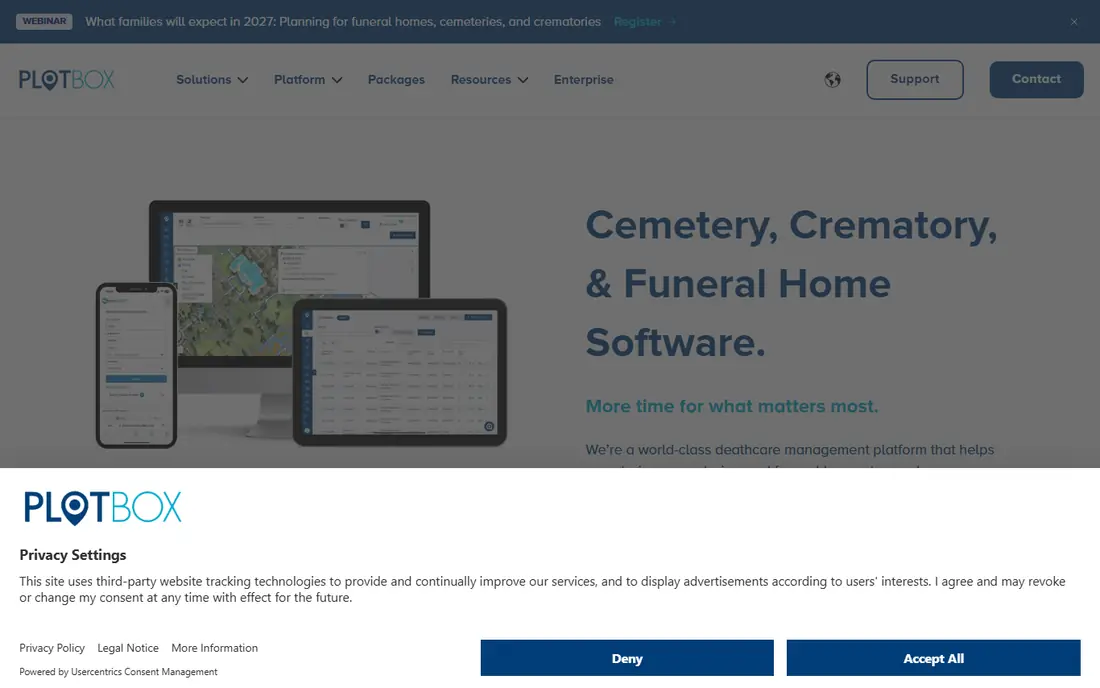
PlotBox is the strongest pick for cemeteries that want mapping and operations in one system. Records, deeds, plots, and contracts link to verified map locations, and bookings, sales, inventory, and reporting sit on top of that map. For a cemetery replacing paper books and loose spreadsheets, that single source of truth reduces double entry and location errors.
The work is in the setup. Mapping a cemetery well takes surveying, data cleaning, and staff training, and PlotBox pricing is quote-based by users and modules. Ask for a quote that includes mapping, migration, and training, not just the license. If your cemetery is large or multi-site, that investment pays back in fewer record disputes.
- Mapping tied tightly to records, deeds, and contracts
- Bookings, sales, and reporting in one system
- Offline-capable field modules for poor connectivity
- Pricing is quote-based, so budgeting needs a sales conversation
- Mapping setup takes real staff time
- Learning curve for teams moving from paper
CemSites suits a cemetery that wants clean records plus a public-facing search for families. Burial, plot, and ownership records sit in one system, mapping tools help visitors locate a gravesite, and memorial pages give families a place to find and remember a loved one without calling the office. That public side cuts routine phone work for small teams.
Pricing transparency is the weak point, since CemSites lists contact-vendor pricing rather than a published starting price. Template limits may also frustrate cemeteries that want highly custom memorial pages. Shortlist it when public search matters, and ask for a written quote and a demo of the memorial pages before you commit.
- Purpose-built cemetery records for burials, plots, and ownership
- Mapping helps visitors find gravesites
- Families can search memorials online
- Pricing is contact-vendor only
- Memorial page templates can feel rigid
- Mobile experience is weaker than the desktop version
Chronicle is a good fit for small and medium cemeteries that need modern software without enterprise pricing. At 20 dollars per month as a starting figure, it covers records, mapping, and community engagement tools, with higher tiers for larger sites and extra services. For a small cemetery with a tight budget, that entry point is unusually accessible.
Extra mapping work costs more. Drone surveys, GIS mapping, and headstone surveys are services on top of the license, so price the full project if your records are paper-based or your map is out of date. Still, for a small cemetery moving off spreadsheets, Chronicle is one of the easiest first steps.
- Low starting price for small cemeteries
- Mapping, records, and community tools in one system
- Free basic tier noted for some cemeteries
- Mapping services such as drone surveys cost extra
- Larger or complex sites may need higher tiers
- Support and onboarding vary by plan
Byond by OpusXenta targets cemeteries, crematoria, and death care providers that want a modern, cloud-based operation. Records management, bookings, services, and task coordination sit in one system, with a user-focused design that aims to ease the move from paper to digital work. For multi-site operators, that shared system helps keep records and sales consistent.
Pricing is modular and quote-based, so small cemeteries should ask if a simpler tier fits before assuming Byond is out of reach. Implementation is project-based, which means data migration and training need planning. Choose Byond when you run several sites or combine cemetery and crematorium work in one operation.
- Modern cloud system for records, bookings, services, and tasks
- Designed for cemeteries, crematoria, and councils
- Real-time business data for managers
- Quote-based modular pricing
- Implementation is project-based
- Smaller cemeteries may find it more system than they need
CemeteryPro, used with CemeteryIndex, suits very small to very large cemeteries that want practical record and sales management. It tracks records, plot sales, and invoicing, with mapping down to the individual grave, and a free link to CemeteryIndex makes records available online to the public. That combination covers the daily work of a small cemetery office.
Pricing includes a setup fee plus a monthly access fee, with one-time license figures that vary by cemetery size, so get the full first-year total in writing. The local install model may also suit teams that prefer desktop software, but it is less flexible than a cloud tool for staff working off-site. For a small cemetery, the simplicity is the selling point.
- Straightforward cemetery management for small teams
- Plot sales and invoicing included
- Public records link through CemeteryIndex
- Local install model suits some teams less than cloud tools
- Setup fee applies
- Mapping depth is lighter than mapping-first tools
EverArk fits a cemetery that mainly needs plot management, mapping, and lasting memorials without a full sales and operations suite. At 12 dollars per user per month, it is one of the lowest-priced options on this list, and a free trial lets a small team test records and mapping with real data. For a cemetery whose main pain is finding and sharing plot information, that focus is enough.
Do not expect deep sales, contract, or accounting tools. EverArk is a records and memorial tool first, so a cemetery with complex pre-need sales or multi-site reporting will outgrow it. Use it when simplicity and low cost matter more than full operations coverage.
- Low per-user price
- Plot, map, and memorial focus for cemeteries
- Free trial lets teams test the workflow
- Smaller feature set than full operations suites
- Sales and accounting depth is limited
- Less suited to large multi-site operations
Pontem Cemetery Data Manager is a long-standing option for cemeteries that want reliable records and mapping without chasing the newest cloud design. It covers cemetery data management, mapping, and reporting, with extra utilities for web pages and books available separately. Many US cemetery offices know Pontem from years of use.
The trade is modern polish. The interface feels older than PlotBox or Chronicle, and extra tools cost more, so the starting price is not the full cost for every team. Shortlist Pontem when stability, US cemetery experience, and straightforward records matter more than a modern cloud interface.
- Long-running cemetery data management for US cemeteries
- Records, mapping, and reporting tools
- Familiar to many cemetery offices
- Pricing starts at 100 dollars per month with no free tier
- Interface feels older than newer cloud tools
- Extra utilities are sold separately
Cemify, from Coyote Creek Digital, gives small and medium cemeteries mapping, records, and public-facing tools at 599 dollars per year as a listed starting figure. That annual price makes budgeting simple for a small cemetery board, and a free trial lets staff test the system before a yearly commitment. For a cemetery that needs a modern public search without enterprise cost, Cemify is worth a look.
Scale is the limit. Larger cemeteries with complex sales, contracts, or multi-site reporting may need a deeper tool such as PlotBox or Byond. Ask Cemify for a written breakdown of what the annual tier includes, including user limits, mapping support, and public search controls, before you sign.
- Low annual price for mapping and records
- Public search and memorial features for families
- Free trial for evaluation
- Feature depth is lighter than enterprise suites
- Support and onboarding details vary
- Larger sites may need a higher tier or a different tool
How we picked these
We compared vendor feature pages, directory listings, and public pricing notes, and we favored tools with current cemetery records, plot mapping, and sales or public search features. Where a vendor did not publish pricing, we used See website rather than repeating a directory estimate as a vendor price. Where a directory figure was the only published starting point, we used it and noted that a vendor quote is still needed.
How to choose for a small cemetery
Start with your records, not the software demo. Count burial records, check if paper books, spreadsheets, or an old system hold them, and ask how each vendor migrates that data. A tool that cannot import your records cleanly will cost staff time for months, whatever its monthly price.
Next, test the map with a real section of your cemetery. Link records to plots, search for a known burial, and check what a visitor sees online. Finally, price the first year fully: license, mapping, migration, training, and any setup fee. A low monthly price with a large mapping bill is not a low-cost project.
Frequently asked questions
What is the best software for cemeteries?
For large or multi-site cemeteries, PlotBox and Byond offer the deepest mapping and operations coverage. For a small cemetery, Chronicle at 20 dollars per month or Cemify at 599 dollars per year are more practical starting points. The best pick depends on cemetery size, record condition, and if public search matters.
What is the best cemetery software for a small cemetery?
A small cemetery usually does best with a simple, low-cost tool that covers records, mapping, and public search without enterprise setup. Chronicle, Cemify, and EverArk all fit that shape, with different prices and feature depths. Test each with your real records before you choose, because migration ease matters more than a long feature list.
How much does cemetery software cost?
Prices vary widely. Low-cost tools start at 12 dollars per user per month or 20 dollars per month, while mid-range tools start at 100 dollars per month, and enterprise tools are quote-based. Mapping, data migration, and training can add a large one-time cost, so ask for a full first-year quote.
Does cemetery software include mapping?
Most modern cemetery tools include mapping, but depth varies. PlotBox and Byond treat mapping as a core feature tied to records, while simpler tools offer basic plot maps. If mapping matters, test how a record links to a map location, and ask if drone or GIS surveys are included or sold separately.
Can families search cemetery records online?
Many tools offer public search and memorial pages, including CemSites, Cemify, and CemeteryPro through CemeteryIndex. Check privacy controls, what fields are public, and if families can request corrections. Do not publish sensitive personal details without a clear policy and consent process.
Should a cemetery keep paper records after going digital?
Yes, keep paper originals and backups even after digitizing. Digital records improve search and sharing, but paper books, deeds, and burial registers remain important legal and historical sources. Store digital backups off-site, and keep a clear process for correcting records when new information arrives.
Sources
See where you really rank - block by block
ProMapRanker scans Google Maps across a grid of your service area. Simple monthly plans from $19, white-label on every plan.
Start freeKeep reading
 zscaler alternatives
Best Zscaler Alternatives in 2026
Looking for zscaler alternatives? We compare 9 SASE and zero trust platforms on architecture, data protection, pricing, and fit for your network and team.
Read → zapier alternatives free
Best Zapier Alternatives Free in 2026
Nine automation tools for zapier alternatives free in 2026, all with genuinely free tiers, plus free plan limits, starting prices and upgrade paths explained.
Read → which platform is best for online reputation
Which Platform Is Best for Online Reputation in 2026
Wondering which platform is best for online reputation? We compare 8 review, listing, and response tools for small and multi-location businesses and agencies.
Read →