 ProMapRanker
Best Business Analytics Tools in 2026


Visual dashboards and exploratory analysis · Pricing starts at: $15 per user per month
Key takeaways
- Tableau leads on visual dashboards, Power BI leads on value for Microsoft shops, and Looker Studio leads on free reporting.
- Seat pricing punishes wide dashboard sharing, so count every viewer, not only the people who build reports.
- A governed metric layer matters most when many teams must agree on one definition of revenue, churn or margin.
- Small businesses should start with Looker Studio, Zoho Analytics or Metabase before paying for an enterprise platform.
- Warehouse-native tools such as Sigma suit teams that already keep clean data in a cloud warehouse.
Quick comparison
| Pick | Great for | Pricing starts at | Free tier | |
|---|---|---|---|---|
| Tableau | Visual dashboards and exploratory analysis | $15 per user per month | Free trial | Visit |
 Microsoft Power BI | Microsoft 365 teams and sharing | $14 per user per month | Yes | Visit |
 Looker Studio | Free reporting for small teams | Free | Yes | Visit |
 Qlik Sense | Associative, exploratory analysis | $30 per user per month | Free trial | Visit |
 ThoughtSpot | Search-first self-service analytics | $25 per user per month | Free trial | Visit |
 Zoho Analytics | Small teams wanting low-cost dashboards | Free | Yes | Visit |
 Metabase | Open source analytics for technical teams | Free | Yes | Visit |
 Domo | Executive dashboards across functions | See website | Free trial | Visit |
 Sisense | Embedded analytics for software products | See website | Free trial | Visit |
The best business analytics tools
We compared vendor pricing pages, product documentation and public reviews to find data analytics tools for businesses that turn real data into decisions, not only charts.
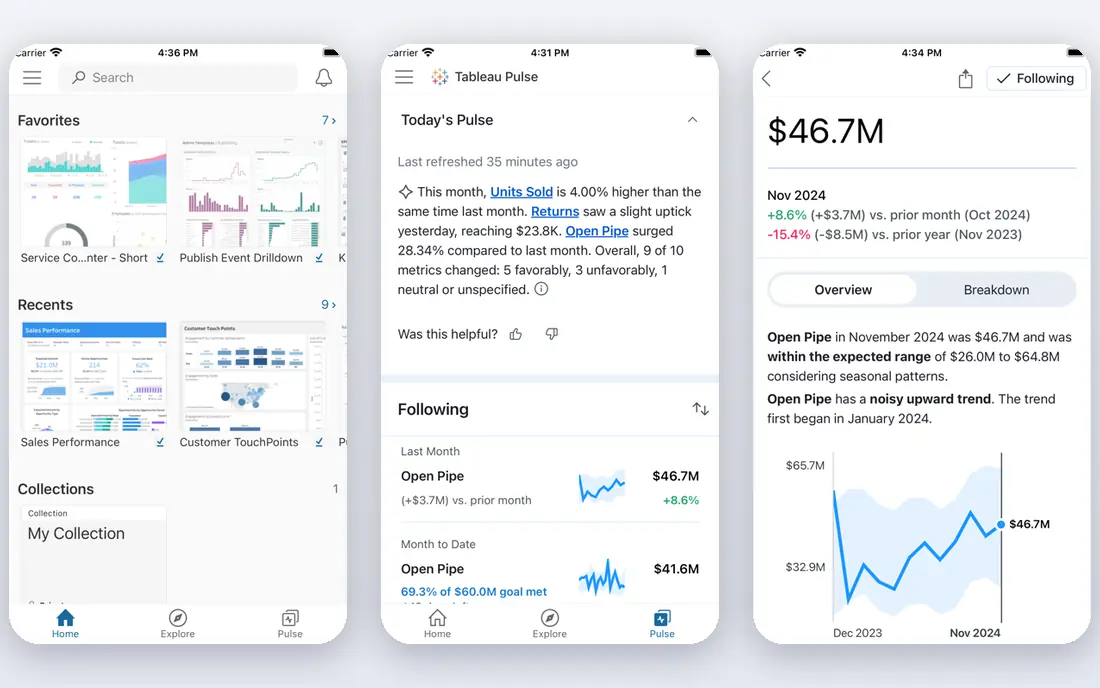
Tableau remains the reference point for visual analytics. Analysts can explore data, build interactive dashboards and share them with executives who want to filter and drill down without writing code. Its visual design tools, calculations and data preparation options suit teams that analyse data daily, and its community and training resources are extensive.
Pricing is role-based. Viewer seats start at $15 per user per month billed annually, Explorer seats cost more, and Creator seats start at $75 per user per month. A team that needs many creators should budget for that gap. Tableau fits analyst-led teams that value visual quality and exploration over the lowest possible seat price.
- Strong visual analysis and dashboard design
- Wide data connectors
- Large analyst community
- Creator seats cost much more than Viewer seats
- Enterprise features add cost quickly
Power BI is the natural pick for teams already using Microsoft 365, Excel, Teams and Azure. Power BI Desktop is free for building reports, and Pro seats start at $14 per user per month, which makes sharing affordable for small and mid-size teams. Its data modelling, Power Query preparation and Fabric integration give analysts a full workflow inside the Microsoft stack.
The limits are licensing and capacity. Free Desktop alone does not allow sharing through the Power BI service, and Copilot and other advanced features may need Fabric capacity on top of seats. Teams outside the Microsoft stack may also find other tools more neutral. For Microsoft shops, Power BI is usually the best value analytics platform.
- Low Pro seat price
- Power BI Desktop is free
- Deep Microsoft 365 and Fabric integration
- Sharing and collaboration need paid seats
- Advanced AI features may need Fabric capacity
Looker Studio, formerly Google Data Studio, is the best free starting point for small businesses. It connects to Google Analytics, Sheets, Ads and many other sources, and lets a team build dashboards and scheduled reports without a licence fee. Sharing is simple, and a small team can cover sales, marketing and website reporting with one tool.
Governance is the weak point. Looker Studio has limited native controls for shared metric definitions, so different reports can define the same measure differently as a team grows. It is also less suited to complex data modelling than Power BI or Tableau. For low-cost departmental reporting, however, it is hard to beat.
- Free to use
- Strong Google data connectors
- Easy sharing and scheduled reports
- Weaker governance and metric control than Looker
- Limited advanced modelling
Qlik Sense uses an associative engine, which lets users explore data freely and see how selections affect related values, including values that fall outside a selection. That style suits analysts who want to discover patterns rather than follow a fixed report path. Qlik also offers data integration tools that help teams bring together varied sources.
Pricing needs care. Business plans have been listed around $30 per user per month, while Cloud Analytics Starter plans are listed at $300 per month for 10 users, so buyers should confirm which plan and data limits apply. Complex dashboards may also need performance tuning. Qlik fits teams that value exploratory analysis and data integration in one platform.
- Associative engine for free exploration
- Strong data integration options
- Good for large, varied data
- Pricing and capacity models need careful reading
- Complex dashboards can need tuning
ThoughtSpot lets business users type a question in plain language and get a chart or table back, rather than waiting for an analyst to build a report. That search-first style suits executives and managers who want quick answers on sales, customers or operations. Essentials plans start at $25 per user per month billed annually, with Pro plans at a higher per-user price.
The catch is setup. Search works best when data is modelled cleanly and metrics are defined consistently, or answers can mislead. Higher plans also add cost per seat, so wide sharing needs budgeting. ThoughtSpot fits business teams that want self-service answers and are willing to invest in clean data models first.
- Natural-language search for business users
- Live answers on warehouse data
- Embedded analytics options
- Per-user price rises on higher plans
- Governance and modelling need setup to work well
Zoho Analytics is a practical pick for small businesses that want dashboards without enterprise pricing. A free plan covers two users, and paid plans start at a low monthly rate for a small team, with higher tiers adding users, rows and features. It connects to Zoho apps and many other sources, and offers AI-assisted insights that suggest patterns in the data.
Enterprise buyers may find its modelling and governance narrower than Tableau, Power BI or Looker. Very large deployments with strict enterprise controls may need a larger platform. For a small team that needs clear dashboards, scheduled reports and a low bill, Zoho Analytics is one of the best value options here.
- Free plan for two users
- Low-cost paid plans
- Many built-in connectors and AI-assisted insights
- Less suited to very large enterprise deployments
- Advanced modelling is narrower than Tableau or Power BI
Metabase balances simplicity and openness. Business users can ask questions through a visual builder without writing SQL, while analysts can still write SQL when they need to. The open source version is free to self-host, and cloud plans start at a modest monthly rate for a small team, with Pro plans adding permissions and single sign-on.
Self-hosting needs staff time for setup, upgrades and backups, and some enterprise features sit behind paid plans. Metabase fits technical teams and small businesses that want an affordable, approachable analytics tool and are comfortable either self-hosting or paying for cloud hosting.
- Open source self-hosted version is free
- Easy question builder for non-technical users
- Low-cost cloud plans
- Advanced permissions and SSO need paid plans
- Self-hosting needs maintenance
Domo is a cloud analytics platform built for cross-functional dashboards, from sales and finance to operations and marketing. It combines data connectors, preparation, visualisation and collaboration, and offers mobile dashboards for executives who check numbers on the move. Embedded dashboards also suit firms that want to share analytics with customers or partners.
Pricing is the barrier for small firms. Domo uses custom, credit-based pricing, and contracts are often sized for mid-market and enterprise buyers. A small team should get a clear quote for users and consumption before committing. Domo fits firms that want one executive-facing platform across many departments.
- Broad data connectors and data preparation
- Executive dashboards and embedded options
- Mobile access
- Quote-based, credit-based pricing
- Contracts can be large for small firms
Sisense suits software companies and larger firms that embed analytics inside their own products. Its dashboards can be customised for end users, and its engine handles large and complex data sets. It also supports cloud and embedded deployments, which matters when analytics must live inside another application rather than as a standalone tool.
Pricing is by quote, and implementation can be complex, so Sisense is not a quick pick for a small team that only needs internal dashboards. For product teams that need embedded, customer-facing analytics at scale, it is a strong contender.
- Strong embedded analytics
- Handles large, complex data
- Customisable dashboards for end users
- Quote-based pricing
- Implementation can be complex for smaller teams
How we picked these
We compared official pricing pages, product documentation and public reviews, and we kept only tools that serve business data analytics, not only website traffic measurement. We mixed free, low-cost and enterprise platforms, and we favoured tools with clear dashboard, sharing and data connector coverage. We did not claim hands-on testing, and we wrote "See website" where a vendor does not publish a price.
What to check before you choose
Start with your data, not the dashboard gallery. List the sources you must connect, such as a CRM, accounting system, spreadsheet or warehouse, and confirm each tool connects to them without costly add-ons. Next, count viewers. A tool that looks cheap per creator can become expensive when every manager and executive needs a viewer seat.
Finally, test with a real question. Build one dashboard from your own data, share it with the people who will use it, and see whether they trust the numbers and can find answers without help. A tool that only analysts can use will not change decisions, however good its charts look.
Frequently asked questions
What are the best data analytics tools for business?
Tableau, Power BI, Looker Studio, Qlik Sense and ThoughtSpot are strong general picks, with Zoho Analytics and Metabase as lower-cost options. Tableau suits visual analysis, Power BI suits Microsoft shops, ThoughtSpot suits search-first users, and Looker Studio suits free small-team reporting. Pick by data sources, viewer count and budget, not by brand alone.
What is the best data analytics software for businesses on a small budget?
Looker Studio is free, Zoho Analytics offers a free plan for two users, and Metabase offers a free open source version. Power BI Desktop is also free for building reports, though sharing needs a paid Pro seat. Start with one of these before paying for an enterprise platform.
What is the best business data analytics tool for Microsoft teams?
Microsoft Power BI is the natural fit, since it integrates with Microsoft 365, Excel, Teams and Fabric, and Pro seats start at $14 per user per month. Tableau and Qlik Sense also work with Microsoft data, but they add a separate platform and, in many cases, a higher seat cost.
Do I need a data warehouse to use these tools?
No, not always. Small teams can connect directly to spreadsheets, a CRM or a database and build useful dashboards. A warehouse becomes valuable when data comes from many sources, volumes grow, or teams need one governed definition of key measures. Warehouse-native tools such as Sigma, which we did not list here, suit that later stage.
How much do business analytics tools cost?
Free tools such as Looker Studio and open source Metabase cost nothing to start, apart from hosting time. Zoho Analytics and Metabase Cloud start at low monthly rates, Power BI Pro starts at $14 per user per month, Tableau Viewer starts at $15 per user per month, and ThoughtSpot starts at $25 per user per month. Domo and Sisense are priced by quote.
Sources
See where you really rank - block by block
ProMapRanker scans Google Maps across a grid of your service area. Simple monthly plans from $19, white-label on every plan.
Start freeKeep reading
 zoro.to alternatives
Best Zoro.to Alternatives in 2026
We compare the best zoro.to alternatives in 2026, listing only legal licensed anime streaming services, from Crunchyroll to free options for fans today.
Read → zip alternatives
Best Zip Alternatives in 2026
We compare the best zip alternatives for buy now, pay later in 2026, covering pay-in-4 plans, fees, spending limits, and credit reporting options today.
Read → yesware alternatives
Best Yesware Alternatives in 2026
Compare the best yesware alternatives for sales email tracking, templates, and sequences, with current pricing and honest tradeoffs for small sales teams.
Read →