 ProMapRanker
Best Bill Pay App in 2026: 9 Apps Compared

Key takeaways
- Prism is our pick for most households because it connects to many billers, tracks real amounts owed, and lets you pay in the app for free.
- doxo suits readers who want one bill pay hub with a wide biller network and optional paid extras.
- Full finance apps such as Monarch Money and Quicken Bill Manager make sense when bill pay is part of a wider budget.
- Manual reminder apps such as Bills Monitor suit readers who do not want to link accounts and only need due-date alerts.
- This is not financial advice. Check fees, payment timing, and biller coverage before you switch a bill to a new app.
Quick comparison
| Pick | Great for | Pricing starts at | Free tier | |
|---|---|---|---|---|
 Prism | Paying bills from one free app | Free | Yes | Visit |
 doxo | One hub for many billers | Free | Yes | Visit |
 Rocket Money | Bills plus subscription tracking | See website | Yes | Visit |
 Quicken Bill Manager | Bill pay inside Quicken | See website | Free trial | Visit |
 Monarch Money | Bills inside a household budget | See website | Free trial | Visit |
 PocketGuard | Bills inside a spending plan | See website | Yes | Visit |
 Bills Monitor | Simple manual bill reminders | Free | Yes | Visit |
 Goodbudget | Manual envelope budgeting for bills | Free | Yes | Visit |
 Honeydue | Couples sharing bills | Free | Yes | Visit |
The best bill pay apps
A good bill pay app should do more than remind you. It should show the real amount owed, warn you before the due date, confirm when a payment posts, and let you pay without jumping between provider sites. Some apps in this list pay bills directly, while others track and remind. Both types help, but you should know which type you are choosing before you rely on it for rent, utilities, or a loan payment.
Prism is our pick for most households because it connects directly to billers rather than only guessing from bank transactions. That direct link shows the real amount owed and confirms when a payment posts, which matters when a due date is close. It also lets you pay bills directly in the app, so you do not need to visit each provider site separately.
Prism is free for its core features, which makes it easy to try without a subscription. The main limits are coverage and setup. Some smaller billers may not be supported, and full tracking works best when you link accounts or enter bills carefully. For readers with common utilities, cards, and loans, Prism covers the core job well.
- Connects to many billers
- Shows real amounts owed
- Pay bills directly in the app
- Requires account linking or manual entry for full tracking
- Some billers may not be supported
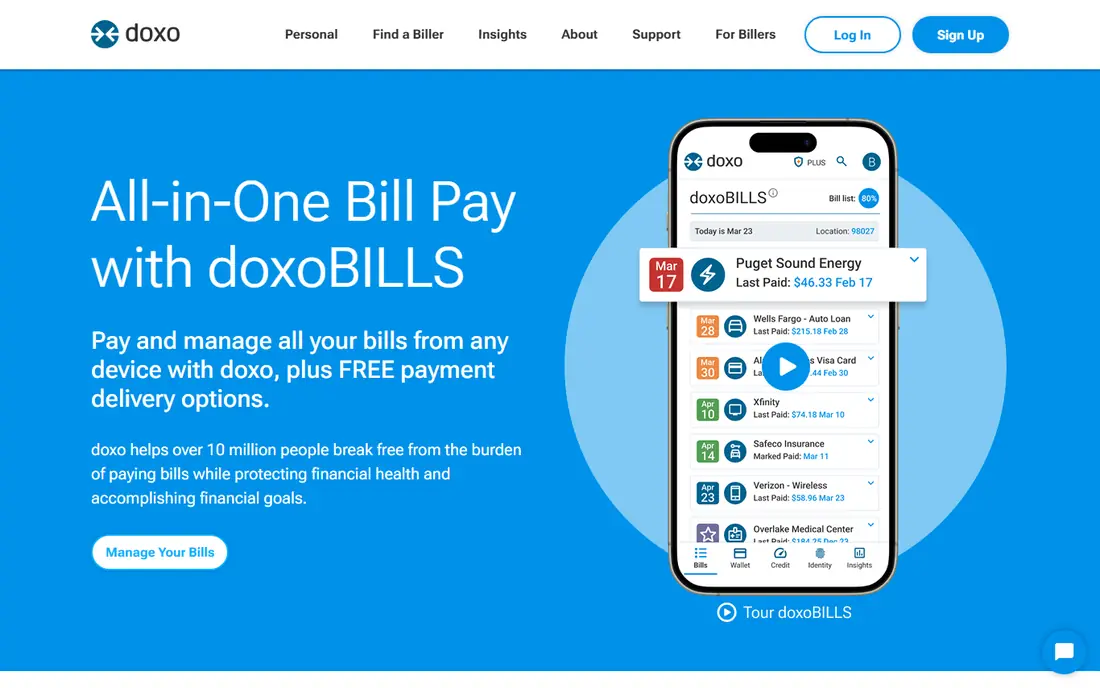
doxo is a bill pay service that lets you manage and pay bills from many providers in one hub. You can add billers, view amounts, set reminders, and keep payment history in one place. That central view suits households with bills spread across utilities, phone, internet, insurance, and other providers.
The free plan covers core bill pay, while doxoPlus is a paid tier that adds extras. Read the fee page carefully, since payment method fees can apply for certain options, such as cards. If you pay by bank account and want one hub, doxo is a strong alternative to Prism. If you want the simplest free experience, Prism still leads.
- Wide biller network
- Pay many bills in one place
- Reminders and payment history
- Some payment methods may carry fees
- Paid doxoPlus adds features some users may not need

Rocket Money is best known for subscription tracking, but it also helps with bills. It finds recurring bills from linked accounts, shows upcoming payments, and sends reminders. Paid plans add bill negotiation for eligible bills, where the service tries to lower cable, internet, or phone costs for a share of savings.
The limit is direct pay. Rocket Money tracks and reminds, but it does not replace a bill pay hub for every biller in the same way Prism or doxo does. It suits readers who already use Rocket Money for subscriptions and want bill reminders in the same app. Readers who need to pay every bill from one place should pair it with Prism or doxo, or choose one of those instead.
- Finds bills and subscriptions from linked accounts
- Bill reminders
- Negotiation on paid plans
- Does not pay all bills directly in the app
- Cancellation and negotiation need paid plans
Quicken Bill Manager is the bill pay feature inside Quicken, and it suits readers who already budget in Quicken. It shows upcoming bills, lets you schedule payments, and places bills inside your wider budget and cash flow view. That context helps when a bill is not just a due date, but part of a monthly plan.
The catch is cost and complexity. Quicken is a paid product after a trial, and Bill Manager is included with certain Quicken plans, not as a free standalone app. For Quicken users, it is a natural choice. For readers who only want bill reminders, a free app such as Prism or Bills Monitor is simpler and cheaper.
- Bill pay inside Quicken budgets
- Upcoming bill view
- Payment scheduling
- Requires a Quicken subscription
- Setup is heavier than a simple reminder app
Monarch Money tracks recurring bills from linked accounts and places them inside a household budget. Couples and families can see upcoming bills, shared spending, and cash flow in one dashboard, which avoids missed payments caused by two people assuming the other paid. That shared view is its main advantage for bill pay.
Monarch Money is a paid app after a trial, and it is primarily a tracking and budgeting tool, not a universal bill pay hub. If you already want a household finance app, its bill view is a strong bonus. If you only need to pay bills, Prism or doxo will do that job for less.
- Shared household bill view
- Recurring bill tracking
- Budgets and cash flow in one place
- Paid after trial
- Does not pay every bill directly for you
PocketGuard tracks recurring bills and shows how they affect the money left to spend after bills, savings, and goals. That simple framing helps readers who want to avoid overspending in the days after a large bill posts. It is less about paying bills directly and more about planning around them.
For readers who need direct bill pay, PocketGuard alone may not be enough. It works best as a planning companion, paired with a bill pay hub or your bank's bill pay. For readers who want a gentle daily spending guide that includes bills, PocketGuard is a good free starting point.
- Shows bills against money left to spend
- Recurring bill tracking
- Simple spending view
- Not a full bill pay hub
- Some features need a paid plan
Bills Monitor is a simple manual bill reminder app that suits readers who do not want to link bank accounts. You enter each bill, its amount, and its due date, and the app shows a calendar view with upcoming payments and visual reports. That simplicity makes setup fast, often in under ten minutes for a short list.
The limit is manual work. Bills Monitor reminds you, but it does not fetch real amounts or pay bills for you, so variable bills need updating each month. It suits readers with a stable, short bill list who only need reminders. Readers with many variable bills will save more time with Prism or doxo.
- Simple manual reminders
- Calendar view of bills
- Visual expense reports
- Manual entry only
- Does not pay bills directly
- IPhone focused in many listings
Goodbudget uses the envelope method, where you set aside money for each bill in a virtual envelope before you spend it. That method helps readers who want to reserve bill money in advance, rather than hoping it is left at month end. Shared budgets let couples or families see the same envelopes, which reduces confusion about who paid what.
Goodbudget does not pay bills directly, and its free plan relies on manual entry. Automatic bank sync is a paid feature. For readers who budget by envelope and want bill money separated, it is a strong choice. For readers who want automatic bill fetching and payment, Prism or doxo fit better.
- Envelope method for bill money
- Shared budgets for households
- Manual control
- Manual entry
- Does not pay bills directly
- Automatic bank sync needs a paid plan
Honeydue is built for couples who share bills and household costs. Partners can link accounts, see shared bills, set reminders, and add notes or chat about expenses in the app. That shared view prevents the common problem where both partners think the other paid a bill, or neither did.
Honeydue is less suited to single households, since its strength is sharing. It also tracks and reminds more than it pays directly, so you may still pay through your bank or provider. For couples who want a simple, free shared bill view, Honeydue is an easy recommendation alongside a bill pay hub.
- Shared bill view for couples
- Bill reminders
- Chat and notes on shared expenses
- Couple focused, less suited to single households
- Does not pay all bills directly
How we picked these
We compared official feature pages, pricing pages, and app store listings for bill pay and bill reminder tools. We kept apps that exist and work in October 2026, that clearly track or pay bills for US households, and that suit ordinary consumers. We left out bank-only bill pay, since every bank differs, and we focused on apps any household can download and try.
How to choose a bill pay app
Start by listing your bills and noting which ones vary each month. If you have many variable bills, choose an app that connects to billers, such as Prism or doxo, so amounts stay accurate. If your bills are stable and few, a manual reminder app may be enough, and it avoids linking accounts.
Next, check payment timing. Pay at least a few days before the due date when using a new app, and confirm the first payment posts with the provider. Check fees for card payments, since bank payments are often cheaper. Finally, keep your bank's bill pay as a backup for any biller the app does not support, and review your bill list once a month for price rises or duplicates.
Frequently asked questions
What is the best app for bill pay?
Prism is the best bill pay app for most households because it connects to many billers, shows real amounts, and lets you pay in the app for free. doxo is a strong alternative with a wide biller network. Choose Prism first, then switch if a specific biller is missing.
What is the best free bill organizer app?
Prism is the best free bill organizer for most people, since its core bill tracking and payment features are free. Bills Monitor is a good free manual alternative if you do not want to link accounts. Honeydue is a good free choice for couples sharing bills.
Can a bill pay app pay all my bills?
Most apps cover common utilities, cards, loans, and phone bills, but some smaller or local billers may not be supported. Check the app's biller list before you switch, and keep your bank's bill pay for any biller the app cannot handle. Test with one bill before moving all payments.
Is it safe to give a bill pay app my bank login?
Reputable apps use secure connections and encryption, and they should explain their security practice on their own site. Your bank's own bill pay is the safest option if you are unsure, since it stays inside your bank. Avoid apps that ask for passwords in an insecure way, and use manual entry if linking feels wrong.
What is the best app to pay bills for a couple?
Honeydue is built for couples, with a shared bill view, reminders, and notes. Monarch Money also suits couples who want a full household budget with bill tracking. For direct payment, pair either with Prism or doxo so shared bills can be paid from one hub.
Sources
See where you really rank - block by block
ProMapRanker scans Google Maps across a grid of your service area. Simple monthly plans from $19, white-label on every plan.
Start freeKeep reading
 zscaler alternatives
Best Zscaler Alternatives in 2026
Looking for zscaler alternatives? We compare 9 SASE and zero trust platforms on architecture, data protection, pricing, and fit for your network and team.
Read → zapier alternatives free
Best Zapier Alternatives Free in 2026
Nine automation tools for zapier alternatives free in 2026, all with genuinely free tiers, plus free plan limits, starting prices and upgrade paths explained.
Read → which platform is best for online reputation
Which Platform Is Best for Online Reputation in 2026
Wondering which platform is best for online reputation? We compare 8 review, listing, and response tools for small and multi-location businesses and agencies.
Read →